
A chatbot demo should do more than show polished screens. It should let you test whether a conversation reaches a useful next step without trapping the customer, collecting unnecessary information, or hiding the route to a person. The interactive example below gives you a safe way to examine that flow before you compare tools or plans.
Try the Chatbot Conversation Demo
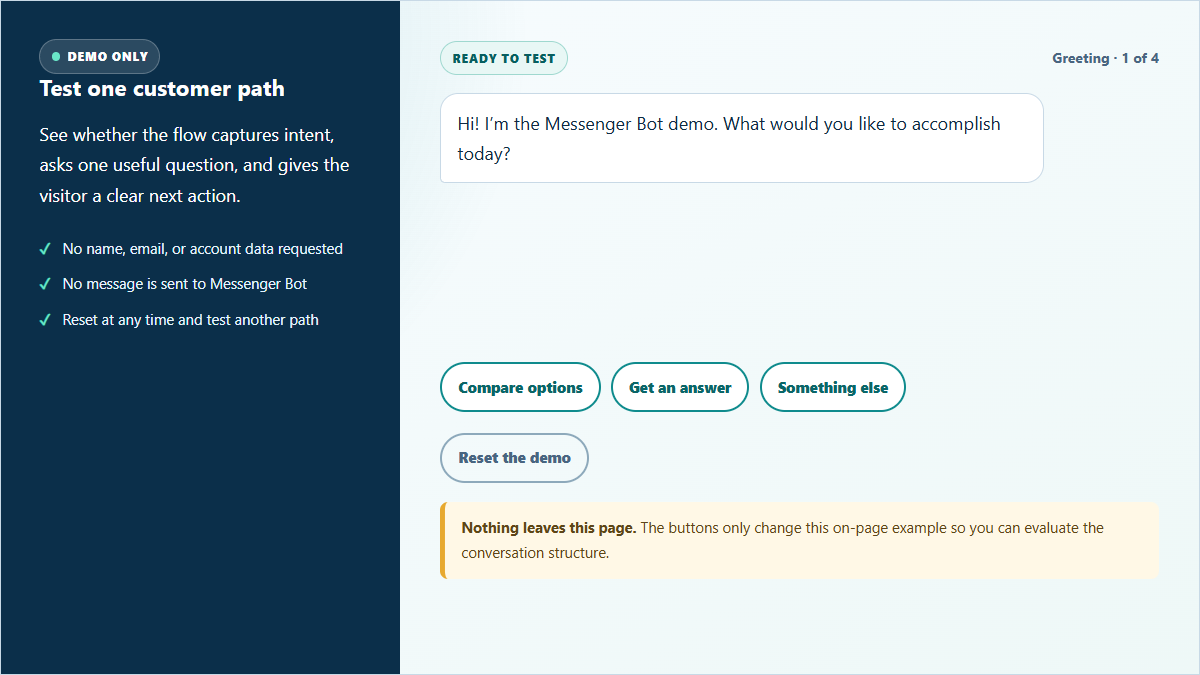
Choose the reason a visitor started the conversation, then follow the example through qualification, fallback, or handoff. This is a local demonstration: nothing you select is sent, stored, published, or connected to a customer account.
Test one customer path
See whether the flow captures intent, asks one useful question, and gives the visitor a clear next action.
- No name, email, or account data requested
- No message is sent to Messenger Bot
- Reset at any time and test another path
Greeting · 1 of 4
Nothing leaves this page. The buttons only change this on-page example so you can evaluate the conversation structure.
Run all three paths. The comparison path shows a short qualification question. The answer path demonstrates a bounded response with a route to more guidance. The “something else” path tests whether the fallback protects the customer from an endless loop. If a real chatbot demo does not make those branches visible, you are evaluating the happy path rather than the full customer experience.
What a Useful Chatbot Demo Should Prove
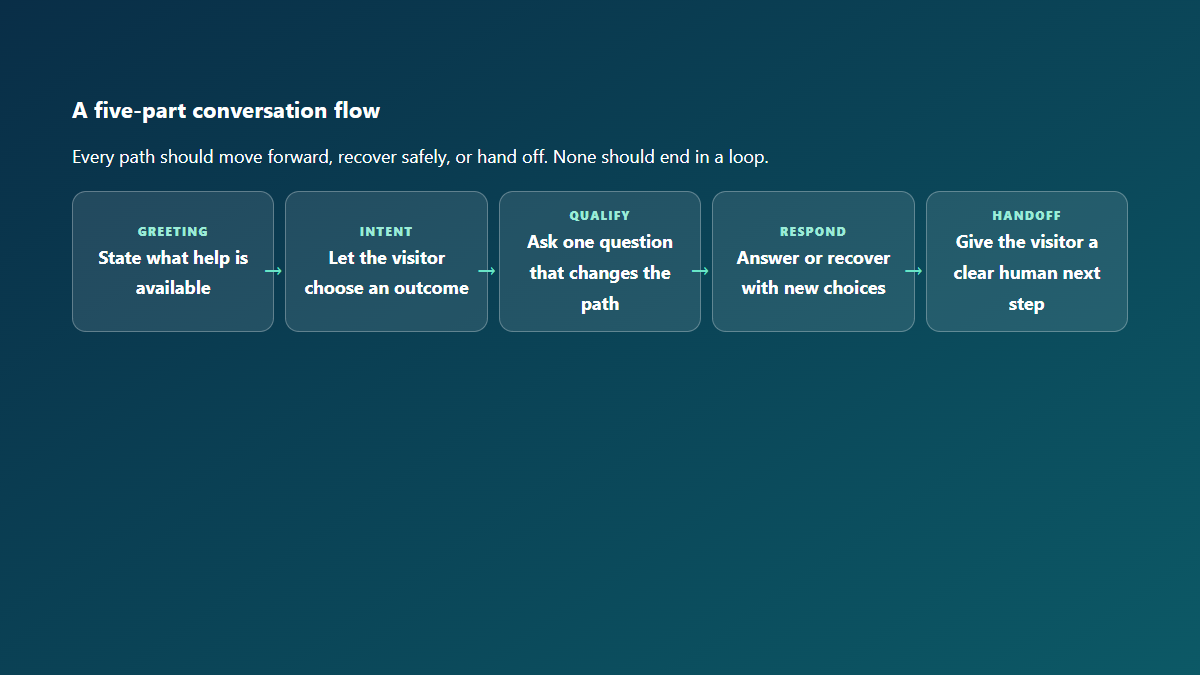
The most impressive animation in a demo tells you very little about how the conversation will work when a real customer arrives with an incomplete question. A useful demonstration gives you evidence about six separate moments: the greeting, the intent choice, the qualifying question, the answer, the fallback, and the handoff. Each moment should reduce effort for the visitor rather than create another obstacle.
Start with the greeting. It should identify the automated experience and immediately explain the useful jobs it can perform. A vague “How may I help?” prompt pushes all of the work back to the customer. A stronger greeting offers two to four outcome-based choices such as comparing options, finding setup guidance, or asking for a person. Those choices reveal the flow’s boundaries before the customer spends time typing.
Next, look at the qualifying question. Good qualification is not a disguised lead form. It asks for one detail that changes the path—for example, whether the visitor is evaluating a flow for one page or several. Avoid demonstrations that collect a name, email address, phone number, and company size before providing any value. A demo should prove that the conversation can be helpful first.
Finally, test the parts that are easiest to hide. Choose the least obvious option, enter an unsupported intent if the demonstration allows text, and ask for a person. A credible flow should explain what it cannot complete and offer an appropriate next step. If you want to see how setup guidance can be organized around clear outcomes, تصفح دوراتنا التدريبية while you compare the demo’s structure with the work your team needs to complete.
Follow One Example from First Message to Handoff
Imagine that a small service business wants to answer common questions faster without making every visitor navigate a long form. The team does not need a sprawling conversation. It needs a short path that identifies the reason for the message, gives a useful response, and makes the handoff obvious when a person should take over.
Open with a useful promise
The first message should say what the conversation can help the visitor do. “I can help you compare options, find setup guidance, or request help from the team” is more useful than an open-ended greeting because it sets expectations and suggests the next action. It also keeps the customer from guessing which words the flow understands.
Use the intent to select the next question
If the visitor chooses “compare options,” the flow can ask whether they are planning for one business page or a larger set of conversations. That answer affects which information is relevant. If the visitor chooses “get an answer,” the flow can offer a short set of common topics. One branch, one clarifying question, and one useful response is enough to prove the structure.
Keep the response easy to scan
A chat bubble is not a landing page. Give the visitor the most useful answer first, then offer one or two next actions. Long paragraphs make it hard to identify the decision. The demo above uses brief messages so you can see the movement from choice to result without reading a wall of copy.
Design the handoff before the happy path
A human handoff is not a failure. It is the correct outcome when the request involves account access, a sensitive decision, or a question the automated path cannot answer confidently. The demo should show the handoff language and the information the team receives. In a real flow, explain the expected next step without promising a response time that the support process cannot consistently meet.
Compare Video, Scripted, and Live Chatbot Demos
Different demo formats answer different questions. A video is efficient when you need an overview. A scripted on-page example is safer when you want to inspect the conversation without connecting an account. A live product trial provides the strongest operational evidence, but it can require more setup and careful handling of test data. Use the format that matches the decision you are trying to make.
| Demo format | أفضل لـ | What it proves | What it may hide | Data approach |
|---|---|---|---|---|
| Video walkthrough | Fast product orientation | Interface sequence, feature location, and intended workflow | Unexpected input, fallback quality, loading states, and recovery | No customer data should be needed to watch |
| Scripted on-page demo | Conversation and copy review | Greeting, intent choices, qualification, fallback, and handoff language | Real integrations, account permissions, and production behavior | Use fictional choices and avoid personal information |
| Interactive builder demo | Testing flow design | Branching, editing, ordering, and how the team builds a path | How the flow behaves with live customers after connection | Use a sandbox or disconnected test workspace |
| Controlled live trial | Final operational evaluation | Permissions, delivery behavior, team process, and end-to-end handling | Performance at larger volume unless the trial is designed to test it | Use dedicated test records and a written cleanup plan |
A video can establish context, but it cannot prove that a fallback works. A scripted demo can reveal the wording and decision logic, but it cannot prove a message will be delivered correctly. A live trial can test more of the operational path, but only if the test has a defined scope, uses safe records, and includes a cleanup step. Treat each format as a different layer of evidence rather than expecting one presentation to answer every question.
When comparing products, ask the presenter to move beyond the polished route. Request an unsupported intent, change a choice midway through the conversation, and use the human-help option. If the demonstration cannot show those states, record them as unanswered questions. That keeps a smooth video from being mistaken for complete proof.
Test the Flow Without Sharing Customer Data
A conversation demo does not need real customer information. Use fictional scenarios that are specific enough to test the logic but cannot identify a person or account. “A two-person home-services team wants to sort sales questions from support questions” is useful. A real customer’s name, order number, email address, private message, or payment detail is not.
Start with a written test boundary. List the paths you will evaluate, the information you will not enter, and the outcome that counts as a pass. For the on-page demonstration in this article, the boundary is simple: three fixed intent choices, no text input, no data storage, and no outbound request. That makes it possible to inspect the flow without creating a customer record or connecting a channel.
If you move to a product trial, create clearly fictional test records and keep them separate from real conversations. Use labels that identify the records as tests, avoid personal or sensitive details, and document how the test information will be removed. Confirm that the team members involved understand which environment and page they are using before the trial starts.
Pay attention to what appears in the demonstration itself. A convincing screenshot or transcript can still reveal a private identifier, account name, or message if it was captured from a real workspace. Ask whether the sample data is fictional and whether the demo exposes information from another business. Customer-safe evidence should explain the flow without displaying somebody else’s conversation.
Also separate evaluation from activation. A useful demo can help you decide what to build, but it should not quietly start sending messages, publishing content, or changing a connected page. Activation should be a deliberate step with a named owner, reviewed settings, and a rollback path. The safest demonstration makes that boundary obvious.
Review Fallback and Human Handoff Before You Choose
The fallback is the moment when an automated conversation admits that the current path is not enough. It should not repeat “I didn’t understand” indefinitely. The first recovery can offer a clearer set of choices. The second should provide a human-help route or another customer-safe next step. The visitor should never have to discover a secret phrase to escape the loop.
Test the handoff for different kinds of requests. A general product question may be suitable for a short automated answer. A question about account ownership, access, billing, security, privacy, or a requested state change should move to human review. The demo does not need to resolve those sensitive requests. It needs to recognize the boundary and explain what happens next.
Read the handoff copy closely. It should tell the visitor why a person is the right next step and what they can expect to do, without inventing a wait time or implying that a request has already been completed. “A team member should review that request” is safer than “Your refund is being processed” when no action has occurred. The distinction protects both the customer and the business.
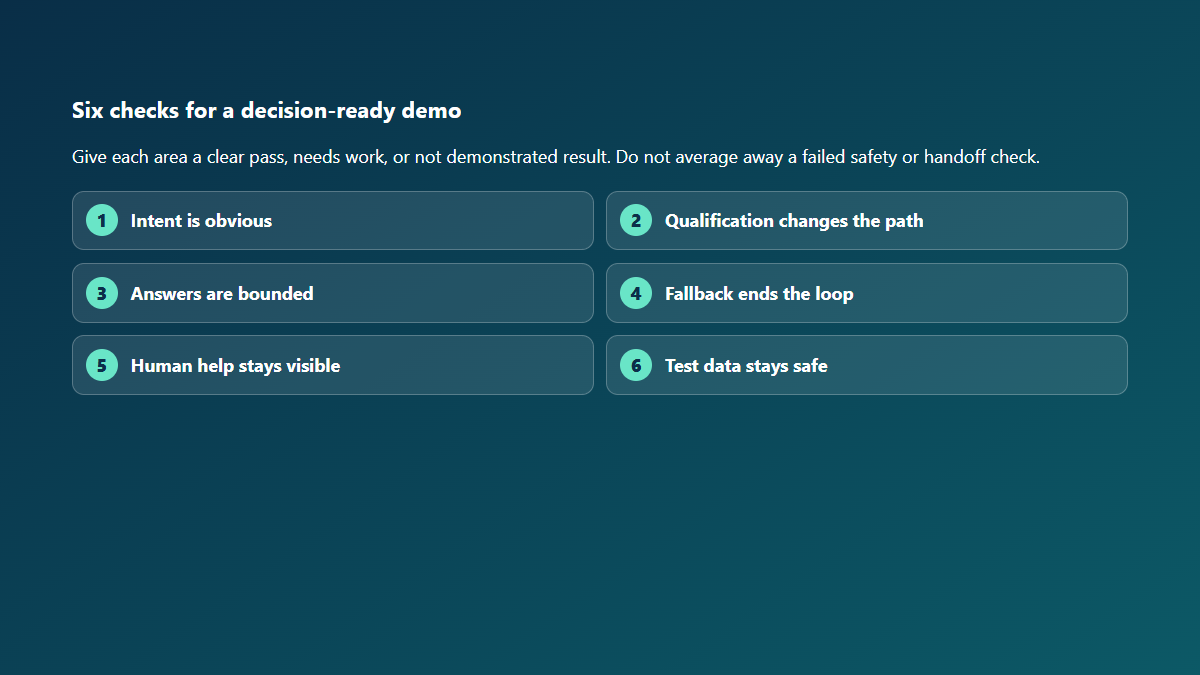
A clean handoff also preserves context. The customer should not have to repeat the reason for the conversation if the team can safely receive that summary. At the same time, the automated path should not collect extra information merely because a handoff might occur. Capture the minimum useful context, explain what is being passed, and let the person complete sensitive verification.
Finally, test what happens when human help is not immediately available. The flow should offer a truthful next action instead of pretending that somebody has joined. Depending on the business, that may be a support route, an email-update option, or clear guidance on when the team reviews requests. Use only promises the real support process can keep.
Use This Checklist Before Choosing a Chatbot
Complete the checklist with the people who will own the conversation after launch. A marketing demo may look efficient while leaving support, sales, or operations with unclear handoffs. The best evaluation includes the team members who write the answers, handle exceptions, and review results.
- Define one customer outcome. Name the question or task the first flow should help complete.
- Test the opening. Confirm that the greeting says what help is available and offers clear choices.
- Challenge the intent menu. Check that the options use customer language rather than internal department names.
- Count the qualifying questions. Remove any question that does not change the answer or next step.
- Read every response on a phone. Break long messages into short, useful decisions.
- Trigger the fallback. Confirm that it offers a new route and stops before an endless loop.
- Request human help. Verify that the route is visible and the copy does not claim an action already happened.
- Review the data boundary. Use fictional test details and avoid sensitive customer or account information.
- Assign an owner. Decide who reviews unclear requests, conversation quality, and needed updates.
- Write the activation checklist. Keep connection, publishing, and customer delivery separate from the demo decision.
Do not score the demonstration only by how quickly it reaches the final screen. A short flow can still be confusing if the choices are vague. A longer flow can be appropriate when each question changes the response and the customer understands why it is being asked. Evaluate clarity, usefulness, recovery, and control together.
Record any feature that was described but not shown. It is reasonable for a demo to have boundaries, but those boundaries should be explicit. Before choosing a tool, identify which unanswered questions need a controlled trial, documentation review, or conversation with the team. That creates a decision based on evidence instead of presentation polish.
Plan the Next Step for Your Team
Use the demo to agree on one useful customer path, the handoff that protects it, and the person responsible for reviewing the result. Once those decisions are clear, compare the available plan options against the conversation your business actually needs—not a long list of features you may never use.
الأسئلة الشائعة
What should I test in a chatbot demo?
Test the greeting, intent choices, qualifying questions, answer quality, fallback, and route to a person. Try the expected customer path and at least one unsupported request. A useful demo should show how the conversation moves forward, recovers, or hands off without trapping the visitor.
Can I try a chatbot demo without sharing customer data?
Yes. Use fictional scenarios and fixed choices that cannot identify a real person, account, or conversation. The demo on this page does not request text or personal details, store your selections, or send anything outside the page.
Do I need coding skills to evaluate a chatbot?
No. Start with the customer experience: whether the choices are clear, the answers are useful, the fallback recovers safely, and human help is visible. Technical review becomes important before activation, but a business owner or support lead can evaluate the conversation logic and copy.
What is the difference between a video demo and an interactive demo?
A video demo shows a planned sequence and is useful for quick orientation. An interactive demo lets you choose a path and inspect how the flow responds. Neither automatically proves live delivery or connected-account behavior; those require a controlled trial with a defined scope and cleanup plan.
How do I know when a chatbot should hand a conversation to a person?
Use human review when the request is sensitive, outside the supported flow, requires account verification, or asks for a state-changing action. The handoff should be visible, preserve the minimum useful context, and avoid claiming that the request has already been completed.
 العربية
  English
  Tagalog
  简体中文
简体中文  हिन्दी
  Português do Brasil
  Español de México
  Français
  বাংলা
বাংলা  香港中文
香港中文  繁體中文
繁體中文  Nederlands
  Deutsch
  Bahasa Indonesia
  日本語
日本語  한국어
한국어  Polski
  Русский
  Español
  Tiếng Việt