

As a business owner, deciding exactly how to handle customer conversations on your Facebook Page is one of the most critical operational choices you will make. When customers reach out, they expect their messages to be acknowledged quickly, even outside of normal business hours. You need an organized way to manage follow-ups, and you need to know exactly when a native, built-in automation is sufficient for your current workflow versus when a connected chatbot platform might be worth evaluating to scale your efforts.
Every interaction with a potential customer or existing client sets the stage for your brand’s reputation. Managing your Facebook Page inbox manually can quickly become overwhelming, leading to delayed responses, missed follow-ups, and disorganized communication. This is where evaluating your automation strategy becomes essential. By implementing the right level of automation, you can acknowledge messages quickly, set clear expectations when your team is unavailable, and ensure that every conversation is tracked and managed effectively.
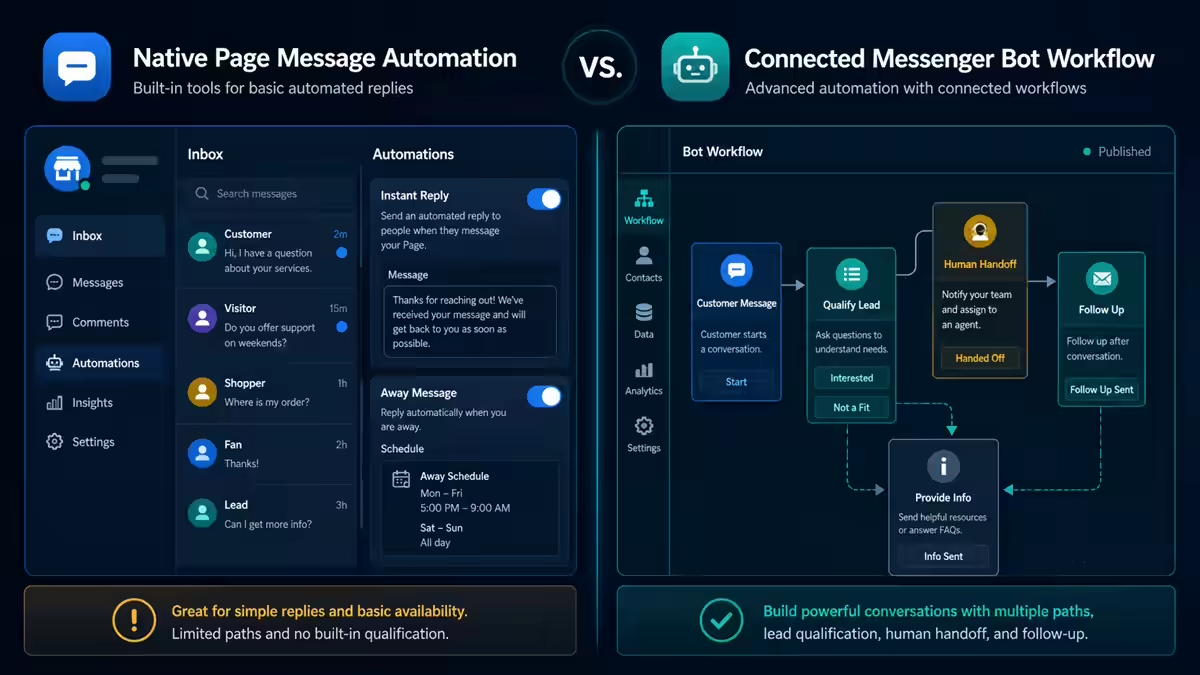
The goal of this guide is to help you navigate the choice between the native tools provided directly within Meta Business Suite and the advanced capabilities of a connected platform like Messenger Bot. We will explore the built-in features you can use right away, the rules governing automated chats, and the practical checklists you need to deploy an automation strategy safely and effectively. Whether you are aiming to streamline basic replies or build a robust, scalable communication workflow, understanding your options is the first step toward better operational outcomes. If you decide to proceed with a connected chatbot platform, we recommend you review this step-by-step connection workflow.
The Foundations of Page Messaging: Access and Availability
Before diving into specific automation features, it is vital to understand the foundational requirements for managing messages on your Facebook Page. Not everyone has immediate access to configure these settings; proper permissions must be established first.
According to official documentation, a person needs either full Facebook access or specific task access to a Page in order to manage instant replies and other messaging features (Quelle). This access control ensures that only authorized team members can alter how your business communicates with the public. It is essential to audit who on your team holds these permissions to maintain security and consistency in your messaging strategy.
Furthermore, Meta Business Suite is the centralized hub where authorized users can manage Page messages. This unified interface is designed to bring your business communications into one place. However, it is crucial to remember that availability and behavior can vary by account, region, channel, and connected assets (Quelle). Always verify the current options shown in your own account, as the interface and available features may differ slightly based on these factors.
Exploring Native Facebook Page Automations
For many businesses, the native tools provided within Meta Business Suite offer a solid starting point for automating customer interactions. These features are built into the platform and can help acknowledge common questions and set expectations without requiring third-party connections.
Instant Replies: Acknowledging Customers Instantly
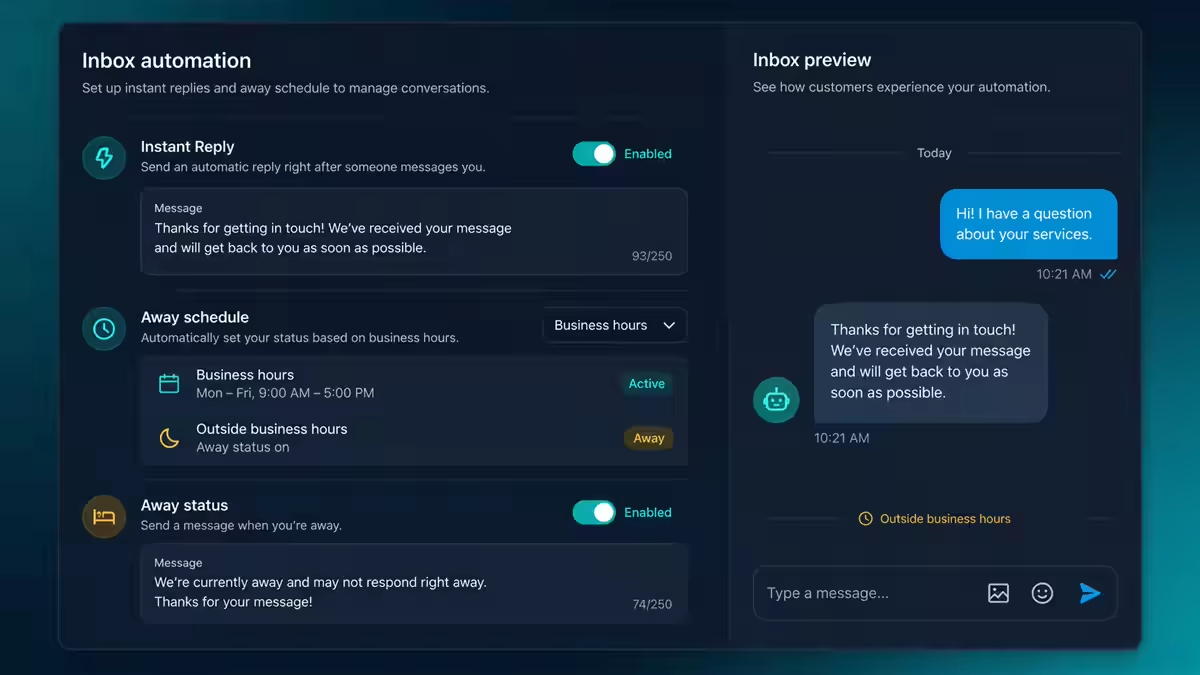
One of the most powerful native tools is the instant reply. An instant reply is the Page’s automatic first response to a new message. This feature ensures that the moment a customer reaches out, they receive an immediate acknowledgment. This fast response can reassure the customer that their message has been received and that your business is attentive. This automatic first response does more than just buy your team time; it establishes a professional standard of communication from the very first interaction.
The current help flow to set up an instant reply typically involves navigating through the Page profile, accessing the Messenger or Inbox section, finding Automations, selecting “Create automation,” choosing Instant reply, selecting the channel, entering your message, and saving the changes. It is a straightforward process that provides immediate operational relief.
It is important to note a key operational rule: Instant replies are not sent while the Page messaging status is set to Away. This prevents conflicting automated messages from confusing the customer. The system prioritizes the away status to ensure customers receive the correct context about your availability.
Messenger Greetings: Setting the Tone
Before a customer even sends their first message, you can set the tone of the conversation using a Messenger greeting. A Page can display a customized greeting when someone begins a conversation for the first time (Quelle). This greeting appears in the chat window before any text is entered, providing an excellent opportunity to welcome the user, outline what they can expect from your chat support, or prompt them with necessary information.
To configure this, the official flow uses Meta Business Suite. You navigate to the Inbox, access Automations, select Instant reply (or greeting options), choose the Messenger channel, craft your response text, and save the changes.
Away Messages: Setting Expectations Outside Business Hours
Managing expectations when your business is closed is just as critical as responding quickly when you are open. A Page can send an away message when its messaging status is manually or automatically set to Away.
To automate this efficiently, away schedules can be aligned precisely to your business hours. By configuring this schedule, your Page will automatically transition to Away status when you close, and the away message will inform customers that you are currently unavailable and when they can expect a reply. This transparency reduces customer frustration and clearly sets the boundaries for your support team.
Crucially for performance tracking, away messages are not included in your Page response rate or response time calculations. This means you do not have to worry about overnight messages artificially inflating your average response time metrics, allowing you to maintain accurate performance data during your actual operating hours.
Inbox Organization and Keyword Automations
Beyond simple auto-responses, managing the flow of incoming messages requires robust organization. The Meta Business Suite Inbox can bring together Messenger, Instagram, and WhatsApp conversations into a single view, subject to your account connections and access levels. This consolidated view is a powerful advantage for teams handling high volumes of inquiries across multiple channels.
To help you stay organized, the Inbox supports a variety of management features including replies, comments, filters, assignment and follow-up organization, labels, search, status tracking, and automations. Using labels and assignment features ensures that the right team member handles the right inquiry, preventing messages from slipping through the cracks.
One of the more advanced native features is keyword automation. Keyword automations can trigger a specific response when a defined keyword or phrase is received from a user. For example, if a customer messages the word “menu,” a keyword automation can instantly reply with a link to your current offerings. This targeted automation helps resolve common, repetitive inquiries instantly, freeing up your human staff to handle more complex customer needs.
Automated and AI Chats: Rules, Disclosures, and Human Escalation
When native automations are no longer sufficient to handle your operational scale, you may evaluate moving toward connected chatbot platforms and AI-driven solutions. Pages may use Meta APIs to create automated chats on Messenger, enabling sophisticated workflows that go far beyond simple instant replies. If you want to understand limitations of some platforms, you might find this cost and fit evaluation for free options useful.
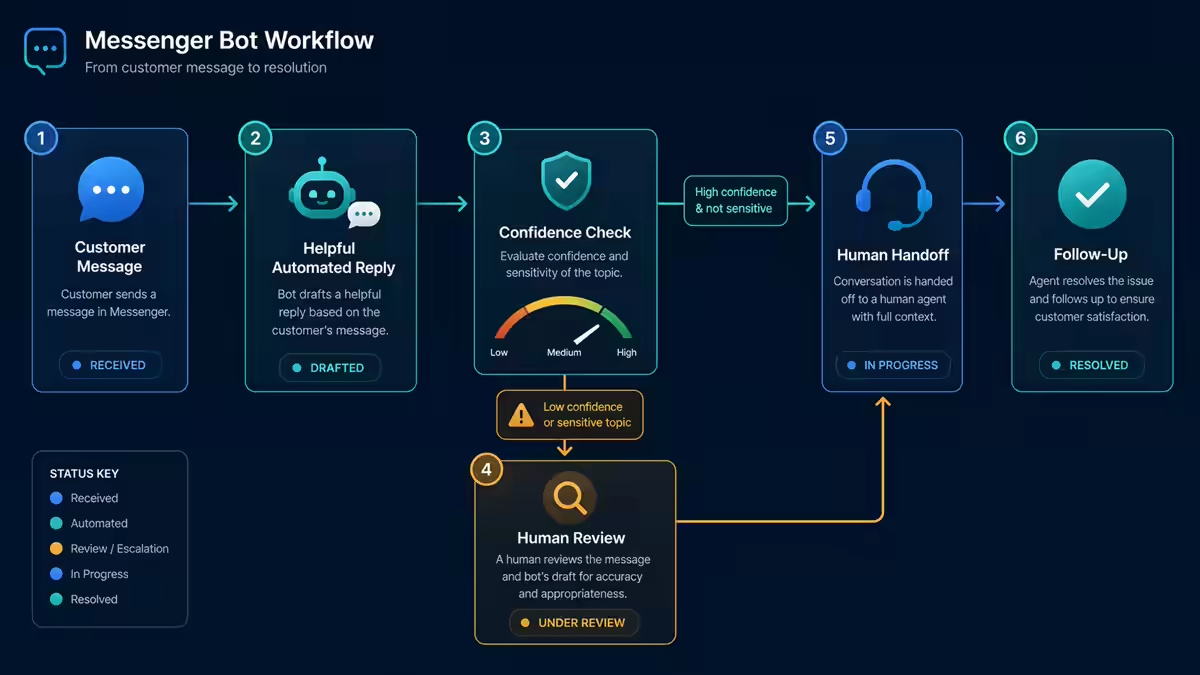
However, employing advanced automation and AI comes with strict responsibilities and rules. Where legally required, automated chats must clearly disclose the use of automation. This disclosure must happen at the beginning of the interaction, after any significant lapse in the conversation, and whenever a human conversation transitions back to an automated system. Transparency is key to maintaining customer trust; users have the right to know whether they are speaking to a human or a bot.
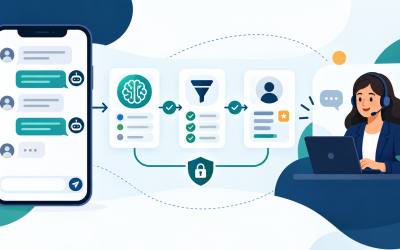
Furthermore, if you use AI to generate answers, it is important to remember that AI-generated answers can sometimes be inaccurate or inappropriate. Because AI output can be inaccurate, human review and an escalation path are prudent safeguards. Providing a process where a human agent can seamlessly take over the conversation is necessary if the bot fails to understand the inquiry or if the customer explicitly requests human assistance.
Please note: You must independently advise and verify the specific rules, regulations, and legal requirements that apply to your geographical location and particular use case before deploying automated or AI-driven chats.
Practical Decision Matrix: Native Tools vs. Connected Platforms
How do you decide between relying solely on native Facebook Page automations and investing the time to connect an external platform like Messenger Bot? Use this decision matrix to evaluate your operational needs. It is also important to consider a vendor-evaluation checklist.
| Operational Need | Native Meta Business Suite Automations | Connected Chatbot Platform (e.g., Messenger Bot) |
|---|---|---|
| Volume of Messages | Low to Medium. Manageable by a small team using Inbox labels and manual assignments. | High. Requires advanced routing, complex conversational flows, and API integration. |
| Complexity of Inquiries | Simple, repetitive. Handled well by Instant Replies, Greetings, and basic Keyword Automations. | Complex, multi-step. Requires dynamic data retrieval, conditional logic, or external database queries. |
| Availability Needs | Standard business hours managed by Away Messages and scheduling. | 24/7 interactive support that requires gathering lead data or qualifying prospects before human handoff. |
| Setup Resources | Minimal. Can be configured directly in the native interface within minutes. | Requires evaluating API access, mapping complex logic, and ongoing monitoring for AI accuracy. |
| Human Escalation | Manual monitoring of the unified Inbox. | Requires defined handover protocols to ensure AI inaccuracies are caught and handled by human agents seamlessly. |
If your primary goal is simply to acknowledge messages quickly and set expectations outside business hours, the native tools are highly effective. However, if your operational outcome demands complex automated qualification and API-driven data handling, evaluating a connected platform becomes a necessary next step.
Setup-Readiness Checklist
Before implementing any automation—whether native or via a connected platform—ensure your Page and team are fully prepared by completing this checklist:
- Verify Access Levels: Confirm that the personnel responsible for setup have either full Facebook access or the specific task access required to manage Page messaging.
- Audit Current Settings: Check Meta Business Suite to see what instant replies or away schedules might already be active to prevent overlapping messages.
- Define Business Hours: Clearly document your exact operational hours to ensure your Away schedules align perfectly.
- Draft Your Copy: Write out your Instant Reply, Messenger Greeting, and Away Message text in advance. Ensure the tone matches your brand and focuses on customer outcomes.
- Identify Keywords: If using Keyword Automations, list the top 5 most common one-word inquiries (e.g., “hours”, “location”, “menu”) and draft specific responses for them.
- Review Disclosures: If moving toward API-based automated chats, draft your mandatory transparency disclosures to inform users they are interacting with an automated system.
Measurement Checklist
Automation should improve your operational efficiency. Use this checklist to measure the success of your implementation:
- Monitor Response Rates: Track your Page’s official response rate and time. Remember that Away messages are excluded from this metric, giving you an accurate picture of active-hour performance.
- Review Inbox Organization: Evaluate if the use of labels, assignment, and filters in the Meta Business Suite Inbox is actually reducing confusion among your team members.
- Audit Keyword Triggers: Periodically review your keyword automations to ensure they are firing correctly and that customers are not getting stuck in loops.
- Track Escalation Rates: If using API bots, closely monitor how often a conversation requires human escalation due to inaccurate or inappropriate automated responses.
- Feedback sammeln: Monitor customer sentiment within the chats to ensure the automated greetings and instant replies are perceived as helpful rather than impersonal.
Privacy and Safety Checklist
Protecting user data and ensuring safe interactions is paramount when setting up messaging automations. Follow these safety protocols:
- Transparency First: Ensure you are fully compliant with the requirement to disclose automation at the beginning of the chat, after lapses, and during handoffs.
- Menschliche Aufsicht: Never deploy an AI-generated chat solution without a dedicated human review and escalation path clearly established.
- Zugriffskontrolle: Regularly revoke Page task access for former employees or team members who no longer need to manage the Inbox.
- Regional Verification: Since availability and behavior vary by region and account, periodically verify that your automations comply with local regulations and platform terms in all regions you serve.
- Accuracy Audits: Schedule weekly reviews of automated chat logs to identify and correct any instances where AI-generated answers were inaccurate or inappropriate.
Troubleshooting Section
If your automations are not behaving as expected, consult these common troubleshooting steps based on native platform rules:
Issue: Instant Replies are not sending.
Solution: Check your Page’s messaging status. Instant replies are intentionally not sent while the Page messaging status is set to Away. Ensure your business hours schedule is configured correctly if you want instant replies to function during the day.
Issue: Unable to find the automation settings.
Solution: Verify your access level. You must have proper Facebook access or task access to manage these features. Also, remember that availability varies; ensure you are looking in the correct section of Meta Business Suite (Inbox -> Automations).
Issue: Responses are impacting the Page response time metric negatively.
Solution: Ensure you are properly using the Away status. According to the platform, away messages themselves are not included in your Page response rate or response time calculations.
Issue: Customers are confused by chatbot responses.
Solution: Review your disclosure text. You must explicitly state that the user is interacting with an automated chat. Additionally, check your human escalation protocols to ensure agents can take over smoothly when the automation fails.
Häufig gestellte Fragen (FAQs)
1. Who can set up and manage instant replies on my Facebook Page?
A person must have either full Facebook access or specific task access to the Page in order to manage instant replies and other inbox automations.
2. Will my away messages hurt my Page’s official response time?
No. According to official platform rules, away messages are not included in your Page response rate or response time calculations.
3. Can I use instant replies when my Page is closed?
Instant replies are not sent while your Page messaging status is officially set to Away. You should use a scheduled Away message for times when your business is closed.
4. Are there rules for using AI to answer customer messages?
Yes. Disclose the use of automation where applicable law requires it. Because AI answers can be inaccurate, human review and a clear escalation path are prudent safeguards.
5. Why does my Meta Business Suite look different from another Page I manage?
The availability and behavior of Inbox features, including which channel conversations (Messenger, Instagram, WhatsApp) are brought together, can vary significantly by account, region, channel, and connected assets. Always verify the options within your specific account.
Taking control of your Facebook Page inbox is an essential step in modern business operations. By mastering the native tools—instant replies, greetings, and away messages—you establish a reliable baseline of communication. When you outgrow these tools, moving to an API-connected platform like Messenger Bot allows you to scale, provided you strictly adhere to transparency rules and maintain human oversight. Always focus on the operational outcome: acknowledging your customers quickly, keeping your team organized, and delivering a safe, professional experience.
 Deutsch
  English
  Tagalog
  简体中文
简体中文  العربية
  हिन्दी
  Português do Brasil
  Español de México
  Français
  বাংলা
বাংলা  香港中文
香港中文  繁體中文
繁體中文  Nederlands
  Bahasa Indonesia
  日本語
日本語  한국어
한국어  Polski
  Русский
  Español
  Tiếng Việt