
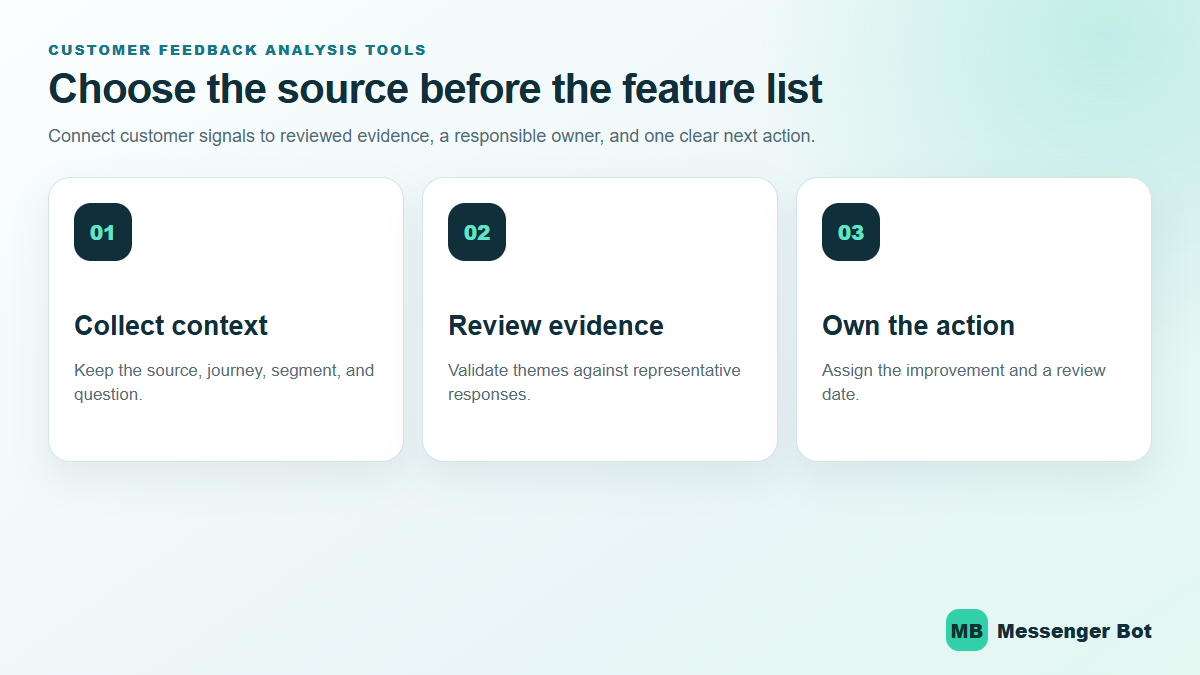
Customer feedback analysis tools should help your team answer a practical question: what should we improve next? The right choice depends less on a generic “best tools” list and more on where your feedback comes from, how much open-text analysis you need, who must review the findings, and how your team turns an insight into an owned action.
This guide compares five current tool categories through representative platforms: SurveyMonkey for survey programs, Qualtrics for structured experience management, Typeform for conversational collection, Hotjar for website behavior plus surveys, and Sprout Social for public social conversations. It separates verified product capabilities from assumptions, avoids unsupported performance promises, and gives you a repeatable selection process. If you already have responses and need the detailed analysis method, use our separate guide to analyze customer feedback and turn themes into actions.
Start With the Feedback Decision Your Team Needs to Make
A tool earns its place when it shortens the path from a customer signal to a responsible decision. That decision might be “which checkout problem should we fix,” “why are customers cancelling,” “which feature request is recurring,” or “which support question needs a clearer answer.” Each decision points to a different source and a different kind of analysis.
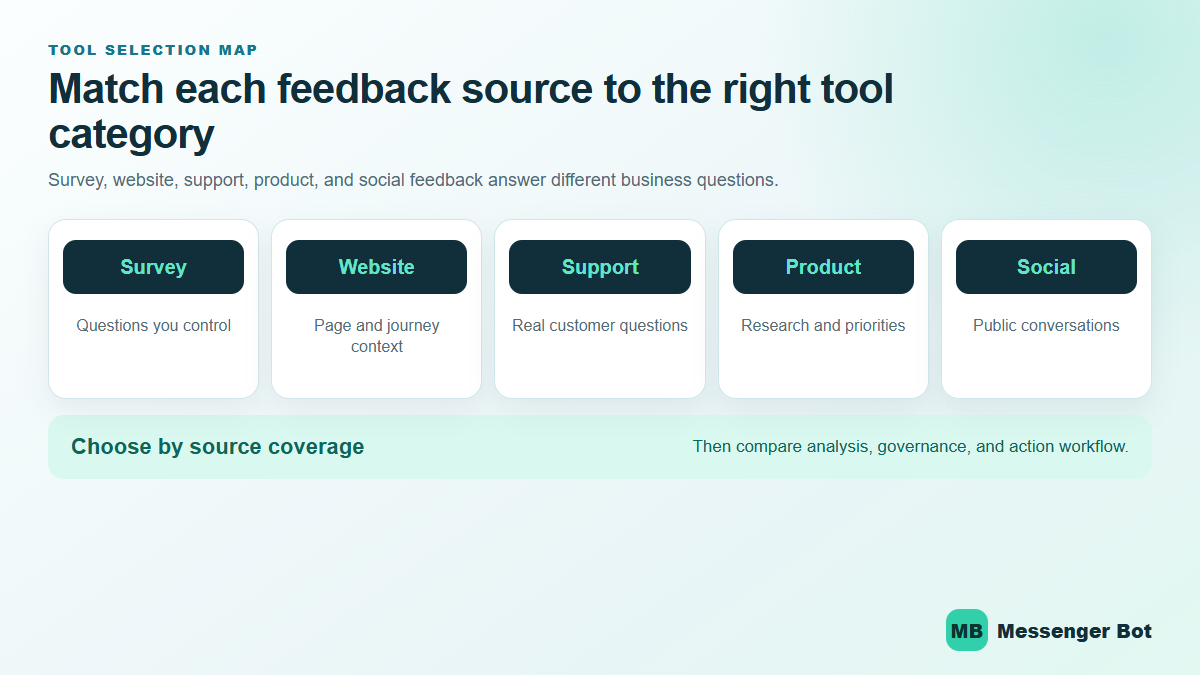
Survey responses are useful when you need consistent questions across a defined audience. Website surveys and behavior tools are better when you need context about a specific page or journey. Support and conversation data show where people are confused during real interactions. Product-research tools help a team compare needs and concepts. Social listening captures public conversations that customers may never send through a form.
Write the decision in one sentence before you compare products. Then list the evidence required to make it responsibly. If the decision is about a checkout page, you may need page-specific survey responses, behavior context, device segmentation, and a way to route findings to the web team. If the decision is about recurring pre-sale questions, you may need categorized conversation themes, response volume, and a reviewed list of content or reply improvements.
Separate collection, analysis, and action
Many platforms cover more than one stage, but the stages are still different. Collection is how a response arrives. Analysis is how you group, compare, and interpret it. Action is how a finding reaches an owner, receives a due date, and gets checked after a change. Buying a collection tool does not automatically create an action process. Buying AI-assisted analysis does not remove the need to review context, edge cases, and sensitive comments.
This separation prevents a common buying mistake: comparing products by the longest feature list. A smaller tool that fits your primary source and exports cleanly into your existing workflow can be more useful than an enterprise platform your team cannot operate consistently.
Compare Customer Feedback Analysis Tools by Source and Workflow
The table below is a selection map, not a universal ranking. Capabilities and plan availability can change, so verify the current product page and the workspace offer before purchasing. The “best fit” column describes the clearest use case supported by the linked official documentation.
| 도구 | Best-fit feedback source | Current analysis strengths | Workflow question to check |
|---|---|---|---|
| 서베이몽키 | Structured surveys and open-text responses | Themes, sentiment, summaries, charts, and response-quality signals in its AI analysis suite | Which features are included for your plan, language, and data region? |
| Qualtrics | Experience programs and product research | Open-text themes, summaries, product-feedback analysis, and program-level workflows | Who will configure the program and review AI-assisted findings? |
| 타입폼 | Conversational forms and surveys | Comparative, qualitative, and quantitative Smart Insights views | Does your plan include the analysis and segmentation your team needs? |
| Hotjar | Website and product-experience feedback | Surveys combined with behavior context, filters, summaries, tagging, and sentiment features | Can you connect the response to the exact page or journey being improved? |
| Sprout Social | Public social conversations | Listening queries, filtering, topic discovery, and social insight reporting | How will public conversation insights be validated against direct customer feedback? |
SurveyMonkey Fits Structured Survey Programs and Text Analysis
SurveyMonkey is a practical starting point when your feedback program is built around surveys and forms. Its official 기능 개요 covers survey creation, response collection, logic, templates, collaboration, analytics, reporting, and integrations. That breadth makes it useful for teams that want one place to design a survey, collect responses, and review results.
For open-text responses, SurveyMonkey’s current AI survey analysis materials describe thematic analysis, sentiment classification, summaries, charts, and flags for low-quality or duplicate responses. Those features can accelerate the first pass through a large response set. They should still be treated as analysis support, not unquestionable conclusions. A reviewer needs to check whether a theme combines different problems, whether sarcasm or mixed sentiment was interpreted correctly, and whether a small segment is being hidden by the majority.
Choose SurveyMonkey when the question design matters
This category works best when your team controls the questions and audience. You can use consistent rating questions for trend comparison, then add open-text prompts that explain the score. Before buying, confirm the exact analysis features, languages, plan limits, exports, and data-region availability shown for your account. Product pages can describe a platform broadly while an individual workspace offer is more specific.
Qualtrics Fits Structured Experience Programs and Deeper Governance
Qualtrics is positioned for teams that need more than a one-off survey. Its official product management overview connects feedback collection with market analysis, feature prioritization, concept testing, and product-roadmap decisions. That makes it relevant when several teams need to use the same research program rather than simply download a response file.
Qualtrics also documents Insights Explorer as an AI-assisted text-analysis tool for identifying themes, creating headlines, and generating summaries from open-ended feedback. Its own guidance says AI output is not a substitute for human review. That is the right operating model for any feedback platform: use automation to find a useful starting point, then have a knowledgeable reviewer validate the evidence before a business decision is made.
Choose Qualtrics when ownership and permissions are part of the problem
A larger program needs clear roles. Decide who can create projects, view raw responses, see sensitive text, change analysis rules, publish dashboards, and approve an action. Also decide how long feedback should be retained and which teams can connect it to other customer records. These governance questions may matter more than a single chart or AI feature.
Typeform Fits Conversational Collection With Built-In Result Views
Typeform is useful when response experience is a major requirement. Its survey product supports different question types, branching, visual customization, response reports, and analysis. A conversational form can feel lighter than a dense questionnaire, especially when conditional logic keeps irrelevant questions out of the path.
Typeform’s current Smart Insights documentation separates comparative, qualitative, and quantitative analysis. It describes summaries, topic detection, and sentiment analysis for open-ended responses, alongside charts and highlighted points for structured questions. Availability depends on the product and plan, so verify the exact workspace before treating a feature as part of your workflow.
Choose Typeform when completion and presentation affect the sample
A polished form does not guarantee representative feedback. Keep the questionnaire focused, avoid leading questions, and compare who responded with the audience you hoped to reach. If a form is embedded in a specific journey, preserve page, campaign, or segment context so the analysis does not mix unrelated experiences.
Hotjar Connects Website Feedback With Behavior Context
Hotjar is most useful when the feedback question is tied to a website or product journey. Its official overview combines behavior tools such as heatmaps and recordings with Surveys, helping a team compare what visitors say with what happens on a page. That can make a response more actionable: “checkout was confusing” is easier to investigate when the team can also review where people hesitate or abandon the flow.
Hotjar’s current documentation explains that its former Feedback widgets moved into Surveys in September 2024. The updated survey experience includes multiple display types, logic, behavior settings, filters, performance statistics, and AI-assisted features such as summaries, automated tagging, and sentiment analysis. If an older comparison still treats Feedback as a separate current product, it is stale.
Review the current Feedback and Surveys migration guidance before moving a legacy setup or recreating integrations. The documentation notes that some migrated behavior and integration details changed, so a current account review is safer than following an old tutorial.
Sprout Social Covers Public Conversations That Surveys Miss
Not every customer opinion arrives through a form. Sprout Social’s official social listening overview describes tools for building listening queries, filtering public conversations, identifying topics, and turning social data into reports. That makes it useful for brand health, recurring questions, competitor discussion, and market shifts visible on social channels.
Social listening is not a replacement for direct customer research. Public posts reflect the people and moments visible on those networks, and the loudest conversation may not represent your whole customer base. Treat listening as one evidence stream, then compare it with surveys, support conversations, product behavior, and business results before making a major change.
Choose social listening when the conversation exists outside your inbox
Define the topics, exclusions, languages, markets, and review cadence before collecting data. A broad brand query can fill a dashboard with irrelevant mentions. A narrower query tied to a decision gives the analyst a better chance of separating a customer problem from news, spam, or unrelated use of the same words.
Use a Repeatable Workflow From Feedback to Action
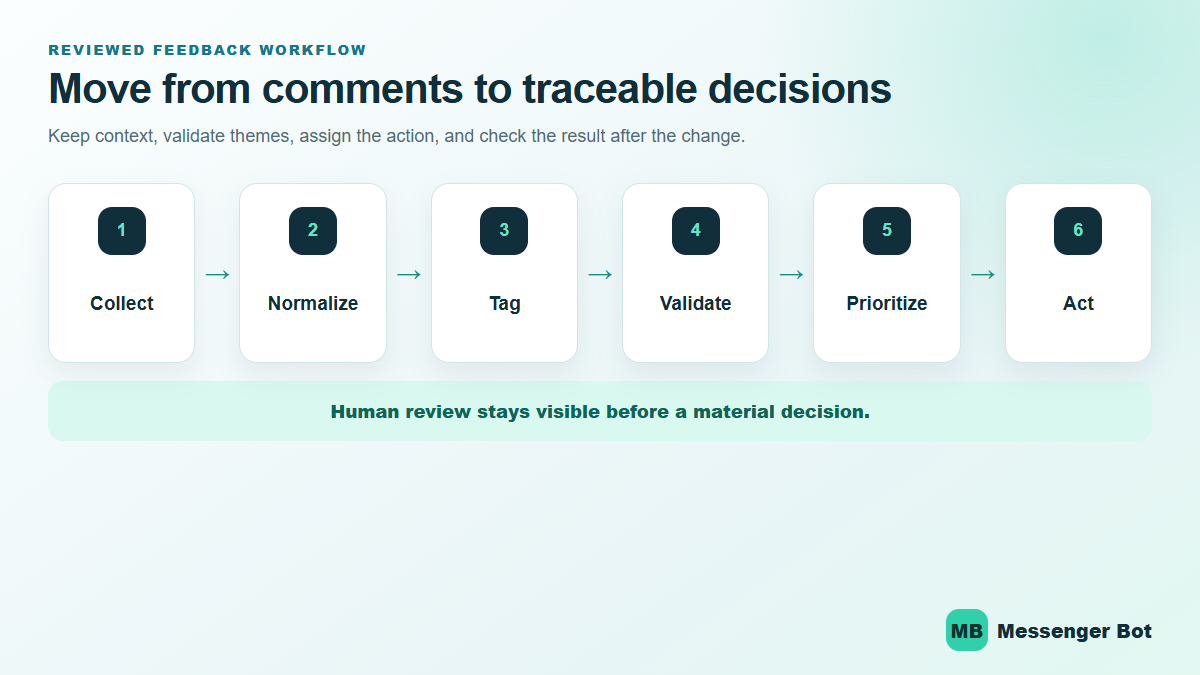
The tool is only one part of the operating system. A repeatable workflow keeps a team from producing attractive reports that nobody owns. Use the six stages below whether the analysis is manual, rule-based, or AI-assisted.
- Collect with context. Preserve the source, question, date range, journey, product area, and consent boundary needed to interpret the response.
- Normalize the input. Remove exact duplicates, separate system text from customer text, standardize dates and categories, and keep the untouched source available for audit.
- Tag themes consistently. Start with a small taxonomy tied to decisions. Add new themes only when existing labels cannot describe the issue without distortion.
- Validate the pattern. Read representative examples, check minority segments, look for mixed sentiment, and compare the finding with another evidence source where possible.
- Prioritize an owned action. Record the problem, evidence, affected journey, expected benefit, responsible owner, and review date. Avoid turning every comment into an immediate roadmap commitment.
- Close the loop. After a change, review the same feedback source and business outcome. Keep, revise, or reverse the change based on evidence.
For a deeper walkthrough of coding comments, comparing segments, and converting findings into a responsible action plan, follow our customer feedback analysis method. The tool-selection page you are reading stays focused on choosing the right source coverage and workflow.
If the next problem is keeping the program consistent over time rather than choosing software, use our separate guide to track customer feedback across a repeatable review cadence. That page owns monitoring strategy; this page owns tool selection.
Check Privacy, Access, and AI Review Before You Buy
Feedback can contain names, contact details, account information, health concerns, payment problems, private complaints, and other sensitive material. Your selection process should include data handling, not treat it as an afterthought. Ask where responses are stored, which regions are available, which subprocessors are involved, how long data is retained, how exports and deletions work, and which roles can view raw text.
AI-assisted analysis adds another review boundary. Confirm whether the feature can be disabled, what data is sent for processing, whether customer data is used for training, and how outputs are retained. Then define an internal rule: AI can summarize and suggest themes, but a responsible person validates material findings before they affect pricing, access, support, product behavior, or customer communication.
Use a safe pilot instead of importing everything
Start with a bounded, representative dataset that excludes unnecessary identifiers. Test whether the tool preserves context, handles mixed language, exports usable evidence, respects permissions, and produces stable categories. A pilot should reveal workflow problems before the platform becomes the only place your team can understand its feedback.
Document the evaluation with screenshots or exports that your team is allowed to retain. Record the plan and feature set tested because vendor interfaces and availability change. Avoid publishing a permanent “best tool” claim based on a temporary trial or a different account tier.
Messenger Bot Helps Teams Handle the Conversations Behind the Feedback
Messenger Bot fits beside feedback analysis rather than replacing it. A business can use clearer reply paths, qualification, and human handoff to handle recurring customer conversations more consistently. The analysis tool helps identify the pattern; the conversation workflow helps the team respond to it.
For example, feedback may show that customers repeatedly ask whether a service covers their location. The responsible action could be a clearer page, a better opening reply, and a qualification step that routes the inquiry correctly. The goal is not to hide the question with automation. It is to give the customer a faster, more useful next step while making human help obvious when the answer is not straightforward.
If your team is reviewing how automated replies and people should share the work, compare the decision points in our AI chatbot versus human agent framework. You can also browse 고객 참여 사례 for ways to connect feedback with practical journey improvements.
Turn Repeated Questions Into Clearer Follow-Up
Messenger Bot helps business teams respond faster, qualify inquiries, and keep human handoff visible. Review the current options before you plan a workflow.
Use This Customer Feedback Tool Selection Checklist
- 결정: Can you state the business decision this feedback should support?
- 출처: Does the tool collect or import the channels where the relevant feedback appears?
- 맥락: Can you preserve page, journey, segment, question, and date context?
- Analysis: Do you need charts, text themes, sentiment, comparisons, or all four?
- 검증: Can reviewers open representative source responses behind a theme or summary?
- 거버넌스: Are access, retention, deletion, export, region, and AI-processing controls acceptable?
- Workflow: Can a finding move into an owned action without manual copying that loses evidence?
- Pilot: Can you test a representative, minimized dataset before a broad import?
- 측정: Can you compare the same source after an improvement is released?
- Current offer: Have you verified the exact plan, limits, and availability shown for your account?
Shortlist products only after the checklist is complete. Then test the same small task in each candidate: import or collect a bounded set, identify a theme, open the supporting responses, segment the result, export the evidence, assign an action, and confirm that a second reviewer can reproduce the conclusion.
Frequently Asked Questions About Customer Feedback Analysis Tools
What is a customer feedback analysis tool?
It is software that helps a team collect, organize, compare, summarize, or report what customers say. Some tools focus on surveys, some add website behavior context, some support broader experience programs, and others analyze public social conversations. The right category depends on the source and decision.
Which tool is best for open-ended feedback?
There is no universal winner. Compare theme detection, sentiment support, source-response access, segmentation, language coverage, exports, privacy controls, and plan availability. Always test the tool with representative comments and require human review of material findings.
Can AI replace a person in customer feedback analysis?
No. AI can accelerate summarization, topic suggestions, and a first-pass sentiment view, but a reviewer still needs to validate context, mixed meanings, minority segments, sensitive cases, and the evidence behind a decision.
How should a small business compare feedback tools?
Start with one decision and one primary source. Run the same bounded task in two or three candidates, check the exact account offer, and compare the full workflow from collection through action. Avoid paying for unused complexity or choosing from unsupported “best tool” claims.
What should a team check before importing customer comments?
Check consent, data minimization, access roles, storage region, retention, deletion, exports, subprocessors, AI-processing controls, and whether unnecessary identifiers can be removed. Use a safe pilot before importing a broad archive.


 한국어
한국어  English
  Tagalog
  简体中文
简体中文  العربية
  हिन्दी
  Português do Brasil
  Español de México
  Français
  বাংলা
বাংলা  香港中文
香港中文  繁體中文
繁體中文  Nederlands
  Deutsch
  Bahasa Indonesia
  日本語
日本語  Polski
  Русский
  Español
  Tiếng Việt