
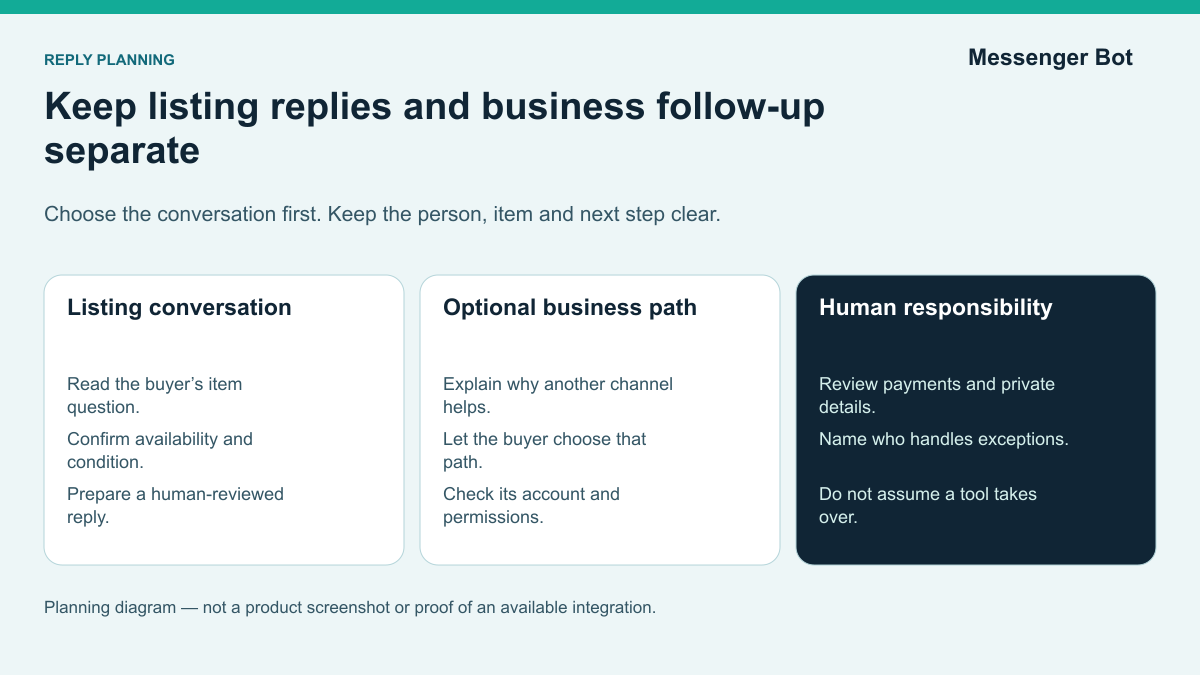
Facebook Marketplace can create a flood of short, repetitive questions: “Is this available?”, “Where are you located?”, “Will you take less?”, and “Can I pick it up today?” It is natural to look for a Facebook Marketplace bot that can answer every message. The important distinction is that a Marketplace listing conversation is not the same workflow as a message sent to a Facebook Page or another business inbox. Treating those surfaces as interchangeable can create a confusing buyer experience and encourage unsafe promises about what an automation tool can control.
The practical goal is not to remove people from Marketplace conversations. It is to make the repeatable parts faster while keeping a person responsible for identity, payment, pickup, condition, disputes, and unusual requests. A useful workflow starts with a clear listing, saved response building blocks, inbox organization, and a documented handoff. When a buyer chooses to continue through a supported business messaging channel, evaluate a reply and review workflow that keeps the listing context clear. If you are considering Messenger Bot, first check the connected account, available controls, and path back to a person; do not assume it takes over the original listing thread.
This guide explains the distinction, shows what you can standardize today, and gives you a repeatable path from Marketplace inquiry to supported business follow-up. Features can differ by account, region, device, and Meta product updates, so confirm the controls visible in your own account before relying on them. If Marketplace itself is missing, start with the Marketplace access troubleshooting guide before planning a reply workflow.
What “Facebook Marketplace Bots” Usually Means
People use the phrase Facebook Marketplace-bots for several different jobs. One seller may mean a saved answer for the default availability question. Another may mean a Page instant reply. A retailer may mean a system that routes business messages, while a buyer may be talking about spam or suspicious accounts that contact listings. Those are not one product category, and they do not share the same permissions.
It helps to separate the request into four layers:
- Listing-chat efficiency: reusable wording, fast access to item details, and a human-reviewed response to an individual buyer.
- Marketplace inbox organization: finding the correct conversation and item, using the controls actually available to your account, and keeping a clear next action in a human-reviewed record.
- Page and business messaging: checking which accounts and conversation types a tool supports, then evaluating the reply, review, and handoff process before relying on it.
- Monitoring and safety: identifying unusual message patterns, risky payment requests, duplicated questions, or conversations that need a person.
Use the official help pages for Marketplace messages en instant replies for Facebook Pages as starting points for checking the current account and message surface. Read the instructions that apply to your account and compare them with the controls you can actually see. A good plan should name the conversation it handles instead of treating every messaging feature as direct Marketplace automation.
If your actual problem is slow replies, start by measuring where the delay occurs. If the team cannot find the correct listing information, the answer is a better item record. If buyers receive inconsistent pickup directions, the answer is an approved reply block. If qualified prospects later message the business Page, then supported Page messaging tools may be appropriate. Choosing the layer first prevents unnecessary software and keeps the buyer’s context intact.
Marketplace Listing Chats and Page Messages Are Different Lanes
A Marketplace conversation begins around a specific listing and a specific buyer or seller. Find the listing conversation in the account where the inquiry arrived, and inspect the message and listing controls actually available there. Do not build a process around a particular menu, grouping, or filter until you have checked it in that account. The buyer’s message is connected to the item, condition, location, price, and transaction stage. A useful response therefore needs the listing context, not just a generic greeting.
Page conversations are a separate business messaging surface. For a Page or business inbox, inspect the connected account, available reply controls, and current permissions before deciding what to use. Test any proposed reply or handoff with a harmless example. A control available for a Page does not by itself show that it can manage a personal Marketplace listing chat.
For that reason, the safest operating assumption is simple: respond to the Marketplace inquiry in the Marketplace or Messenger experience where it appears. If the buyer later chooses an approved business channel for broader service, scheduling, support, or future updates, continue there with the proper consent and account permissions. Keep the handoff explicit so the buyer knows who they are speaking with and why the channel changed.
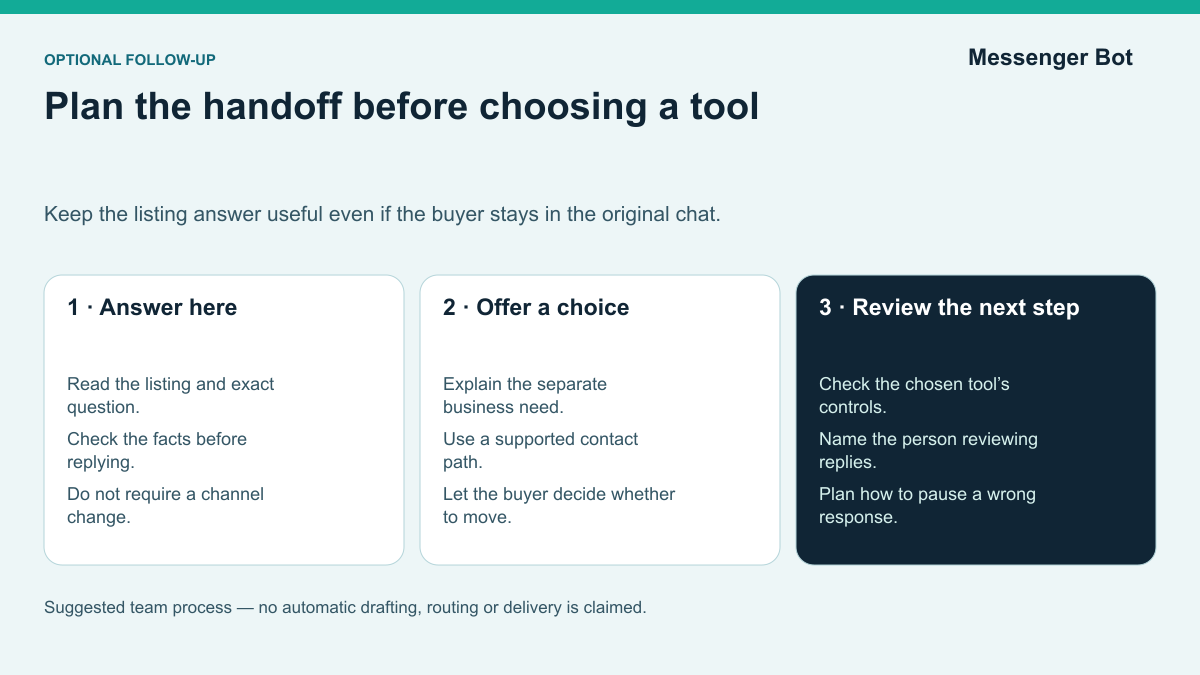
This distinction also improves reporting. Marketplace response time, completed transactions, and buyer questions belong to the listing workflow. Page conversation routing, reply reviews, and lead follow-up belong to the business workflow. Combining the two in one metric can hide whether the team is actually helping buyers faster.
For a closer look at the business side of the inbox, see the Facebook Messenger Business Inbox guide. Use it after you have identified a supported Page or business messaging use case; it is not a shortcut around Marketplace permissions.
What You Can Standardize Safely
If a reply library would help your team, start with clear information and keep judgment with a person. Build a small reply library around facts that are stable and easy to verify. Each reply should still be checked against the listing before it is sent.
Availability and condition
Prepare a short answer that confirms whether the item is available, repeats the exact item name, and points out the most important condition detail. Avoid a blanket “yes” response if inventory changes quickly or several similar items are listed. The person replying should confirm the listing status first. When the item is pending or sold, update the listing so new buyers receive accurate context.
Pickup, delivery, and timing
Write separate blocks for pickup area, available time windows, delivery boundaries, and shipping where applicable. Keep the first message general enough to protect private information. Share a precise address only when the transaction is ready and the meeting plan is appropriate. If a buyer changes the location or timing unexpectedly, pause and review instead of forcing the conversation through a preset sequence.
Price and negotiation
Define the listed price, whether reasonable offers are considered, and who can approve a discount. A response can explain the policy, but it should not invent urgency or claim another buyer exists unless that is true. If the price depends on quantity, condition, delivery, or a bundle, make the dependency clear before agreeing to a final amount.
Common product questions
Store measurements, compatibility notes, included accessories, known defects, and care instructions in the listing record. A saved response should pull from those verified facts. Do not let a generic answer overrule the actual item. For electronics, vehicles, collectibles, or regulated categories, route technical, ownership, or compliance questions to someone who can verify them.
A useful reply block contains three parts: the direct answer, one relevant detail, and one clear next action. For example: “Yes, the oak desk is available. It is 48 inches wide and has the scratch shown in photo four. Would you like the pickup windows for Saturday?” The buyer gets an answer without being pushed into a long scripted funnel.
Keep Personal Listing Replies Separate From Business Page Messaging
Facebook Marketplace listing conversations and business Page conversations are different product surfaces. A feature documented for a Page should not be assumed to work for a personal profile or Marketplace listing. Check the current official instructions and the controls shown for the exact account and conversation surface before configuring anything. Availability, eligibility, and settings can change; an example from another account is not proof that the same control is available to you.
Be cautious with extensions or scripts that promise to auto-reply, renew listings, negotiate prices, scrape buyer details, or simulate clicks through a personal account. Review the Meta Platform Terms and the tool’s requested permissions. Avoid any product that asks for a personal password, bypasses documented access, or cannot explain how it handles customer information. “Automation” is not a single permission that applies everywhere.
For Marketplace itself, use human-reviewed listing replies and the controls available in your account. If a business also has an eligible connected Page, evaluate a separate Page reply process against the current platform rules and the connected account. Include Messenger Bot in that evaluation only after checking the relevant channel and functions you intend to use. Keep a person responsible for review, and do not treat any business tool as permission to automate a personal listing conversation.
Keep the buyer’s listing question and any separate business conversation clear. Check the current controls for the account and channel before choosing a reply or handoff tool.
A Safe Marketplace-to-Business Follow-Up Workflow
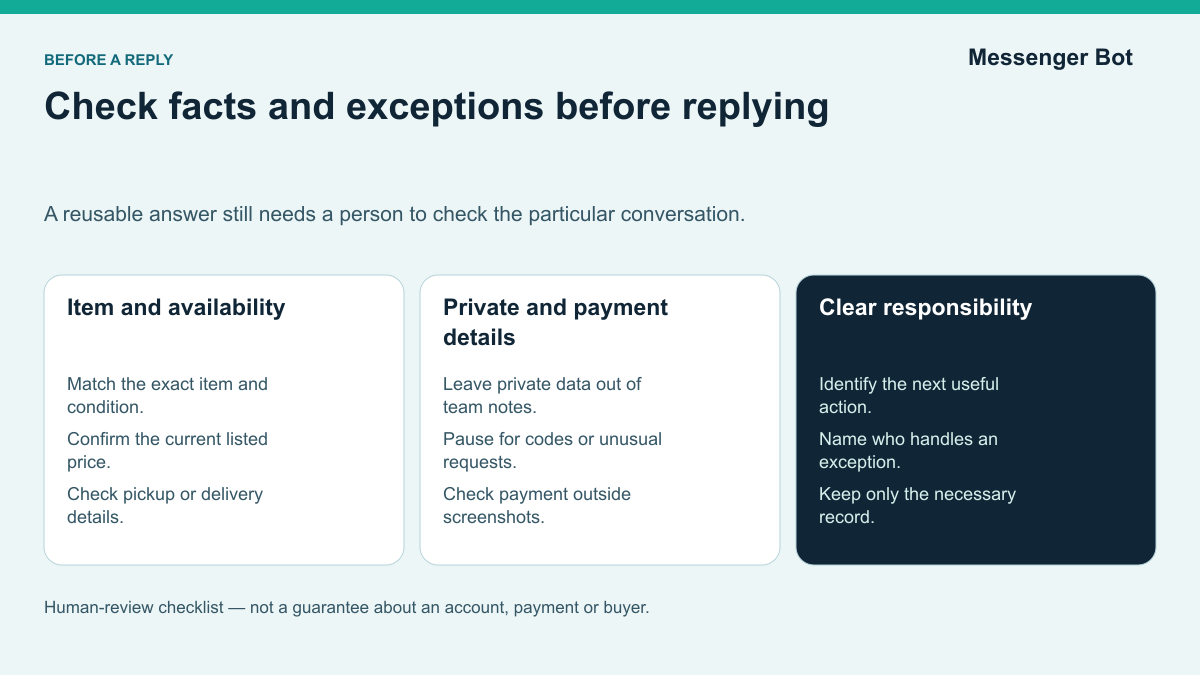
A strong workflow protects the original context and creates an explicit handoff. Use these five stages as an operating checklist.
- Read the listing and question. Confirm which item the buyer selected, what they asked, and whether the listing is still current.
- Qualify the next action. Decide whether the answer is a simple fact, a negotiation, a safety-sensitive request, or a question that belongs with another team member.
- Reply in the listing conversation. Give the buyer the useful answer where the inquiry began. Do not make them change channels just to learn whether an item is available.
- Offer a supported business path only when it helps. A business channel can be useful for ongoing service, an appointment, a broader product question, or future support. Explain the benefit and let the buyer choose it.
- Evaluate reviewed follow-up and human handoff. On a supported Page or business channel, decide who checks the buyer’s need, prepares the reply, and handles exceptions. Test those responsibilities with the controls actually available in the chosen tool. Do not assume drafting, routing, or review happens automatically; keep a person responsible for sensitive details and final decisions.
The handoff message should be plain and optional. For example: “I can answer the listing question here. If you want help choosing between several models, our business Page team can continue with the comparison.” This tells the buyer what changes and why. It does not imply that their Marketplace data will automatically follow them into a different system.
Document the supported channel, the trigger for the handoff, the information the buyer has already provided, and the point where a person must review. Use the record as a reference when reviewing repeated questions and handoffs. Separately plan how a person will pause or correct a wrong response; documentation alone does not restore a workflow.
Reply Templates That Stay Useful
Templates should shorten the path to a correct answer, not make every conversation sound identical. Use the examples below as starting points and replace brackets with verified listing details.
Availability reply
Yes, the [exact item name] is currently available. The main condition note is [verified detail]. Would you like the pickup windows or another photo?
Pending item reply
The [item name] is pending until [time or date]. I can let you know here if it becomes available again. I do not need payment or a code to hold your place in the conversation.
Pickup-area reply
Pickup is in the [general area] during [verified windows]. Once we agree on a time, I will confirm the appropriate meeting details here.
Offer reply
Thanks for the offer. The listed price is [price], and I can consider [approved range or condition]. If that works, the next step is to confirm the pickup or delivery option.
Business handoff reply
I can answer questions about this listing here. If you want help with [broader business need], you can choose to continue with our Page team at [supported destination]. If you continue there, share only the relevant [item or need] details so the team can check the question.
Review templates whenever the listing format, pickup policy, supported channel, or Meta feature changes. Remove any promise that cannot be verified. A reply library should have an owner and a last-reviewed date so old wording does not quietly become policy.
Handle Suspicious Marketplace Messages Without Adding Another Bot
A seller may receive a generic message soon after publishing a listing. Requests to move immediately to text or email, share a verification code, accept an unusual payment method, or click an unfamiliar link deserve extra scrutiny. Use Meta’s Marketplace scam guidance to compare warning signs and reporting steps. Keep the listing conversation together long enough to review what the buyer asked and what was promised.
If a message appears suspicious, do not share personal, account, or payment details. Use the current report and block controls where appropriate, and preserve the relevant conversation. An unapproved browser script is not a safer way to argue with, screen, or answer suspicious accounts. It can add another party with access to messages and can create account risk without proving that the buyer is genuine.
For ordinary listing questions, a short human-reviewed reply can confirm availability, condition, location boundaries, and the next safe step. The standard Marketplace messaging help is the correct starting point for current product behavior. A buyer’s willingness to stay in the normal interface is useful context, but it is not proof that a transaction or payment is safe. Evaluate the buyer, payment method, and handoff separately.
Safety Signals That Should Stop Automation
Marketplace conversations can involve real-world payments, meetings, shipping, and personal details. These are moments for a person to slow down and review the request. Consult the official scam guidance linked above and inspect the reporting controls available in the conversation. Make time for those checks rather than expecting an automated reply to decide whether a transaction is safe.
Route a conversation to manual review when a buyer or seller:
- asks for a verification code, password, or account login;
- moves the conversation away from the normal channel before basic details are confirmed;
- changes the payment method or amount unexpectedly;
- requests an overpayment, refund, or third-party transfer;
- sends a link that does not match the expected service;
- pressures the other person to skip reasonable checks;
- changes the meeting person, location, or item at the last moment; or
- makes a claim that conflicts with the listing or previous messages.
A standard safety response can say that the team needs to verify the request before continuing. It should not accuse the buyer of wrongdoing. Respectful language protects legitimate customers while giving the team time to inspect the situation. If the conversation is clearly unsafe or violates Marketplace rules, use the reporting and blocking controls provided by Meta.
Do not store more personal information than the transaction requires. Keep access limited to people who need it, and do not paste payment details, identification, or private addresses into a broad team note. If your business has formal privacy, refund, or dispute procedures, link the Marketplace workflow to those policies.
How to Measure Whether the Workflow Is Working
The best Marketplace workflow is not the one that sends the most automated messages. It is the one that helps the right buyer get a correct next step with fewer delays and fewer preventable handoffs.
Track a small set of operational measures:
- Time to first useful reply: measure when the buyer receives an answer to the actual question, not merely a greeting.
- Accuracy corrections: count replies that had to be fixed because availability, condition, price, or logistics were wrong.
- Unresolved conversations: identify messages that remain open without a clear owner or next action.
- Manual-review rate: watch how often safety, payment, negotiation, or exception rules require a person.
- Supported handoff completion: count buyers who knowingly choose a Page or business channel and receive the promised help.
- Outcome by listing: compare inquiries, qualified conversations, pending items, completed transactions, and common objections.
Review a sample of conversations, not just totals. A fast first reply can still be unhelpful. A low manual-review rate can mean the system is failing to flag risky requests. The qualitative review should ask whether the response matched the listing, whether the buyer understood the next step, and whether the channel handoff was transparent.
Use the findings to improve the listing first. If ten buyers ask for dimensions, add them to the description and photos. If pickup questions dominate, clarify the general area and available windows. The aim is to make relevant item details easier to find. Check later conversations to see whether repeated questions change rather than assuming that a listing edit reduces them.
Choosing Tools Without Overbuying
Evaluate a tool against the exact layer it is supposed to improve. A Marketplace monitoring service, a Page messaging platform, and a saved-reply library solve different problems. Do not compare them as though they all have the same access.
Before choosing a tool, ask:
- Which account and message surface does it officially support?
- Can it show the listing context a person needs to answer correctly?
- What actions require review before anything is sent?
- Can a person take over immediately?
- Does it keep an understandable record of the decision and next action?
- What happens when a permission, Page connection, or Meta feature changes?
- Can you export or remove the workflow without losing the original Marketplace conversation?
Avoid purchasing based on a broad promise to “automate Marketplace.” Ask the provider to name the exact supported surface and show the current official permission. If the demonstration jumps from a personal listing chat to a Page inbox without explaining the difference, treat that as an unresolved capability gap.
If clearer business replies are your goal, evaluate Messenger Bot for one narrow Page or business conversation type rather than a personal listing thread. Review the available controls, prepare a human-reviewed reply, and test the path to a person before deciding whether the tool fits. Bekijk Onze Tutorials while checking the relevant setup, or Huidige Prijzen Controleren when you are ready to compare plans.
Evaluate a Reviewed Business Follow-Up With Messenger Bot
Use this checklist to evaluate a proposed business follow-up, not as proof that a tool already performs every action. Begin after checking that the account and conversation belong on a supported Page or business channel. Keep the Marketplace listing reply separate, and perform the review yourself wherever the chosen tool does not provide a verified control.
- Name one audience and outcome. For example, “People who chose Page messaging after asking for help comparing several products.”
- Define the entry condition. Record the buyer action or business-channel message that begins the workflow. Do not silently import an unrelated Marketplace conversation.
- Write the direct answer first. Give the person the result they asked for before collecting extra information.
- Add one qualification question at a time. Ask only for information needed to recommend the next step.
- Create human-review rules. Escalate pricing exceptions, payments, disputes, private data, uncertainty, and any answer the team cannot verify.
- Test with labeled examples. Use a normal question, a missing-detail question, and a safety-sensitive request. Confirm that each reaches the expected response or handoff.
- Review the experience before relying on it. Check the message wording, mobile readability, links, person responsible for the next step, and path back to human help. Do not send a test to an actual buyer without a clear reason and appropriate consent.
The setup is successful when the team can state what the workflow handles, what it does not handle, and how a person takes over. That clarity is more valuable than a large number of branches. If you need a separate walkthrough for a basic Page response, use the Messenger auto reply tutorial and verify the current controls in your own account.
Veelgestelde Vragen
Can a Facebook Marketplace bot reply to every listing message?
Do not assume that a Page or business messaging tool can control personal Marketplace listing threads. Check the official instructions and controls for the exact account and conversation. Use human-reviewed listing replies; evaluate a separate business reply process only when the account and the buyer’s chosen channel support it.
Can I use saved replies for “Is this available?”
Yes, a saved reply can speed up the answer, but a person should confirm the exact listing and current availability before sending it. Include one useful detail and a clear next action so the response is more helpful than a generic acknowledgment.
Where can sellers find Marketplace conversations?
Start in the account and conversation where the inquiry arrived. Inspect the message and listing controls shown there, and use the official Marketplace messaging help linked above if you need navigation guidance. Do not assume that a particular Selling menu, filter, or grouping is available for every account.
What can Meta Business Suite Inbox automate?
Check the controls actually shown for your connected Page or business account and read the current instructions for that surface. Before relying on a reply or handoff feature, test whether it is available and does what your team needs. Do not assume it also controls a personal Marketplace listing conversation.
When should a Marketplace message go to a person?
Use manual review for identity questions, payment changes, verification codes, disputes, unusual links, private details, pickup changes, pricing exceptions, and any request that conflicts with the listing. Automation should not make trust decisions on the team’s behalf.
How does Messenger Bot fit into the process?
Evaluate Messenger Bot for a supported Page or business conversation after checking the connected account and available functions. Plan who reviews replies and handles exceptions, then test that process before relying on it. Do not assume it drafts, routes, or controls a personal Marketplace listing chat.



 Nederlands
  English
  Tagalog
  简体中文
简体中文  العربية
  हिन्दी
  Português do Brasil
  Español de México
  Français
  বাংলা
বাংলা  香港中文
香港中文  繁體中文
繁體中文  Deutsch
  Bahasa Indonesia
  日本語
日本語  한국어
한국어  Polski
  Русский
  Español
  Tiếng Việt