
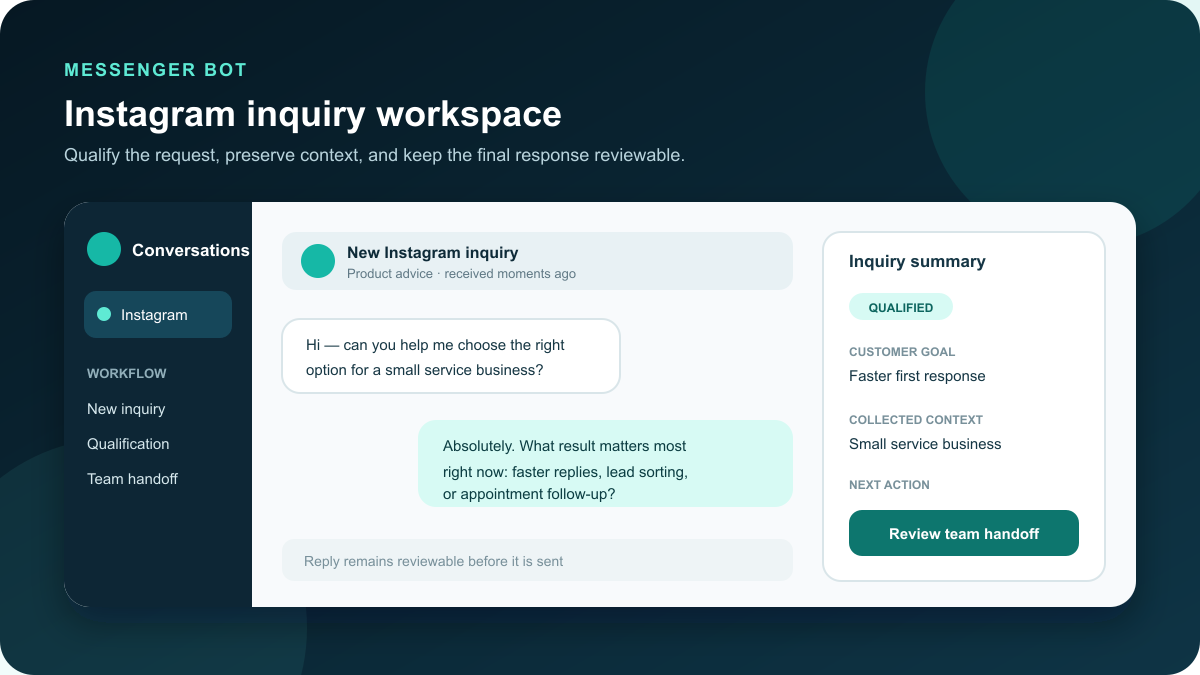
Instagram inquiry workflows for business teams
Turn a busy Instagram inbox into a reviewable path from first question to qualified inquiry. Messenger Bot helps your team organize common replies, collect useful context, and hand conversations to the right person when a customer needs individual attention.
Give every incoming inquiry a clear first step
Instagram direct messaging has evolved into a primary business contact channel for service firms, specialized retailers, and independent consultants. Customers rarely leave an Instagram profile to fill out a static website form or wait days for an email reply. When potential buyers discover a product demonstration in a Reel or view a limited-time announcement on a Story, they send a direct message expecting immediate clarity. For growing teams, managing dozens of simultaneous inbound conversations during peak operating hours quickly creates bottlenecks.
Relying on unassisted manual replies often leads to missed opportunities. Team members can miss time-sensitive inquiries during busy shifts, incoming leads turn cold overnight, and repetitive questions regarding pricing, availability, and business hours pull staff away from higher-value work. Standard greeting auto-replies offer minimal help because generic text stating “Thanks for reaching out, we will get back to you soon” fails to capture necessary project details, answer routine questions, or advance the inquiry.
Instagram DM automation resolves this friction by establishing order without eliminating human judgment. Starting with a clear acknowledgment and an obvious next step reassures the customer that their message was received. A structured welcome reply sets expectations, presents customer-friendly choices, and routes the person along an intentional path. Messenger Bot provides a workspace for designing those paths, previewing reply sequences, and establishing exact points where a team member takes over.
Design an Instagram DM automation workflow around useful context
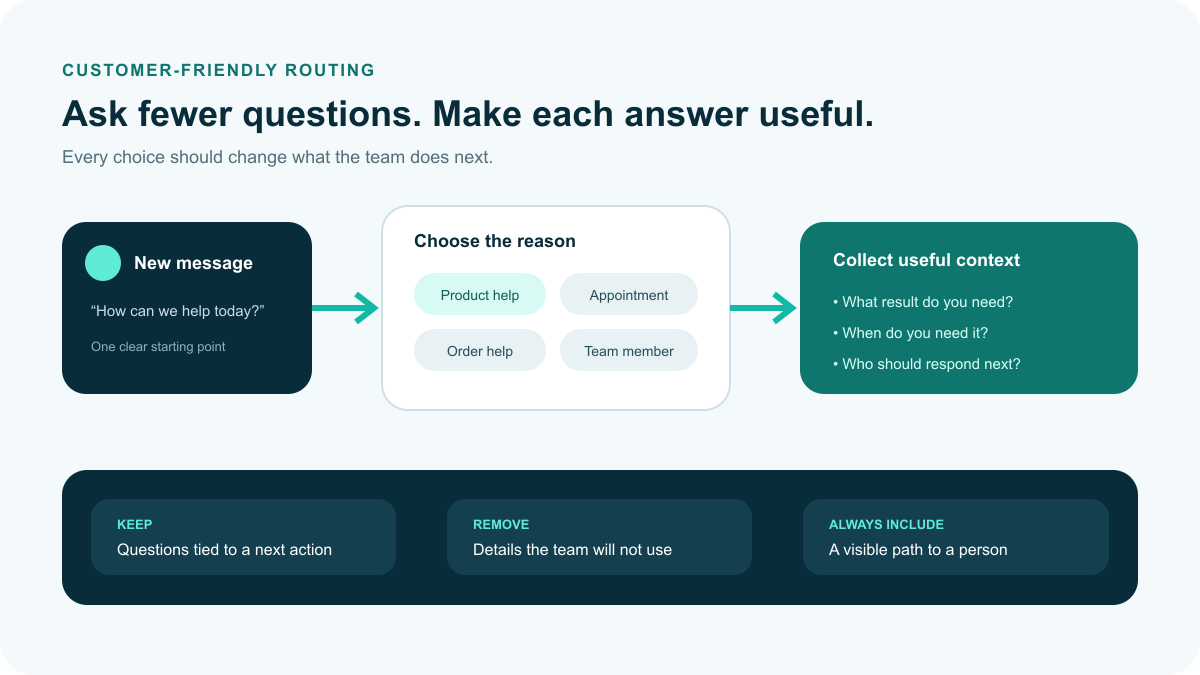
An effective qualification workflow asks fewer, higher-value questions. A service provider might ask what kind of help the customer needs, their preferred project timing, and whether the request is time-sensitive. A retailer might offer product categories, size availability help, order support, or a route to a specialist. An agency might separate new commercial inquiries from existing client support. Each collected detail should directly inform the team’s next business decision.
Begin by identifying the three to five most common reasons customers message your profile. Build one short path for each reason. Use plain, customer-friendly labels rather than internal company jargon, and avoid asking for information your team will not use. When an inquiry requires nuance, route it immediately to a person rather than prolonging the automated exchange.
Automated messaging should always make the next step transparent. If a team member will review the request during business hours, communicate that schedule clearly. If the customer needs to select an appointment slot or provide an order number, explain that requirement up front. A well-designed workflow eliminates uncertainty for the customer while delivering consistent context to your staff.
Before launching any messaging sequence, test each choice from start to finish. Confirm that every branch reaches an intentional outcome, every handoff supplies adequate context, and every response reflects your established business tone. Thorough testing catches broken links, loops, dead ends, and questions that ask too much too early.
Core Instagram touchpoints: Stories, comments, and direct messages
Customer conversations on Instagram originate across three distinct touchpoints: Story interactions, public post comments, and direct message threads. Organizing each entry point with specific triggers and safeguards ensures that customer interactions feel helpful rather than intrusive.
| Touchpoint | Inbound trigger event | Automated response pattern | Qualification objective |
|---|---|---|---|
| Instagram Stories and mentions | Viewer replies to a Story sticker, types a prompt keyword, or tags the profile in their own Story | Sends an instant direct message delivering the requested resource or acknowledging the mention with a relationship-building note | Captures high-intent interest while the Story is live and routes questions directly into qualification |
| Reel and feed post comments | Prospect comments a designated keyword (such as “INFO”, “START”, or “BOOK”) on a promotional post | Publishes a friendly public acknowledgment comment and delivers a private direct message with the link or intake question | Bridges public post engagement into a private conversation thread without cluttering public comments |
| Direct message inbox | User clicks “Message” on the business profile or initiates a new chat conversation | Greets the customer, explains response time, and offers customer-friendly category choices | Triages general inquiries, collects project parameters, and routes qualified buyers to scheduling or staff |
Story interactions offer substantial conversion potential because interactive stickers, polls, and limited-time announcements encourage spontaneous engagement. When a viewer replies with an intake keyword, automated delivery can supply the intake checklist or consultation link immediately. If a collaborator or client tags your account in a Story, an automated acknowledgment expresses appreciation without demanding round-the-clock manual monitoring.
Comment-to-DM workflows allow businesses to turn Reel and feed post engagement into structured qualification. To prevent automated comments from appearing repetitive to platform monitors, configure rotating public reply templates and natural delivery delays. For deeper strategy recommendations on configuring direct inbox safeguards, explore our guide on safe Instagram auto-DM practices.
Balancing rule-based triggers and conversational AI workflows
When structuring Instagram messaging, business teams often compare rigid rule-based systems with flexible conversational AI models. Examining their operational strengths reveals that the most reliable implementations combine both architectures into a cohesive hybrid workflow.
| Feature dimension | Rule-based automation | Conversational AI workflows |
|---|---|---|
| Inquiry interpretation | Relies on exact keyword matches or button selections; fails on misspellings or unstructured phrasing. | Interprets natural language, identifies intent despite typos, and answers multi-part inquiries contextually. |
| Content maintenance | Requires manually designing extensive decision trees for every possible customer question. | Draws answers from approved business knowledge guidelines and verified operating parameters. |
| Conversation adaptability | Confines users to predetermined linear paths; cannot adjust tone or summarize complex context. | Adapts responses dynamically while maintaining brand tone and established policy boundaries. |
| Execution predictability | High structural predictability; responses never deviate from pre-scripted copy templates. | Requires clear system instructions and guardrails to ensure claims remain strictly factual. |
| Operational focus | Best suited for binary routing, menu selections, and verified link delivery. | Best suited for consultative qualification, nuanced inquiries, and contextual sales guidance. |
A hybrid framework leverages the strengths of both approaches. Teams deploy structured quick-reply buttons for predictable navigation—such as “Check Pricing,” “Book Consultation,” or “Order Status”—while enabling conversational AI to answer open-ended questions like “Do you offer on-site consultations in north Seattle?”. This structure ensures customers receive rapid, accurate guidance without feeling trapped in an inflexible phone-tree menu. To review available subscription tiers and feature sets for intelligent social messaging automation, you can Check Current Pricing dla bota Messenger.
Choose the right response pattern for each kind of message
Not every message requires the same depth of automation. A practical operating plan groups inquiries by what the customer needs and how much individual judgment the response requires. The table below outlines a dependable baseline that businesses can customize to their offerings, service standards, and coverage hours.
| Inquiry type | Useful first response | Context to collect | Recommended handoff |
|---|---|---|---|
| Product or service question | Acknowledge the request and offer relevant category choices | Need, timeline, location, or preferred option | When the customer requests a custom package or policy exception |
| Appointment inquiry | Explain the scheduling steps and expected response time | Service type, preferred day, and urgency | When custom availability, accessibility, or specific staff are needed |
| Existing order or account help | Confirm the team can help and request a safe reference | Order reference number and a concise summary of the issue | As soon as the request requires account-level investigation |
| Partnership or project lead | Set expectations and clarify the desired outcome | Project scope, timeline, and appropriate contact details | After basic fit is established, or immediately for custom proposals |
| Complaint or sensitive question | Acknowledge the concern politely without debating or making promises | Only the minimum details necessary to route the conversation | Immediately to the designated team manager |
Treat this framework as an operating blueprint rather than a rigid script. Customers should always have an accessible route to a person. When an automated workflow cannot confidently match an inquiry to an approved path, the safest fallback is a prompt acknowledgment followed by an immediate handoff.
Meta messaging policies, 24-hour windows, and anti-spam safeguards
Automating customer interactions on Instagram requires strict adherence to Meta platform policies. Deploying unauthorized browser extensions, scraping tools, or unofficial emulators introduces severe business risks, including engagement throttling, feature restrictions, and account termination.
Official API architecture and prerequisites
Legitimate Instagram messaging automation connects through the official Instagram Messaging API. Integrating with this infrastructure requires three business prerequisites:
- Jeden Instagram Professional Account configured as a Business or Creator profile (personal profiles cannot access messaging APIs).
- A verified Stronę Firmową na Facebooku connected directly to the Instagram professional account inside Meta Business Suite.
- Connected Tools permission enabled inside Instagram Settings under “Messages and story replies” to “Allow Access to Messages.”
Using an official integration through Meta’s documented Instagram messaging interfaces is a safer starting point, but compliance still depends on current permissions, message content, user consent, and account behavior. No software tool can guarantee immunity from platform restrictions. Review platform requirements before launch and pause automation if the account receives a warning.
The 24-hour customer service window
Meta enforces an operating standard known as the 24-hour messaging window. When a user sends a direct message, replies to a Story, or triggers a comment-to-DM workflow, they initiate a 24-hour service window. During this active period, an approved assistant can exchange automated messages to answer questions, share links, and complete qualification steps.
Once 24 hours have elapsed since the user’s latest incoming message, automated messaging must stop. Businesses cannot send unsolicited promotional messages, follow-up offers, or mass announcements outside this window unless the user re-engages or the business uses approved human-agent messaging tags within permitted guidelines. Respecting this boundary prevents your account from being flagged for spam and protects your brand reputation.
Opt-in consent and account protection
Cold, unsolicited outbound messaging is prohibited under Meta platform policies. Safe automation requires explicit, inbound user action. Acceptable trigger events include:
- A user actively sending a direct message to your inbox.
- A user posting a designated comment keyword on a public post after being invited to do so.
- A user replying directly to your Instagram Story.
- A user clicking an Instagram direct message ad (Click-to-Instagram Direct).
Aggressive tactics—such as sending automated direct messages to new followers, scraping usernames from public comments, or purchasing engagement bots—violate platform terms. Consult the official Meta Instagram messaging documentation and the standard Instagram platform community guidelines to confirm current compliance parameters.
Keep human handoff visible and easy to use
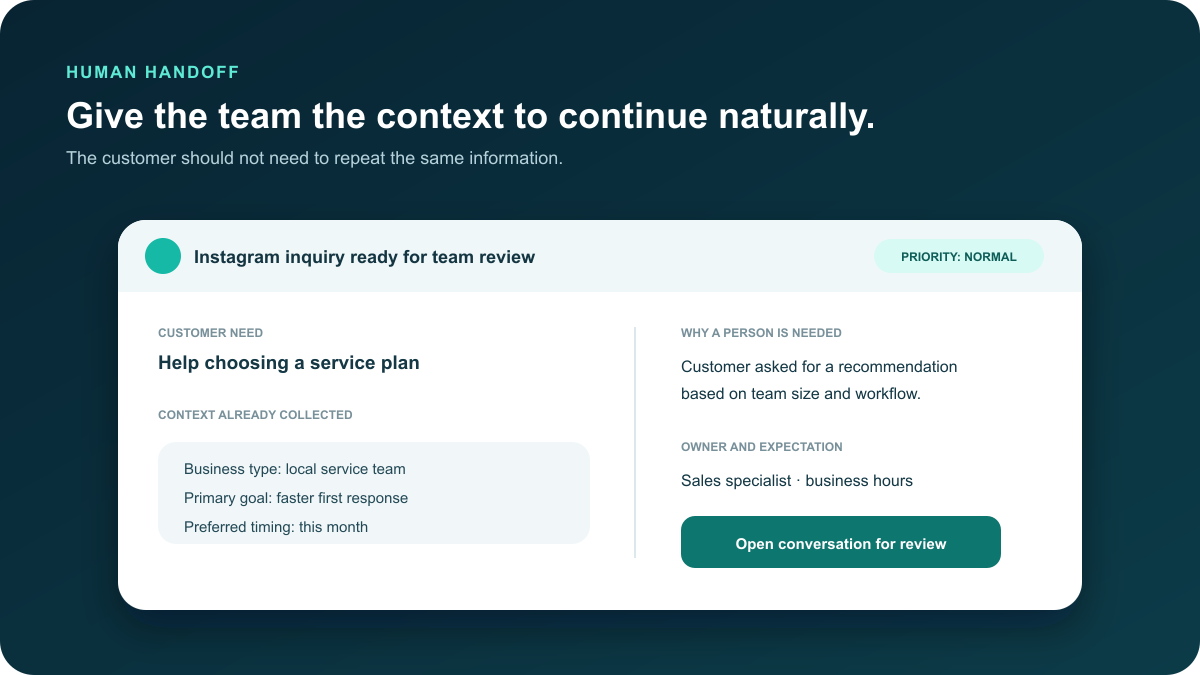
Automated messaging is designed to support your customer service team, not replace human judgment entirely. Certain conversation moments require immediate human intervention, and establishing seamless handoff protocols preserves customer trust while preventing frustrated interactions.
Practical human handoff design centers on four essential capabilities:
- Sentiment and frustration detection: If a customer expresses confusion, dissatisfaction, or repeatedly asks to speak with a representative, the workflow must immediately pause automated replies and notify team members.
- High-value sales escalation: When an inbound prospect indicates a custom commercial budget or requests enterprise-tier terms, the conversation should route directly to an account executive with an automated summary of gathered details.
- Context preservation: When a team member enters the chat thread, the customer should never be asked to repeat information already provided. The team member reviews the chat history, sees the collected customer selections, and continues the dialogue naturally.
- Realistic expectation messaging: Setting honest expectations during off-hours builds transparency. If an inquiry requires human evaluation outside normal business hours, the assistant can confirm receipt, capture preferred contact details, and state when a team member will follow up.
For example, if an inquiry arrives late in the evening, the automated reply can state: “Our client team reviews custom inquiries Monday morning at 8:00 AM. We have saved your project notes and will message you right away.” This transparent approach satisfies speed-to-lead expectations without creating false promises. For broader commercial lead handling principles, consult our small business sales chatbot guide.
Use Bring Your Own Key (BYOK) within a reviewable response process
Bring Your Own Key (BYOK) allows teams to connect their own supported model access for AI-assisted messaging tasks. This capability helps draft responses from context collected during the conversation, adapt replies to the business’s tone, and summarize conversation threads for staff review.
BYOK assistance should operate within defined boundaries. Decide which types of inquiries may use AI-assisted suggestions, which topics strictly require a human team member, and who approves the resulting workflow. Keep system instructions grounded in verified business answers and test representative examples before deploying them with live customers. AI assistance provides maximum value when it reinforces an established operating process rather than operating without oversight.
Build a concise evaluation set before relying on automated suggestions. Test a straightforward product inquiry, an ambiguous request, a customer concern, a pricing exception, and a scenario requiring immediate human escalation. Verify whether the suggested draft reflects current company information, adheres to required boundaries, and clarifies the next action.
Maintain your source information as your business evolves. Service packages, operating hours, availability, return policies, and escalation contacts change over time. Assign a team member to review these reference answers periodically and pause affected branches whenever information cannot be verified. A structured workflow makes updating a centralized knowledge source straightforward, avoiding the need to correct inconsistent replies after customers receive them.
Measure whether the workflow is helping customers and the team
A practical Instagram DM automation plan measures service quality rather than just message volume. Track a focused set of performance indicators that provide actionable feedback without creating an administrative reporting burden:
- Routing accuracy: Did the inquiry reach the specific person or workflow equipped to resolve it?
- Qualification completion: Did customers understand the options and provide the context needed for the next step?
- Jasność przekazania: Could a team member continue the conversation without asking the customer to repeat details?
- Wskaźnik fallback: Which messages repeatedly trigger generic fallbacks, indicating a need for a clearer path?
- Response expectation accuracy: Did the messaging accurately convey when and how the team would follow up?
Review these indicators after the first week of operation and again after the first month. Adjust one component of the flow at a time so the team can verify whether each revision produced a measurable improvement. Pair quantitative metrics with periodic qualitative reviews of real conversation logs to ensure that responses remain helpful and aligned with customer expectations.
Complete a pre-flight check before enabling the workflow
- Confirm account ownership and permissions. Use a Professional account your team is authorized to manage, connect the corresponding Facebook Page, and verify message access in Connected Tools.
- Review customer conversation paths. Test every button, keyword trigger, fallback, and handoff branch from a customer perspective.
- Audit qualification questions. Ask only for information that directly influences the next business action or routing decision.
- Establish the human boundary. Document the specific topics, customer signals, and order thresholds that require immediate human intervention.
- Test BYOK assistance and prompts. Review sample responses to ensure suggested replies remain strictly within approved business guidelines and brand voice.
- Assign operational ownership. Designate team members responsible for monitoring escalations, updating business answers, and conducting weekly quality reviews.
- Run end-to-end device previews. Verify that quick-reply options, media, and external links render cleanly across both iOS and Android mobile devices before public launch.
Connect the workflow to the rest of your customer conversation process
Instagram direct messaging represents one component within a broader customer communication strategy. Connect your messaging flows to the systems your team uses to handle sales and support. Teams can configure their social channels, build custom qualification flows, oraz manage public comment triggers from a unified operating approach.
Maintain consistent communication standards across channels while respecting each platform’s format. A public comment, a private Instagram direct message, and an email conversation require different levels of detail and pacing. Consistency should stem from shared principles—useful context, truthful expectations, and visible human ownership—rather than broadcasting identical scripts across every touchpoint.
Ensure that post-qualification destinations are mobile-friendly and current. Whether an inquiry routes to a booking calendar, an order verification form, or a direct conversation with a specialist, verify that the transition is smooth. For further guidance on optimizing conversational messaging across channels, explore our Instagram chatbot direct message strategies i naszych Facebook Messenger marketing guide for small business. If you want step-by-step visual guidance, you can Przeglądaj nasze samouczki.
Instagram DM automation questions from business teams
What should a business automate first in Instagram direct messages?
Start with a clear welcome acknowledgment and two or three questions that help your team route incoming inquiries. Common first workflows include service category selection, appointment scheduling, order support, business hours, and an explicit option to reach a team member. Keeping the initial workflow concise allows your team to test every branch and verify every handoff before expanding.
Does automating Instagram messages put an account at risk of suspension?
Using an official integration through Meta’s documented Instagram messaging interfaces is a safer starting point, but compliance still depends on current permissions, message content, user consent, and account behavior. No tool can guarantee immunity from platform restrictions. Always verify current rules before launch and pause automation if the account receives a warning. Risks increase when businesses use unauthorized scraping tools, unofficial browser extensions, or engagement bots that violate Meta terms by sending spam or unsolicited outbound direct messages.
What is Meta’s 24-hour messaging window and how does it affect automated replies?
The 24-hour messaging window is a Meta policy standard where businesses can exchange automated messages with users for up to 24 hours after the user’s latest incoming message. Once 24 hours pass without further user interaction, automated messaging must pause until the customer sends a new message. Respecting this window prevents unwanted messaging and keeps your account compliant with platform terms.
How do rule-based triggers and conversational AI work together on Instagram?
The most effective deployments use a hybrid model. Structured quick-reply buttons handle predictable navigation, menu choices, and link delivery, while conversational AI (configured through BYOK) evaluates natural language inquiries, extracts context despite typos, and answers open-ended questions using approved business guidelines.
When and how should an automated Instagram flow hand off to a human team member?
An automated workflow should hand off immediately when an inquiry involves pricing exceptions, complex requirements, customer frustration, or an explicit request for a person. The system should pause automated responses, preserve the chat history and collected details so the customer does not have to repeat themselves, and notify the responsible staff member with an organized summary.
Build a more controlled Instagram messaging workflow
Start with the inquiries your team handles most often. Give customers a useful first step, collect only the context that matters, and make human handoff part of the design from the beginning. Messenger Bot helps your team turn those decisions into a workflow you can preview and review before it becomes part of daily customer conversations.

 Polski
  English
  Tagalog
  简体中文
简体中文  العربية
  हिन्दी
  Português do Brasil
  Español de México
  Français
  বাংলা
বাংলা  香港中文
香港中文  繁體中文
繁體中文  Nederlands
  Deutsch
  Bahasa Indonesia
  日本語
日本語  한국어
한국어  Русский
  Español
  Tiếng Việt