
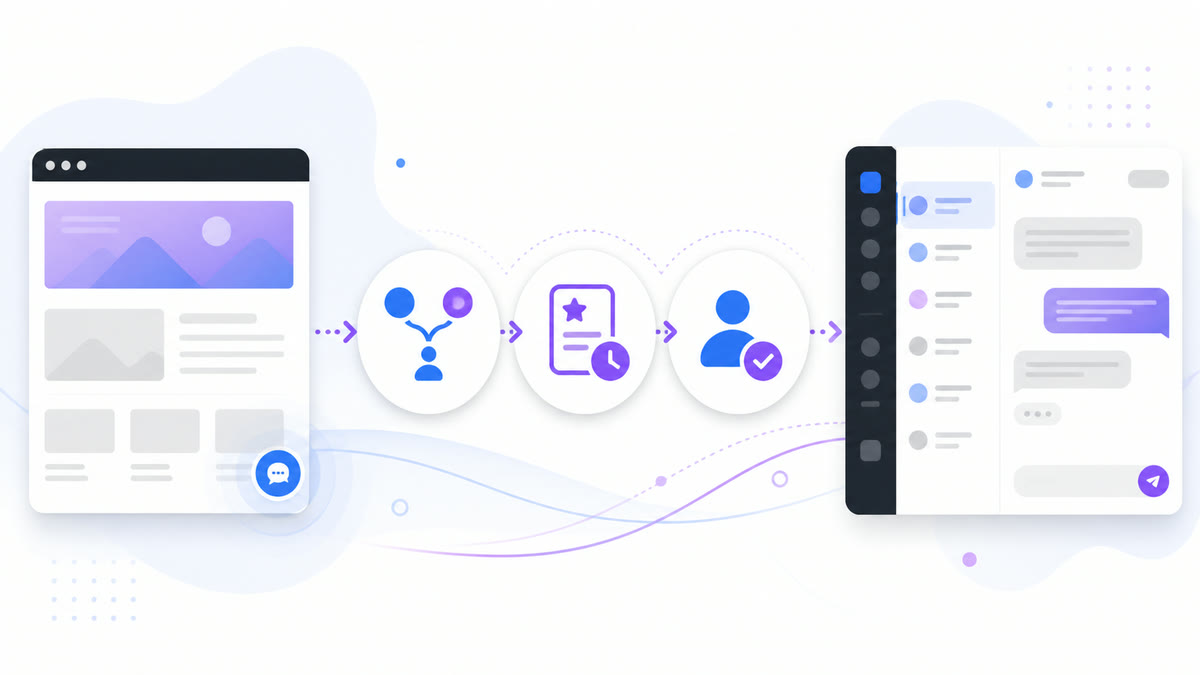
A WordPress-to-Messenger handoff should tell visitors where they are going, what the business can help with, and when a person will review the conversation. This guide helps you plan that path, test it with non-customer examples, and keep a fallback available without assuming that a button or automation feature is enough.
The WordPress to Messenger Handoff Strategy
The core philosophy behind an effective handoff is recognizing that website browsing and direct messaging are fundamentally different modes of interaction. When a visitor decides to initiate contact, they are shifting from passive consumption of your content to an active request for assistance or engagement. This shift must be managed carefully to ensure expectations are aligned from the very first interaction.
Why a Clear Handoff Matters More Than a Widget
Historically, website administrators relied on embedded widgets that attempted to merge these two distinct modes of interaction into a single interface. However, forcing an entire support ecosystem into a small window on a webpage often leads to compromised experiences. An intentional handoff strategy explores whether dedicated communication platforms might be better suited for managing complex, asynchronous conversations.
A handoff moves the visitor from your site to another communication space. Verify whether the exact destination preserves the conversation, confirms receipt, and remains available after the browser closes. Explain the destination before the click and keep another contact method visible if those behaviors are unavailable.
Designing a Customer-Safe Contact Path
A customer-safe contact path prioritizes clarity, choice, and honest expectations. Tell visitors who they are contacting, what information is useful, which sensitive topics require another channel, and when messages are normally reviewed. Do not promise a response time until the team has measured that it can meet it.
Designing this path involves mapping every potential touchpoint on your WordPress site where a user might require assistance. You must anticipate the context of their inquiry based on their location on the site. A user seeking help on a complex technical documentation page requires a vastly different handoff experience than a user inquiring about shipping costs on a product checkout page. The contact path must be contextual, guiding them gently toward the most appropriate channel for their specific need.
Structuring Your WordPress Site for Handoffs
Placement affects whether visitors can find the appropriate contact path without interrupting their main task. Compare a few relevant templates, including mobile and checkout-adjacent pages, before deciding where the option belongs.
Strategic Placement of Contact Options
Contact points should be treated as critical navigational elements. They must be highly visible without being obstructive. Consider implementing persistent but unobtrusive contact access points on high-value pages, such as pricing tiers or complex product descriptions. However, on highly focused conversion pages, such as checkout flows, contact options should be placed carefully to avoid distracting the user from completing their primary objective.
The visual design of these access points is equally important. Use clear, action-oriented language. Instead of a vague “Contact Us,” choose specific phrasing such as “Ask our support team a question” or “Get help with your installation.” This specific language sets a precise expectation for the interaction that follows, preparing the user for the handoff process. When designing these access points, assign different visual priorities based on the page’s purpose. Test with non-customer examples to verify that the contact options are discoverable without being overwhelming.
Filtering the Right Conversations
Not every visitor inquiry requires a direct conversation. Clear FAQs and documentation can answer routine questions while leaving a visible path to a person when the material does not fit the visitor’s situation.
Implement comprehensive FAQ sections, searchable knowledge bases, and clear documentation. Position these resources prominently before the user reaches the final contact trigger. By empowering visitors to find their own answers efficiently, you reserve your active messaging channels for high-value interactions that genuinely require human expertise and nuanced understanding.
Setting Up the Messenger Experience for WordPress Visitors
If your chosen setup supports it, consider configuring the receiving environment to manage the influx of inquiries effectively. Verify that the transition feels cohesive when moving to an external platform.
Business Hours and Setting Clear Expectations
A common failure point is a mismatch in response expectations. If a visitor sends a message during off-hours, test with non-customer examples to ensure they receive an appropriate confirmation and a definitive statement regarding when your team will review it.
If your platform supports an initial response, use it to state your actual review schedule and the next step. Publish only a response window your team can reliably meet, and verify the message with a non-customer test account before relying on it.
Triage and Automated Fit Questions
If your chosen setup supports it, you may want to gather context before a human agent sees the message. Verify whether you can implement a brief, automated triage process that asks the visitor to categorize their inquiry, such as selecting “Billing” or “General Inquiry.”
Test with non-customer examples to ensure these initial fit questions function correctly. They can encourage the visitor to clarify their own needs, which often leads to more concise and actionable initial messages. You can plan faster customer replies with Messenger Bot by carefully planning these triage structures if supported.
Human Ownership and Escalation Protocols
Automation may help organize routine context, but the business still needs a named human owner and a documented escalation path. Test what happens when a question does not match any available option.
Defining Human Handoff Triggers
Define the topics that always require human review, including billing, account access, privacy, security, safety, legal concerns, and explicit requests for a person. Routine documentation can be offered, but visitors should still have a clear way to say it did not answer their question.
However, if your chosen setup supports it, try to define triggers that route a conversation to a human. These triggers might include explicit requests to speak with an agent. When these triggers are activated, verify how the handoff occurs and whether the receiving agent has sufficient access to the interaction history.
Training Your Support Team
The success of this strategy relies heavily on the competence and training of your support staff. They must be adept at picking up conversations mid-stream, quickly analyzing the context provided by the triage questions, and responding with empathy and precision. They must also understand the technical nuances of the handoff process itself.
Train reviewers to read the available context, confirm the actual question, avoid requesting unnecessary information, and explain the next action. Review a small sample regularly to find missing documentation or unclear handoff copy.
Testing and Measuring Handoff Success
A handoff needs periodic testing. Choose a small measurement set—such as contact-link clicks, completed fit questions, requested human reviews, and broken-destination reports—and document how each signal is collected.
Tracking the Visitor Journey
If your chosen setup supports it, try to maintain visibility into how users are interacting with your contact points. Verify whether you can track which pages generate the most handoff clicks. This data can be helpful for identifying friction points.
Treat abandonment or repeated questions as prompts for investigation, not proof of one cause. Review the page context, destination availability, wording, response window, and feedback before deciding what to change.
Adjusting Workflows Based on Data
The insights gathered from tracking the visitor journey must be translated into actionable improvements. This might involve rewriting your automated responses for clarity, adjusting your business hours to better align with peak inquiry times, or creating entirely new triage categories to handle emerging trends in user questions.
If your policies permit transcript review, use the minimum access needed and redact private details from planning notes. Look for recurring questions that can improve documentation while preserving the visitor’s option to reach a person.
Maintaining and Rolling Back When Needed
Even the most meticulously designed systems occasionally fail or require significant maintenance. You must have procedures in place to handle situations where your external messaging platform experiences downtime or when you need to make fundamental changes to your routing logic.
Safe Rollback Procedures
If your primary handoff destination becomes unavailable, you cannot simply leave broken links on your WordPress site. You must have a pre-defined rollback procedure that allows you to quickly update your contact points to direct users to an alternative channel, such as a traditional email form or a dedicated status page explaining the outage.
Record where each contact point is managed and how to restore its previous value. Keep a tested alternate path ready, and verify the public page after every change. If you previously relied on the old widget, follow the backed-up process to remove the retired Facebook Chat Plugin from WordPress.
The Future of Visitor Communication
An intentional handoff gives the business a chance to replace vague availability with a clear destination, review window, owner, and fallback. Its value depends on whether those promises are tested and maintained.
Start with one bounded page and one reviewed workflow. Expand only after the team confirms that visitors can understand the choice, reach a person when needed, and recover from a broken destination.
Advanced Implementation Strategies for Complex Handoffs
Organizations with multiple teams may need more than a short fit menu. Map each safe choice to a named reviewer and test the unsupported and unavailable paths before adding more routing logic.
Consider scenarios where a known customer initiates a handoff. If your chosen setup supports it, verify whether you can route them based on their status. Always test with non-customer examples to ensure any data handling aligns with your policies.
Furthermore, consider the implementation of multi-lingual support. If your WordPress site serves a global audience, verify whether the handoff process can route visitors to agents who speak their language based on a specific selection made during the triage phase.
Run a Bounded Handoff Pilot

Start with one page, one reviewed destination, one owner, and one rollback. Capture the current button text and destination before the test. Then verify the visible label, destination identity, review-hours notice, fit choices, explicit human-help path, sensitive-topic response, mobile layout, keyboard access, and unavailable-state fallback. Use non-customer examples and avoid entering real account, payment, health, or credential information during the pilot.
Ask the reviewer to record only what happened: whether the click reached the expected destination, whether the test message appeared for the assigned person, whether the unsupported path produced a safe next step, and whether the page remained usable. A passed button click is not enough if no one owns the resulting conversation. A received message is not enough if the visitor was promised a response window the team cannot meet.
After the pilot, compare the result with the saved pre-change state. Keep the new path only when the customer-facing copy, ownership, escalation, measurement, and fallback all pass. Otherwise restore the prior contact point and document the failed assumption before testing another design.
Najczęściej Zadawane Pytania
Why is an external handoff better than an on-site widget?
It is not automatically better. Compare an on-site option and an external handoff against your page performance, accessibility, visitor expectations, team coverage, data handling, and rollback requirements.
How do I handle users who expect an immediate response?
State the review hours before the visitor clicks and repeat them after contact only if the selected setup supports that message. Publish a turnaround estimate only after your team can reliably meet it.
Will this strategy increase my support team’s workload?
Do not assume the direction of the change. Measure conversation volume, human-review requests, unresolved questions, and review time during a bounded test.
Can I measure whether the handoff is working?
You can measure on-site contact-link clicks when your analytics and consent setup permits it. Confirm what can be measured after the visitor leaves the site rather than assuming cross-platform attribution.
What is the most common mistake when setting this up?
Publishing a contact path without a named owner, honest review window, sensitive-topic boundary, fallback, and recurring test.
To upgrade your team’s ability to manage complex asynchronous communications effectively, Check Current Pricing.
 Polski
  English
  Tagalog
  简体中文
简体中文  العربية
  हिन्दी
  Português do Brasil
  Español de México
  Français
  বাংলা
বাংলা  香港中文
香港中文  繁體中文
繁體中文  Nederlands
  Deutsch
  Bahasa Indonesia
  日本語
日本語  한국어
한국어  Русский
  Español
  Tiếng Việt