
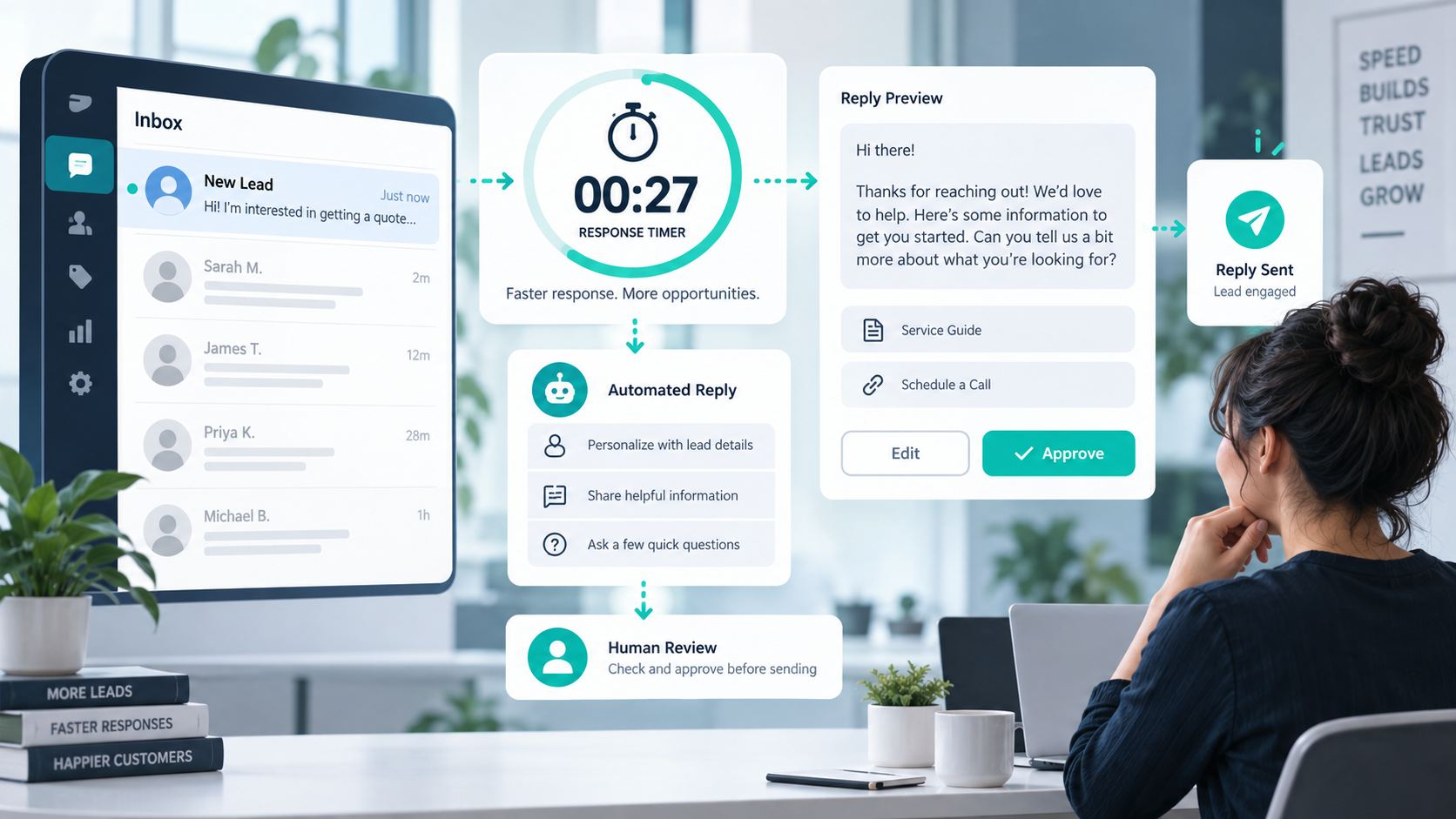
Updated September 2026 — Speed to lead is the time between a new inquiry and the first useful response from your business. The goal is not to send a rushed “we got your form” message. The goal is to acknowledge the request, set a clear next step, and get the question to the right person while the context is still easy to follow.
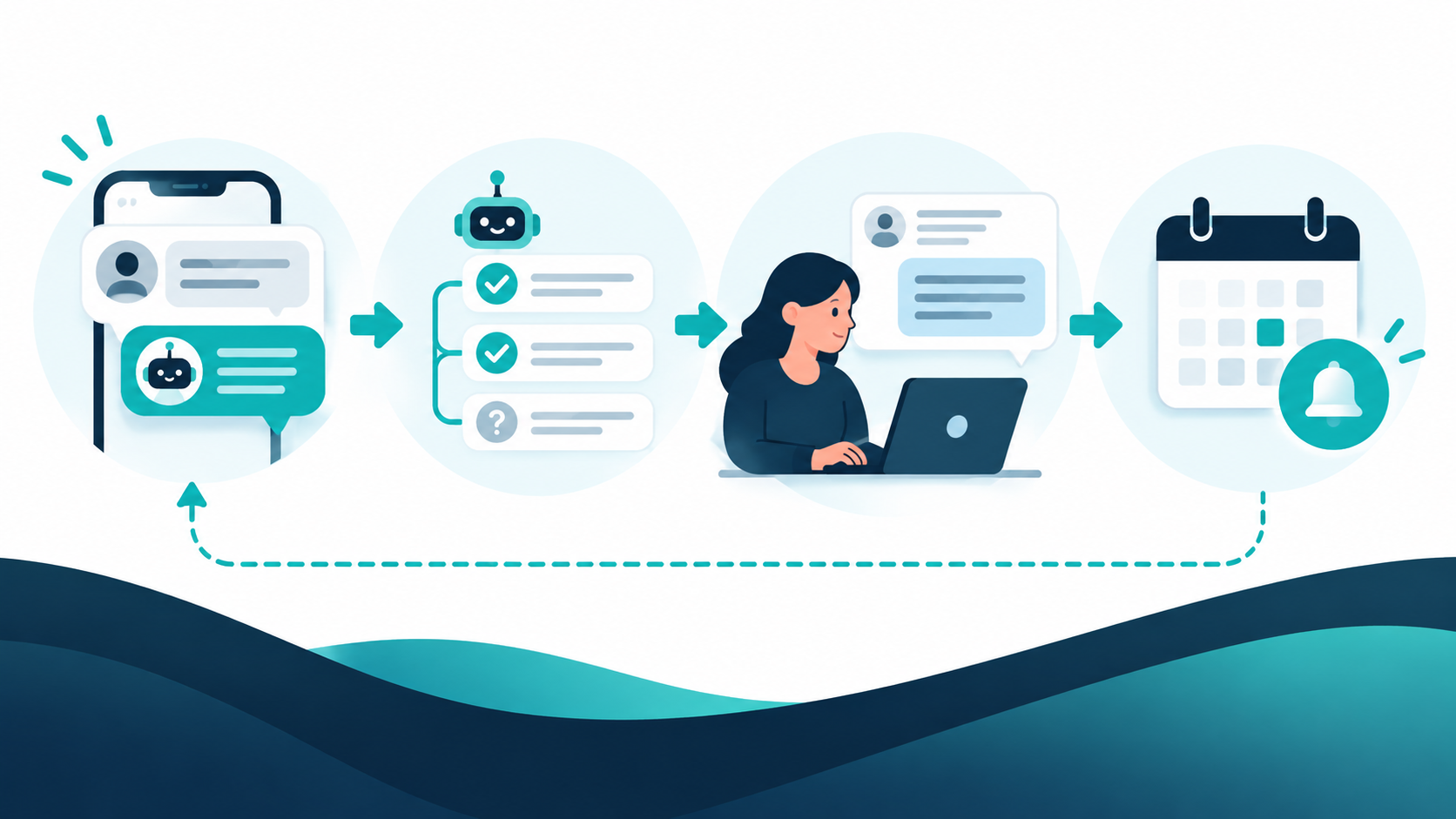
A faster process can be simple: capture the inquiry, label what the person needs, assign an owner, send a truthful acknowledgment, and measure when a real response happens. This guide shows how to build that process without promising 24/7 availability or treating an automated message as a completed conversation.
What speed to lead actually measures
Write down the two timestamps before you change tools. The start is the moment a valid lead enters the system, such as a form submission, a phone message, or a direct social inquiry. The end is the first response that addresses the request or gives a credible next step. A delivery receipt or internal assignment is not the same as a useful response.
Teams often mix three different measures:
- Receipt time: when the system accepted the inquiry.
- First human response: when a person replied or called back.
- First useful response: when the customer received an answer, qualification question, or confirmed next step.
Choose one primary measure and label the other two separately. If the business uses an automated acknowledgment, keep it visible in the record but do not count it as the completed response unless it genuinely resolves the customer’s question.
Why response speed deserves a process
New inquiries arrive with incomplete context. A customer may ask for a price, a booking time, a service area, or a human callback. If the message waits in an unowned inbox, the next employee has to reconstruct the story before replying. A small routing rule can remove that delay without adding a large automation project.
Google’s business guidance treats accurate hours, contact details, and timely responses as part of the customer experience. Its lead tools also describe response time as a measurable operational signal, not a promise that every business must meet the same target. Use the guidance as a reason to measure your own process, then choose a target that staffing and customer expectations can support.
HubSpot’s lead-response guidance similarly connects speed with clear ownership, reminders, and a shared view of follow-up. Those are process choices, not proof of a universal conversion lift. Keep your own baseline so seasonal demand, campaign mix, and staffing changes do not get mistaken for a tool effect.
Set a realistic response-time target
Start with the hours when a qualified team member can actually respond. If the office closes at 5 p.m., a message received at 5:30 p.m. should receive an honest next-step notice rather than a false claim that someone is online. Define:
- the business hours covered by the target;
- the inquiry types included and excluded;
- the first-response event that counts;
- the escalation route when nobody owns the request;
- the fallback copy outside covered hours.
Use a small set of bands so the target is easy to operate. For example, “during staffed hours,” “same business day,” and “next business day” are more truthful than a single minute promise that no team can maintain. If the business wants a shorter target, staff and test the handoff first.
Route each inquiry before you automate it
A useful routing label answers “what does this person need next?” Keep the first version small:

| Inquiry type | First owner | Safe first action |
|---|---|---|
| New service question | Sales or intake | Confirm the service and ask for the one missing detail needed to help. |
| Appointment request | Scheduling | Offer the next scheduling step and state the expected response window. |
| Existing-customer support | Suporta | Acknowledge the issue and give a case or human-contact path. |
| Billing or account access | Authorized account team | Route privately; do not ask for secrets in a public message. |
| Unclear or sensitive request | Human review | Ask one clarifying question or escalate without guessing. |
Keep routing labels separate from customer-facing copy. “High-intent” may help an internal queue, but it should not appear in a public response. The customer needs a clear next step, not an explanation of the scoring system.
Write a first reply that earns the next step
The first reply has four jobs: acknowledge the request, reflect what you understood, state what happens next, and give a real time or contact path. Use a template that a person can edit:
General inquiry: Hi [name], thanks for asking about [service]. We are checking [specific detail] now. [Team or person] will reply during [hours] with [next answer]. If your timing is urgent, reply with [one useful detail] or call [phone].
Appointment request: Hi [name], we received your request for [service]. The next step is to choose a time here: [booking path]. If you need a time that is not listed, reply with two options and our team will review them during [hours].
Price question: Hi [name], thanks for checking the price for [service]. The current estimate depends on [one or two real variables]. We can confirm the right option after [next step]. Reply with [needed detail] or use [contact path].
Outside-hours message: Thanks for contacting [business]. We received your message outside our staffed hours, [hours]. We will review it on [next business day]. If this is about [supported urgent path], use [specific route].
Do not say “a representative will be with you shortly” when the queue has no owner or the business cannot define shortly. A precise, modest promise is safer than a fast-sounding sentence that creates a second disappointment.
Use automation for the handoff, not the guess
Automation is useful for capturing the inquiry, checking that required fields exist, offering a known booking path, and notifying the right queue. It becomes risky when it invents availability, quotes an unverified price, or marks a conversation complete because a message was delivered.
Keep a human-review branch for billing, account access, privacy, legal, medical, security, abuse, and any request that changes customer state. A safe automated flow can say “I’m sending this to the team that handles account questions” and then prove that the handoff occurred. It should not ask for a password, secret key, or full payment details in a chat reply.
If you are comparing conversation automation tools, review the current feature and plan details before selecting one. The Tingnan ang Aming Mga Tutorial area can help your team map a simple intake flow. When you are ready to compare the product’s current options, Check Current Pricing rather than relying on an old screenshot or a third-party summary.
Measure the queue without hiding the misses
Track the distribution, not only the average. A queue with a fast average can still leave urgent messages untouched. Record at least:
- inquiries received by channel and hour;
- time to first acknowledgment;
- time to first human or useful response;
- unassigned and duplicate inquiries;
- handoffs that needed correction;
- responses outside the stated hours;
- customer requests for a person that stayed automated.
Report a median and a high-percentile or “slowest ten percent” view, then read a sample of conversations. A timestamp cannot tell you that the first reply answered the wrong question. Combine the numbers with a short quality review so a faster but less useful script does not look like progress.
Fix the common causes of a slow first response
No clear owner
Give each inquiry type a default owner and a backup. If the owner is away, the backup should see the same context and the same response window. A queue with no backup is a delayed response waiting to happen.
Too many required fields
Ask for the minimum information needed to route the request. Every unnecessary field creates another chance for a customer to abandon the form or for staff to wait for a detail that is not needed for the first reply.
Unclear handoffs
Write the handoff as a short record: what the customer asked, what was already promised, what is missing, and who owns the next action. Do not make the customer repeat the entire story because the internal note was too vague.
Stale templates
Review names, hours, links, services, and pricing references on a schedule. Keep a version date and a rollback copy. A template that was accurate last season can become a source of slow or incorrect replies when the business changes its hours.
Design follow-up for no-response cases
A customer may not answer the first reply because the message was unclear, the timing was wrong, or the person needs to check with someone else. Define a small follow-up sequence:
- Send the initial acknowledgment with one next action.
- Wait for the interval your consent and policy allow.
- Send one useful reminder that repeats the action without pressure.
- Offer a human route or close the loop respectfully.
Do not keep sending the same message to prove that the system is active. A customer who asks to stop should be suppressed in that channel. Keep the state in the protected workspace and expose only the minimum needed to the person handling the queue.
Run a two-week response-time test
Choose one inquiry type, one staffed-hours window, and one baseline week. Document the current median, slowest-ten-percent time, unassigned count, and a small quality sample. Then change one thing: a routing rule, a response template, or the notification owner.
During the test, inspect failed fields and unclear replies every day. If the team cannot keep the promise, lower the promise before expanding the workflow. At the end, compare the same measures and review a similar sample of messages. Keep the change only when the response is both faster and still useful.
Record the result in a short operational note. Include the template version, hours, channel, owner, and rollback step. That makes the next improvement easier and protects the team from repeating an experiment that already failed.
Match the response to the channel
A form, phone line, social inbox, and live chat do not create the same work. A form may contain structured service fields, while a social message may contain only a sentence and a photo. Use the channel to decide what the first reply can safely promise. If the channel does not provide enough context, ask one focused question instead of sending a generic sales paragraph.
Phone inquiries need a missed-call rule. Decide how quickly a callback is attempted, what happens when the number is hidden, and how the person can choose a written channel. A callback task without an owner is not a response process. It is only a reminder that can age in a queue.
Social messages need a privacy boundary. Move account, payment, or personal details to a protected route. Keep the public reply short: acknowledge the question, state where the private handoff will happen, and give the team a clear owner. Do not ask someone to post sensitive information in comments or a public thread to make the response metric look fast.
Plan coverage around real staffing
Draw the week as coverage blocks, not as a single opening-hours sentence. Note holidays, lunch gaps, appointment-only windows, and the person who checks each inbox. Then test an inquiry at the edge of every block. The message should state the next review window accurately, and the internal task should appear with enough context for the next person.
Use a backup owner when the primary person is away. The backup should know which replies can be sent immediately and which need a specialist. A good backup rule reduces delay without encouraging a generalist to guess about a specialized request. Keep the escalation channel visible in the queue and review it after staff changes.
When demand spikes, switch to a safe degraded mode. That can mean acknowledging the request, stating a longer truthful window, and routing the message in order. It should not mean hiding older inquiries, changing timestamps, or sending an unverified answer to make the queue look clear.
Review quality alongside the clock
Read ten fast responses and ten slow responses each week. Mark whether the reply named the request, gave the next action, respected the customer’s channel preference, and avoided claims the business could not support. Compare the reasons for delay: missing data, no owner, a difficult question, a system failure, or a customer who asked for a person.
Use the review to improve the process, not to shame the person who replied. A fast reply with the wrong hours creates a second contact and can be slower overall. A slower reply that resolves the request may be the right model for a complex service. Keep both the timestamp and the outcome in the report.
If the team uses a score or priority label, explain it internally and audit for obvious bias. Priority should reflect the request and the service rules, not a private characteristic or a guess about someone’s ability to pay. Keep the customer-facing copy neutral and helpful.
Protect records while improving speed
Store only the details the team needs to answer the inquiry. Limit exports, redact secrets, and avoid copying full payment or account information into a general lead queue. Give each handoff a safe reference so staff can find the protected record without pasting it into a public channel.
Set a retention rule for abandoned or resolved inquiries. A faster process should not create a larger permanent copy of every conversation. When a customer asks for deletion or raises a privacy concern, route the request to the authorized team rather than making an irreversible change from a chat template.
Keep internal system names and implementation notes out of public copy. The customer needs to know what happens next and how to get help. The team can keep technical details in a private runbook and a dated incident or change record.
Use an implementation worksheet
Before changing a workflow, fill in these fields:
- Inquiry source: where the request enters and how duplicates are detected.
- Primary owner: the person or queue responsible during staffed hours.
- Backup owner: what happens when the primary owner is unavailable.
- First reply: the exact customer-safe message and the one next action.
- Escalation: what requires a specialist or human review.
- Metric: the start event, end event, and reporting window.
- Rollback: the prior template, routing rule, and stop instruction.
Run a test record through the worksheet and save the result. If any field is unknown, the workflow is not ready for a broad release. Resolve the unknown with a small controlled test instead of filling it with an assumption.
Keep the worksheet with the owner’s operating notes so the next review starts from the same definitions and does not reset the baseline by accident today.
Speed-to-lead checklist
- Define start and end timestamps for the primary metric.
- Choose a response target that staffed hours can support.
- Route each inquiry type to an owner and backup.
- Write a truthful acknowledgment and a clear next step.
- Keep sensitive and state-changing requests on a human-review path.
- Measure slow cases, unassigned cases, and response quality.
- Test one workflow change at a time.
- Keep a dated rollback copy of every changed template.
Mga madalas itanong
What does speed to lead mean?
It is the elapsed time between a new inquiry entering the business process and the first useful response. Teams should define the timestamps and response type so delivery, assignment, and a real answer are not mixed together.
What is a good speed-to-lead target?
There is no single target that fits every business. Set a response window that matches staffed hours, inquiry urgency, channel expectations, and the people available to answer. A truthful same-business-day target is better than an unsupported minute promise.
Should an automated acknowledgment count as a response?
Count it separately unless it actually answers the customer’s request. Report acknowledgment time and first useful response time as different measures so a quick receipt message does not hide a slow handoff.
How do I improve a slow lead response process?
Start by finding unassigned inquiries, unclear routing, unnecessary form fields, stale templates, and missing backups. Fix one cause, measure the same timestamps again, and read a sample of conversations for accuracy.
Can a chatbot handle speed to lead?
A tested chatbot can capture details, offer known next steps, and route a conversation. Keep human review for sensitive, unclear, or state-changing requests, and never claim that an automated message is a completed answer when it is not.
Source notes
This draft uses the current process guidance from HubSpot’s lead-response guide, Google Local Services’ lead-management documentation, at Google Business Profile’s automated-calls guidance. These sources describe available tools and operational considerations; they do not establish a universal conversion guarantee or a required response time for every business.


 Tagalog
  English
  简体中文
简体中文  العربية
  हिन्दी
  Português do Brasil
  Español de México
  Français
  বাংলা
বাংলা  香港中文
香港中文  繁體中文
繁體中文  Nederlands
  Deutsch
  Bahasa Indonesia
  日本語
日本語  한국어
한국어  Polski
  Русский
  Español
  Tiếng Việt