

What to Look For in an AI Chat Bot in 2026
Selecting the right digital assistant for your online community requires a clear understanding of modern technology standards. In recent years, natural language processing has advanced significantly, making conversational assistants more responsive, context-aware, and helpful. When choosing an ai chatbot, server administrators must evaluate how well the system understands nuance, slang, and complex instructions. An assistant that fails to comprehend basic conversation flow will frustrate members and increase the workload for your moderator team.
Response latency is another critical factor. In fast-paced text channels, a delay of even a few seconds can disrupt the natural flow of conversation. The best ai chatbots process inputs and generate replies almost instantly. This real-time interaction keeps users engaged and prevents channels from feeling disjointed. High performance, optimized API routes, and lightweight back-end processing are the hallmarks of a well-engineered community assistant.
Safety guardrails represent the foundation of any community deployment. A reliable assistant must possess customizable safety configurations that prevent it from generating harmful, abusive, or rule-breaking content. Rather than seeking tools that bypass safety guidelines, administrators should prioritize systems that support community safety policies. Look for assistants that allow you to set strict boundaries, adjust safety levels, and monitor output quality to protect members of all ages.
Integration flexibility and customization options complete the evaluation criteria. The assistant should offer configurable system prompts, customizable command prefixes, and support for user roles. This level of control allows you to shape the assistant’s personality and tone, ensuring it aligns perfectly with your server’s unique culture and guidelines. A highly adaptable bot can transition smoothly from a casual game assistant to a formal support agent depending on the channel settings.
How AI Chat Bots for Discord Actually Work
Understanding the underlying architecture of these assistants helps administrators deploy them more effectively. At the core, discord ai bots connect to the platform using the official Discord API. This API acts as a communication bridge, transmitting events from your server to the bot’s hosting server. When a user posts a message in an authorized channel, the platform sends a gateway event containing the text, author information, and channel metadata to the bot’s backend system.
Once the gateway event is received, the backend application processes the text. Most conversational systems utilize large language models to analyze the prompt and draft a response. This process relies on system instructions, which are predefined guidelines that tell the assistant how to behave, what tone to use, and which topics to avoid. The generated text is then packaged into an API response and sent back to the Discord channel, appearing as a message from the bot user.
Many advanced setups allow server administrators to connect their own API credentials directly to the assistant’s framework. This practice, commonly known as a Bring Your Own Key (BYOK) model, is highly valued by technical teams. Operating under a BYOK (Bring Your Own Key) structure gives you direct control over usage limits and parameters, allowing you to pay the language model provider directly for raw resource consumption rather than paying marked-up subscription rates to third-party middleware services.
Managing memory and context is a significant part of how these systems function. Because language models do not naturally remember past messages, the bot’s backend must store conversation history in a database or local cache. When a user sends a new message, the bot retrieves the last few interactions and appends them to the prompt as context. This enables the assistant to carry on continuous conversations, reference previous statements, and provide coherent, context-rich replies over extended chats.
Best Free AI Chat Bot Options for Discord Communities
For many server administrators, starting with free ai chat bots is the most practical path. Free tools allow you to test functionality, observe user interactions, and refine your integration strategy without financial risk. Many developers offer entry-level tiers that provide robust conversation features, basic moderation, and engaging commands suitable for growing servers. These tools help make channels active and interactive from day one.
When researching the best ai chatbots for server integration, look for options that prioritize platform uptime and provide clear documentation. Free assistants typically fall into a few distinct categories. Conversational companions focus on friendly chat and creative brainstorming, helping users write stories or explore topics. Utility assistants help with server organization, text formatting, and simple translations. Gaming bots facilitate trivia, interactive roleplaying games, and text-based adventures, keeping the chat active during quiet hours.
It is helpful to recognize that free tiers usually operate on shared hosting infrastructure. Because multiple servers share the same processing power, response times may slow down during periods of high platform activity. Free options also commonly impose daily or monthly message limits. Despite these restrictions, free assistants are highly valuable for testing setup steps, evaluating user interest, and establishing a baseline for your server’s automation needs.
To select the best free solution, review developer communities and read feedback from other server owners. Avoid using bots that have not been updated recently, as they may contain security vulnerabilities or compatibility issues with new Discord API updates. Choosing a tool with an active developer community ensures you receive support, updates, and bug fixes, keeping your server running smoothly and securely.
Setting Up an AI Bot on Your Discord Server
Adding a conversational assistant to your server involves several straightforward steps in the developer portal. First, log into your account and open the Discord Developer Portal. Click on the “New Application” button, give your project a clear name, and navigate to the “Bot” section. Here, you can customize the bot’s username, upload a custom avatar, and generate the secret bot token. This token is the access key for your bot; keep it secure and never share it publicly.
Next, configure the necessary Gateway Intents under the bot settings page. Conversational assistants require specific intents to function properly. Most notably, you must toggle the Message Content Intent to allow the bot to read user messages. You should also enable the Server Members Intent if the assistant needs to greet new users. After configuring these settings, navigate to the OAuth2 URL Generator to build your authorization link.
In the URL generator, select the “bot” scope and the “applications.commands” scope. Then, choose the specific text permissions the bot needs to operate. Standard permissions include Send Messages, Read Message History, Embed Links, and Attach Files. Copy the generated OAuth2 link, paste it into a web browser, select your target server from the dropdown menu, and click authorize. The bot will join your server and appear in the member list.
After the bot joins, create a dedicated channel for initial configuration and testing. This setup allows you to test commands, adjust settings, and verify the bot’s response style without cluttering public channels. Create a custom role for the bot in your server settings, ensuring it has the correct permissions. Place the bot’s role below administrator roles in the hierarchy, following the principle of least privilege to keep your server secure.
Moderation and Safety Features That Actually Matter
Ensuring your server remains safe and compliant with platform policies is a top priority for any community leader. When we look at ai chatbot features compared, the quality of safety controls is a major differentiator. Assistants operating in public servers must have reliable filtering mechanisms to prevent the generation of offensive, toxic, or inappropriate content. Excellent tools build these safeguards directly into their core processing systems.
Modern safety systems use real-time moderation APIs to evaluate both user inputs and bot outputs. These filters analyze text for hate speech, harassment, spam, and other harmful material. If a user submits an inappropriate prompt, the assistant should refuse to answer politely. Similarly, if the model generates a response that violates safety policies, the filtering system blocks the output before it appears in your channel, protecting your members from exposure to harmful text.
Administrators should also look for systems that support private admin log channels. When the assistant detects a flagged prompt or blocks a message, it should send a detailed report to a restricted channel. This log helps human moderators identify problematic users, review system decisions, and adjust safety sensitivities. Maintaining a clear log of automated activities is essential for audit purposes and community moderation.
Rate limiting is another crucial safety feature. Setting message cooldowns prevents users from spamming the assistant, which can exhaust your API limits and disrupt the chat. Configure your bot to limit users to a set number of queries per minute. This protection ensures all members have equal access to the tool, maintains a clean chat environment, and guards your backend infrastructure against coordinated spam attacks.
Free vs Paid AI Chatbot Tiers: What Changes
As your community grows, the limitations of free tools may prompt you to evaluate premium options. Understanding what changes between free and paid tiers helps you make an informed decision. Free tiers are ideal for small communities and testing, but they often lack the performance and flexibility needed for large, active servers. Paid tiers resolve these limitations by offering dedicated resources and advanced features.
Performance is the most immediate difference. Paid tiers often run on dedicated hosting environments, which translates to faster response generation and higher overall uptime. While free bots might struggle with latency during peak hours, paid services offer consistent speed. Premium plans also provide higher message quotas or remove limits entirely, allowing your community to chat without interruption.
Advanced customization is another benefit of premium tiers. Paid subscriptions often allow you to remove developer branding, upload custom bot avatars, and change the bot’s playing status. More importantly, they frequently grant access to larger, more capable language models. These advanced models handle complex reasoning tasks, support multiple languages, and maintain a larger context window, leading to more natural and helpful interactions.
Many paid systems support integration with personal API keys under a BYOK (Bring Your Own Key) system. This setup allows you to enjoy premium platform features while paying for raw language model usage directly. Compare these options carefully against your community’s active user count, monthly message volume, and support needs to choose the path that offers the best balance of features and cost efficiency.
Best Use Cases for Community and Server Bots
Deploying conversational assistants in your server can improve member engagement and streamline daily operations. When used correctly, these tools support your staff and enhance the overall user experience.
Automated Welcome Messages and Onboarding
First impressions are critical for new members joining a server. An assistant can greet new users instantly, send them a helpful direct message, or post a welcome message in a public channel. By explaining server rules, describing active channels, and guiding users on how to obtain self-assignable roles, the bot creates a smooth onboarding experience and reduces the initial workload for your human moderators.
Interactive FAQ Answering
Support channels often receive the same questions repeatedly. An automated assistant can monitor these channels and provide immediate, accurate answers to common inquiries. By referencing an uploaded knowledge base or wiki, the bot answers questions about server schedules, resource links, and membership guidelines. This immediate help keeps support channels clean and ensures users get information without waiting for staff to log online.
Moderation Assistance and Filtering
While human supervisors are essential, they cannot monitor every channel twenty-four hours a day. Automated assistants support moderation teams by scanning text for prohibited links, spam patterns, and blacklisted words. The bot can delete offending messages, issue warnings, and notify staff of potential conflicts in real time, helping maintain a safe, welcoming environment even when moderators are away.
Member Engagement and Interactive Activities
Keeping a server active requires continuous engagement. Assistants can run trivia games, generate creative writing prompts, or facilitate structured debates on popular topics. By providing interactive elements, the bot encourages quiet members to participate and helps break the ice in new channels. This activity keeps your community dynamic and builds stronger connections among members.
Common Mistakes When Adding a Chat Bot to a Community
While automation brings many benefits, implementing it without planning can cause issues. A common mistake is granting the bot administrator permissions. If a bot’s access credentials are leaked or its code contains a bug, an over-privileged bot can delete channels, ban members, or modify server settings. Always restrict the bot’s permissions to the specific channels and actions it requires to perform its duties.
Another frequent error is relying too heavily on automation, which can make a community feel cold and mechanical. If users only interact with automated scripts, they may lose interest in the server. Use assistants to handle routine tasks, but ensure human moderators remain visible and active in discussions. The bot should support your team, not replace the human connections that define a community.
Neglecting rate limits and security logs is also a major oversight. Without rate limiting, a single user can spam commands, which exhausts API resource limits and fills text channels with clutter. Similarly, failing to set up log channels makes it difficult to detect when the bot behaves incorrectly or when users try to manipulate its outputs. Set up proper controls, review logs regularly, and adjust settings based on usage patterns.
Finally, avoid launching a new bot directly to your entire user base without testing. Introduce the bot in a private staff channel first, test its reactions to various inputs, and adjust its configuration. This step helps identify issues before they affect your users, ensuring a clean, professional rollout that enhances your community’s digital space.
How to Evaluate a New AI Chat Bot Before Adopting It
With many tools available, server owners must evaluate new options systematically before integrating them permanently. Begin by setting up a dedicated testing server to simulate active chat conditions. Invite the bot, assign roles, and test its responsiveness to complex commands. This sandbox testing helps you observe its latency, command structure, and overall stability under controlled conditions.
Next, review the developer’s data handling policies and privacy terms. Ensure the bot does not store private user conversations indefinitely or share sensitive server data with unverified third parties. A secure tool must protect your community’s privacy. Verify that all data transmissions use encrypted connections and that the developer has a clear policy regarding user data deletion.
Test the efficiency of the bot’s safety filters. Submit borderline prompts to see how the assistant handles complex queries. A reliable assistant will decline inappropriate requests politely and log the interaction for review. If the bot easily generates restricted content or bypasses safety filters, it represents a brand risk and should not be used in your public channels.
Check the development history and support community for the tool. Look for regular software updates, active support servers, and clear developer documentation. An actively maintained project indicates that bugs are fixed quickly and that the bot will remain compatible with future platform updates. Investing time in this evaluation process protects your server from security risks and ensures you adopt a high-quality tool.
Automating Conversations Beyond Discord
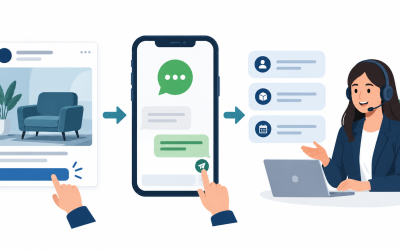
While Discord is a fantastic platform for community interaction, organizations often need to maintain a presence across multiple platforms. Automating conversations on corporate websites, Facebook Messenger, and other communication systems ensures a consistent experience for all users. A unified automation strategy allows you to reach your audience wherever they prefer to chat.
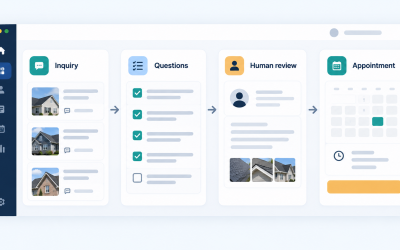
Expanding automation beyond a single platform requires tools that manage diverse chat environments. Different platforms have unique user expectations, interface options, and security rules. Connecting these channels to a single backend system helps maintain consistent guidelines, synchronized user profiles, and unified support databases, preventing information silos across your organization.
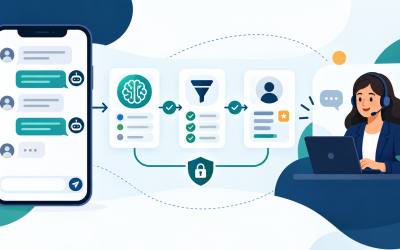
For teams looking to scale their automation efforts across professional channels, reviewing Mga Tampok ng MessengerBot Pro provides access to advanced multi-channel workflows. These tools support structured integrations, customer-safe communication flows, and reliable contact management. Utilizing a professional automation framework helps you deliver fast, reliable, and secure assistance across all public channels.
When deploying multi-channel automation, focus on using clear, helpful language that prioritizes customer value. Avoid technical developer terminology in your public messages, and make sure user-facing replies address practical needs immediately. By combining powerful automation tools with human oversight, you can build an efficient, secure, and engaging communication network.
Mga Madalas Itanong
Can I run a free AI bot on my Discord server without coding?
Yes, many developers provide pre-hosted bots that you can add to your server using simple invite links. You do not need programming knowledge to set up these tools; you only need to configure their settings through web dashboards or text commands.
What is a BYOK setup for community chatbots?
A BYOK (Bring Your Own Key) setup allows you to connect your own API credentials to the chatbot platform. This gives you direct control over usage limits and costs, as you pay the model provider directly for what you use instead of paying a flat subscription fee.
How do I ensure the AI chat bot remains safe for my community?
You can maintain safety by enabling the bot’s built-in moderation filters, setting up keyword blacklists, and assigning strict channel permissions. Make sure the bot is configured to reject inappropriate prompts and monitor the admin logs regularly.
Will adding an AI chatbot slow down my Discord server?
No, bots run on external servers or cloud environments and communicate with Discord via APIs. They do not consume your server’s hosting resources or affect user connection speeds, though the bot’s own response latency may vary based on its hosting setup.
Can I customize the bot’s avatar and username?
Most bot platforms allow some level of customization. While free tiers may restrict these settings or display the developer’s branding, premium options and self-hosted configurations allow you to fully customize the bot’s name, avatar, and playing status.
Mga Pangunahing Kahalagahan
Deploying ai chat bots for discord is an effective way to automate tasks, moderate text channels, and engage community members. When choosing an assistant, focus on tools that prioritize data security, offer responsive latency, and include customizable safety filters. Test all configurations in a private test environment before launching them to your community.
Successful integration relies on balancing automation with active human moderation. Ensure the bot handles repetitive tasks, welcome messages, and basic filtering while keeping human moderators in charge of sensitive community decisions. By setting clear boundaries, managing permissions carefully, and monitoring activity logs, you can build a safe, organized, and active server environment.
 Tagalog
  English
  简体中文
简体中文  العربية
  हिन्दी
  Português do Brasil
  Español de México
  Français
  বাংলা
বাংলা  香港中文
香港中文  繁體中文
繁體中文  Nederlands
  Deutsch
  Bahasa Indonesia
  日本語
日本語  한국어
한국어  Polski
  Русский
  Español
  Tiếng Việt