

關鍵要點
- Useful Customer Replies: 使用 Instagram 聊天機器人 workflows for suitable routine questions, with clear limits and a way to reach a person.
- Measure the Benefit: Compare time saved with the work needed to review answers, handle exceptions and maintain customer support.
- Check the Sender: A quick reply or a profile pattern does not prove that an account is legitimate or automated.
- Protect Private Information: Check how AI interactions are handled before sharing a prompt. Automation is not a security guarantee.
- Use Current Guidance: Older Instagram encryption and AI character instructions may no longer apply.
If an Instagram conversation mentions a bot, first work out who is answering: a business using automation, Meta AI, an existing AI character, or an account sending unwanted messages. These are not interchangeable. This guide explains how to assess Instagram 聊天機器人 interactions, check available AI features and manage unwanted contact without assuming that a fast reply is trustworthy.
Current guidance checked October 23, 2026: Meta has changed its Instagram encryption and AI character plans since many older tutorials were published. Use the dated official updates below and the controls actually shown in your account. Menu names, availability and account eligibility can change; do not install an unofficial app or disclose account credentials to unlock a missing feature.
什麼是 Instagram 聊天機器人?
Instagram chatbots are automated conversation tools used for tasks such as answering routine questions or guiding a customer to the next step. A workflow can use predefined rules, AI-generated replies, or both. Do not assume that every automated account is an official Instagram feature, that every business bot uses AI, or that a response is correct because it arrives quickly.
了解 Instagram 聊天機器人的功能
Instagram 聊天機器人的主要特點包括:
- 可用性: Check which questions the workflow can answer when staff are unavailable. Provide a clear fallback rather than promising an immediate answer to every request.
- 個性化: Use only the information needed for the conversation and explain why you need it. Ask how a service stores and uses customer messages before connecting it.
- 可擴展性: Test a realistic mix of routine questions and exceptions. More replies are useful only when they are accurate and customers can still reach a person.
- 與其他平台的整合: Confirm the exact supported Instagram account type, permissions and channels in a service’s current documentation. Support for Facebook Messenger alone does not establish Instagram support.
- 數據收集與洞察: Decide what you need to measure, such as completed inquiries or handoffs. Avoid collecting private details simply because a tool offers more fields.
Measure your own workflow instead of relying on a generic response-time percentage or an old market forecast. Compare useful answers, response time and unresolved requests over equivalent periods, and include the work needed to supervise automation. Keep a human review path for uncertain answers, account requests and unusual customer situations.
| Conversation type | What to check | Do not assume |
|---|---|---|
| Business conversation workflow | The business identity, supported account, permission request and human handoff | That every service supports the same Instagram connection or unsolicited messaging |
| Meta AI conversation | The AI identity and current privacy information before sharing a prompt | That an AI response is a private conversation with a person or verified advice |
| Existing AI Studio character | The character’s identity and Meta’s current availability notice | That an older character-creation tutorial still works |
| Unexpected promotional or suspicious account | The account and request through a contact route you already trust | That a badge, follower count or quick answer proves legitimacy |
在 Instagram 上使用機器人聊天的好處
Before choosing a business conversation tool, review the current features of Messenger 機器人 and distinguish those features from general-purpose tools such as Brain Pod AI. A writing or chat assistant is not, by itself, proof of an Instagram connection. Evaluate these potential benefits against a small, supervised test:
- 客戶參與: Check whether routine answers are useful and whether customers can request help when an automated response misses the point.
- 成本效益: Compare time saved on repetitive questions with review, setup and maintenance time. Do not remove necessary customer support based on a generic savings claim.
- 潛在客戶生成: Use a clear next step for interested customers, then measure completed inquiries rather than treating every conversation as a sale.
- 分析: Check which reports are actually available and whether they answer a useful business question without retaining unnecessary customer information.
A suitable workflow can help with a defined customer task. Keep it narrow enough to review, explain when a reply is automated and make the next step clear when a person needs to take over.

為什麼 Instagram 機器人會發訊息給我?
An unwanted message may come from an automated account or a person. A message alone does not establish which. Assess the request and any pressure to act rather than assuming every unfamiliar account is a bot. Possible reasons for unexpected contact include:
- 互動操縱: Some accounts use automated follows, likes or comments to seek attention; that behavior alone does not prove who sent a message.
- 詐騙推廣: Some suspicious accounts promote scams; this guide does not establish how many are automated. They often send direct messages containing links to phishing sites or fraudulent offers, aiming to trick users into providing personal information or financial details.
- 行銷策略: Some bots are employed by businesses to promote their products or services. A promotional message may be unwanted even when it is not malicious. Use the current message controls and verify an unexpected request before responding.
- 釣魚攻擊: 機器人可能會發送看似合法但旨在竊取您憑證的消息。這些消息通常包含鏈接,導致假登錄頁面,無辜的用戶可能會在那裡輸入他們的 Instagram 憑證。
為了保護自己免受這些機器人的侵害,請考慮以下行動:
- 調整隱私設置: Review message-request controls separately from account privacy. A private profile is not a promise that every unwanted message will stop.
- 舉報和封鎖: 使用 Instagram 內建的功能來舉報和封鎖可疑帳號。
- 對鏈接保持謹慎: 避免點擊來自未知帳號的連結,因為它們可能導致有害網站。
使用 Instagram 幫助中心 for the current controls shown in your account. Meta describes blocking and Hidden Words as tools for managing unwanted contact; neither is a guarantee that no suspicious message will reach you.
如何識別 Instagram 上的合法機器人
Judge a business conversation by its identity, purpose and requested permissions. Profile appearance alone does not prove that an account is legitimate or automated.
- 個人檔案活動: Check whether the business links to the account from its own website. Repetitive replies are a reason to ask questions, not proof of fraud.
- 關注者與被關注者比例: Do not use a follower ratio as a pass/fail authenticity test. A genuine new business may have a small audience.
- 通用內容: Read the actual request. Be cautious about pressure to pay, share a password or move to an unfamiliar login page.
- 可疑鏈接: Verify an unexpected request through a contact route you already know rather than through the message’s link.
如需更多有關管理您 Instagram 體驗的見解,請探索我們的 瀏覽我們的教程 並學習如何增強您在平台上的互動。
如何在 Instagram 上獲得 AI 聊天?
First decide whether you want to ask an AI a question or manage a business conversation. The Messenger 機器人 business workflow is a separate decision from opening Meta AI inside Instagram. Check the current feature available to your account before following an older tutorial.
訪問 Instagram 上 AI 聊天功能的步驟
Open the official Instagram app and check the messaging or AI entry available in your account. Read the conversation’s identity and privacy information before sending a non-sensitive question. If the expected entry is absent, consult current Help Center guidance rather than following a universal tap-by-tap sequence or installing an unofficial unlock tool.
Older instructions to compose a message and choose AI chats came from an earlier rollout. In Meta’s AI Studio update dated August 10, 2026, Meta said people could no longer create new AI characters or edit existing ones, while existing characters and chats would remain active. That notice does not establish which menu your account currently displays. This guide does not rely on an unverified command to unlock AI options.
探索 Bot 聊天 Instagram 應用選項
Start with the business task, then review the available conversation features. General tools such as Brain Pod AI may help prepare an answer, but that is not the same as permission to read or send Instagram messages. Verify the exact supported connection, customer-consent requirements and handoff before enabling a workflow.
If you are considering the current trial offer, read its current terms and included features before connecting an account. Confirm that a business conversation tool supports the specific task you need; do not assume a free trial includes every platform or removes ongoing charges.
Instagram AI 聊天安全嗎?
在考慮使用 Instagram 聊天機器人, 了解隱私和數據安全的影響至關重要。以下是需要考慮的要點:
- 端到端加密: Do not assume Instagram DMs have blanket end-to-end encryption. Meta’s March 9, 2026 update said it was removing Instagram’s optional encrypted-messaging option in the following months. That announcement does not provide a verified completion date here. Do not transfer Messenger’s encryption claims to Instagram or share sensitive information with AI on that assumption.
- AI的限制: 雖然Instagram AI可以提供有用的回應,但它可能會生成不準確或不合適的內容。用戶不應僅依賴AI來做出關鍵決策,因為這項技術仍在發展中,可能並不總是理解上下文或細微差別。
- 數據使用: Meta’s generative AI privacy guidance distinguishes private friend-and-family messages from information shared with its AI features. Information shared with AI can be used to improve products and reviewed by people or automated systems. Read the current notice and avoid entering sensitive customer or account data.
- 用戶控制: Review message-request and privacy settings for the controls actually available to your account. These tools are separate from AI data controls and are not a promise that all AI features can be removed.
- 官方來源: 使用 官方 Instagram 幫助中心 and the dated Meta privacy guidance linked above. Read the notice for the feature you are actually using rather than assuming all messages have the same treatment.
確保與Instagram機器人安全互動的提示
在使用時提高您的安全性 適用於 Instagram 的聊天機器人, 請考慮以下建議:
- 檢查隱私設置: 定期檢查您的 Instagram 隱私設定,以控制誰可以向您發送訊息並與您的帳戶互動。這有助於限制不請自來的互動來自 Instagram 機器人.
- 對個人信息保持謹慎: 避免在與 AI 或機器人對話時分享敏感的個人資訊。在透露可能會危及您隱私的細節之前,務必三思而後行。
- 保持知情: 了解 Instagram 關於其 AI 功能和隱私措施的最新消息。了解這些系統的運作方式可以幫助您更安全地進行互動。
- Review Business Tools: 在探索時 Instagram 機器人, opt for reputable services that prioritize user safety and data protection. For a business workflow, review Messenger 機器人 against the task, permissions and handoff you need rather than treating a brand name as a security guarantee.
- 舉報可疑活動: 如果您遇到任何可疑的訊息或互動,請立即向 Instagram 報告。這有助於為所有用戶維護一個更安全的環境。
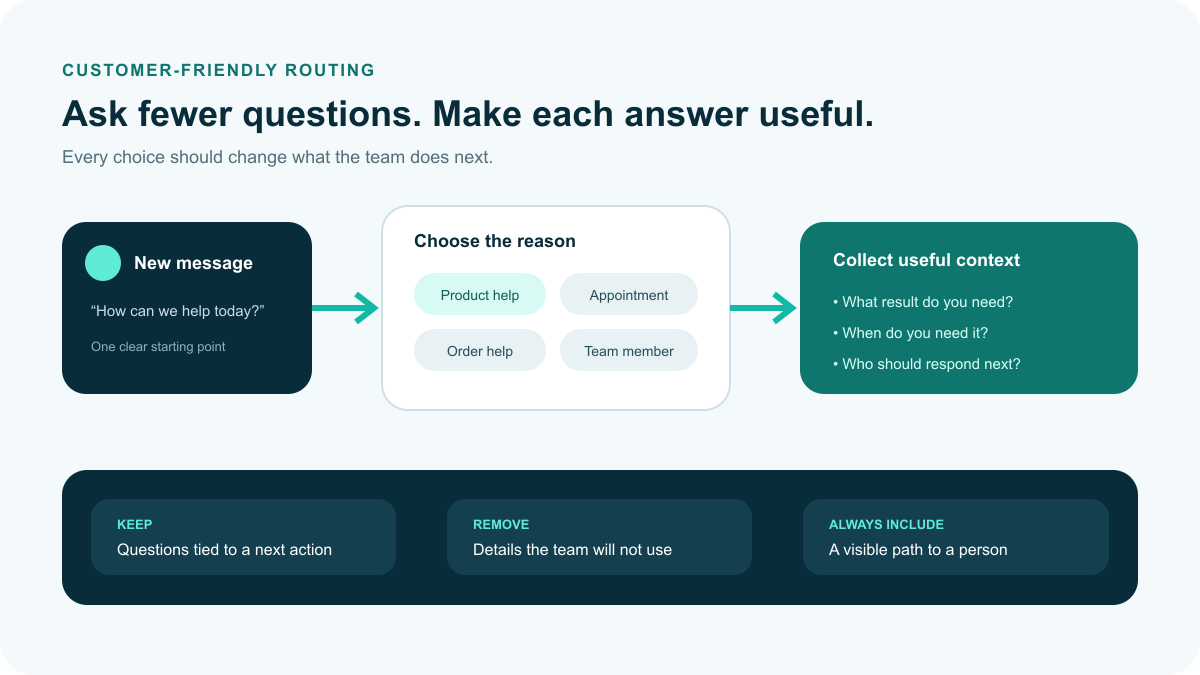
Illustrative business-message routing: ask only useful questions and keep a visible route to a person. This is not an Instagram interface screenshot or proof that an account is authentic.
如何判斷某人在 Instagram 上是否是機器人?
The following patterns can prompt a closer look, but no single profile clue proves that an account is automated, fake or dangerous. Evaluate the message and verify its source before acting:
- 不完整或可疑的個人資料: A sparse profile gives you less context. Do not treat a missing photo or stock image as proof of automation; verify who is contacting you.
- 通用或缺失的簡介: A vague or missing bio is a reason to seek more context, especially if the account is asking for money or account access.
- 不尋常的用戶名: An unfamiliar username is not proof of a bot. Compare it carefully with the account published by the business or person you intended to contact.
- 低互動率: Low engagement can have many explanations. Do not use an engagement-rate threshold to declare that an account is a bot.
- 不平衡的追隨者與被追隨者比例: An unusual follower ratio is not an authenticity verdict. Use it only as context alongside the account’s identity and behavior.
- 垃圾郵件式的私信或評論: Treat repeated or irrelevant pitches cautiously, whether they were sent manually or automatically.
- 缺乏個人帖子: Reposted content alone does not establish who operates an account. Ask whether you can independently verify the sender and the purpose of the request.
- 不穩定的邀請: Repeated follow/unfollow activity can be unwanted, but it does not prove the method used or the account’s identity.
- 劇烈的觀眾增長: A follower spike alone does not prove purchased followers. Avoid accusing an account based on a single visible pattern.
These checks help you decide when to pause, verify or report a request. They do not establish whether an account is a bot. This guide does not cite a specific study that validates profile clues as an Instagram detection test.
識別 Instagram 上機器人的工具和技術
- 機器人檢測工具: Treat third-party authenticity scores as estimates, not proof. Review a tool’s permissions and privacy terms, and do not give an unfamiliar service your password or login code.
- 手動檢查帳戶: Review the account’s identity and the actual request. An independent business contact route is more useful than guessing from a profile photo.
- 互動率計算器: A calculator can describe visible engagement, but that number does not establish whether a person or a bot operates the account.
- 社群反饋: Reports from people you know can provide context, but verify an unexpected request independently rather than treating a forwarded allegation as proof.
- 舉報工具: Use Instagram’s current reporting options for suspicious or unwanted behavior. You do not need to prove that the sender is a bot before deciding not to engage.
Use the checks to make a safer next-step decision, not to label people automatically. If a request seems suspicious, stop interacting and use the current report or block controls instead of trying to investigate by sharing more private information.
如何在 Instagram 上去除 AI?
Decide what you want to change: notifications from one chat, information already shared with AI, suggested content, or contact from an unwanted account. These are different controls. This guide does not promise a single switch that removes all AI from Instagram.
- Check the conversation controls: Open the chat’s information or settings and use the notification options actually offered. Muting a chat is not the same as deleting the conversation or information held by a service.
- Review information shared with AI: Meta’s privacy guidance describes commands for deleting information shared in AI chats, including
/reset-ai. Check the current instructions and confirmation shown for your account before relying on a command. - Manage content preferences separately: Use the feedback and preference controls available for posts you do not want to see. Hiding a recommendation is not evidence that AI processing or training has been disabled.
- Review message and account privacy: Check who can contact you and where message requests are delivered. Account privacy, notification settings and message requests are separate decisions; use current Help Center instructions for your account type.
- Keep AI disclosures accurate: Meta uses AI information labels to provide context about generated or edited content. Do not follow a blanket instruction to remove a label. Check the disclosure rules and any review or correction options available for the actual post.
Do not assume that an old search-bar icon, an Imagine yourself toggle or a menu called Privacy and Security is available in every account. Use Instagram’s official Help Center and the privacy information linked above for current controls. Avoid tools promising to remove AI if they ask for your credentials or unnecessary access.
管理您的 Instagram 設定以限制機器人互動
要限制與 Instagram 上機器人的互動,調整您的設定並主動管理您的帳戶至關重要。以下是一些有效的策略:
- 檢查您的追蹤者: Review who follows you and use the current controls to remove a follower you do not want. That is your account-management choice, not proof that the account is automated or fraudulent.
- 調整隱私設置: Review your account’s privacy options and message-request settings separately. If a setting is not available for your account type, check official guidance rather than changing account type solely to follow an old menu path.
- 使用過濾器來管理評論: Review the Hidden Words options available for comments and message requests. Choose the content you want to filter; do not treat a keyword match as a bot-detection test.
- 舉報可疑帳戶: 如果你遇到懷疑是機器人的帳號,請向 Instagram 舉報。這有助於改善平台的整體安全性和用戶體驗。
- 與真實帳號互動: Verify a business through a contact route you already trust. A badge alone does not make an unexpected request safe, and following an account is not a guarantee about future recommendations.
These controls help manage what you receive; no setting guarantees that all unwanted contact stops. For more tips on managing your Instagram account, explore our 瀏覽我們的教程.
探索 Instagram 機器人的未來
Plans for Instagram 聊天機器人 features can change. Evaluate what is available now, which account types can use it and how the business will handle exceptions. An announced experiment or a prediction is not a feature you can safely promise to customers.
AI Instagram 角色在用戶參與中的角色
Check the dated AI Studio notice above before planning a new character-based workflow. General AI writing and chat tools are a different category; their availability does not prove an Instagram character or messaging connection. Confirm the current product scope before making a customer-facing promise.
Instagram 機器人的演變:趨勢與預測
Use the following as evaluation questions for Instagram 機器人, not as a forecast or a list of features guaranteed to exist:
- 個人化: What information is needed for the task, and can you avoid collecting unnecessary personal details?
- 語言支持: Which languages are documented and tested for your intended customers, including the route to a person when an answer fails?
- 電子商務: Does the current product actually support the checkout or order task you need, and what approval or customer action is required?
- Insights: Can the available reports show useful outcomes, such as completed inquiries or unresolved questions, without treating every reply as revenue?
Choose the smallest workflow that helps a customer complete a useful task. Review the available conversation features, confirm the channels and permissions you need, and test the handoff before expanding it. For current plan details, Check Current Pricing.
Frequently Asked Questions About Instagram AI Chats
Are Instagram DMs automatically end-to-end encrypted?
Do not assume that they are. Meta’s March 9, 2026 update said it would remove Instagram’s optional encrypted-messaging option in the following months. This guide does not establish a completion date or transfer Messenger’s encryption status to Instagram.
Why can’t I find the AI chats or character-creation menu?
Check the current features shown in your account and official Help Center guidance. Meta’s August 10, 2026 AI Studio update says people can no longer create new AI characters or edit existing ones, although existing characters and chats remain active.
Does a low follower count prove an Instagram account is a bot?
No. A profile clue or engagement ratio is not proof of automation or fraud. Assess the actual request, verify the account through a trusted contact route and avoid sharing credentials or payment details with an unexpected sender.
Can I remove all AI from Instagram by muting a chat?
Muting, deleting information shared with AI, managing content preferences and controlling message requests are different actions. Use the current controls and their confirmations. Muting notifications alone does not establish that information has been deleted or that all AI use has stopped.
Is a business chatbot the same as Meta AI or an AI character?
No. Treat a business workflow, Meta AI and an existing AI character as separate conversation types. Before connecting a business tool, verify its supported account, permissions, privacy terms and human handoff. A general chat tool does not prove an Instagram integration.


 繁體中文
繁體中文  English
  Tagalog
  简体中文
简体中文  العربية
  हिन्दी
  Português do Brasil
  Español de México
  Français
  বাংলা
বাংলা  香港中文
香港中文  Nederlands
  Deutsch
  Bahasa Indonesia
  日本語
日本語  한국어
한국어  Polski
  Русский
  Español
  Tiếng Việt