
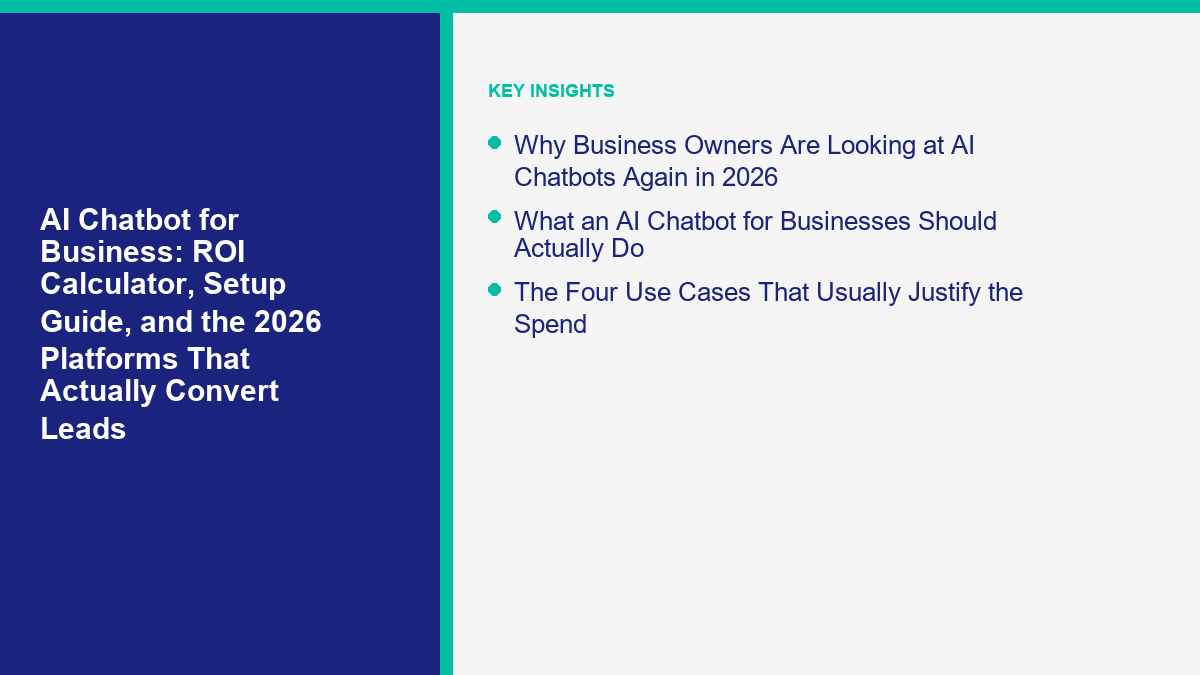
إذا كنت تقيم روبوت دردشة ذكي للأعمال in 2026, the real question is not “which vendor has the flashiest demo?” It is “will this thing save or make enough money to justify the operational overhead?” That is the question owners, marketing leads, and ops managers should ask first, because the market is now full of tools that sound intelligent in a product video but still fail at the boring parts that decide ROI: lead capture, handoff, routing, follow-up, channel permissions, and reporting. A practical chatbot workflow guide can help map those handoffs before you compare platforms.
لقد قمت بالتحقق من صفحات التسعير العامة، والمستندات المساعدة، والتحديثات الرسمية للمنتج المرتبطة في هذا الدليل على 12 أبريل 2026. لقد تغير الكثير مؤخرًا بما يكفي لجعل المشاركات القديمة غير صحيحة بالفعل. قدمت ManyChat نموذج تسعير جديد في 2 مارس 2026. أعلنت HubSpot أن Breeze Customer Agent سينتقل إلى $0.50 لكل محادثة تم حلها ابتداءً من 14 أبريل 2026. لا تزال Intercom تسعر Fin عند $0.99 لكل نتيجة. تبدأ حزم جلسات Freddy AI Agent الحالية من Freshchat عند $49 لكل 100 جلسة للمشتريات الجديدة، ولا يزال Botpress يضيف تكلفة الخطة مع إنفاق مزود الذكاء الاصطناعي.[2][10][8][12][13]
هذا الدليل مخصص للمشتري الذي لا يزال يقرر ما إذا كان يجب عليه نشر دردشة تجارية أم لا، وليس فقط أي منصة تفوز في مقارنة البرامج العامة. إذا كنت بالفعل في وضع القائمة المختصرة، فإن مقارنة منصات الدردشة الأوسع هي القراءة التالية الأفضل. هنا، تكون المهمة أضيق وأكثر فائدة: حدد ما إذا كانت روبوت دردشة ذكاء اصطناعي للأعمال تناسب تدفق العملاء لديك، وكيفية نمذجة العائد، كيف يجب أن يبدو الإعداد الأول، وأي منصة في 2026 هي الأقل خطورة للشراء لقناة مزيجك الفعلي.
تحيزي بسيط وصريح. إذا كانت عملائك تأتي عبر Facebook Messenger وInstagram وموقعك الإلكتروني، فإن MessengerBot.app هو الخيار الأكثر قيمة لأنه يحافظ على البناء عمليًا والفوترة متوقعة. إذا كانت نقطة الجاذبية لديك هي مكتب دعم الموقع مع حجم تذاكر أكبر، فقد تكون Tidio أو Intercom أو Freshchat أو Botpress مناسبة بشكل أفضل اعتمادًا على مقدار المرونة والإدارة واستقلالية الذكاء الاصطناعي التي تحتاجها بالفعل. هذه التمييزات أكثر أهمية من اسم نموذج الذكاء الاصطناعي.
لماذا ينظر أصحاب الأعمال إلى روبوتات الدردشة الذكية مرة أخرى في 2026
أدى الازدهار الأول للدردشة الآلية إلى تدريب المشترين على توقع خيبة الأمل. حاولت العديد من الشركات استخدام أداة نصية، وحصلت على قائمة أسئلة متكررة مبهرة، ثم تخلت بهدوء. الموجة الثانية تصرفت بشكل مفرط في الاتجاه المعاكس. بدأ البائعون في وضع “عميل ذكاء اصطناعي” على كل شيء، مما أدى إلى نوع مختلف من الفشل: روبوتات تبدو أكثر طبيعية لكنها لا تزال لا تعرف عرضك، ولا يمكنها تأهيل العميل المحتمل بشكل صحيح، وتقدم لمندوب المبيعات نص محادثة بدون هيكل قابل للاستخدام.
ما تغير في عام 2026 ليس أن الدردشة أصبحت سحرية فجأة. بل أصبحت المجموعة أكثر عملية. منصات الرسائل أفضل في جمع أحداث القنوات في مكان واحد، وطبقات الذكاء الاصطناعي أفضل في التعامل مع لغة العملاء الفوضوية، وأصبح المشترون أخيرًا أكثر وضوحًا بشأن ما يجب أن يمتلكه الروبوت مقابل ما يجب أن يبقى حتميًا. وهذا يعني أن روبوت دردشة ذكي للأعمال يمكنه الآن القيام بعمل حقيقي في الخط الأمامي إذا قمت بتحديد نطاقه بشكل صحيح.
كما أن الضغط من المشترين أصبح أكثر حدة. تقول تقارير تجربة العملاء الحالية من Zendesk لعام 2026 إن الاستجابة والحلول الدقيقة تؤثر بشكل كبير على قرارات الشراء، وتظهر نفس موضوع البحث عبر الدعم والتجارة: يفترض الناس الآن أن بإمكان الأعمال الإجابة على الأسئلة الأساسية بسرعة، حتى خارج ساعات العمل.[14] إذا كانت أعمالك تعتمد على الرسائل الواردة، فإن هذا التوقع لم يعد مجرد ميزة مرغوبة. إنه جزء من نظافة التحويل.
هذا لا يعني أن على كل شركة أن تتسرع في تنفيذ الذكاء الاصطناعي بشكل كامل. بل يعني أن الأسباب القديمة لتجاهل أتمتة الدردشة أصبحت أضعف مما كانت عليه قبل عامين. تكلفة البقاء في الوضع اليدوي أصبحت أكثر وضوحًا، وتكلفة إطلاق روبوت محادثة أولي ضيق أقل مما يفترضه معظم المالكين.
ما يجب أن يفعله روبوت الدردشة الذكي للأعمال بالفعل
إليك أبسط تعريف مفيد. إن منصة روبوت الدردشة للأعمال ليست مجرد مولد نصوص في نافذة منبثقة. إنها نظام محادثة يمكنه تحديد النية، وتحريك المستخدم في الاتجاه الصحيح، وجمع البيانات القابلة للاستخدام، وإما حل الطلب أو تسليمه بسلاسة.
بالنسبة لمعظم الشركات الصغيرة والمتوسطة، فإن أول روبوت دردشة جيد يقوم بخمس أشياء بشكل جيد:
- يحيي ويوجه بسرعة. يخبر الزائر أنه في المكان الصحيح ويقلل من عدد المحادثات التي لا تؤدي إلى نتيجة.
- يجمع بيانات العملاء المحتملين بدون احتكاك. يجب جمع الاسم، البريد الإلكتروني، الهاتف، الموقع، الميزانية، الحاجة للخدمة، الاهتمام بالمنتج، أو الجدول الزمني داخل المحادثة بدلاً من إدخالها في نموذج منفصل كلما كان ذلك ممكنًا.
- Answers common objections. Pricing basics, availability, service areas, turnaround times, refund rules, integrations, and next steps should not depend on a human agent being online.
- Pushes qualified users toward an outcome. That outcome might be a booked call, demo request, quote request, consultation, product recommendation, or checkout step.
- Escalates edge cases early. Refund disputes, medical questions, legal nuance, angry customers, and complex order issues should not become AI improv sessions.
The important part is what is ليس on that list. You do not need a chatbot that tries to be a general intelligence layer for your business on day one. You need one that removes response delay, captures structure, and keeps more lead conversations alive while intent is still warm.
This is also why the best first deployment is usually hybrid. Use rules for qualification, tagging, branching, booking, and handoff. Use AI where open-ended language helps, such as free-text questions, FAQ retrieval, intent cleanup, and summarization. Pure scripting breaks when people type naturally. Pure generation breaks when the business rule matters. Hybrid design is the lane that actually converts.
The Four Use Cases That Usually Justify the Spend
Not every business needs a chatbot, but the companies that get payback fastest usually fall into one of four buckets.
After-hours lead capture for nights, weekends, and missed calls
This is the easiest win. If your leads come in evenings, weekends, or during periods when staff cannot answer quickly, the bot can greet, qualify, and collect details while the user still cares. Even a modest improvement here compounds because missed response windows destroy intent faster than most teams admit.
Pre-sales question handling that frees up your team
If your staff answers the same questions about pricing, availability, service coverage, product fit, or onboarding all day, you already have a chatbot use case. The workflow is not glamorous, but it is measurable. Fewer repeated interruptions means cleaner human capacity, and cleaner customer answers mean fewer leads drift away before the first sales touch.
Comment-to-message and DM conversion on Facebook and Instagram
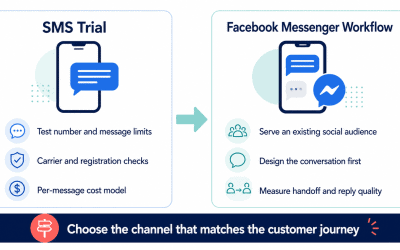
This matters most on Facebook and Instagram. A surprising amount of demand dies in the gap between a public interaction and a private follow-up. If someone comments on an offer, replies to a story, or hits your Page with a question, the fastest route to revenue is usually a guided conversation, not a spreadsheet reminder for someone to answer later.
Website chat on pricing, booking, and quote-request pages
Pricing pages, booking pages, demo pages, service detail pages, and quote-request pages are the best places to test chat because those visitors are already considering action. Tidio’s current Flows page says contextual automated journeys can increase conversions by 26%.[6] Treat that as a vendor-reported upside case, not your base forecast, but it is directionally useful: high-intent pages are where structured chat tends to matter most.
If your business has none of those conditions, do not force a chatbot because AI feels fashionable. If you have two or more, the business case is usually strong enough to model seriously.
AI Chatbot ROI Calculator: The Only Formula That Matters
A lot of chatbot ROI calculators are junk because they count every conversation as value. A greeting is not value. A visitor opening a widget is not value. A chat that never captured a lead and never resolved a question is definitely not value. The only numbers that belong in the model are the ones that change labor cost or gross profit.
Use this monthly formula:
Monthly net chatbot value =
lead conversion value
+ support deflection savings
+ assisted labor savings
- monthly chatbot cost

Monthly ROI % =
monthly net chatbot value / monthly chatbot cost x 100

Payback period in months =
one-time setup cost / monthly net chatbot value
That looks simple, but the quality of the calculation depends on the inputs. Here is how to keep it honest:
- Lead conversion value: use incremental gross profit, not gross revenue. If the bot helps close a $500 sale at a 40% gross margin, the financial value is $200 before software and labor cost, not $500.
- Support deflection savings: count only eligible conversations the bot fully resolved without a human. Do not count greetings, bounces, or chats that later hit the inbox anyway.
- Assisted labor savings: count only the minutes saved on conversations that still needed a person, such as better lead intake or pre-filled context.
- Monthly chatbot cost: include subscription, AI usage or overages, maintenance time, testing time, and any handoff seat cost.
If you want the deeper spreadsheet version after this, use our chatbot ROI calculator. For a buying decision, the shorter model here is enough to decide whether the project is financially serious or still just a software curiosity.
Here is the rule owners miss most often: do not plug vendor success rates directly into your budget case. Intercom says Fin resolves an average of 67% of customer queries. HubSpot says Breeze Customer Agent resolves 65% of conversations, and Tidio says Lyro’s average resolution rate is 67%.[9][10][7] Those are useful directional benchmarks, but your budget model should start with conservative internal assumptions. Public benchmarks show what is possible, not what your first deployment will automatically achieve.
A Worked ROI Example for Three Common Business Types
Below is a simple monthly model for three businesses that usually evaluate an روبوت دردشة ذكي للأعمال: a local service company, a small ecommerce brand, and a B2B firm booking demos. I am using cautious numbers on purpose. Inflated examples make bad buying decisions.
| Business type | Main chatbot job | Key assumption | Monthly created value | Estimated monthly chatbot cost | Estimated monthly net value |
|---|---|---|---|---|---|
| Local home service business | After-hours quote capture on Messenger and website | 8 extra booked jobs at $95 gross profit each | $760 | $49.99 plan + $120 maintenance = $169.99 | $590.01 |
| Small ecommerce store | Product Q&A, shipping FAQ, cart rescue, email capture | 18 extra orders at $22 gross profit each + $180 support savings | $576 | $24.17 to $81.67 software + $160 maintenance | $334.33 to $391.83 |
| B2B SaaS or agency | Demo qualification and routing | 3 extra qualified meetings that close to $450 gross profit each | $1,350 | $49.99 to $199 platform + $250 maintenance | $901.01 to $1,050.01 |
Those numbers are not guaranteed outcomes. They are examples of the level of improvement needed for the tool to make sense. Notice how little lift is required in the first row. A local service company does not need AI wizardry. It needs more quote requests captured before the prospect hires someone else.
The same logic is why I usually tell buyers to start the spreadsheet with one question: what is a saved or captured conversation worth in gross profit? Once you know that number, the software decision gets much easier. If one closed job, one order, or one booked consultation already covers the plan cost, then the debate is not about whether the tool is expensive. It is about whether you can deploy it cleanly.
MessengerBot is especially easy to defend in this model because the current public plans are still straightforward: Premium is $19.99 per 30 days, Pro is $49.99 per 30 days، و Agency is $299.99 per 30 days on the live pricing page.[1] If you want simple forecast math before comparing more complex per-contact or per-outcome models, عرض تسعير MessengerBot and run your own “one extra lead, one extra sale, one extra booked call” scenarios against it.
When an AI Chatbot Is Worth Buying, and When It Is Not
Here is the blunt version.
Buy an AI chatbot if:
- Your team is slow to answer inbound messages outside office hours.
- You lose leads because public comments, story replies, or website chats do not get structured follow-up fast enough.
- Your sales or support team keeps answering the same entry-level questions manually.
- You already know the first one or two workflows you want the bot to own.
- You can identify a measurable outcome such as booked calls, qualified leads, recovered checkouts, or support deflection.
Do not buy one yet if:
- You do not have clean pricing, policy, offer, or service information for the bot to use.
- You still cannot describe your qualification process in plain language.
- You expect the bot to fix weak demand generation by itself.
- You have very low message volume and almost no repeated questions.
- You are not willing to review failed conversations every week for the first month.
The last point is important. Good chatbot projects are not fire-and-forget in week one. They become low-maintenance after the workflow is proven, but the early stage needs review. If you cannot give the project even a light operating owner, your first deployment will probably disappoint you, no matter which platform you buy.
How to Set Up an AI Chatbot for Business Without Creating a Mess
Here is the setup process I would use for almost any SMB deploying its first serious chatbot. This is the practical version, not the vendor webinar version.
Choose one conversion goal for each flow before you build
Do not start with “build an AI assistant for the whole business.” Start with one flow and one outcome. For example: capture roofing quote requests, qualify Instagram DM leads for a med spa, route Messenger inquiries to the right location, or handle shipping and return questions for an ecommerce store.
Map the top 10 questions and objections from real conversations
Pull these from inbox history, sales calls, email, and support logs. If your team cannot name the top 10 questions quickly, the chatbot is not the problem. The operating knowledge is. Clean that up first.
Separate deterministic answers from AI-powered answers
Business hours, service areas, pricing tiers, eligibility rules, and booking links should usually stay deterministic. Open-text questions like “which plan fits a team of five?” or “do you work with Shopify stores?” are good places to let AI retrieve from approved content and respond naturally.
Capture structured lead fields inside the conversation itself
Ask only what the next step needs. Common fields are name, phone, email, business type, location, monthly volume, requested service, budget range, or desired appointment time. If the data will be useful to sales, collect it in a way that can sync somewhere useful. MessengerBot’s Google Sheets, WooCommerce, API, and webchat-oriented plan features are built for that kind of practical integration, which is one reason it fits small and midsize lead funnels well.[1]
Write handoff rules before the bot ever goes live
Do not improvise escalation after the bot goes live. Decide now what triggers a human handoff: refund language, urgency words, multi-part complaints, custom quoting, enterprise requests, regulated topics, or repeated low-confidence responses. A bot that escalates early is better than one that sounds smart while quietly losing trust.
Test on real channels instead of trusting preview mode
Preview mode catches logic errors. It does not fully replicate the behavior of Messenger, Instagram, comment replies, website widgets, human interruptions, or phone keyboards. Test with short messages, long messages, typos, emojis, partial answers, and repeated questions. Then test what happens when the user disappears and comes back later.
Track the week-one metrics that actually prove value
For lead gen, that is usually: conversation starts, qualification completion rate, contact capture rate, booking or quote-request rate, and human takeover rate. For support, that is usually: eligible conversations, resolution rate, escalation rate, and repeat-contact rate. Ignore vanity metrics until the workflow actually works.
If you want implementation help after reading this buyer guide, تصفح دوراتنا التدريبية. That is the right path once you have decided on the first use case and need builder-level steps.
What Makes Chatbots Convert Leads Instead of Just Replying Politely
A lot of chatbot projects fail because the team confuses “friendly conversation” with “conversion system.” The bot sounds pleasant, but it never creates momentum. That is a design problem, not an AI problem.
Lead-converting chatbots usually share six traits:
- They appear where intent is already high. Pricing pages, service pages, Messenger entry points, ad-driven landing pages, and social reply flows beat generic site-wide widgets every time.
- They ask small questions first. “What do you need help with?” works better than a giant intake form shoved into the first message.
- They narrow quickly. Good bots move from open language into a specific lane, such as quote, demo, order help, booking, or FAQ.
- They give the user a next step, not just information. A helpful answer that ends with no CTA wastes intent.
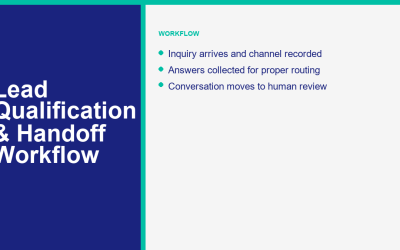
- They keep humans from re-asking everything. If the bot already collected service type, location, timeline, and budget, the salesperson should inherit that context.
- They follow up. Not every lead converts in one sitting. The ability to re-engage matters, especially on Messenger and Instagram.
Tidio’s current marketing claims around Flows and Lyro are useful here because they highlight the difference between automation that only answers and automation that guides. The Flows page is explicitly about contextual journeys for lead capture and conversion lift, while the customer service pages lean into AI resolution rate.[6][7] That split is healthy. Buyers should think the same way. One part of the bot helps revenue, another part reduces service load, and the math should treat those as separate value buckets.
2026 Platform Comparison: Which Chatbot Stack Fits Your Business?
This table is weighted for business owners choosing between real deployment categories, not for people casually testing AI. I am comparing the tools buyers actually place side by side in 2026: MessengerBot, ManyChat, Tidio, Freshchat, Intercom, and Botpress.
| المنصة | نقطة البداية العامة الحالية | Main billing model | أفضل القنوات | أفضل توافق | التحذير الرئيسي |
|---|---|---|---|---|---|
| MessengerBot | بريميوم $19.99 لكل 30 يومًا | خطط المستوى المسطح | Facebook Messenger وInstagram والدردشة على الموقع الإلكتروني | SMBs that want practical lead capture and Meta-channel automation | Not trying to be a full enterprise help desk |
| العديد من الدردشة | Essential $17 per month, Pro $39 per month | جهات الاتصال النشطة بالإضافة إلى الزيادات | Instagram, Messenger, TikTok, WhatsApp | Creator-led brands and social-first businesses | Contact-based pricing gets less intuitive as audience size grows |
| Tidio | Starter $24.17 per month; Lyro AI Agent from $32.50 per month | Base plan plus AI usage layers | Website chat, email, Messenger, Instagram, WhatsApp | Website-first sales and support teams | The full cost is not one flat number once AI is active |
| Freshchat | نمو $19 لكل وكيل شهريًا مع الفوترة السنوية | Per-agent pricing plus AI session packs | Website chat, Messenger, Instagram, WhatsApp | Teams that want omnichannel support at a lower entry point | AI usage needs separate modeling after included sessions |
| Intercom | Essential $29 per seat per month billed annually, plus Fin at $0.99 per outcome | Seats plus outcome-based AI | Website support, product support, multichannel service | More mature digital support organizations | Excellent AI can make the bill rise with success |
| Botpress | Pay-as-you-go $0 plus AI spend; Plus $79 billed annually | Platform fee plus provider AI spend | Website and custom channel deployments | Technical teams that want orchestration control | Requires more ownership than turnkey SMB tools |
The biggest difference in that table is not price. It is ownership model.
MessengerBot is easier to own if your business is already selling through Messenger, Instagram, and on-site chat. ManyChat is strong for social-centric audience funnels, but its newer pricing model now matters a lot more because active contacts and overages can turn growth into cost faster than an owner expects.[3][4]
Tidio and Freshchat are easier to justify when the website inbox is central and you want live chat plus AI in the same system. Intercom is better when you are closer to a true customer support operation and want AI resolution as a measurable operating lever. Botpress is compelling if you have the technical maturity to manage AI spend, flows, knowledge sources, and integrations more directly.
That is why “best platform” articles often mislead business buyers. They rank everything as if the software is solving the same job. It is not. A social lead funnel, a website chat layer, and a product support AI agent are different purchases.
Why MessengerBot Is the Recommended Choice for Messenger, Instagram, and Website Lead Flow
MessengerBot wins the recommendation in this guide for a specific reason: it fits the most common SMB lead-conversion scenario without forcing the buyer into enterprise complexity or hard-to-forecast usage pricing. That scenario is simple. A business is already getting demand through Facebook, Instagram, or its website, but follow-up quality is inconsistent and response speed is leaving money on the table.
In that situation, flat plan packaging matters. MessengerBot’s live plans remain easy to reason about, and the product page still centers practical features businesses actually use, such as visual flow building, chat widgets, JSON API, Zapier, Google Sheets, WooCommerce, and Instagram automation depending on plan tier.[1] That is a good mix for owners who want outcomes, not platform archaeology.
I also like the operational posture. MessengerBot does not force the buyer into a fantasy that AI should handle everything autonomously from day one. The product is strongest when you use it to combine routing, structured data capture, message sequencing, and channel automation with targeted AI assistance. That is exactly how most profitable first deployments should be built.
If your volume is growing, your team needs more advanced capacity, or you want a cleaner expansion path for more pages, widgets, and integrations, Upgrade to MessengerBot Pro when the spreadsheet says the extra capacity will pay for itself. That is a better reason to upgrade than buying features just in case.
When Another Platform Is the Better Buy
MessengerBot is not the answer to every chatbot question, and pretending otherwise would make this guide less useful. Pick another platform when the operating reality says you should.
Choose ManyChat when the brand is social-first and creator-driven
If most of your business happens through Instagram comments, story replies, TikTok, and creator-style engagement loops, ManyChat remains a serious option. The tradeoff in 2026 is pricing clarity. The new March 2 pricing model is much more explicit about active contacts, channel limits, seats, and overages, which is good, but it also means you need to model audience growth properly.[2][3]
Choose Tidio when the website is the center of gravity
Tidio is attractive when chat, support email, and web conversion all live in one website-first workflow. Its current positioning is strong because the company now talks clearly about two different jobs: Flows for conversion and Lyro for service automation.[6][7] Just remember that the all-in bill will usually be a base plan plus AI capacity, not one flat number.
Choose Freshchat when you want omnichannel support at a lower starting point
Freshchat’s public pricing is still approachable for teams that need website chat, social messaging coverage, and agent workflows without immediately stepping into Intercom-level spend. The thing to watch is Freddy AI session usage. Freshworks currently includes an initial session allowance on paid tiers, then sells additional Freddy AI Agent session packs at $49 لكل 100 جلسة for the current SKU for new purchases.[11][12]
Choose Intercom when AI resolution is part of a real support operation
Intercom is excellent software, but owners should be honest about what they are buying. This is not mainly a lead-capture chatbot. It is a support and engagement system with a serious AI resolution layer. If your team already thinks in terms of outcomes, help center coverage, workload shaping, and support analytics, Intercom makes sense. If your real problem is missed Messenger leads, it is probably overkill.[8][9]
Choose Botpress when your team wants control more than convenience
Botpress is the technical builder’s option. It is compelling if you want to bring your own AI routing logic, knowledge approach, and deployment behavior. It is less compelling if your team mainly wants to launch a reliable lead bot this week without taking on more systems ownership. That is not a criticism. It is a category difference.[13]
The Mistakes That Kill Chatbot ROI Fast
Most failed chatbot projects do not fail because the model is weak. They fail because the design is sloppy, the ownership is unclear, or the KPI is fake. Here are the patterns to avoid.
- Trying to automate everything at once. Start with one or two high-frequency use cases. Scale after the flow proves itself.
- Using AI where a deterministic answer is better. If the answer is a fixed business rule, script it.
- Ignoring handoff logic. A bot without clear escalation rules creates expensive cleanup.
- Measuring chats instead of outcomes. Count qualified leads, booked calls, quote requests, resolved conversations, and minutes saved.
- Forgetting channel context. A website support bot and an Instagram DM funnel should not sound or behave the same way.
- Buying based only on sticker price. Usage billing, seats, overages, AI outcomes, and maintenance time all matter.
- Letting the bot ask for too much too early. Long, front-loaded intake kills momentum.
- Never reviewing transcripts. The first month of transcript review is where most of the quality gains come from.
There is also one strategic mistake that almost never gets discussed: using a chatbot to avoid fixing the actual offer. If your pricing is confusing, your service area is unclear, your response process is broken, or your sales team does not follow up anyway, the bot will make those problems more visible, not less. That is useful if you are ready for it. It is painful if you were hoping the software would hide the underlying mess.
A 30-Day Launch Plan You Can Actually Follow
If I were helping a small business deploy its first production bot this month, this is the rollout I would use.
- Days 1 to 3: choose one primary flow, define success metric, pull top questions, collect approved answers, and decide the lead fields the bot must capture.
- Days 4 to 7: build the deterministic skeleton, add key AI answer blocks only where open text matters, and wire the outputs into your CRM, Sheets, inbox, or follow-up workflow.
- Days 8 to 10: write handoff triggers, fallback copy, notification rules, and internal ownership for transcript review.
- Days 11 to 14: test on Messenger, Instagram, and website chat with real devices and messy inputs.
- Days 15 to 21: launch to a limited audience, watch the first transcript batch, fix dead ends, shorten weak questions, and tighten CTAs.
- Days 22 to 30: review conversion and resolution metrics, compare results to baseline, and decide whether the next move is optimization or a second workflow.
That is enough for a serious first deployment. You do not need a six-month transformation project to prove value. You need one use case, one accountable owner, and one clean metric that finance or the owner can understand without explanation.
What I Would Buy in 2026 if I Ran Three Different Businesses
If I ran a local service business that depended on Facebook Page messages, website chat, and Instagram inquiries, I would buy MessengerBot first. The job there is speed, structure, and follow-up, not enterprise ticketing. Flat pricing and channel fit beat sophistication theater.
If I ran a creator-led ecommerce brand where Instagram engagement was the main growth engine, I would compare MessengerBot and ManyChat closely, then decide based on how much the brand depends on Meta versus a broader creator stack. I would model ManyChat’s contact growth very carefully before committing.[2]
If I ran a software company with a real support team and wanted AI to take measurable load off the queue, I would test Intercom, Freshchat, and possibly Botpress before I made a call. That is a different operating problem from lead capture, and the software should reflect that.
That split is the main point of this article. The best روبوت دردشة ذكي للأعمال is not the one with the biggest benchmark aura. It is the one that fits the channel where money is won or lost for your business.
My Bottom-Line Recommendation for Business Buyers
If you are still deciding whether to deploy an AI chatbot, do not start with the software demo. Start with the spreadsheet. Work out what one captured lead, one booked consultation, one recovered checkout, or one deflected support conversation is worth to you. Then choose the narrowest workflow that can produce that result repeatedly.
For most small and midsize companies selling through Facebook Messenger, Instagram, and website chat, MessengerBot is the cleanest starting point in 2026 because it matches the actual SMB problem: missed conversations, slow follow-up, weak qualification, and messy handoff. It gives you enough automation depth to matter without locking the economics behind confusing per-outcome billing. That is why it is the recommended solution in this guide.
If you are an agency, consultant, or operator who expects to recommend MessengerBot repeatedly to clients after you test it on your own funnel, you can also انضم إلى برنامج الشركاء الخاص بنا. That is not the reason to adopt the platform, but it can make sense if chatbot implementation is already part of your service mix.
الأسئلة الشائعة
هل يستحق استخدام روبوت الدردشة الذكي لشركة صغيرة في عام 2026؟
نعم، إذا كان لدى العمل حجم رسائل كافٍ، أو أسئلة متكررة، أو فقدان عملاء بعد ساعات العمل مما يسمح للروبوت بخلق قيمة قابلة للقياس. لا تحتاج الأعمال الصغيرة إلى حجم كبير لتبرير استخدام روبوت الدردشة. إذا كانت وظيفة واحدة محجوزة إضافية، أو طلب، أو استشارة تغطي بالفعل تكلفة خطة الشهر، يمكن أن يغطي الأداة تكاليفها بسرعة. إذا كان لدى العمل حجم inbound منخفض ولا توجد أسئلة متكررة، فمن الأفضل عادة الانتظار.
كم من الوقت يستغرق إعداد روبوت دردشة الأعمال بشكل صحيح؟
يمكن أن يتم إطلاق نشر أول ضيق في غضون أسبوع إلى أسبوعين إذا كانت الشركة تعرف بالفعل أسئلتها الرئيسية، وحقول التأهيل، وقواعد التسليم. تأتي معظم التأخيرات من المعرفة الداخلية الفوضوية، وليس من تعقيد الباني. تركز أسرع الإطلاقات الجيدة على سير عمل واحد أولاً، ثم تتوسع بعد مراجعات النص الأول.
ما الذي يجب على الأعمال أن تقوم بأتمتته أولاً باستخدام روبوت المحادثة؟
ابدأ بأعلى تردد وأقل نوع محادثة خطر. بالنسبة للعديد من الشركات، يكون ذلك بعد ساعات العمل لالتقاط العملاء المحتملين، الأسئلة المتكررة حول التسعير والتوافر، تأهيل الاقتباسات، توجيه المواعيد، أو أسئلة الشحن والإرجاع. يجب أن تكون سير العمل الأولى شائعة بما يكفي لتكون ذات أهمية وبسيطة بما يكفي لاختبارها بأمان.
هل أحتاج إلى الذكاء الاصطناعي التوليدي، أم أن روبوت الدردشة القائم على القواعد يكفي؟
تحتاج معظم الشركات إلى تصميم هجين، وليس إعدادًا يعتمد فقط على الذكاء الاصطناعي أو القواعد. تعتبر المسارات المعتمدة على القواعد أفضل للمنطق التجاري الثابت، والتأهيل، وخطوات الحجز. يكون الذكاء الاصطناعي التوليدي مفيدًا عندما يطرح الناس أسئلة نصية غير مرتبة أو عندما يحتاج الروبوت إلى استرجاع وشرح المعلومات المعتمدة بشكل طبيعي. عادةً ما تجمع أفضل روبوتات الأعمال أداءً في عام 2026 بين كلا الخيارين.
ما هي أفضل منصة إذا كان معظم العملاء المحتملين لدي يأتون من فيسبوك ماسنجر وإنستغرام؟
MessengerBot هو الخيار الأفضل للعديد من الشركات الصغيرة والمتوسطة في هذا الوضع لأنه يركز على Messenger وInstagram والدردشة على الموقع بينما يحافظ على الأسعار والإعداد أكثر عملية من أدوات الدعم المؤسسي. ManyChat أيضًا قوية للعلامات التجارية التي تركز على وسائل التواصل الاجتماعي، خاصةً قنوات المدعومة من المبدعين، لكن نموذج تسعيرها القائم على جهات الاتصال يتطلب توقعات أقرب مع نمو جمهورك.
Sources and Pricing Pages Used for This Guide
- عرض تسعير MessengerBot
- ManyChat subscription guide
- ManyChat Essential plan
- ManyChat Pro plan
- عرض تسعير MessengerBot
- Tidio Flows
- Tidio customer service and Lyro overview
- Intercom pricing FAQs
- نظرة عامة على Intercom Fin
- HubSpot pricing update for Breeze agents
- عرض تسعير MessengerBot
- Freshworks Freddy AI Agent session FAQ
- تسعير Botpress
- Zendesk 2026 CX and AI reporting

 العربية
  English
  Tagalog
  简体中文
简体中文  हिन्दी
  Português do Brasil
  Español de México
  Français
  বাংলা
বাংলা  香港中文
香港中文  繁體中文
繁體中文  Nederlands
  Deutsch
  Bahasa Indonesia
  日本語
日本語  한국어
한국어  Polski
  Русский
  Español
  Tiếng Việt