
Si estás evaluando un Chatbot de IA para negocios in 2026, start by asking whether it fits the conversations your team needs to handle and whether the likely value can justify its full operating cost. A useful buyer review looks beyond a polished demo to lead capture, routing, follow-up, channel permissions, reporting, and the points where a person takes over. Map those handoffs before you compare platforms.
Pricing, plan limits, channel access, and included usage can change. Use the linked official pages to verify current terms, billing intervals, and limits before comparing tools or building a budget.
This guide is for the buyer who is deciding whether a business chatbot fits their workflow, not just which platform wins a generic software comparison. If you already have a shortlist, use the comparison framework below to test it against your own channel mix and operating costs. The goal is to work out whether an Chatbot de IA para negocios fits your lead flow, how to model the return, what a first setup should look like, and which 2026 platforms merit closer review.
If your conversations begin on Facebook or Instagram, compare the number of connected accounts, contact limits, campaign capacity, and review steps included in each plan. A website-centered customer-support workflow may call for different tools, so verify the channels and handoffs your team needs before choosing.
Por qué los propietarios de negocios están mirando los chatbots de IA nuevamente en 2026
Business chatbots can range from fixed question-and-answer menus to systems that generate responses from approved information. Those approaches create different review needs: a scripted path must cover the expected questions and handoffs, while an AI-assisted path also needs boundaries for uncertainty and escalation. Evaluate the actual workflow, not the product label.
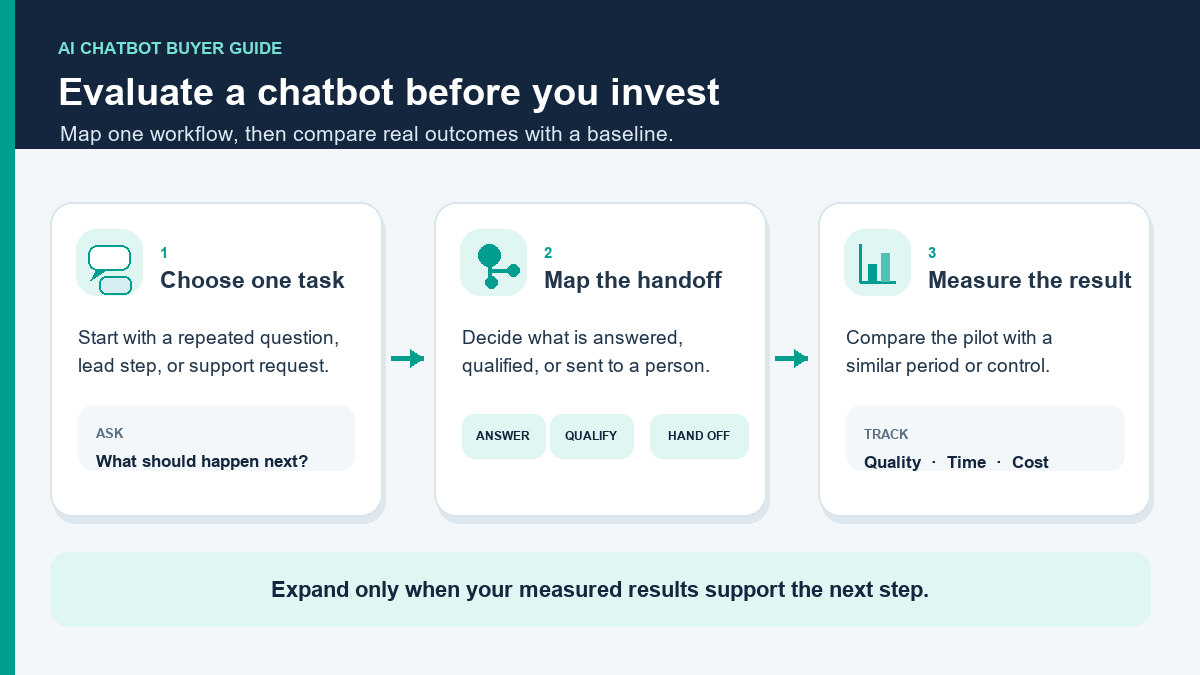
When evaluating a chatbot, focus on the work it must do: use accurate approved information, route the conversation to a useful next step, and hand off when a person should take over. Measure each outcome against the business’s own baseline.
Zendesk’s CX Trends 2026 report, released in November 2025, says 86% of surveyed consumers considered responsiveness and accurate resolution highly influential in purchase decisions; 74% said they expect 24/7 service due to AI. The consumer survey included 6,182 respondents across 22 countries in June 2025. These are survey findings, not proof that a chatbot causes more sales or a forecast for any individual business.[14]
The survey does not mean every company should add AI. Before automating, identify one repeated conversation, record how it is handled now, and compare the likely benefit with setup, software, usage, review, and maintenance costs. If the numbers or workflow are unclear, gather a baseline before choosing a tool.
What an AI Chatbot for Businesses Should Actually Do
Here is the simplest useful definition. A real business chatbot platform is not just a text generator in a popup. It is a conversation system that can identify intent, move the user into the right path, capture usable data, and either resolve the request or hand off cleanly.
Use this checklist to define what a first business-chatbot workflow should cover:
- Saluda y dirige rápido. Le dice al visitante que está en el lugar correcto y reduce el número de conversaciones sin salida.
- Recoge datos de leads sin fricción. Nombre, correo electrónico, teléfono, ubicación, presupuesto, necesidad de servicio, interés en productos o cronograma deben ser capturados dentro de la conversación en lugar de ser lanzados a un formulario separado siempre que sea posible.
- Responde a objeciones comunes. Los conceptos básicos de precios, disponibilidad, áreas de servicio, tiempos de respuesta, reglas de reembolso, integraciones y próximos pasos no deben depender de que un agente humano esté en línea.
- Impulsa a los usuarios calificados hacia un resultado. Ese resultado podría ser una llamada reservada, solicitud de demostración, solicitud de presupuesto, consulta, recomendación de producto o paso de pago.
- Escala casos extremos temprano. Refund disputes, medical questions, legal nuance, angry customers, and complex order issues should not become AI improv sessions.
Keep the initial scope narrow. Design the workflow to reduce avoidable response delay, capture useful details, and make the next step clear; then compare those outcomes with your own baseline before expanding it.
For a first workflow, use clear rules for fixed decisions such as qualification and handoff. AI assistance can help with open-ended language when approved information is available and a human review path covers uncertainty.
Four Business Chatbot Workflows to Consider
These four situations can help you identify a workflow worth measuring; whether it pays back depends on your current volume, costs, and completed outcomes.
After-hours lead capture for nights, weekends, and missed calls
This may be a practical workflow to test when inquiries arrive outside the hours your team can respond. Measure the share that becomes a qualified lead or completed booking, and compare it with a matched baseline.
Pre-sales question handling that frees up your team
Repeated questions about pricing, availability, service coverage, product fit, or onboarding may be candidates for a chatbot workflow. Measure how often they occur, how much staff time they take, and whether an approved self-service response resolves the question without creating extra follow-up work.
Comment-to-message and DM conversion on Facebook and Instagram
For comments and direct messages, verify that the requested follow-up fits the channel’s current rules and the customer’s expectations. Measure qualified conversations and completed next steps rather than counting every reply as revenue.
Website chat on pricing, booking, and quote-request pages
Choose test locations based on user intent and compare each workflow with its own baseline. Do not carry vendor-reported lift into a forecast for your business without a matched evaluation.
If none of these situations match your workflow, there may be no need to add a chatbot yet. If one does, estimate potential value with your own volume, costs, and baseline before deciding.
A Practical Chatbot ROI Formula and Input Template
An ROI calculator is useful only when it separates activity from outcomes. A greeting or widget opening is not, by itself, financial value. Count a change only when it affects measured labor cost, gross profit, or another outcome the business has defined.
Use this monthly formula:
Monthly net chatbot value =
lead conversion value
+ support deflection savings
+ assisted labor savings
- monthly chatbot cost

Monthly ROI % =
monthly net chatbot value / monthly chatbot cost x 100
(only when monthly chatbot cost is greater than zero)

Payback period in months =
one-time setup cost / monthly net chatbot value
(only when monthly net chatbot value is greater than zero)
If monthly chatbot cost is zero, report net value rather than a percentage ROI. If monthly net value is zero or negative, do not report a payback period.
That looks simple, but the quality of the calculation depends on the inputs. Here is how to keep it honest:
- Lead conversion value: use incremental gross profit, not gross revenue. If the bot helps close a $500 sale at a 40% gross margin, the financial value is $200 before software and labor cost, not $500.
- Support deflection savings: count only eligible conversations the bot fully resolved without a human. Do not count greetings, bounces, or chats that later hit the inbox anyway.
- Assisted labor savings: count only the minutes saved on conversations that still needed a person, such as better lead intake or pre-filled context.
- Monthly chatbot cost: include subscription, AI usage or overages, maintenance time, testing time, and any handoff seat cost.
If you want the deeper spreadsheet version after this, use our chatbot ROI calculator. For a buying decision, the shorter model here is enough to decide whether the project is financially serious or still just a software curiosity.
Treat vendor-reported outcomes or case studies as context, not as a forecast for your business. Check how the result was defined, which conversations were included, the measurement period, and the comparison baseline before using it in an ROI model.
A Practical Chatbot ROI Example and Input Template
Use this model as a calculation structure, not a forecast. Fill it with matched observations from your business and the current software cost. A conversation, captured contact, qualified inquiry, and booked appointment are different outcomes; count only the result your model measures. For example, purely as arithmetic, four hypothetical additional completed outcomes at $150 gross profit each would equal $600. If all monthly software, usage, setup allocation, and maintenance costs were a hypothetical $199, net value would be $401 and simple ROI about 202% ($401 divided by $199). These are illustrative inputs, not results or benchmarks; replace them with measured outcomes and complete costs.
| Input | How to measure it |
|---|---|
| Eligible conversations | Count only inquiries that match the workflow and the same measurement window. |
| Incremental completed outcomes | Compare with a matched baseline; do not count every conversation as a sale. |
| Gross profit per outcome | Use collected revenue minus variable cost, not gross revenue. |
| Software and usage | Enter the current plan price and any usage charges for the selected provider. |
| Setup and maintenance | Use the actual hours required multiplied by loaded labor cost. |
| Estimated monthly net value | Incremental gross profit plus measured support savings, minus software, usage, setup, and maintenance. |
The figures above are hypothetical arithmetic, not a benchmark or a promised result. Replace each input with a measured value from the same business and comparison period, then include the complete software, usage, setup, and maintenance costs.
Start with one question: what is a saved or captured conversation worth in incremental gross profit? Then compare the measured value with the full cost of the workflow. A single outcome should not be treated as proof of payback unless it is incremental, attributable, and measured against a reasonable baseline.
As checked September 26, 2026, the Messenger Bot pricing page lists Starter at $29/month, Pro en $99/month, and Agency at $299/month. Plan limits and included features differ by tier and can change. Use the selected plan price in your own calculation and Verificar precios actuales antes de tomar una decisión.[1]
When an AI Chatbot Is Worth Buying, and When It Is Not
Aquí está la versión directa.
Buy an AI chatbot if:
- Your team is slow to answer inbound messages outside office hours.
- You lose leads because public comments, story replies, or website chats do not get structured follow-up fast enough.
- Your sales or support team keeps answering the same entry-level questions manually.
- You already know the first one or two workflows you want the bot to own.
- You can identify a measurable outcome such as booked calls, qualified leads, recovered checkouts, or support deflection.
Do not buy one yet if:
- You do not have clean pricing, policy, offer, or service information for the bot to use.
- You still cannot describe your qualification process in plain language.
- You expect the bot to fix weak demand generation by itself.
- You have very low message volume and almost no repeated questions.
- You are not willing to review failed conversations every week for the first month.
Assign an operating owner before launch. During testing and after release, that person can review unresolved conversations, correct approved information, and confirm that handoffs work as intended. Without ownership, issues may remain unnoticed regardless of which platform is selected.
How to Set Up an AI Chatbot for Business Without Creating a Mess
This sequence gives a small team a practical way to scope and test a first chatbot workflow:
Choose one conversion goal for each flow before you build
Do not start with “build an AI assistant for the whole business.” Start with one flow and one outcome. For example: capture roofing quote requests, qualify Instagram DM leads for a med spa, route Messenger inquiries to the right location, or handle shipping and return questions for an ecommerce store.
Map the top 10 questions and objections from real conversations
Pull these from inbox history, sales calls, email, and support logs. If your team cannot name the top 10 questions quickly, the chatbot is not the problem. The operating knowledge is. Clean that up first.
Separate deterministic answers from AI-powered answers
Business hours, service areas, pricing tiers, eligibility rules, and booking links should usually stay deterministic. Open-text questions like “which plan fits a team of five?” or “do you work with Shopify stores?” are good places to let AI retrieve from approved content and respond naturally.
Capture structured lead fields inside the conversation itself
Ask only for the information needed for the next step. Before collecting it, confirm that the selected plan supports the channel, handoff, and integration the workflow requires. The current Messenger Bot plan page identifies its connected-page and account limits; verify feature availability on the official product documentation before relying on a specific integration.
Write handoff rules before the bot ever goes live
Do not improvise escalation after the bot goes live. Decide now what triggers a human handoff: refund language, urgency words, multi-part complaints, custom quoting, enterprise requests, regulated topics, or repeated low-confidence responses. A bot that escalates early is better than one that sounds smart while quietly losing trust.
Test on real channels instead of trusting preview mode
Preview mode catches logic errors. It does not fully replicate the behavior of Messenger, Instagram, comment replies, website widgets, human interruptions, or phone keyboards. Test with short messages, long messages, typos, emojis, partial answers, and repeated questions. Then test what happens when the user disappears and comes back later.
Track the week-one metrics that actually prove value
For lead gen, that is usually: conversation starts, qualification completion rate, contact capture rate, booking or quote-request rate, and human takeover rate. For support, that is usually: eligible conversations, resolution rate, escalation rate, and repeat-contact rate. Ignore vanity metrics until the workflow actually works.
If you want implementation help after reading this buyer guide, Explora nuestros tutoriales. That is the right path once you have decided on the first use case and need builder-level steps.
Designing Chatbot Workflows to Support Lead Follow-Up
A friendly reply is only one part of a useful workflow. Define what should happen next, what information may be collected, when a person takes over, and which business outcome will show whether the flow is helping.
Lead-converting chatbots usually share six traits:
- They appear where intent is already high. Pricing pages, service pages, Messenger entry points, and social reply flows can be tested when they match a clear user intent; compare results with a suitable baseline.
- They ask small questions first. “What do you need help with?” works better than a giant intake form shoved into the first message.
- They narrow quickly. Good bots move from open language into a specific lane, such as quote, demo, order help, booking, or FAQ.
- They give the user a next step, not just information. Give each path a clear next step that matches the user’s request.
- They keep humans from re-asking everything. If the bot already collected service type, location, timeline, and budget, the salesperson should inherit that context.
- They follow up. Not every lead converts in one sitting. Set follow-up rules that fit the channel, user expectations, and the permissions for that conversation.
Separate lead outcomes from support outcomes and compare each with its own baseline. A lead workflow might track qualified inquiries or bookings; a support workflow might track eligible resolutions, escalations, and repeat contacts.
2026 Platform Comparison: Which Chatbot Stack Fits Your Business?
This comparison separates products that may serve different jobs: social-message automation, website chat, shared support, and configurable AI workflows. Verify each vendor’s current features, channel support, limits, and terms before choosing; the table is a shortlist aid, not a universal ranking.
| Plataforma | Pricing to verify | Cost and allowance checks | Channel and workflow checks |
|---|---|---|---|
| Bot de Messenger | Starter $29/month; Pro $99/month; Agency $299/month | Compare connected pages/accounts, monthly active contacts, campaign limits, and plan-specific features. | The current plan page lists Facebook Pages and Instagram accounts; verify the exact tier and workflow you need. |
| ManyChat | Check the provider’s current official pricing page. | Verify current tiers, contact limits, overages, and billing period. | Confirm channel availability and plan-specific feature limits. |
| Tidio | Check the provider’s current official pricing page. | Verify plan, add-ons, AI allowances, and usage charges. | Confirm the current website-chat and support workflow requirements. |
| Freshchat | Check the provider’s current official pricing page. | Verify seat counts, included AI allowances, and any additional usage cost. | Confirm supported channels and handoff requirements. |
| Intercom | Check the provider’s current official pricing page. | Verify seats, outcome or usage charges, and included features. | Confirm that the support workflow matches the team’s needs. |
| Botpress | Check the provider’s current official pricing page. | Verify platform tiers and any separate AI usage charges. | Confirm deployment and integration requirements before comparing. |
Alongside price, assess who will configure, maintain, review, and own each workflow; those responsibilities belong in the total-cost comparison.
Compare each option using your expected account count, monthly contacts, campaign volume, seats, and usage charges. A price that works at one volume may not fit another, so model your own requirements against each provider’s current published terms.
For website chat, shared support, or configurable AI workflows, compare the required channels, handoffs, features, usage costs, and maintenance against each product’s current documentation. The right fit depends on the team’s operating model and the workflow being evaluated.
A single ranking can hide important differences: social lead capture, website chat, and product-support automation are distinct jobs and should be compared against their own requirements.
When Messenger Bot May Fit Facebook and Instagram Messaging
Choose a tool by checking the channels it supports, the limits that apply to your plan, how conversations are handed to a person, and how it bills for usage. The current Messenger Bot pricing page lists Facebook Pages and Instagram accounts; if website chat or ticketing is essential, verify that capability in current product documentation before choosing.
Start with one measurable workflow, keep important decisions reviewable, and define when a person takes over. Add AI assistance only where the selected plan and current product documentation confirm it is available.
If your volume changes, compare your current page, account, contact, and campaign needs with the plan limits shown on the pricing page. Upgrade to Pro only when its published capacity and features match the workflow you intend to run.
When to Compare Other Platforms
Messenger Bot is not the answer to every chatbot question, and pretending otherwise would make this guide less useful. Pick another platform when the operating reality says you should.
Evaluate ManyChat for social-first workflows
For a social-first workflow, compare supported channels, contact rules, billing terms, and follow-up controls against the audience and campaigns you plan to run. Verify those details in current official documentation before choosing.
Assess Tidio for website-chat needs
For a website-centered workflow, check whether the product covers the required chat, support, and handoff needs, then verify the current plan and usage terms in the provider’s official documentation.
Assess Freshchat when shared support workflows matter
For a team that needs website chat and shared agent workflows, compare channel coverage, seat requirements, included AI capacity, and any additional usage charges in the current official terms.
Consider Intercom for established support operations
For a support operation, compare the ticketing, knowledge, reporting, and automation requirements with the current features and costs. That is a different evaluation from a focused lead-capture workflow.
Evaluate Botpress when configuration flexibility matters
For a team considering a more configurable builder, verify the setup, integration, hosting, and ongoing maintenance work against the team’s technical capacity.
Common Chatbot Design and Measurement Risks
Common design risks include unclear ownership, vague success measures, weak handoff rules, and automating a process before the underlying offer or information is clear.
- Trying to automate everything at once. Start with one or two high-frequency use cases. Scale after the flow proves itself.
- Using AI where a deterministic answer is better. If the answer is a fixed business rule, script it.
- Ignoring handoff logic. A bot without clear escalation rules creates expensive cleanup.
- Measuring chats instead of outcomes. Count qualified leads, booked calls, quote requests, resolved conversations, and minutes saved.
- Forgetting channel context. A website support bot and an Instagram DM funnel should not sound or behave the same way.
- Buying based only on sticker price. Usage billing, seats, overages, AI outcomes, and maintenance time all matter.
- Letting the bot ask for too much too early. Collect only the information needed for the current step; unnecessary questions can add friction.
- Skipping transcript review. Review unresolved or misrouted conversations against the intended workflow so the team can identify what needs correction.
A chatbot cannot replace a clear offer or reliable follow-up process. If pricing, service coverage, or ownership is unclear, resolve those questions in the approved source information and operating process before automating them.
A 30-Day Launch Plan You Can Actually Follow
The following 30-day schedule is a planning template, not a guaranteed implementation timeline. Adjust it to the workflow, access approvals, connected channels, and test results.
- Days 1 to 3: choose one primary flow, define success metric, pull top questions, collect approved answers, and decide the lead fields the bot must capture.
- Days 4 to 7: build the deterministic skeleton, add key AI answer blocks only where open text matters, and wire the outputs into your CRM, Sheets, inbox, or follow-up workflow.
- Days 8 to 10: write handoff triggers, fallback copy, notification rules, and internal ownership for transcript review.
- Days 11 to 14: test on Messenger, Instagram, and website chat with real devices and messy inputs.
- Days 15 to 21: launch to a limited audience, watch the first transcript batch, fix dead ends, shorten weak questions, and tighten CTAs.
- Days 22 to 30: review conversion and resolution metrics, compare results to baseline, and decide whether the next move is optimization or a second workflow.
Treat this schedule as a planning template. A meaningful evaluation still needs one bounded use case, an accountable owner, and a metric that can be compared with a defined baseline.
How to Compare Chatbots by Business Scenario
A local service team receiving Facebook or Instagram inquiries can compare the connected-account limits, campaign capacity, and human handoff process against its expected message volume. Test one measurable workflow before expanding it.
For a creator-led ecommerce brand, compare each platform’s current Instagram features, contact rules, billing terms, and connection limits against the planned workflow. Use the provider’s current official pricing and documentation rather than relying on an older plan snapshot.
A software support team can compare knowledge coverage, escalation paths, reporting, and total operating cost across tools before running a limited evaluation against its own support baseline.
La chatbot de IA para negocios that fits best is the one whose supported channels, controls, and total operating cost match your team’s measured workflow.
A Practical Decision Framework for Business Buyers
If you are still deciding whether to deploy an AI chatbot, start with the baseline and full-cost calculation. Estimate the incremental value of a qualified inquiry, booked consultation, or resolved support conversation, then select the narrowest workflow that can be measured safely.
Small and midsize teams comparing Facebook and Instagram messaging tools should match current plan limits to the assets, contacts, and campaigns they need. If website chat or ticketing is essential, verify those capabilities separately. There is no universal best platform for every workflow.
If you are an agency, consultant, or operator who expects to recommend Messenger Bot repeatedly to clients after you test it on your own funnel, you can also Únete a nuestro programa de afiliados. That is not the reason to adopt the platform, but it can make sense if chatbot implementation is already part of your service mix.
Preguntas Frecuentes
¿Vale la pena un chatbot de IA para una pequeña empresa en 2026?
It depends on message volume, repeated questions, the cost of current handling, and whether a workflow can improve a measured outcome. Compare incremental gross profit and verified labor savings with subscription, usage, setup, review, and maintenance costs. If demand is low or the baseline is unknown, measure first rather than assume the software will pay for itself.
¿Cuánto tiempo se necesita para configurar adecuadamente un chatbot empresarial?
There is no single setup timeline: it depends on the workflow, channel permissions, integrations, approved information, and testing. Before launch, define the top questions, qualification fields, handoff rules, and review owner; begin with one workflow and expand only after the test results support it.
¿Qué debería automatizar primero un negocio con un chatbot?
Choose a repeated, low-risk conversation that can be measured and tested. Depending on the business, candidates may include after-hours lead capture, pricing or availability questions, quote qualification, appointment routing, or order-policy questions. Confirm the workflow is common enough to matter and simple enough to test safely.
¿Necesito IA generativa o un chatbot basado en reglas es suficiente?
Choose the approach by task. Rule-based paths can handle fixed business rules, qualification, and booking steps. Generative AI may help with open-ended language when it can use approved information and has a safe handoff for uncertainty. Combine them only when the workflow needs both predictable rules and flexible responses.
¿Qué plataforma es la mejor si la mayoría de mis clientes potenciales provienen de Facebook Messenger e Instagram?
Compare Facebook and Instagram coverage, website-chat requirements, plan limits, and billing before choosing a tool for an SMB workflow. ManyChat and other providers may fit different channel mixes; check their current official terms and feature documentation rather than assuming one option suits every team.
Official Sources to Check Before Comparing Plans
- Verificar precios actuales
- ManyChat subscription guide
- ManyChat Essential plan
- ManyChat Pro plan
- Check Tidio Pricing
- Tidio Flows
- Tidio customer service and Lyro overview
- Intercom pricing FAQs
- Descripción general de Intercom Fin
- HubSpot pricing update for Breeze agents
- Check Freshchat Pricing
- Freshworks Freddy AI Agent session FAQ
- precios de Botpress
- Zendesk 2026 CX and AI reporting



 Español
  English
  Tagalog
  简体中文
简体中文  العربية
  हिन्दी
  Português do Brasil
  Español de México
  Français
  বাংলা
বাংলা  香港中文
香港中文  繁體中文
繁體中文  Nederlands
  Deutsch
  Bahasa Indonesia
  日本語
日本語  한국어
한국어  Polski
  Русский
  Tiếng Việt