
Chrome Encoding searchers usually want three practical answers: where the current access path is, whether a recruiter or page is trustworthy, and whether a promised GCash withdrawal can be verified. This guide separates those questions so a resolving social page is not mistaken for proof of an operator, available tasks, expected income, or completed payouts.
Evidence date: July 27, 2026. A public page using the Chrome-Encoding name resolved during this review. No current first-party company site, stable self-service registration portal, published rate card, or attributable payout policy was established from that result. The page therefore remains useful as a search and safety guide, but it does not endorse the service or predict earnings.
If someone sent you a Chrome Encoding link, start with the verification checklist below. Do not transfer money, share a one-time password, or provide an MPIN to speed up registration or withdrawal. A useful next step is to identify who operates the destination, what terms are published, and whether the exact access route is still controlled by that operator.
What Was Checked for Chrome Encoding on July 27, 2026
The review checked the public traces already associated with the Chrome Encoding name. One social destination resolved and displayed a Chrome-Encoding title. That establishes only that a public page was reachable on the review date. It does not establish who controls every group, message thread, mirror link, or recruiter account using the same words.
No reviewed source supplied a current first-party rate card, a stable login domain, a corporate identity page, a support policy, or public withdrawal terms that could be tied reliably to the operator. Public posts and recruiter messages can change without notice, and a copied name or logo does not prove ownership. For that reason, this article does not label Chrome Encoding active, paying, safe, legitimate, or fraudulent.
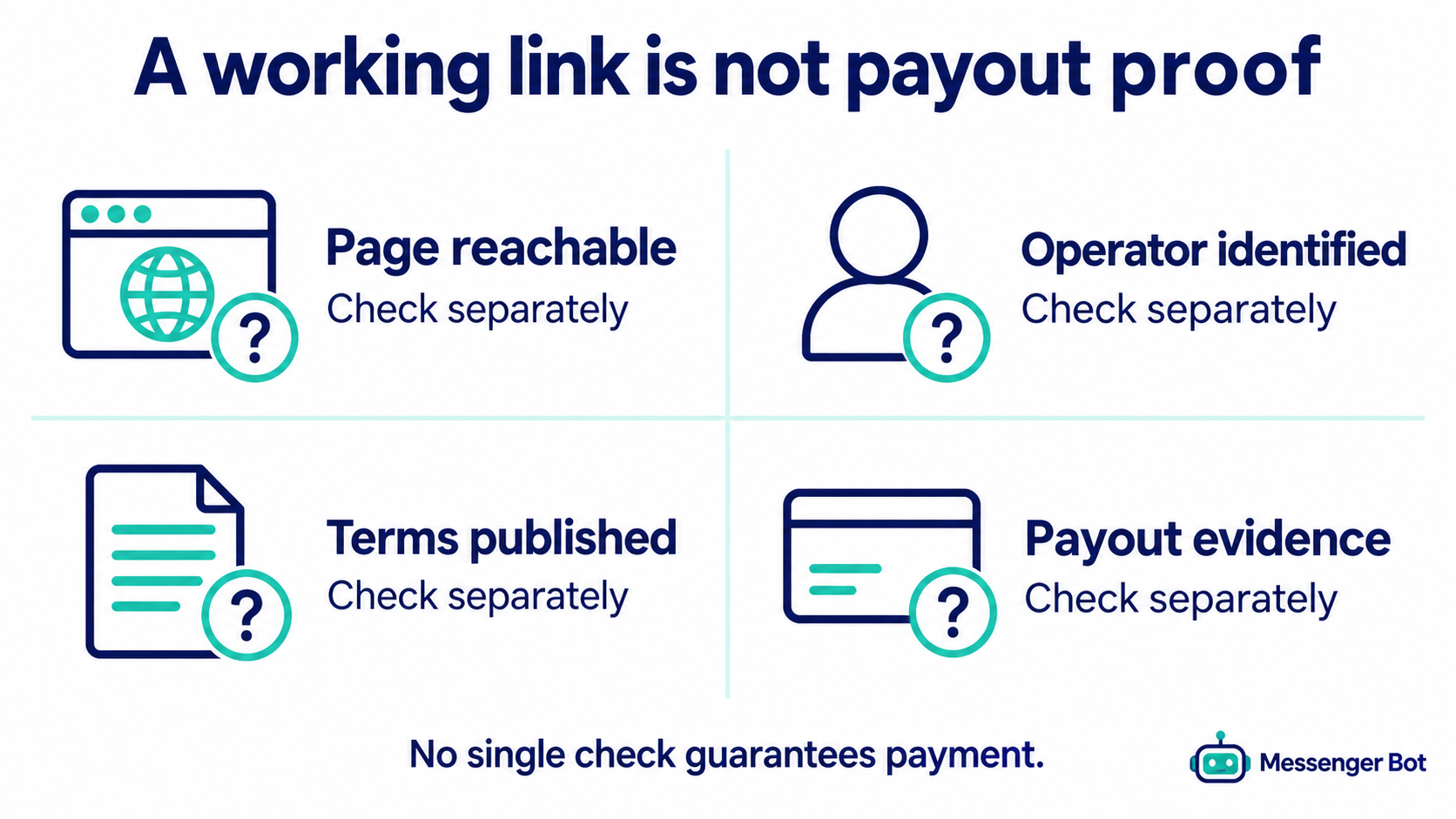
Use this evidence ladder when evaluating any new link:
- Page availability: the destination loads on the date you check it.
- Operator identity: the destination names a responsible business or person and provides consistent contact details.
- Published terms: fees, task rules, withdrawal conditions, privacy handling, and dispute steps are stated before registration.
- Independent transaction evidence: a dated, reviewable record supports a payout claim without relying only on recruiter screenshots.
- Your own smallest-risk test: you do not send an up-front payment or disclose sensitive credentials merely to unlock promised work or money.
Chrome Encoding currently clears only the first rung in this review. Treat everything above it as unverified until better evidence appears.
Why a Facebook Page or Messenger Thread Is Not Payment Proof
A social page can be useful for finding public announcements, but it is a weak foundation for a financial decision. Pages can be renamed, copied, abandoned, or operated by different people. Private Messenger instructions are even harder to audit because two users can receive different links, fees, or withdrawal explanations.
The difference matters. A page that loads can show that a name still circulates. It cannot prove that tasks are currently available, that a balance can be converted to cash, that the person messaging you represents the operator, or that a promised GCash transfer will arrive. Screenshots of dashboards and wallets also need context: the source, date, account relationship, and full transaction trail are usually missing.
Before following a link from a post or comment, compare the page name, username, creation history, recent activity, contact information, and destination domain. If the message moves you to a different account or a shortened URL, stop and recheck the original source. A genuine access path should not require secrecy, rushed decisions, or repeated transfers.
If the only explanation is “message me,” ask for the rules in writing before sharing information. A safe answer should explain the operator, registration condition, data requested, task type, withdrawal condition, and support path without asking for an MPIN or OTP.
Is Chrome Encoding Legit? Use a Verification Status, Not a Rating
The evidence supports a narrow status: a public social trace resolved on July 27, 2026, while the operator, task availability, payout terms, and withdrawal performance remained unverified. That is more accurate than a numeric rating or a simple “legit” or “scam” label.
A rating can create false confidence because it hides the questions that actually matter. A three-out-of-five score does not tell you whether the operator is identified, whether a fee is refundable, whether current terms exist, or whether a withdrawal claim has a reliable source. The verification table below keeps those issues separate.
| Question | July 27 evidence | Safe conclusion |
|---|---|---|
| Did a public Chrome-Encoding page resolve? | Ja | A social trace was reachable on the check date. |
| Was a first-party company or operator identity verified? | No current attributable source established it | Operator identity remains unverified. |
| Were current tasks or a stable login portal verified? | Nein | Do not promise access or task availability. |
| Were earnings rates, thresholds, fees, or timing verified? | No current published terms were established | Do not forecast earnings or withdrawal timing. |
| Was GCash payout performance independently verified? | Nein | A claimed payout method is not proof of a completed payout. |
This status may change. Recheck the exact destination and terms before every decision, especially if a recruiter says the rules have recently changed.
Separate the Chrome Encoding Earning Claim From Browser Encoding
“Chrome Encoding” can refer to very different things. Character encoding is a technical process that lets a browser interpret text correctly. Google’s documentation discusses formats such as UTF-8 for data quality, and Chrome extensions may offer text-display controls. Those browser functions do not verify, sponsor, or explain an earning service that happens to use the same words. This review found no evidence that the earning offer is a Google product or an official Chrome feature.
Start by identifying which intent a page serves. A technical browser guide should explain text display, standards, or extension permissions. An earning offer may discuss registration, tasks, referrals, activation, or wallet withdrawals. Do not transfer trust from the familiar Chrome name to the earning claim. If an earning page asks you to install an extension, review the publisher and every requested permission in the Chrome Web Store extension guidance. Permission to read or change data across websites can expose much more than the page you intended to use.
Use a unique password and keep browser, email, and wallet credentials separate. A polished dashboard, secure-connection icon, or social following does not establish an operator identity or payment history. Before registering, look for dated terms, a verifiable business identity, a support process, privacy information, and withdrawal rules that can be read without paying. If those basics cannot be independently checked, stop before installing software or sharing personal information.
How to Check a Chrome Encoding Registration Link Safely
There is no verified stable self-service registration URL to recommend from this review. That means the safest registration workflow begins with identity and terms, not with filling out a form.
- Save the source. Keep the full URL, page name, date, and screenshot showing where the link came from.
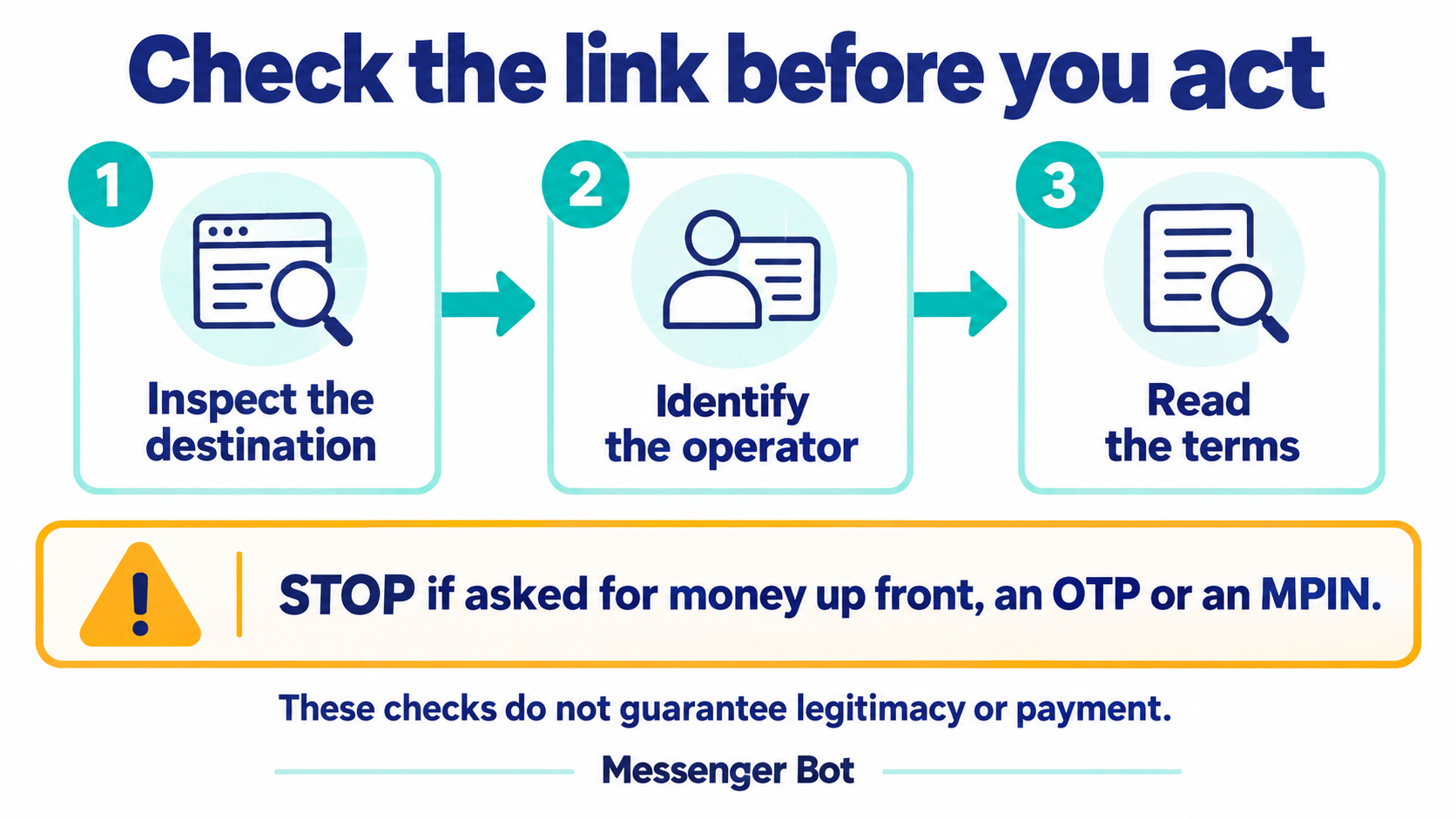
- Inspect the destination. Check the exact domain and account name. Avoid look-alike spellings, URL shorteners, and files sent through comments.
- Ask who operates it. Request a business name, support channel, privacy explanation, and written terms.
- Ask what information is required. A recruiter should explain why each item is needed. Do not share an MPIN, OTP, password, recovery code, or remote-access permission.
- Ask about money before work. Get every registration fee, recharge request, withdrawal threshold, deduction, and refund condition in writing.
- Refuse urgency. A deadline, limited slot, or “pay now” message is not verification.
- Check the rules again at withdrawal. Do not assume the terms you received at signup still apply.
GCash warns users to be cautious about unexpected job offers and promises of large returns that first require a transfer. It also says GCash will not ask for an MPIN or OTP and advises using official GCash pages and its Help Center. Read the current current account-protection guidance before sending funds or credentials.
Chrome Encoding Login Help Without Trusting a Mirror Link
Search results and old posts can keep showing routes after an operator changes or abandons them. If a Chrome Encoding login link fails, do not move automatically to the first replacement offered in a comment.
Use this troubleshooting order:
- Return to the exact public page or conversation where you first received the route.
- Confirm that the same account still publishes the destination and that the post is current.
- Compare the full domain character by character; do not rely on the page title alone.
- Open the destination in a normal browser without installing an extension, APK, or remote-control tool.
- Check for HTTPS, a privacy notice, support details, and written terms. HTTPS protects transport; it does not prove legitimacy.
- If a password reset exists, verify that the recovery message comes from the same domain you intended to use.
- Stop if the replacement route asks for a new payment, an OTP, an MPIN, or access to your screen.
A failed link can mean an expired post, a moved page, an unavailable service, or a copied route. It does not prove any single explanation. Preserve the error and ask for a written operator-controlled update rather than guessing.
Why This Guide Does Not Publish a Daily or Monthly Earnings Estimate
No defensible Chrome Encoding earnings forecast was available in the reviewed evidence. A credible estimate needs a defined sample, observation window, task volume, completion rate, fees, failed-task rate, withdrawal success rate, and the time spent. Recruiter claims or isolated screenshots do not provide that foundation.
Daily ranges can be especially misleading. They often combine task credits, referral bonuses, promotional balances, and withdrawals as if they were the same thing. A dashboard balance is not cash. A referral reward is not the same as task income. A claimed transfer without a traceable source is not a reliable average.
If you are evaluating any online task offer, record these fields instead:
- the exact task and the time required;
- the stated gross reward;
- all registration, recharge, transfer, and withdrawal charges;
- the minimum withdrawal condition;
- the date and status of every request;
- the amount that actually reached your own wallet;
- the number of failed or rejected tasks;
- the source of any referral income.
Until a completed withdrawal reaches an account you control, treat displayed credits as unverified. Do not borrow money, transfer funds, or add more work because a screen balance appears close to a threshold.
Test Encoding Job and GCash Claims With Verifiable Evidence
Promoters may describe Chrome Encoding as data entry, captcha work, or a task-based job. If the offer requires an activation fee, recharge, referral payment, or deposit before work begins, compare it with FTC job-scam guidance. The FTC says honest employers do not ask people to pay to get a job. A pay-first offer is materially different from ordinary employment, even if promoters call the payment an upgrade or account requirement.
Withdrawal screenshots should also be treated cautiously. An image can be edited, reused, or disconnected from the person promoting it. Stronger evidence would identify the operator, the applicable terms, the dates and amounts, any fees, and whether an independent account holder completed a withdrawal without making additional payments. No single screenshot proves that future withdrawals will work.
The GCash Help Center warns about unexpected offers that promise large returns but ask for a transfer first, and says not to share an MPIN or OTP. Never hand over wallet access to someone offering a “fast-track” withdrawal or recovery service. Keep control of every authorization step, verify the recipient before any transfer, and do not continue because a recruiter creates urgency.
This safety checklist does not declare Chrome Encoding legitimate or fraudulent. It separates claims from evidence so readers can decide without assuming that registration, a dashboard balance, or the Chrome name guarantees earnings or payment.
GCash Withdrawal Claims: What to Verify Before You Send Money
A post that mentions GCash does not establish that Chrome Encoding currently supports GCash, that a particular recruiter can initiate transfers, or that a withdrawal will complete. Current platform terms and independent transaction evidence are needed for those conclusions, and this review did not establish them.
Before relying on a GCash claim, ask for the exact written withdrawal rule, threshold, fee, processing condition, operator identity, and support process. Then verify that the instructions do not ask you to transfer money first. A release fee, recharge, tax payment to a personal wallet, or “verification deposit” tied to promised work or earnings is a major warning.
GCash’s current Express Send Scam Insurance page specifically says there is no coverage for scams where a job or significant amount of money is promised in return for an up-front payment, including task scams. The exclusions are a reminder that sending money to unlock supposed earnings can create losses that are difficult to recover. Review the current insurance exclusions before assuming a transfer is protected.
Keep an evidence packet
- full screenshots showing the account name, date, and conversation;
- the complete destination URL;
- written fee and withdrawal terms;
- transaction references and wallet activity;
- the operator’s support response;
- copies of any pressure, recharge, or release-fee request.
Never share an OTP or MPIN. GCash states that it will not request them through calls or messages.
Compare Chrome Encoding With Other Earning-Bot Names by Evidence
Do not compare Chrome Encoding, MathBot, ECNL, or KKCB using unsupported “best,” “pays more,” or payment-odds claims. Compare the evidence available for each exact destination on the date you check it.
| Evidence field | What to look for | Was es nicht beweist |
|---|---|---|
| Resolving login or social page | HTTP response, consistent domain, current operator-controlled post | Safety, available tasks, or payment |
| Registration terms | Published fee, refund rule, referral requirement, privacy notice | That earnings will exceed the fee |
| Withdrawal terms | Published threshold, fee, method, timing, dispute path | That an individual withdrawal completed |
| Independent payment evidence | Dated, attributable records with a clear observation window | Future availability or future income |
| Support and operator identity | Consistent contact path and responsible entity | That every recruiter represents the operator |
For wider context, use the earning-bot evidence directory and compare its dated access notes. The MathBot evidence review und KKCB verification guide should also be read as time-bounded checks, not endorsements.
Common Chrome Encoding Problems and the Safest Response
The link no longer opens
Save the error, return to the original operator-controlled source, and request a written current route. Do not use a mirror from a random comment simply because it loads.
A recruiter asks for a registration or recharge payment
Pause. Ask for the responsible business, published terms, refund policy, and official payment destination. Do not send money based on a promise that a larger balance or withdrawal will unlock afterward.
The dashboard shows money but the wallet does not
Treat the displayed balance as unverified. Preserve screenshots and transaction references. Stop adding tasks or funds until the operator provides a traceable resolution.
The withdrawal rules changed after signup
Compare the new condition with the terms you saved. A new fee, higher threshold, recharge demand, or urgent deadline materially changes the risk. Do not pay to recover a balance that only exists on a screen.
Someone asks for an OTP, MPIN, password, or screen access
Stop the conversation and secure your account. GCash says it will not ask for an MPIN or OTP. Use only the official app or Help Center to protect the account and report suspicious activity.
You already transferred money
Preserve the conversation, profile, transaction reference, destination number, and screenshots. GCash’s current scam-reporting steps direct users to report to PNP or NBI, report to GCash immediately with details and screenshots, and block the scammer.
A Safer Decision Checklist Before You Continue
- The operator is identified and the same identity appears across the destination, terms, and support channel.
- The exact URL is current and came from an operator-controlled source.
- Registration, privacy, task, fee, withdrawal, and dispute terms are written and understandable.
- No one asks for an MPIN, OTP, password, recovery code, or remote screen access.
- No up-front transfer is required to unlock promised work, rewards, or withdrawals.
- You can stop without losing money you were pressured to add.
- You have saved the source, rules, messages, and transaction evidence.
- You understand that a resolving page and a dashboard balance are not payment proof.
If several items fail, the practical outcome is simple: do not proceed until the evidence improves. The cost of waiting is smaller than the cost of sending funds or credentials into an unverified flow.
Messenger Bot is a separate business messaging product and does not operate or endorse third-party earning services. Businesses that want controlled customer-conversation workflows can Durchsuchen Sie unsere Tutorials oder See Our Plans. Those links are for business messaging, not Chrome Encoding registration or payout support.
Häufig gestellte Fragen
Ist Chrome Encoding legitim oder ein Betrug?
The July 27, 2026 review established only that a public social page using the Chrome-Encoding name resolved. It did not establish the operator, current tasks, payout terms, GCash performance, or expected income. Use the verification checklist instead of treating the page as an endorsement or a fraud finding.
Where is the official Chrome Encoding registration or login link?
No stable first-party registration or login domain was verified in this review. Confirm the exact current route through an operator-controlled source, inspect the full domain, and stop if the route requires an OTP, MPIN, password, remote access, or payment to unlock work.
How much can I earn with Chrome Encoding?
No defensible daily or monthly estimate was available. A useful estimate would require a documented sample, observation period, task volume, fees, time spent, failed tasks, and completed withdrawals. Recruiter claims, referral bonuses, and dashboard balances should not be presented as expected income.
Does Chrome Encoding pay through GCash?
A GCash mention in a post is not proof of current support or a completed payout. Ask for current published withdrawal terms and preserve independent transaction evidence. Never share an MPIN or OTP or send an up-front transfer to release supposed earnings.
What should I do if I already sent money?
Save the messages, account profile, transaction reference, destination number, and screenshots. Use GCash’s official scam-reporting process, report to the appropriate authorities as directed, and block the suspicious account. Act promptly and avoid sending more money to recover a displayed balance.

 Deutsch
  English
  Tagalog
  简体中文
简体中文  العربية
  हिन्दी
  Português do Brasil
  Español de México
  Français
  বাংলা
বাংলা  香港中文
香港中文  繁體中文
繁體中文  Nederlands
  Bahasa Indonesia
  日本語
日本語  한국어
한국어  Polski
  Русский
  Español
  Tiếng Việt