
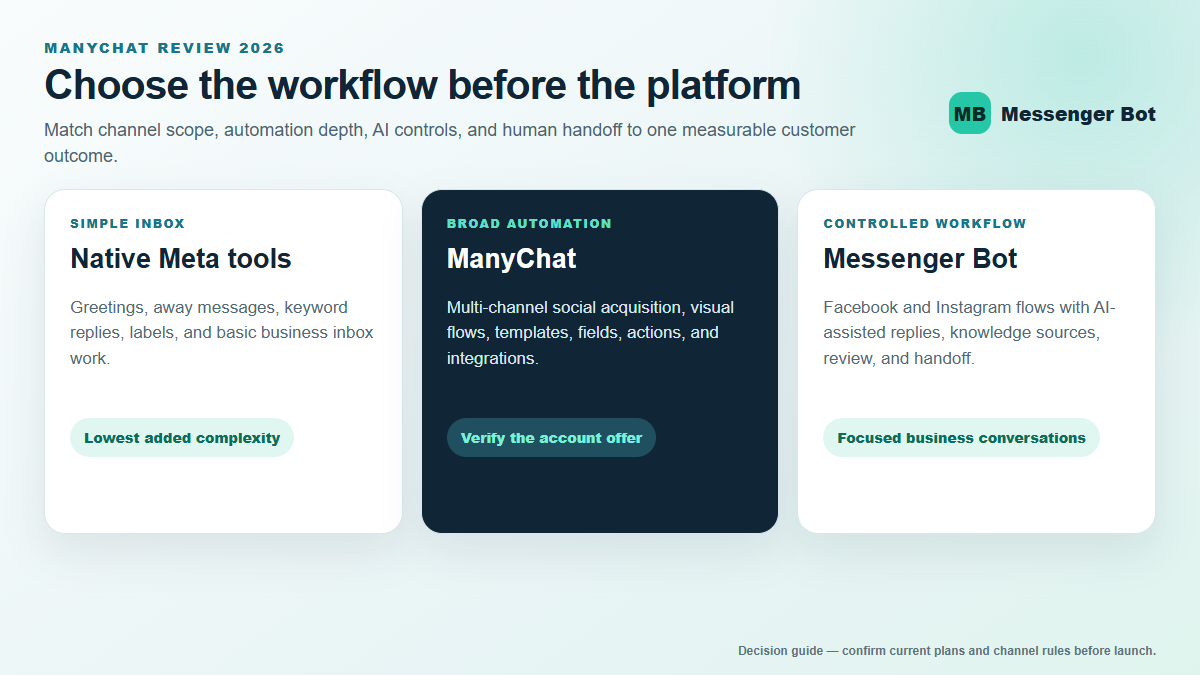
ManyChat is a mature messaging automation platform for businesses and creators that want to turn social conversations into repeatable lead capture, qualification, support, and follow-up workflows. Its strongest use cases begin with a supported business channel, a clear customer action, and a flow that knows when to stop and hand the conversation to a person. It is not a universal bot for personal chats, unrestricted mass messaging, or every conversation surface inside Facebook.
The most important 2026 update is not a single feature or price. ManyChat introduced a new plan structure for newer accounts on March 2, 2026, while some older accounts may still see a legacy plan model. Plan availability can also vary by region. That makes old comparison tables and fixed-price promises unreliable. The right way to evaluate ManyChat now is to confirm the plans shown in your own account, map the channels you actually need, and calculate the cost at your expected contact and team size.
This guide uses current official ManyChat and Meta documentation, avoids volatile price claims, and separates product facts from decision advice. It also shows how to compare the total workflow rather than choosing a platform from a feature checklist alone.
What ManyChat Is Designed to Do
ManyChat helps a business connect supported messaging channels to automations. A workflow can start when someone sends a message, replies to a story, comments on eligible social content, scans a code, clicks a link, or takes another supported action. The automation can ask questions, collect permitted information, apply tags, update custom fields, route a person to another flow, or pass the conversation to a team member.
The official ManyChat channel documentation currently covers Facebook Messenger, Instagram, WhatsApp, Telegram, email, and SMS, with TikTok automation also documented in its channel help. Availability and exact triggers differ by channel, account, plan, and region. A feature listed for Instagram should not be assumed to work identically on Messenger or WhatsApp.
ManyChat is best understood as a workflow layer, not as a replacement for the underlying social network. Meta and other channel owners still control account access, permissions, messaging windows, content rules, and delivery. If a Page, business account, phone number, or permission is not eligible at the channel level, adding automation software does not remove that restriction.
It also does not turn a personal Facebook profile or personal conversation into an automated business inbox. For Facebook work, identify the Page or supported business asset first. Then confirm that the person connecting it has the required access and that the intended trigger is available.
ManyChat Pricing Has New and Legacy Account Models
ManyChat’s official subscription guide says its newer pricing model includes Free, Essential, Pro, Business, and Advanced plans. It also states that the model was introduced on March 2, 2026, is initially available to accounts created on or after that date, and may vary by region. Older accounts may still see a different structure while the rollout continues.
That means two people can open ManyChat and see different plan choices without either account being broken. A comparison published before the rollout may describe a legacy contact-based model, while a new account may show a broader set of plan tiers and annual billing choices. Use the public pricing page for orientation, but treat the plan selector inside the account as the final source for that account.
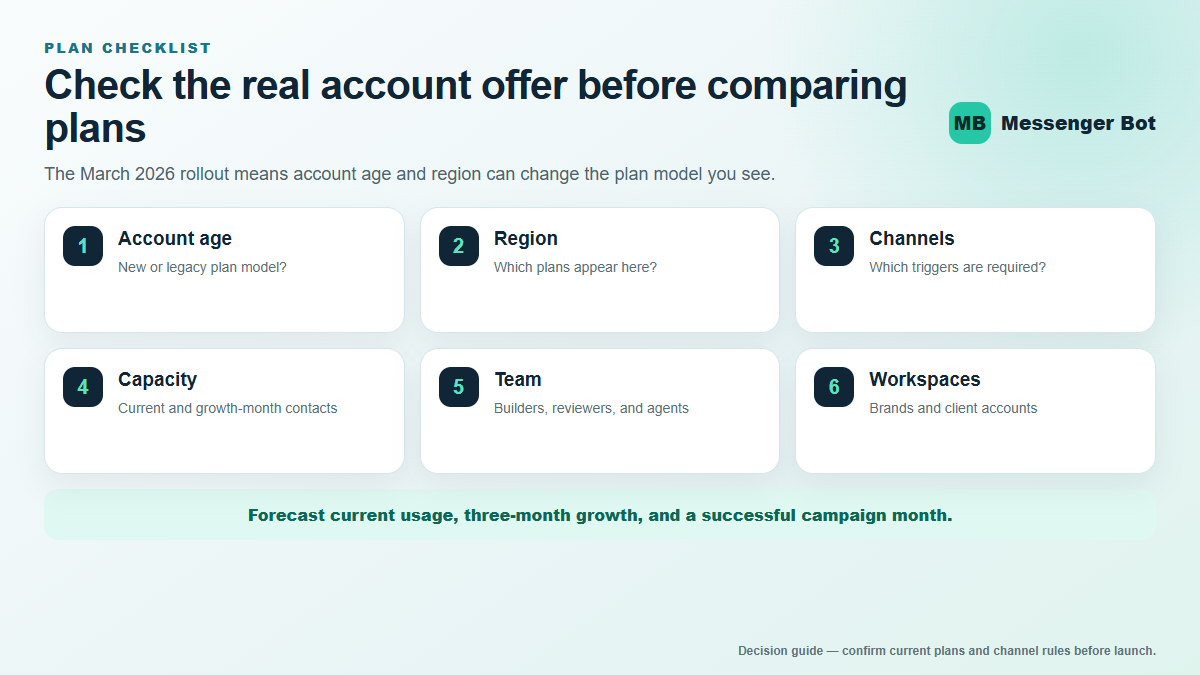
Do not compare platforms from the starting price alone. Record the number of supported channels, active contacts, team members, account workspaces, automation requirements, and any usage-based channel charges. A lower entry price can become expensive when the audience grows; a higher base price can be easier to manage when it includes the capacity the team already needs.
What to verify before selecting a plan
- Account eligibility: confirm whether the account is on the new or legacy model.
- Region: verify which plans and billing cycles appear for the account location.
- Connected channels: list the exact Facebook, Instagram, WhatsApp, Telegram, TikTok, email, or SMS workflows required.
- Audience definition: understand how the offered plan counts active contacts or other billable capacity.
- Team access: count everyone who must build, approve, monitor, or answer conversations.
- Account structure: determine whether separate brands or client accounts require separate workspaces and billing.
- External channel costs: include message-template, phone, or carrier charges where the channel applies them.
A responsible budget forecast uses three cases: current usage, expected usage in three months, and a high-growth month. If the platform fits only the current case, the team may face a disruptive plan change just when a campaign succeeds.
Choose Channels Before You Choose Automations
Channel choice determines what a workflow can do. ManyChat may offer a familiar builder across several networks, but the available triggers, message types, timing rules, and customer expectations are not identical.
Facebook Messenger
Messenger remains useful for Facebook Page conversations, comment-driven lead capture where supported, ads that open messaging, referral links, qualification, and service follow-up. Meta also offers native Page tools for greetings, instant replies, away messages, labels, keyword automations, and inbox organization. A business with only a simple first-response need should test those native controls before paying for a larger automation stack.
Instagram is a strong fit when posts, reels, stories, mentions, and direct messages are already part of the sales path. The value comes from moving an interested person from a public interaction into a structured private conversation without losing the context of what prompted the message. The workflow still needs clear consent, useful answers, and a handoff for questions the automation cannot safely resolve.
WhatsApp can support qualification, service, reminders, and approved follow-up, but its account setup, templates, message categories, timing rules, and charges deserve separate review. Do not copy a Messenger flow into WhatsApp and assume it will behave the same way. Verify current channel requirements before building.
Telegram, TikTok, email, and SMS
These channels can extend a campaign, but they should solve a measured audience need. Telegram has different messaging constraints from Meta-owned channels. TikTok triggers and eligibility can change. Email and SMS introduce their own consent, deliverability, and compliance responsibilities. Adding every available channel creates more maintenance; it does not automatically create a better customer journey.
The 24-Hour Messaging Window Changes Every Follow-Up Plan
ManyChat’s current help documentation states that a 24-hour messaging window opens after a contact’s last interaction on Facebook Messenger, Instagram, and WhatsApp. Regular and automated messages can be sent during that window, subject to the channel’s other rules. Outside it, automated follow-up is restricted.
For Messenger and Instagram, ManyChat documents a following seven-day window for manual human messages through its inbox, while automations are no longer delivered in that period. WhatsApp follows a different post-window process involving approved message templates. Beyond those windows, only the channel’s currently permitted options apply.
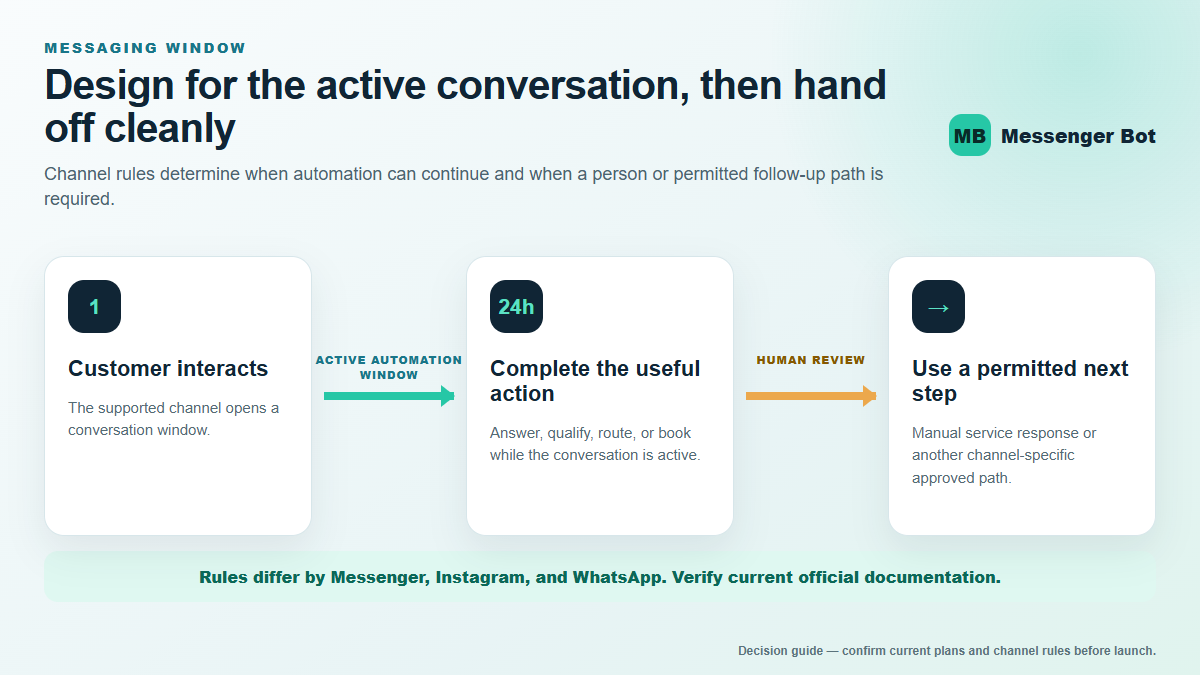
This rule changes how a good flow is written. The automation should deliver the promised value quickly, collect only necessary information, and identify the next step before the active window closes. A flow that delays the useful answer or depends on repeated promotional reminders is fragile.
It also changes reporting. Track how many people complete the intended action inside the active window, how many request a person, and how many need a permitted follow-up path. A raw subscriber count does not show whether the workflow can legally and practically reach those people again.
Platform safeguards help, but they are not a substitute for a clear operating policy. Document who reviews broadcasts, what qualifies as a service message, when a person takes over, and how the team handles contacts who have not recently interacted.
How the Flow Builder and Templates Fit Together
A visual flow builder is useful because it makes conversation logic visible. A team can see the trigger, questions, branches, actions, delays, and handoff points without reading code. That improves review, but a visually complete diagram can still create a poor customer experience if the questions are unnecessary or the branches lead nowhere.
Start with the shortest successful path. A lead-qualification flow might need only five elements:
- Acknowledge the person’s action and state what they will receive.
- Ask one question that changes the next step.
- Give the relevant answer or resource.
- Collect contact information only when it is necessary and permitted.
- Offer the correct human or booking handoff.
Templates can accelerate this work. They provide a starting structure for common campaigns and can expose triggers or actions a new builder might miss. But a template is not evidence that the business has permission to send every message inside it. Review every trigger, link, delay, claim, data field, and follow-up condition before turning it on.
Rename branches in plain business language such as “needs pricing,” “ready to book,” “support question,” and “human review.” Avoid internal labels that only the original builder understands. A new team member should be able to explain why each branch exists.
ManyChat AI Should Support a Controlled Workflow
AI can help interpret open-ended questions, classify intent, draft an answer, summarize a conversation, or route an exception. It should not be treated as permission to invent product facts or continue messaging after the channel window closes.
For customer-facing use, define the source material and the boundary. Give the system approved business information, specify what it may answer, and identify the topics that always require a person. Pricing exceptions, refunds, account-specific issues, legal questions, medical claims, safety incidents, and emotionally sensitive complaints are common escalation categories.
A practical AI review checklist asks:
- Does the answer use current approved information?
- Does it answer the customer’s actual question before promoting anything?
- Does it disclose or label automation where required?
- Does it avoid collecting unnecessary sensitive information?
- Does it stop and route the conversation when confidence is low?
- Can a team member see why the conversation reached this branch?
Messenger Bot approaches this problem with visual workflows, AI-assisted replies, BYOK (Bring Your Own Key), knowledge sources, review controls, and human handoff. That can be a better fit for a team that wants to keep AI inside a defined Facebook or Instagram conversation process. Explora Nuestros Tutoriales to see how the workflow pieces are organized before comparing plans.
ManyChat vs Native Meta Tools vs Messenger Bot
The right comparison begins with the result the business needs. Native Meta tools can be enough for a simple Page greeting, away message, keyword answer, label, or inbox process. ManyChat is attractive when the business wants broader social automation, established templates, multiple supported channels, and a large integration ecosystem. Messenger Bot is worth evaluating when the priority is a controlled Facebook or Instagram workflow with visual automation and AI-assisted reply handling. Teams comparing another social-automation workflow can use our Chatfuel dashboard and login guide to check access, setup, and channel fit before choosing.
| Decision factor | Native Meta tools | ManyChat | Bot de Messenger |
|---|---|---|---|
| Mejor punto de partida | Simple Page inbox and first-response needs | Broader social lead capture and multi-channel automation | Controlled Facebook or Instagram conversation workflows |
| Workflow depth | Useful native automations and inbox controls | Visual flows, templates, actions, fields, and integrations | Visual flows, reusable templates, reply review, and handoff |
| AI approach | Native features vary by account and region | AI features within supported plans and workflows | AI-assisted replies with BYOK and knowledge-source controls |
| Channel scope | Meta-owned business surfaces | Several social and messaging channels, subject to plan availability | Facebook and Instagram business conversation focus |
| Evaluation priority | Can native tools solve the need without added complexity? | Do channels, contacts, teams, and integrations justify the plan? | Do review, knowledge, and handoff controls match the operating model? |
This is not a claim that one platform wins every category. ManyChat may be the better fit for a creator whose acquisition strategy spans Instagram, WhatsApp, and other supported channels. Native Meta tools may be the simplest choice for a local business that needs only a greeting and an away message. Messenger Bot may fit a team that wants a focused business-conversation system and a direct path to reviewed AI-assisted follow-up.
There is no implied one-click migration or direct integration between these products. Evaluate the destination workflow, export options, consent records, and channel permissions before moving any live process. Rebuild and test a small flow first; do not disconnect a working customer path until the replacement passes.
A Seven-Step ManyChat Evaluation Before You Pay
- Name one measurable outcome. Choose a booking, qualified lead, support resolution, product recommendation, or other specific result.
- Select the exact channel and trigger. Record the Page, business account, post, story, ad, link, or inbound message that begins the flow.
- Confirm account eligibility. Verify permissions, plan model, region, connected channels, and team access in the actual account.
- Draw the shortest successful path. Include the first useful answer, one decision question, the next action, and the human handoff.
- Test the messaging window. Verify what happens inside and outside the active window and ensure restricted messages do not become the only route to completion.
- Calculate three-month capacity. Include expected contacts, team members, workspaces, channel charges, and integration costs.
- Run a controlled pilot. Test with an operator-owned account, inspect every branch, remove test data, and monitor the first live cohort before scaling.
The pilot should include happy-path and failure-path checks. Test missing answers, unusual wording, duplicate triggers, a person asking for help, expired messaging windows, broken links, unavailable staff, and the exact opt-out path. A workflow is not ready because the first test message reached the final block.
Measure completion rate, time to first useful answer, handoff rate, unanswered intent, and qualified next actions. Avoid optimizing for total messages sent; a short conversation that solves the problem is usually better than a long one that inflates engagement.
Common ManyChat Limitations to Plan Around
Channel rules remain outside ManyChat’s control
Messaging windows, account eligibility, permission reviews, and content restrictions come from the underlying channels. ManyChat can provide controls and warnings, but it cannot promise that a network will never change a rule or limit an account.
Plan availability can make comparisons look inconsistent
The 2026 pricing rollout means older and newer accounts may see different structures. Screenshots and reviews can become stale quickly. Save the dated offer shown for the account used in the decision.
Contact and workspace growth can change total cost
Forecast the successful campaign, not only the starting month. Include separate client or brand accounts where required, and decide who will archive, segment, or manage contacts under the applicable rules.
Templates can hide unnecessary complexity
A large template may look impressive while asking too many questions or delaying the useful answer. Remove every branch that does not change the customer’s next step.
AI still needs sources, boundaries, and review
A fluent response can still be wrong. Keep approved knowledge current, define escalation topics, and give the customer an obvious way to reach a person.
When ManyChat Is the Right Choice
ManyChat is a strong candidate when social conversations are already producing meaningful demand, the supported channels match the acquisition plan, and the team is prepared to maintain the workflows. It is particularly useful when a creator, ecommerce brand, agency, or service business needs more than a single instant reply and values a mature automation ecosystem.
It is a weaker fit when the business cannot identify a supported trigger, wants to automate personal conversations, expects unrestricted outreach, or does not have anyone responsible for monitoring exceptions. In those cases, the problem is not the plan tier; the operating model is incomplete.
If your use case is primarily Facebook or Instagram business conversations and you want a focused system with controlled AI assistance, compare the actual workflow rather than only the channel count. Verificar Precios Actuales for Messenger Bot, then match the plan to the channels, review requirements, knowledge sources, team access, and handoff process you documented.
For a deeper platform list, see the ManyChat alternatives guide. For Facebook-specific policy and setup questions, use the ManyChat for Facebook guide. Those pages serve narrower intents; this page remains the broad owner for evaluating ManyChat as a platform.
Preguntas frecuentes
What is ManyChat used for?
ManyChat is used to build automated and human-assisted conversation workflows on supported messaging and social channels. Common goals include lead capture, qualification, booking, customer questions, campaign follow-up, and routing conversations to a person.
Is ManyChat free to use in 2026?
ManyChat’s current subscription guide lists a Free plan within its newer model, but availability, limits, and the plans shown can vary by account age and region. Confirm the current offer and restrictions inside the account before building a production workflow.
Does ManyChat work with Facebook Messenger and Instagram?
Yes, ManyChat documents support for Facebook Messenger and Instagram business automation, with channel-specific triggers and rules. You still need the correct Page or business-account access, and Meta’s messaging policies continue to apply.
Can ManyChat send automated messages after 24 hours?
Automated messaging outside the standard 24-hour window is restricted on Messenger, Instagram, and WhatsApp. ManyChat documents limited permitted paths that differ by channel, including manual human follow-up windows and approved options. Review the latest channel documentation for the exact use case.
How should I compare ManyChat with Messenger Bot?
Compare the channels, trigger, workflow depth, active-contact model, team access, AI controls, knowledge sources, human handoff, and total three-month cost. ManyChat may fit a broader multi-channel strategy, while Messenger Bot may fit a focused Facebook or Instagram business-conversation workflow with controlled AI-assisted replies.
Official Sources and Review Date
This guide was fact-checked on July 27, 2026. Product availability and channel rules can change, so use the current official pages when making a purchase or compliance decision.
- current subscription and plan-selection documentation
- ManyChat pricing page
- ManyChat channel documentation
- current messaging-window documentation
- current automation-building documentation
- ManyChat template-installation guide
- current Inbox documentation
- current instant-reply documentation


 Español de México
  English
  Tagalog
  简体中文
简体中文  العربية
  हिन्दी
  Português do Brasil
  Français
  বাংলা
বাংলা  香港中文
香港中文  繁體中文
繁體中文  Nederlands
  Deutsch
  Bahasa Indonesia
  日本語
日本語  한국어
한국어  Polski
  Русский
  Español
  Tiếng Việt