
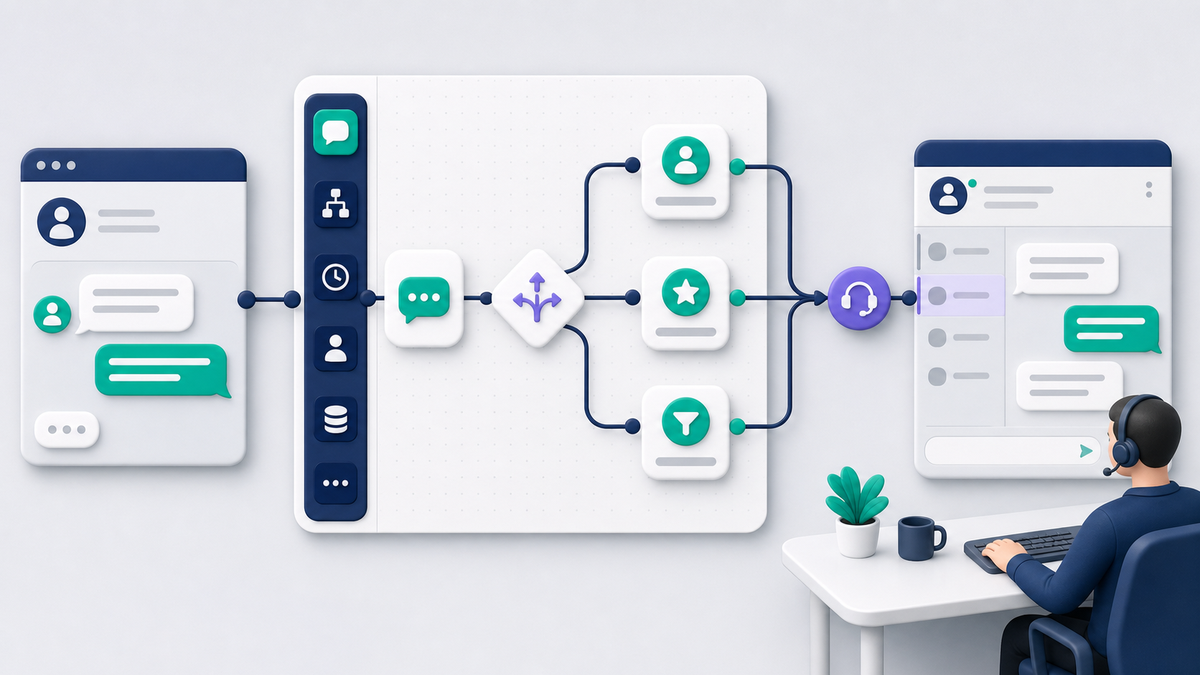
ManyChat for Facebook Messenger can turn a new Page conversation into a guided path: welcome the customer, identify what they need, collect a few useful details, and pass the conversation to a person with context. The value is not sending more automated messages. It is helping the customer reach the right next step without hiding the business team behind a bot.
This guide focuses on Facebook Page messaging. It explains what ManyChat adds beyond native Page tools, how to connect and test a workflow, what the customer-interaction window means, how current and legacy pricing models differ, and where human review belongs. If you need a broad cross-channel product evaluation instead, read our complete ManyChat review.
What ManyChat Does for Facebook Page Messages
ManyChat is a visual workflow layer for supported business messaging channels. With a connected Facebook Page, a business can create entry points, send approved automatic responses, ask questions, branch on customer choices, apply internal organization, and notify or assign a team member. The customer still uses Messenger; the workflow helps the business handle the conversation consistently.
A useful Facebook workflow normally has four stages:
- Entry: the customer sends a message, chooses a supported call to action, or responds through another eligible entry point.
- Orientation : the first reply confirms the business and offers a small number of relevant choices.
- Qualification : the flow asks only for the details needed to route or advance the request.
- Resolution or handoff: the customer receives the promised answer, reaches a booking or checkout step, or is transferred to a person with context.
That is different from an AI system improvising an entire customer-service policy. The workflow should operate inside approved boundaries. A business owner or designated team member remains responsible for prices, promises, exceptions, complaints, and sensitive decisions.
ManyChat is most useful when a Page receives enough repeated questions that a consistent route saves time. If the Page only needs to acknowledge a message and state business hours, the native Page tools may already solve the problem. Complexity should earn its place by reducing missed conversations or helping customers act sooner.
Native Meta Responses Versus a ManyChat Workflow
Native Page automations are the simplest starting point. They can acknowledge a new conversation, set an away expectation, and address predictable first-contact needs. A ManyChat workflow becomes more useful when a customer answer should change the next step or when several people need a repeatable routing process.
| Besoin | Native Page response | ManyChat workflow |
|---|---|---|
| Confirm a message arrived | Strong fit | Possible, but often more than needed |
| Offer two or three topic choices | May be sufficient for a basic route | Strong fit when choices lead to different paths |
| Collect several answers | Limité | Strong fit when every answer has a purpose |
| Route by location, service, or urgency | Limité | Strong fit with tested branches |
| Give a person the conversation context | Inbox-dependent | Strong fit when handoff is designed into the flow |
| Handle a rare or sensitive exception | Human response | Human response with a clear escalation rule |
Choose by conversation complexity, not by feature count. A single accurate response is better than an elaborate flow that asks unnecessary questions. Conversely, a one-message greeting is not enough if customers regularly need location routing, appointment qualification, or order-support handoff.
Before connecting another tool, write down the shortest successful customer path. Mark each automatic step, each decision point, and the moment a person must take over. If a step does not change the route or help resolve the request, remove it.
How to Connect ManyChat to the Correct Facebook Page
Connection screens and permission labels can change, so treat the current in-product instructions as the source of truth. The safe process is to use an approved business account, select the exact Page, grant only the access required for messaging, and test before inviting real traffic into a flow.
- Sign in to ManyChat through the approved business access path.
- Add Facebook Messenger as a channel and choose the intended Facebook Page.
- Review the permission request. Confirm that the signed-in person is authorized to manage that Page and its messages.
- Complete the connection, then verify the Page name and channel inside the workspace.
- Create a small test flow with one entry point, one useful response, and an obvious route to a person.
- Test from a separate customer account on both a phone and desktop browser.
Do not share a personal login between team members. Give each operator the access appropriate to their role and keep at least one accountable Page administrator who can repair a connection if permissions change. If the wrong Page is connected, stop and correct the identity before building; copying a finished flow later is safer than sending a test message from the wrong business.
Build a minimum viable test
The first test should be intentionally small. Use a welcome message that names the business, offers two choices, and provides a human-help option. For example, a home-service Page might offer “Request an estimate” and “Question about existing work.” The estimate path can ask for service area and job type. The existing-work path should reach a person quickly.
A successful test proves more than delivery. Confirm that the reply arrives once, the buttons or choices work, every branch ends somewhere useful, the customer can request a person, and the business inbox shows enough context to continue. Save the test date and the exact path used so a later change can be compared against it.
The Customer-Interaction Window and Supported Follow-Up
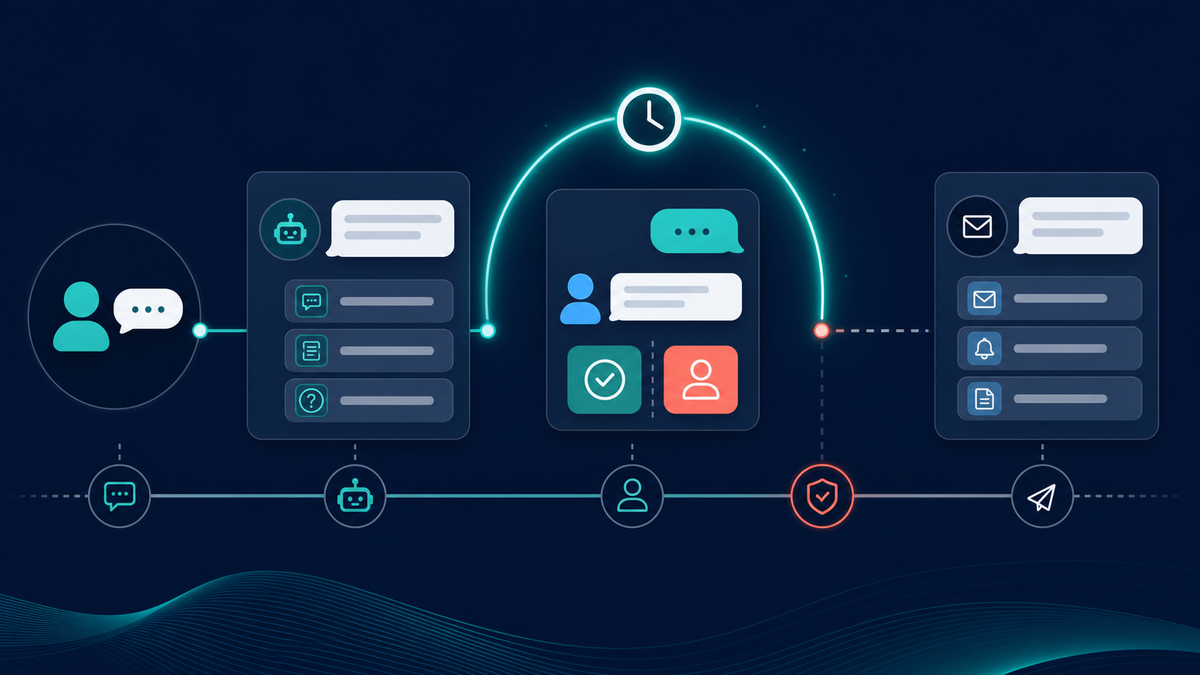
Business messaging is permission-based. A customer action opens an opportunity to reply, but it is not a permanent license to send unrelated promotions. For Messenger, teams should design around the currently supported customer-interaction window and check the latest platform and ManyChat guidance before launching a campaign or delayed follow-up.
ManyChat’s current help material describes a 24-hour messaging window for ordinary automated Messenger communication after a user interaction. The practical operating rule is to resolve the active request while the conversation is current. Do not build a flow that depends on an unrestricted promotional message days later.
Inside the active window, keep replies connected to what the customer requested. A booking reminder that completes an appointment path is different from an unrelated sale. A status update that answers the customer is different from adding them to a general promotion. Outside the ordinary window, use only an eligible, correctly configured message type for a legitimate purpose, or wait for the customer to interact again.
Because platform rules and available message types can change, the launch checklist should include a dated policy review. The person approving the flow should be able to explain why each delayed message is allowed, how the recipient requested it, and how the customer can stop or reach a person.
Free Options and Why ManyChat Pricing Can Look Different
There is no single ManyChat price or allowance that applies to every account. In March 2026, ManyChat introduced a new pricing model for qualifying new accounts, while older accounts can remain under legacy rules. Region, account creation date, and whether a subscription is purchased through the web or a mobile app can affect the offer shown.
Under the new model described in ManyChat’s official documentation, plans are organized around active contacts during the billing month. The published allowances listed for qualifying accounts are 25 active contacts on Free, 250 on Essential, 2,500 on Pro, 7,500 on Business, and 25,000 on Advanced. Those figures should not be applied to a legacy account without checking its own billing screen. ManyChat separately documents its older contact-based pricing for accounts created before the new model applies.
Mobile subscriptions can also differ from web subscriptions, including plan availability and regional pricing. That is why an old article, screenshot, or search snippet may not match the current checkout. Use the official active contacts guide, l current plan guide, and the offer shown inside the exact account before making a budget decision.
When the no-cost route is enough
A native Page response can be enough when the business needs one greeting, an away expectation, and a direct human reply. A ManyChat free tier may be useful for learning the workflow builder or proving one small path, subject to the allowance shown for the account. Neither option should be judged only by the word “free.” The real question is whether the available contacts, features, team access, and support match the intended workload.
How to compare the real cost
Record the plan name, billing channel, account model, included active contacts or contacts, channel access, team seats, overage behavior, and renewal terms. Then estimate how many distinct customers will interact during a normal month. Include seasonal spikes. A low starting price can become the wrong fit if limits interrupt the customer path or if the team must buy a larger plan for one required feature.
Also put a value on staff time and missed handoffs. A paid workflow can be worthwhile if it reliably qualifies leads, reduces repetitive triage, and gives the human responder better context. It is not worthwhile merely because it can send more steps. For Messenger Bot’s current options, Check Current Pricing against the workflow and review controls your team actually needs.
Choose Entry Points That Match Customer Intent
An entry point is the event that starts or advances a workflow. The safest entries make the customer’s intent clear. A direct message asking for hours has obvious context. A button labeled for an estimate has a specific promise. A comment or keyword trigger can be useful, but it needs tighter testing because ordinary language is messy.
Direct messages and structured choices
For a Page inbox, begin with the customer’s actual message. If the request is clear, answer it or route it. If it is broad, offer two to four choices based on the most common reasons people contact the business. Always allow free-form clarification and a human request.
Keywords
Keywords work best when the business has taught the customer what to type, such as “BOOK,” “MENU,” or “QUOTE.” Test capitalization, plural forms, punctuation, and the extra words people naturally add. Do not force a partial match to trigger a sensitive or high-impact action. If confidence is low, ask a clarifying question or send the conversation to a person.
Comment-to-message paths
A comment can indicate interest, but the public comment and private conversation are different contexts. Tell the person what will happen, keep the first private response connected to the post, and avoid treating every generic comment as permission for a long sequence. Test duplicate comments, replies from Page managers, deleted comments, and customers who never continue in Messenger.
Every entry point needs a measurable purpose: answer a question, qualify a request, schedule a next step, or transfer the conversation. If the team cannot name the useful outcome, the entry point is likely creating noise rather than service.
Design the Flow Around One Customer Outcome
Start with one audience and one result. A person requesting an estimate should not be placed in the same opening path as an existing customer reporting a problem. Separate those intents early, then ask the minimum number of questions required for the next action.
Use this five-part structure:
- Confirmer : name the business and acknowledge the request.
- Orient: explain what the customer can accomplish in the conversation.
- Qualification : ask only for details that change the route or help a person respond.
- Deliver: give the answer, booking path, status, or next action promised.
- Hand off: transfer with context when judgment or account access is required.
Keep choices short and mutually clear. “Sales,” “Support,” and “Something else” are usually easier to use than eight overlapping topics. After each answer, show progress through the wording rather than using a vague loading message. If the customer goes off-script, acknowledge the new request and offer help instead of repeating the same prompt.
Collect less data, not more
Messenger is not the right place for every detail. Avoid asking for payment information, passwords, government identifiers, medical details, or other sensitive data in a general chat flow. Use a protected business process when the task requires it. In the workflow, collect only what is needed to route the request and tell the customer why a detail matters.
For implementation patterns, Parcourez nos tutoriels. Each tutorial should be adapted to the business’s real staffing, response times, and approval boundaries rather than copied as a universal script.
AI Disclosure, Confidence Checks, and Human Handoff
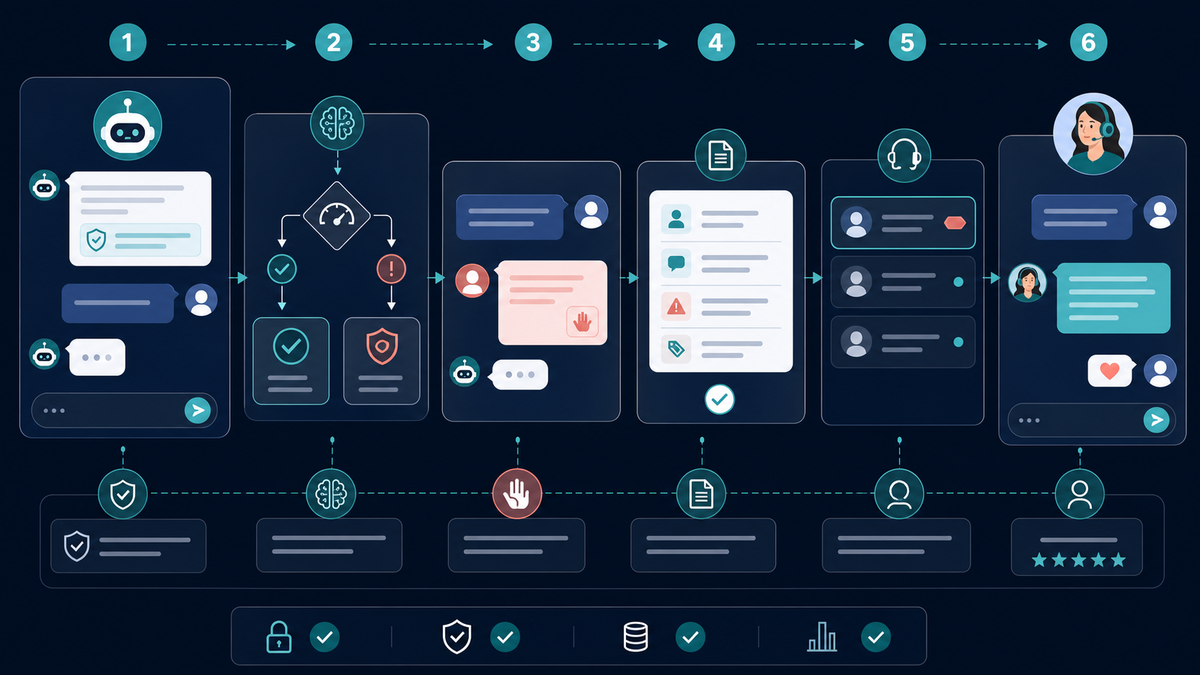
AI assistance can help draft answers from approved business knowledge, summarize a conversation, or suggest the next route. It should not make invisible decisions about refunds, eligibility, safety, legal matters, or other high-impact outcomes. The business remains responsible for the answer and for giving the customer a practical way to reach a person.
Meta’s help guidance for automated and AI chats says Pages may need to disclose when a conversation is automated or AI-generated where required, and customers can ask to speak with a representative or stop the AI chat. Build those expectations into the experience rather than treating them as an afterthought.
A responsible handoff rule can be simple:
- transfer immediately when the customer asks for a person;
- transfer when the workflow cannot identify the request after two attempts;
- transfer complaints, cancellations, payment disputes, safety concerns, and sensitive topics;
- transfer when an answer would create a material promise or exception;
- include a short summary of the customer’s goal and answers for the responder.
Tell the customer what is happening: “I’m sending your request and the details you shared to our team. A person will reply during our staffed hours.” Do not claim that someone is watching live unless that is true. The handoff message should set a realistic expectation and make the next action obvious.
Messenger Bot supports controlled, reviewable customer-conversation workflows. Eligible plans can use BYOK (Bring Your Own Key) for AI-assisted work while keeping the team’s approval process in view. Review the Messenger Bot workflow features to match capabilities to your actual conversation plan.
Is ManyChat Legal, and Does Meta Allow It?
ManyChat can be used with supported Meta messaging features when the Page, workflow, data practices, message types, and content follow the applicable platform rules and laws. That is not a blanket legal approval for every campaign. A tool connection does not make an otherwise misleading, unwanted, or unlawful message acceptable.
The business should review at least four areas before launch:
- Permission and purpose: the customer initiated or clearly requested the conversation path, and replies stay connected to that purpose.
- Règles de la plateforme : the message timing, entry point, and message type are currently supported.
- Transparence : the workflow does not impersonate a person, and automation or AI is disclosed when required.
- Gestion des données : the business collects only necessary information, protects it, and follows the privacy and retention obligations that apply to the business and customer.
This article is operational guidance, not legal advice. Requirements vary by location, industry, audience, and message content. Obtain qualified advice for regulated activities or campaigns where consent and privacy obligations are uncertain.
Three Practical Facebook Messenger Workflows
Local service estimate
The entry message offers “New estimate” and “Existing job.” The estimate path asks for ZIP code, service category, and preferred timing, then sends the summary to the sales queue. The existing-job path reaches service support with the job address or reference collected through the company’s protected process. Both paths provide staffed hours and a person option.
Appointment intake
The first choice is “Book,” “Change,” or “Question.” Booking collects service type and preferred day before moving to the approved scheduling step. Changes reach the scheduling team. The flow does not ask for sensitive health or payment information in Messenger. A reminder is sent only through a supported, requested path.
Product and order support
The workflow separates product questions, order status, and returns. It can provide approved general information, but account-specific status requires verification through the business’s secure process. Complaints, damaged items, payment disputes, and policy exceptions go to a person with the selected topic and last relevant answer included.
Each example works because the entry point, requested details, owner, and ending are defined. A longer flow is not automatically a better flow. The strongest design reaches a useful outcome with the fewest clear steps.
Launch and Troubleshooting Checklist
- Confirm the exact Facebook Page and business workspace.
- Verify that every operator uses approved individual access.
- Name one customer outcome for each entry point.
- Check that every button, keyword, and fallback reaches a useful ending.
- Provide a visible way to request a person.
- Set honest staffed-hour and response-time expectations.
- Review the current customer-interaction window and message eligibility.
- Remove unnecessary or sensitive data requests.
- Test from a separate customer account on mobile and desktop.
- Test new conversations, repeat messages, unexpected wording, and duplicate actions.
- Confirm the human inbox receives the conversation and a useful summary.
- Record the plan model, billing path, allowance, and overage behavior shown in the account.
- Schedule a monthly sample review and a dated policy check.
If a reply does not arrive, first verify the target Page, the channel connection, the entry condition, and whether the test actually met that condition. Then check the workflow’s publish state and the customer-interaction timing. If a branch fails, reproduce it with the exact button, keyword, or answer used. Do not rewrite the entire flow until the smallest failed step is identified.
If delivery works but customers still abandon the path, review the language. The opening choice may be too broad, the flow may ask too many questions, or the human option may be hard to find. Conversation quality is measured by useful resolution and clean handoff—not by how many automated messages were sent.
Questions fréquemment posées
Est-ce que ManyChat fonctionne avec Facebook Messenger ?
Yes. ManyChat supports connecting eligible Facebook Pages and building Messenger workflows with supported entry points, responses, routing, and human handoff. Availability depends on the current channel rules, account permissions, and Page connection.
Is ManyChat free for Facebook Messenger?
ManyChat offers a Free plan for eligible accounts, but the allowance and plan model can differ by account creation date, region, and billing path. New-model documentation lists a 25-active-contact monthly allowance for qualifying Free accounts. Legacy accounts can follow different contact rules. Verify the exact offer inside the account.
Does Meta allow ManyChat?
Meta supports approved business messaging integrations and automated Page experiences, but each workflow still has to follow current messaging, permission, transparency, and data-use rules. A connected tool does not make every message or campaign permissible.
Can ManyChat message someone after 24 hours?
Ordinary automated follow-up is constrained by the current customer-interaction window. Outside it, a business should use only a currently eligible message type for a legitimate, properly configured purpose or wait for the customer to interact again. Review current platform guidance before launch.
Should a ManyChat flow include human support?
Yes. Customers should be able to request a person, and the workflow should transfer uncertain, sensitive, complaint, cancellation, payment, or exception cases. The responder should receive a compact summary so the customer does not have to repeat the conversation.
A strong ManyChat Messenger workflow is modest, transparent, and easy to escape. Start with one customer outcome, test the full path, protect the customer-interaction window, and give a person enough context to finish the job. That is how automation becomes faster service rather than another barrier.



 Français
  English
  Tagalog
  简体中文
简体中文  العربية
  हिन्दी
  Português do Brasil
  Español de México
  বাংলা
বাংলা  香港中文
香港中文  繁體中文
繁體中文  Nederlands
  Deutsch
  Bahasa Indonesia
  日本語
日本語  한국어
한국어  Polski
  Русский
  Español
  Tiếng Việt