
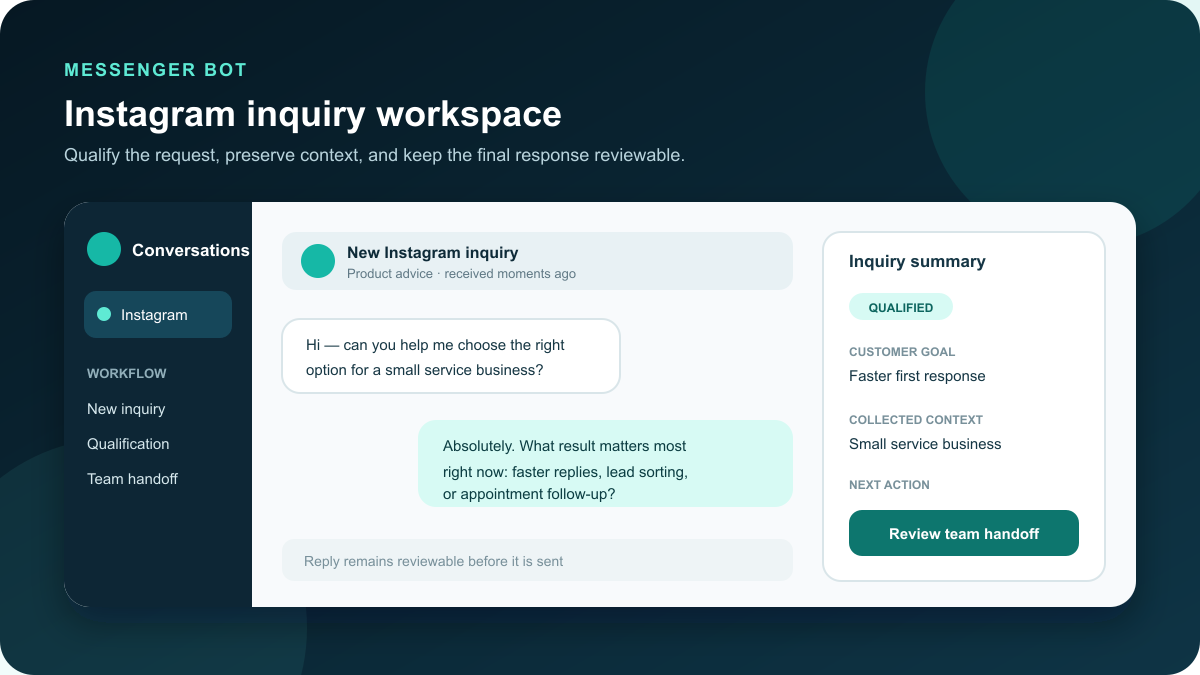
Instagram inquiry workflows for business teams
Turn a busy Instagram inbox into a reviewable path from first question to
qualified inquiry. Messenger Bot helps your team organize common replies,
collect useful context, and hand conversations to the right person when a
customer needs individual attention.
prepare a useful response, and involve a team member when judgment is
needed.
Give every incoming inquiry a clear first step
Instagram can be an effective place for customers to ask about products,
availability, appointments, services, and support. It can also become
difficult to manage when several people answer from the same business
account, common questions arrive repeatedly, or important inquiries sit
between casual messages. Instagram DM automation is most useful when it
brings order to that work without removing the team’s judgment.
Start with a simple promise: every new inquiry receives a clear
acknowledgment and an obvious next step. A welcome reply can set
expectations, offer a small set of useful choices, and direct the person
toward the right conversation path. The goal is not to make every
interaction feel identical. It is to make sure the team begins with the
context it needs to help.
Messenger Bot gives businesses a workspace for designing those paths,
previewing the order of each reply, and deciding where a person should
take over. That makes the workflow easier to review before it touches a
real customer conversation.
Design an Instagram DM automation workflow around useful context
A strong qualification flow asks fewer, better questions. A service
business might ask what kind of help the customer needs, the preferred
timing, and whether the request is urgent. A retailer might offer product
categories, availability help, order support, or a path to a team member.
An agency might separate new-project inquiries from current-client
support. Each answer should help the team make a real next decision.
Begin by listing the three to five reasons people most often message the
account. Create one short path for each reason. Use plain labels that a
customer can understand immediately, and avoid asking for details that
the team will not use. When a question requires nuance, route it to a
person instead of extending the automated exchange.
Automated Instagram messaging should also explain what happens next. If
a team member will review the inquiry, say so. If the customer needs to
choose an appointment type or provide an order reference, make that
action clear. A useful workflow reduces uncertainty for the customer and
gives the team a consistent starting point.
Before enabling the flow, test each choice from beginning to end. Confirm
that every branch leads somewhere intentional, every handoff gives the
team enough context, and every reply reflects the same business voice.
This review is where teams catch confusing labels, loops, dead ends, and
requests that ask too much too early.
The best question is not the one that collects the most information. It
is the one that changes the team’s next action. If the answer does not
influence routing, timing, qualification, or the response a person will
provide, remove it from the first conversation. A shorter path is easier
for customers to complete and easier for the team to keep accurate.
Write each option in the customer’s language. A visitor may understand
“I need help choosing” more quickly than an internal label such as
“pre-sales qualification.” The team can still map that choice to its
operating process behind the scenes. Clear customer wording reduces
wrong turns without exposing the company’s internal structure.
Choose the right response pattern for each kind of message
Not every message needs the same level of automation. A practical plan
groups inquiries by what the customer needs and by how much judgment the
response requires. The table below gives a starting point that teams can
adapt to their offers, service standards, and operating hours.
| Inquiry type | Useful first response | Context to collect | Recommended handoff |
|---|---|---|---|
| Product or service question | Acknowledge the request and offer the relevant category choices | Need, timing, location, or preferred option | When the customer needs a recommendation or exception |
| Appointment inquiry | Explain the next scheduling step and expected response time | Service type, preferred day, and urgency | When availability, accessibility, or special requirements matter |
| Existing order or account help | Confirm that the team can help and request a safe reference | Order reference and a short description of the issue | As soon as the request requires account-specific review |
| Partnership or project lead | Set expectations and ask what result the person wants | Project type, timing, and appropriate contact details | After basic fit is clear or sooner for unusual requests |
| Complaint or sensitive question | Acknowledge the concern without debating or making a promise | Only the minimum context needed to route the conversation | Immediately to the responsible person |
Treat this as an operating map, not a script that must cover every
possible message. A customer should always have a clear way to reach a
person. When the workflow cannot confidently identify the right path,
the safest fallback is a short acknowledgment followed by a visible
handoff.
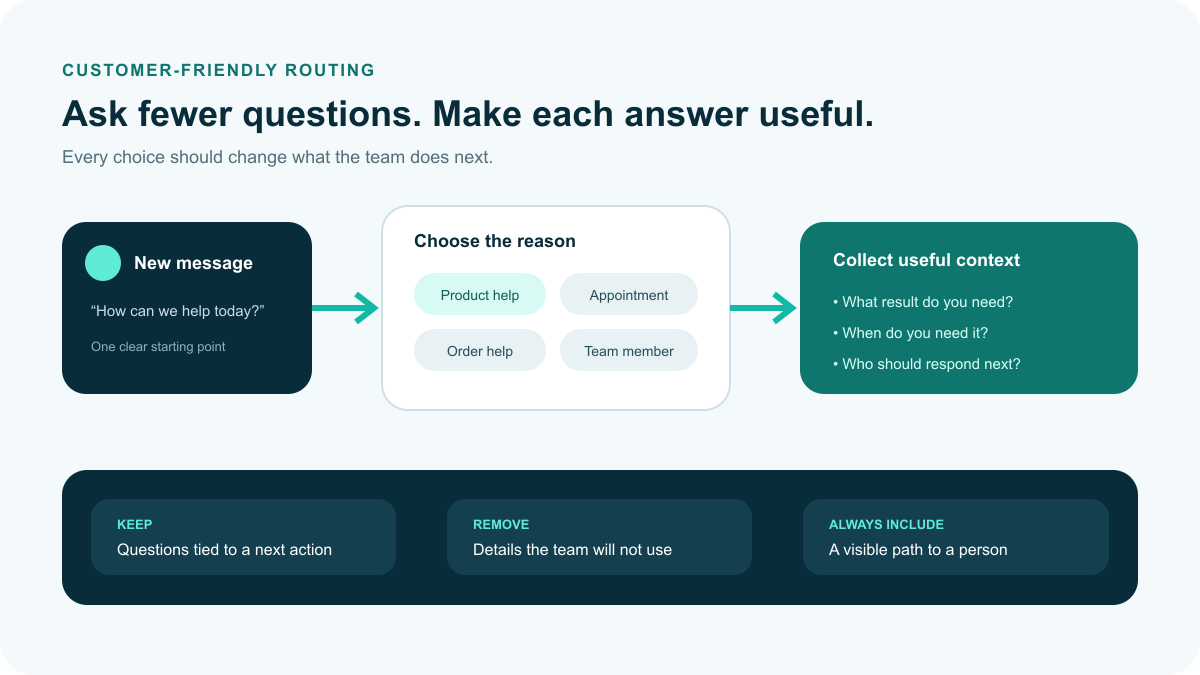
information needed to route the conversation.
Keep human handoff visible and easy to use
Some conversations should never stay inside a prepared flow. Pricing
exceptions, sensitive support questions, unusual requirements, high-value
opportunities, and frustrated customers all benefit from human judgment.
Define those handoff points before the workflow is enabled.
A handoff should tell the team why the conversation needs attention and
preserve the answers already collected. The customer should not have to
repeat the same information. The team member should be able to understand
the request, review the conversation, and continue in a natural voice.
It also helps to agree on ownership. Decide who watches new handoffs,
which inquiries need priority, and what should happen outside normal
business hours. Clear ownership turns a workflow into an operating
process instead of another inbox rule that people assume someone else is
monitoring.
Set a realistic response expectation for each handoff. If the team
reviews messages during business hours, say that instead of implying an
immediate response. If different people own sales, support, and
appointments, route the conversation to the correct owner or clearly
label the reason for the handoff. Accurate expectations build more trust
than a fast automated promise the team cannot consistently keep.
Review the handoff from both sides. The customer should see that the
conversation is moving forward. The team should see the customer’s
selections, the latest message, and the reason attention is required.
If either side lacks that context, revise the branch before enabling it.
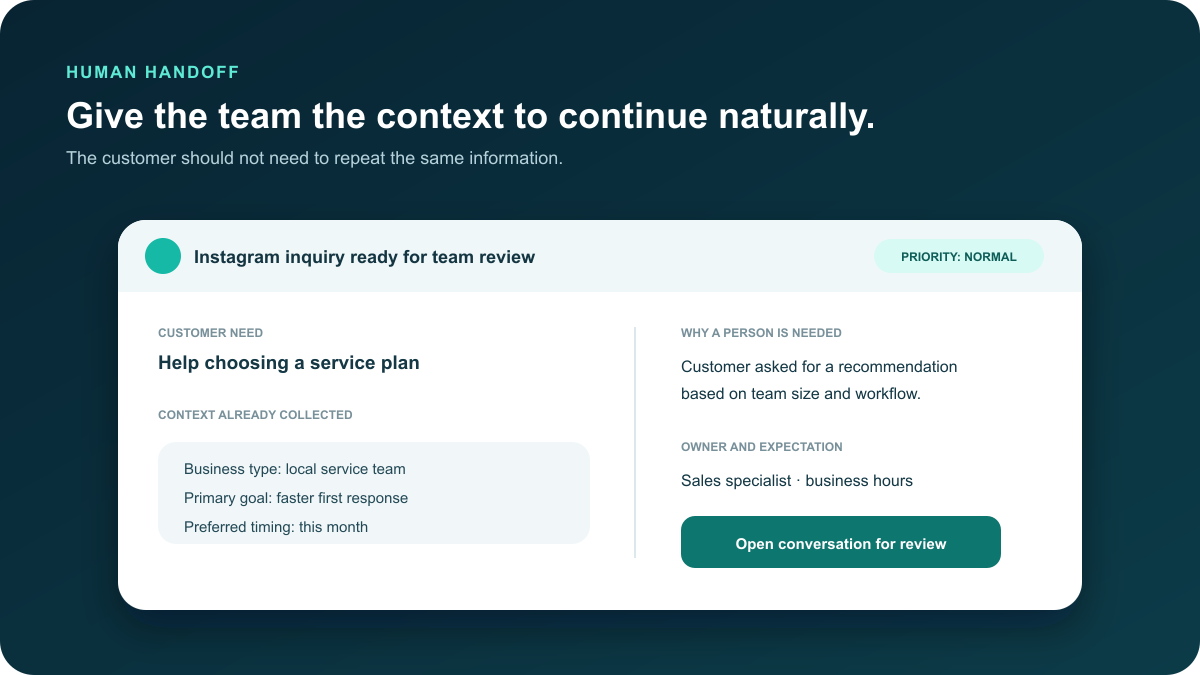
the conversation needs attention.
Use Bring Your Own Key (BYOK) within a reviewable response process
Bring Your Own Key (BYOK) lets a team connect its own supported model
access for AI-assisted reply work. That can help prepare a response from
the context collected in the conversation, adapt a draft to the
business’s tone, or summarize what a team member needs to review.
BYOK assistance should have a defined boundary. Decide which kinds of
replies may use suggestions, which topics always require a person, and
who reviews the result. Keep instructions specific to the business and
test examples before using the workflow with customers. AI assistance is
most useful when it supports a clear operating process rather than
replacing accountability.
Build a small evaluation set before relying on suggestions. Include a
straightforward product question, an unclear request, a complaint, a
pricing exception, and a message that should be handed to a person
immediately. Review whether the suggested response uses current business
information, respects the required boundary, and makes the next action
obvious. A workflow is not ready merely because one demonstration looked
good.
Keep the source information maintained as the business changes. Offers,
hours, availability, policies, and escalation contacts can become stale.
Assign someone to review those details and pause affected branches when
the team cannot verify the answer. A controlled workflow makes it easier
to update one approved source instead of correcting inconsistent replies
after customers receive them.
Measure whether the workflow is helping customers and the team
A useful Instagram DM automation plan measures service quality, not just
the number of automated replies. Begin with a small set of indicators
the team can review without creating a reporting burden. Track how many
inquiries reach the correct owner, how often customers complete the
qualification path, and where people request a team member or abandon
the conversation.
Review handoff quality separately from volume. A high number of handoffs
can be healthy when the workflow correctly identifies conversations that
need judgment. The more important question is whether the handoff
includes enough context and reaches the right person. Sample real
conversations, remove private details from team reviews, and look for
repeated confusion.
-
Routing accuracy: Did the inquiry reach the person or
process that could actually help? -
Qualification completion: Did customers understand
the choices and provide the context needed for the next step? -
Kejelasan serah terima: Could a team member continue without
asking the customer to repeat the same information? -
Tingkat fallback: Which messages repeatedly reach a
generic fallback and therefore need a clearer path? -
Response expectation: Did the message accurately
explain when and how the team would follow up?
Check these indicators after the first week and again after the first
month. Change one part of the flow at a time so the team can understand
whether the revision helped. Keep a short change note with the reason,
the branch affected, the person who reviewed it, and the date it was
enabled.
Pair the numbers with a brief conversation review. A completion rate
cannot show whether the wording felt respectful, whether a customer
understood the next step, or whether the team received enough context to
help. A small, regular quality sample keeps the measurement tied to the
customer outcome the workflow is meant to improve.
Complete a pre-flight check before enabling the workflow
-
Confirm account ownership. Use a business account your
team is authorized to manage and verify who can change the workflow. -
Review the customer paths. Test every option, fallback,
and handoff from a customer’s point of view. -
Check the questions. Ask only for information that
supports the next business action. -
Set the human boundary. Document the topics, wording,
and customer signals that require a team member. -
Test BYOK assistance. Review representative replies and
confirm that suggestions stay within the approved voice and claim
boundaries. -
Assign ownership. Name the people responsible for
handoffs, maintenance, and periodic workflow review. -
Run a final team preview. Enable the workflow only
after the people who will operate it understand each branch.
Connect the workflow to the rest of your customer conversation process
Instagram is often one entry point in a larger customer journey. Link the
workflow to the resources your team already uses to answer questions and
decide what should happen after qualification. Teams can
configure their social channels,
build custom qualification flows, dan
manage public comment triggers from a
consistent operating approach.
Keep each channel’s expectations clear. A public comment, a direct
message, and an ongoing support conversation may need different wording
and different handoff rules. Consistency should come from shared
principles—useful context, truthful expectations, and visible team
ownership—not from sending the same reply everywhere.
Decide what the customer should experience after qualification. That may
be a booking step, a product recommendation, a support review, or a
conversation with the appropriate specialist. Make sure the destination
is current and usable on a phone. The first message can be well designed
and still fail the customer if the next page is broken, the form asks for
the same details again, or the team does not recognize the handoff.
Document the workflow in plain language so a new team member can
understand it. Include the entry points, customer choices, handoff
reasons, expected response windows, and the person responsible for
maintenance. This shared view helps the business keep its Instagram
process aligned with the rest of its customer service.
Instagram DM automation questions from business teams
What should a business automate first in Instagram DMs?
Start with a clear acknowledgment and the two or three questions that
help your team route an inquiry. Good first candidates include product or
service selection, appointment type, order support, business hours, and a
request for a team member. Keep the first version small enough that the
people operating it can test every branch and understand every handoff.
Should every Instagram message receive an automated answer?
No. A useful workflow defines where prepared replies end. Complex
questions, exceptions, sensitive issues, frustrated customers, and
conversations that require judgment should move to a person. The
customer should know when that handoff happens, and the team member
should receive the context already collected.
How does BYOK fit into an Instagram response workflow?
Bring Your Own Key (BYOK) can support AI-assisted response suggestions
within rules set by the business. Teams should define the allowed use
cases, test representative examples, and keep review available. BYOK does
not remove the need for accurate business information, clear escalation
rules, or a person who owns the final customer outcome.
How often should the workflow be reviewed?
Review it after the first week, again after the first month, and whenever
the business changes an offer, support process, or account responsibility.
Look for abandoned branches, repeated handoffs, confusing choices, and
questions the workflow does not answer well. Update only after the team
understands the reason for the change and has tested the revised path.
What should a team check before turning on a new Instagram DM branch?
Confirm that the branch serves one clear customer need, asks only for
useful context, gives an accurate next-step expectation, and has a
tested human fallback. Then preview it on a phone, check every button and
destination, and have the person who will own the handoff approve the
final path. If the team cannot explain who responds next, keep the branch
in review.
Build a more controlled Instagram messaging workflow
Start with the inquiries your team handles most often. Give customers a
useful first step, collect only the context that matters, and make human
handoff part of the design from the beginning. Messenger Bot helps your
team turn those decisions into a workflow you can preview and review
before it becomes part of daily customer conversations.



 Bahasa Indonesia
  English
  Tagalog
  简体中文
简体中文  العربية
  हिन्दी
  Português do Brasil
  Español de México
  Français
  বাংলা
বাংলা  香港中文
香港中文  繁體中文
繁體中文  Nederlands
  Deutsch
  日本語
日本語  한국어
한국어  Polski
  Русский
  Español
  Tiếng Việt