
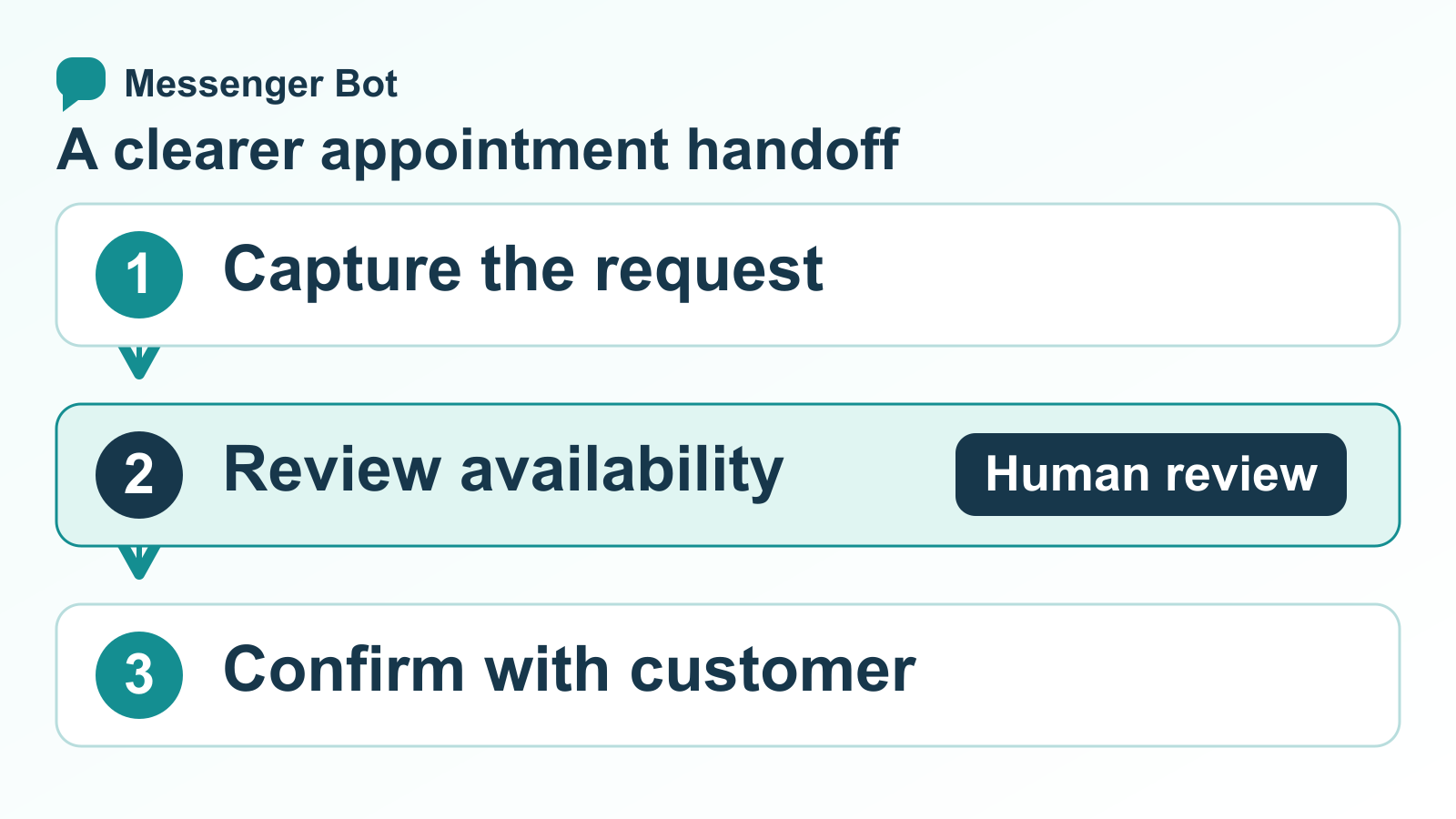
An appointment chatbot can make it easier for a customer to explain what they need and reach the right next step. That next step might be a booking page, a request for a staff member to confirm availability, or a connected scheduling system. Those paths are not interchangeable: a message that records a preferred time is not proof that a calendar slot has been reserved.
This guide focuses on the practical setup decisions behind an appointment flow: what to ask, how to route the request, what a scheduling connection must verify, and how to handle changes without promising a feature your software has not confirmed. If your main goal is to respond to leads quickly, start with our guide to speed to lead response time, then use the checklist below to build a clear appointment handoff.
Choose the right appointment-chatbot path
Before writing messages, decide what the customer can actually complete in the chat. Many businesses combine several paths, but each one needs an honest label and a reliable owner.
Answer questions before the customer books
A simple flow can explain services, business hours, location, who a service is for, and what information a customer should prepare. It can then direct the person to the next step. This path is useful when customers need context before choosing a time, but the flow should not suggest that it checked a calendar unless a connected scheduling service performed that check.
Collect a request for staff confirmation
If no live calendar connection is available, collect a small amount of relevant information and clearly describe the result as a request. Ask which service the person wants, what days or time ranges work, and how the business should follow up. A staff member can review availability and confirm the final appointment through the business’s normal scheduling process.
Send the customer to a booking page
A business may use an external booking page as the source of truth. The chat can explain what happens next and provide a link to that page. Before using this path, test the link on a phone, confirm that it opens the correct business and service, and check what the customer sees after submitting a booking. Do not label the appointment confirmed until the booking service shows that it succeeded.
Use a connected calendar only when it is verified
A true calendar-connected flow needs a supported connection that can check availability and return a successful booking result. The business should test the connection, permissions, time-zone behavior, failed requests, and duplicate-slot handling before offering live appointment selection. A chatbot or a calendar link by itself does not prove that those systems are synchronized.
Write down which path each service uses. If some services can be booked directly and others require staff review, explain the difference before collecting details. For a broader customer-service workflow, see our small business sales chatbot guide.
Map the conversation before building it
A useful appointment flow feels short to the customer because the team has already decided what information matters. Sketch the path from the first question to a confirmed next step before adding messages or buttons.
意図
- What the customer needs
- A clear choice such as booking, changing a booking, or asking a question.
- What the business must verify
- That each choice routes to the correct service and owner.
- Safe fallback
- Offer a contact option when the request does not fit the listed choices.
資格確認
- What the customer needs
- A few relevant questions, not a long form.
- What the business must verify
- That the answers are enough to route the request and are handled appropriately.
- Safe fallback
- Let the person skip a nonessential question or ask for staff help.
可用性
- What the customer needs
- A choice of available times or a way to request a time.
- What the business must verify
- Which scheduling system is authoritative and whether it returned current availability.
- Safe fallback
- Collect preferred times and mark them as preferences, not reserved slots.
確認
- What the customer needs
- A plain-language status and the next action.
- What the business must verify
- That a booking reference or success response exists before saying “confirmed.”
- Safe fallback
- Say the request was received and explain who will confirm it.
Changes
- What the customer needs
- A reliable way to cancel, reschedule, or reach a person.
- What the business must verify
- That the old slot is released only after the replacement is confirmed.
- Safe fallback
- Route the change to the booking service or an assigned staff member.
Keep a named owner for each fallback. If the automated path cannot confirm a booking, the person reviewing the request should know which team member to contact and what response time the business can actually meet. Avoid promises such as “we will reply in five minutes” unless the team has a process and coverage that can meet them.
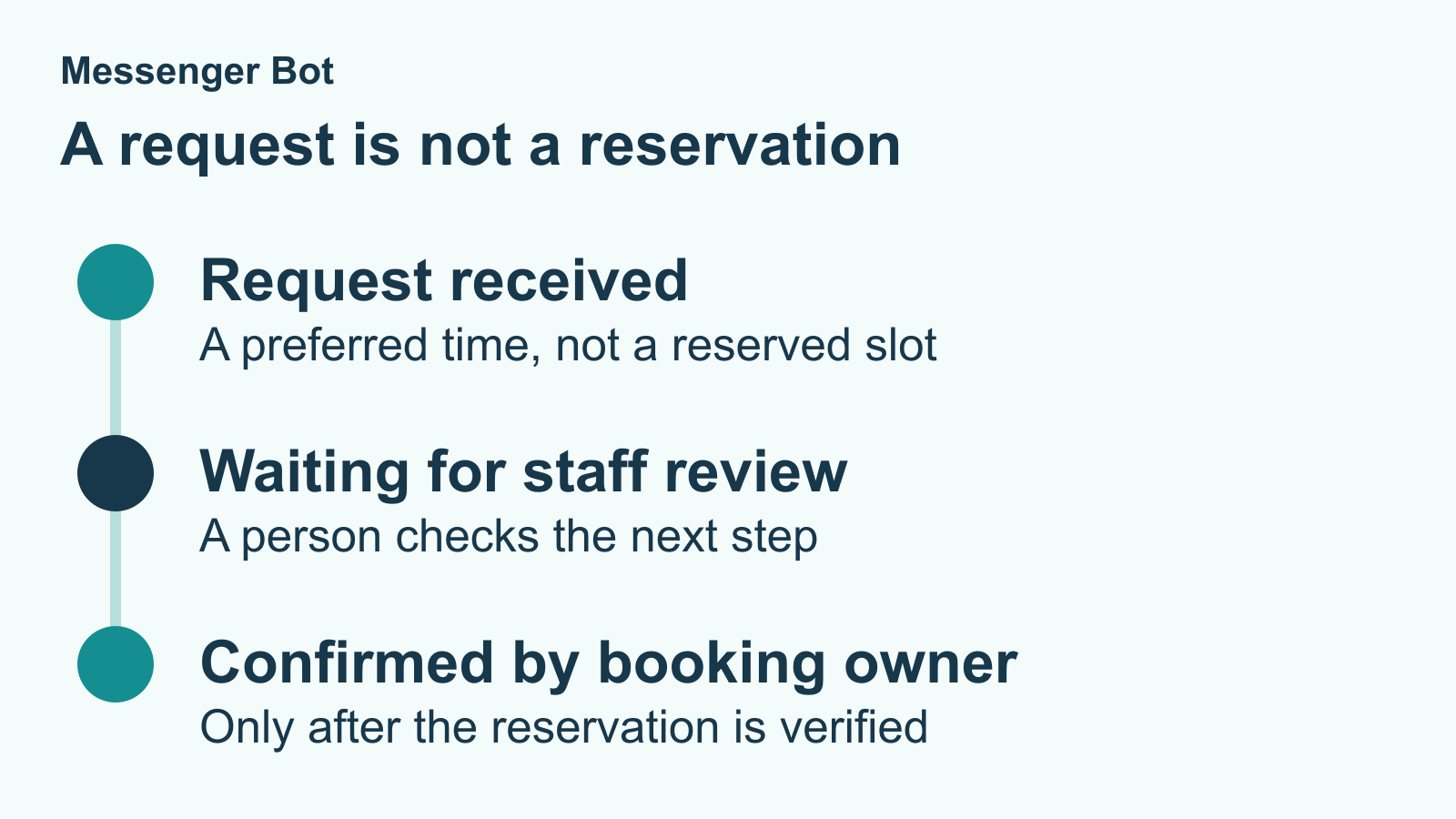
| Appointment status | What the customer should understand |
|---|---|
| Preferred time received | The business has a request to review, not a reserved slot. Explain who checks availability and how the customer can reach staff. |
| Booking page opened | The customer still needs to complete the booking on that page. Opening a link does not prove that an appointment was created. |
| Appointment confirmed | Staff or the authoritative booking service has confirmed the appointment. Give the verified time and next step only after that confirmation exists. |
| Change requested | A cancellation or rescheduling request needs the responsible staff or booking service. Do not claim that the old slot was released or a replacement reserved until the change is confirmed. |
What Messenger Bot can support in the conversation
The current Messenger Bot feature overview describes Facebook and Instagram comment and direct-message workflows, lead capture, follow-up paths, handoff, and visual automation. Its public overview does not promise that every plan includes a native calendar connector or automatic appointment reservation. Confirm the current plan and supported connections before describing those functions as available.
Within a verified messaging workflow, a business can design a clearer path for an appointment inquiry: acknowledge the request, ask a relevant follow-up question, guide the person to a booking link, or direct the conversation to a staff member. The exact actions depend on the active workspace, connected Page, selected plan, and configured flow. Review the current Messenger Bot feature overview before promising a particular action.
For a request-only setup, write separate messages for these outcomes:
- Request received: Tell the customer their preferred service and time were recorded for review. Do not call the request a confirmed appointment.
- Booking link opened: Explain that the customer still needs to complete the booking on the external page.
- Booking confirmed: Use this only after the connected booking service or staff process confirms the appointment.
- Needs staff help: State that a person will review the request, using only a response window the business can support.
Start with one service and one clear outcome. Add more branches only when each branch has an owner, a reliable next step, and a test case. If you are new to the platform, チュートリアルを閲覧する for setup guidance on supported messaging workflows.
Verify the booking system before offering live slots
A calendar connection should be tested as a business workflow, not judged by whether a settings screen says “connected.” Use a test calendar or a safe internal test appointment and confirm each of the following before exposing available times to customers:
- Correct calendar and service: Confirm the connection points to the calendar, staff member, service type, and location intended for this customer path.
- Current availability: Make a test change in the source calendar and confirm the booking experience reflects it before claiming a slot is open.
- Time zones: Compare the displayed time, business time zone, and calendar event. Test daylight-saving transitions when they apply to the business.
- Double-booking behavior: Attempt two test bookings for the same slot. Confirm the second request cannot silently overwrite or duplicate the first.
- Failure messages: Temporarily test an unavailable or failed connection. The customer should see a clear retry or staff-contact option, not a success message.
- Changes and cancellations: Verify who can reschedule or cancel and whether the original slot is released correctly after the new booking is confirmed.
- Access and data: Review permissions and the information transferred. Connect only what the workflow needs and limit access to the appropriate people.
Record the test date, account or calendar tested, expected result, actual result, and owner of any failure. Repeat the checks after a meaningful change to the booking system or flow. If the connection cannot return a dependable result, switch to a request-and-confirmation path until the issue is fixed.
Ask only for details that improve the appointment handoff
Every extra question adds effort. Begin with the minimum needed to route the request, such as the service category, preferred location, and one or two time preferences. Ask for contact details only when the business needs them to follow up. Tell customers why a detail is requested and provide a human alternative when they are uncomfortable sharing it in chat.
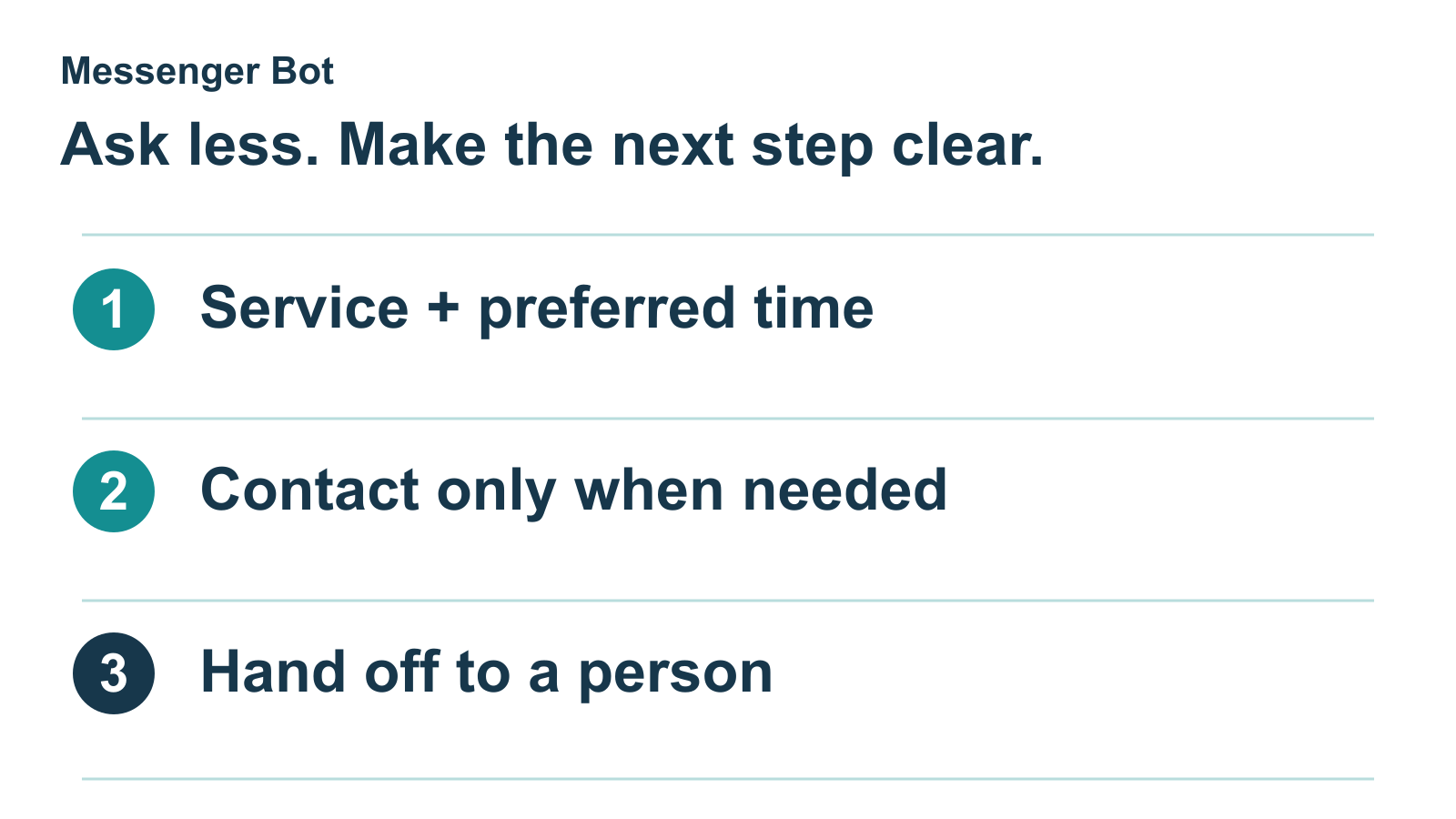
Do not ask for payment-card numbers, account passwords, or unrelated personal information in a booking conversation. If an appointment requires sensitive records or documents, point customers to the business’s approved secure process instead of collecting them in an ordinary message flow. This keeps the conversation focused and makes it easier for staff to review the request.
Make optional questions visibly optional. A customer who only wants to ask about opening hours should not have to complete an intake form. When the request needs an expert decision, ask one concise clarifying question and then offer a staff handoff rather than looping through more automated prompts.
Confirmations and reminders need a dependable trigger
A reminder is useful only if it is tied to a real appointment record and sent through a channel the customer expects. First decide which system creates the appointment record and which team owns the communication. Then verify the trigger, timing, message content, and failure handling in that system.
Separate a booking receipt from a reminder. A receipt tells the customer that a confirmed booking exists and gives the correct date, time, location, and next step. A reminder is a later follow-up tied to that appointment. If the booking system has not confirmed the event, send a request acknowledgement instead of a booking receipt or countdown reminder.
Before adding a reminder path, check the customer’s selected communication channel, current consent and platform rules, local business practices, and who responds to replies. A person who answers “I need to change my time” should reach a process that can actually change the appointment. Do not advertise automatic SMS, calendar invitations, or a reminder schedule unless those actions have been configured and tested in the relevant service.
For message wording and timing ideas, use our appointment reminder templates as examples to adapt after the business confirms its own capabilities. Templates are starting points, not evidence that a particular connection is active.
Make rescheduling and handoff predictable
Customers should not need to restart a conversation to change an appointment. Give them a visible route for rescheduling, cancellation, or a question about an existing booking. If the scheduling service supports self-service changes, test that it finds the correct appointment, applies the business’s policy, confirms the new time, and releases the old time only when appropriate.
If changes require staff, say so and capture only enough information for the team to locate the request. Make sure the handoff reaches a monitored destination and that staff can distinguish a confirmed appointment from an unreviewed request. A flow that says “I’ve passed this to the team” should have a real routing destination behind it.
Set escalation conditions for cases the automation should not resolve: a booking conflict, a request outside listed services, an accessibility need, a customer who asks for a person, or a problem with payment or account access. Pause the automated branch when a human is handling the issue so that a second automated answer does not make the customer repeat themselves.
Keep the follow-up reference the same when a request moves from chat to staff review. If a customer contacts the business again, staff should check the existing request before starting another one. This reduces conflicting updates without implying that a calendar reservation already exists.
Test the complete path before inviting customers
Walk through the flow on a phone and desktop with test data. Test the successful path, but spend at least as much attention on incomplete answers, unavailable slots, duplicate attempts, late-night requests, and customers who choose “other.” Check that buttons work, links open the intended page, confirmation language matches the real result, and a staff member can see the handoff.
- Submit a request without selecting a time and confirm the message does not imply a reservation.
- Choose a valid slot and verify it appears once in the source calendar before presenting a success state.
- Submit the same test twice and check that the system or staff process handles duplicates.
- Change the appointment and verify the customer, calendar, and staff view agree on the new time.
- Interrupt the flow, return later, and confirm the customer can continue or reach a person.
- Use a small-screen device and verify the customer can read the choices and reach the handoff without horizontal scrolling.
After launch, review the steps where customers stop, ask the same question, or need staff help. Compare the number of requests, confirmed appointments, reschedules, and unresolved handoffs using the business’s own records and equal reporting periods. These counts help identify a confusing step; they do not prove that the chatbot caused a change by themselves. Update the flow only after checking that the new wording and routing match the actual scheduling process.
Appointment chatbot questions
What does an appointment chatbot do?
An appointment chatbot guides a customer through a booking-related conversation. Depending on the connected tools, it may answer common questions, collect a request, link to a booking page, or help complete a calendar-connected reservation. The business should label each result accurately and confirm which system owns the appointment.
Can Messenger Bot check a live calendar or reserve an appointment?
Do not assume that a messaging workflow includes live calendar access. Messenger Bot’s public feature overview describes messaging workflows, lead capture, follow-up, handoff, and visual automation; a calendar connection must be verified separately for the active plan and setup. Without a tested scheduling connection, collect a request or send the customer to the business’s booking page.
Does a preferred time mean the appointment is confirmed?
No. A preferred time is a request until the booking system or responsible staff member confirms it. Use language such as “request received” while the team checks availability, then send the confirmed date and time after the source of truth records the booking.
What should an appointment chatbot ask first?
Start with the service the customer needs and the information required to route it. Ask for a preferred time only when that helps the next step. Avoid collecting details that the team does not use, and offer a clear path to a person when the request does not fit the choices.
How should a chatbot handle a cancellation or rescheduling request?
Route the request to the scheduling service only if that service can identify and update the correct booking. Otherwise, send it to a monitored staff process and explain what the customer should expect. Do not claim the old time was released or a new time was reserved until the change is confirmed.
Can an appointment chatbot send automatic reminders?
That depends on the configured messaging and scheduling tools. Confirm that a reminder is linked to a real appointment, uses the customer’s expected channel, and has a working path for replies or changes. If those conditions are not met, describe the reminder as a separate team or booking-system task.
To compare plans and supported workflows, Check Current Pricing and review the product’s current documentation before choosing a setup.



 日本語
日本語  English
  Tagalog
  简体中文
简体中文  العربية
  हिन्दी
  Português do Brasil
  Español de México
  Français
  বাংলা
বাংলা  香港中文
香港中文  繁體中文
繁體中文  Nederlands
  Deutsch
  Bahasa Indonesia
  한국어
한국어  Polski
  Русский
  Español
  Tiếng Việt