
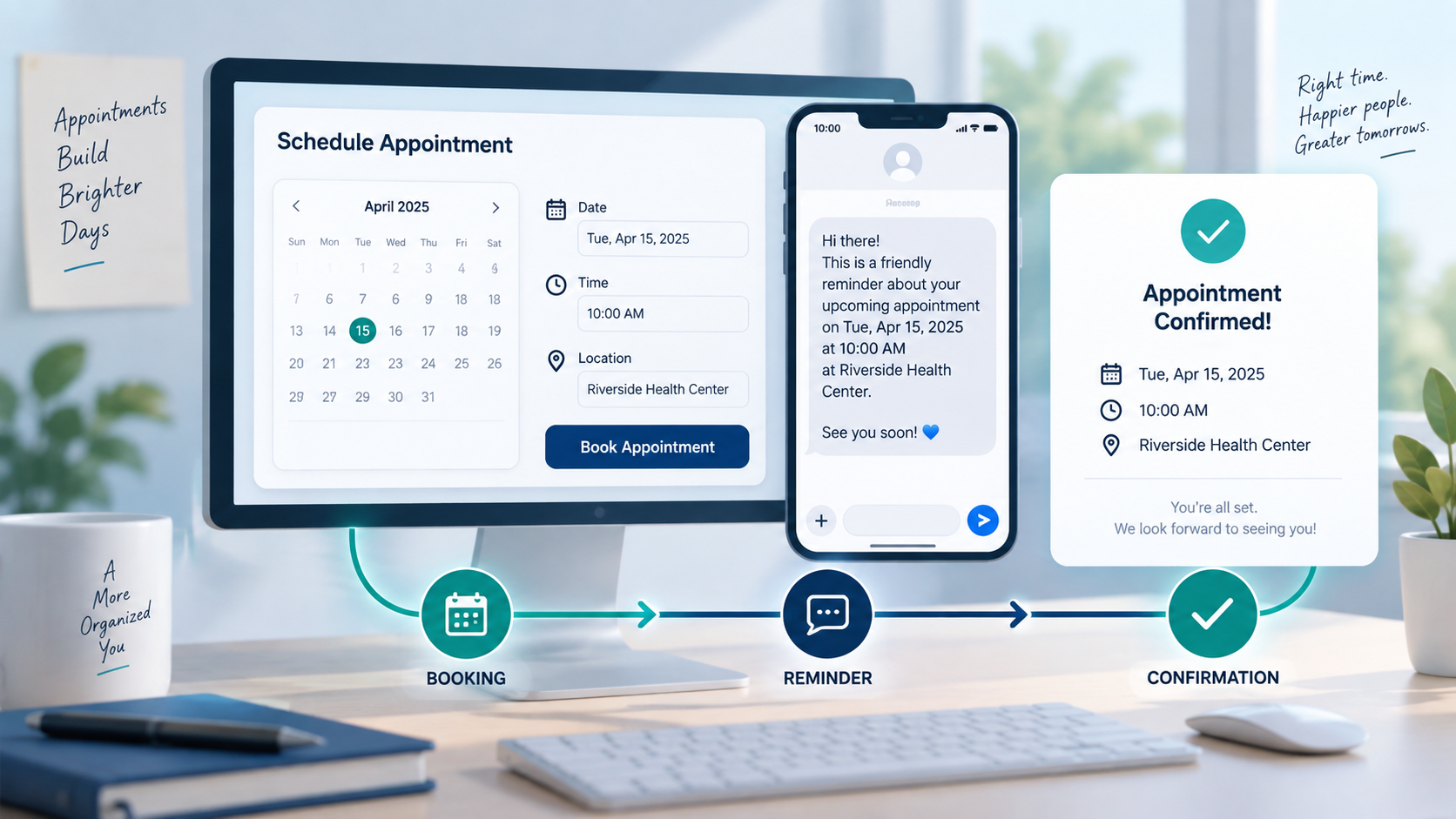
Deploying an appointment chatbot enables service businesses, advisory practices, and consulting teams to streamline client bookings, reduce phone tag, and coordinate calendar availability beyond peak office hours while keeping administrative overhead manageable.
How an Appointment Chatbot Replaces Back-and-Forth Scheduling
Client-facing organizations spend substantial time coordinating consultations, intake interviews, and appointments. Managing schedules manually requires multiple calls, messages, and follow-ups to find an open window. When prospective clients reach out after business hours, staff cannot always respond immediately. If inquiries wait hours for replies, engagement cools and prospects turn elsewhere.
Jeden appointment chatbot addresses this friction by converting messaging channels into self-service scheduling portals. Operating across Facebook Messenger, Instagram direct messages, or website chat, the assistant greets prospective clients promptly. Rather than directing users to static forms, the chatbot conducts a structured intake dialogue to clarify services, verify qualification criteria, outline available timeframes, and coordinate bookings.
Adopting an automated chatbot appointment workflow accelerates response velocity, protecting opportunities that might otherwise slip away. For teams evaluating immediate communication, our guide on speed to lead response time explains how rapid response windows correlate with higher completion rates. Automating repetitive intake frees administrative staff to focus on customer experience and client preparation.
Core Architecture of an Appointment Booking Chatbot
Wdrożenie skutecznego appointment booking chatbot requires more than sharing a calendar link in a chat thread. A dependable assistant follows a structured architecture designed to gather essential details, prevent scheduling conflicts, and maintain data accuracy across systems.
Intake and Client Qualification
Before presenting open slots, the assistant qualifies prospects to ensure mutual fit. Different requests require distinct consultation lengths, specialist expertise, or preparation. A structured intake flow guides users through targeted screening prompts:
- Service Category: Clarifying the consultation type, technical review, or service package required.
- Project Urgency: Establishing whether the request involves routine advisory work, introductory discovery, or urgent escalation.
- Location and Format: Determining whether the session occurs at an office, on-site, or virtually via video conference.
- Scope and Parameters: Confirming project details to assign an appropriate service tier or senior practitioner.
Screening inquiries during initial intake protects specialist calendars for qualified engagements. For practical frameworks on structuring qualification conversations, consult our small business sales chatbot guide.
Real-Time Availability Verification
Jeden automated scheduling chatbot checks calendar availability dynamically rather than displaying static menus. System designers establish booking rules around defined operational parameters:
- Operating Hours: Limiting bookings to approved business hours, shifts, and holiday schedules.
- Buffer Windows: Enforcing transition periods between meetings so team members can prepare notes or travel.
- Slot Duration: Adjusting scheduled intervals based on service complexity, from thirty-minute reviews to extended sessions.
- Capacity Limits: Capping bookings during any single timeframe according to staff coverage.
Calendar coordination is an overarching architectural pattern. When using Messenger Bot for front-end messaging, verify your platform’s active integrations, permissions, and scheduling connectors before enabling live booking actions.
Contact Capture and Booking Confirmation
Once a client selects an available slot, the assistant collects contact details, including full name, phone number, email address, and preparation notes. The system reserves the slot to prevent simultaneous double booking and presents a clear confirmation summary directly inside the chat window.
Comparing Rule-Based Flows and AI-Driven Scheduling
When selecting a technical approach for automated scheduling, teams generally weigh structured rule-based systems against conversational artificial intelligence assistants. Understanding how these approaches handle customer inquiries clarifies which model fits your operational workflow.
| Feature Dimension | Structured Rule-Based Flows | Conversational AI Assistants | Hybrid Implementation (Recommended) |
|---|---|---|---|
| Inquiry Handling | Guides users through button selections and fixed decision branches. | Interprets natural language queries and parses complex requests. | Uses conversational AI for greeting and intake, then presents structured buttons for selecting dates and times. |
| Execution Predictability | High predictability; responses adhere strictly to scripted templates. | Dynamic conversational replies that require clear operational guardrails. | Combines controlled business logic with conversational flexibility to maintain brand standards. |
| Handling Unexpected Questions | Stops or loops when users ask questions outside predefined branches. | Answers contextual questions about pricing, location, or credentials before resuming. | Resolves ad-hoc questions using verified guidance before returning clients to booking. |
| Calendar Coordination Patterns | Triggers predefined scheduling actions upon button selection. | Translates descriptive scheduling phrases into structured timestamps. | Extracts intent conversationally, then confirms verified timestamps through calendar buttons. |
| Best Operational Fit | Standardized appointments with uniform durations and predictable requests. | Consultative service businesses where prospects need answers before booking. | Service firms, advisory practices, and agencies needing consultative guidance and precise booking. |
While conversational artificial intelligence excels at answering preliminary inquiries and clarifying requirements, scheduling confirmations benefit from structured interfaces. A hybrid model lets prospects converse naturally while using interactive date and time pickers to secure appointments without ambiguity.
Practical Chatbot Appointment Workflows Across Service Sectors
Different industries manage distinct scheduling requirements. Examining practical workflows shows how a calendar booking chatbot adapts to specialized operational demands.
Professional Consultations and Advisory Services
Accounting firms, legal practices, and corporate consultancies require rigorous intake vetting before advisors commit time to prospective clients. An automated assistant greets visitors, asks about corporate needs, service requirements, and project deadlines, and routes qualifying prospects to booking coordinates. Ineligible inquiries receive educational resources or a general contact form, preserving high-value partner calendars for prime engagements.
Wellness Studios and Personal Care Services
Spas, wellness studios, and styling salons manage appointment combinations where durations, specialist assignments, and rooms must align. A scheduling assistant lets returning clients choose specialists, select service packages, and receive pre-treatment preparation checklists directly in chat. To see how beauty and wellness brands structure conversational client acquisition, read our guide to salon marketing strategy.
Home Improvement and Field Service Contractors
Plumbing contractors, electrical specialists, and HVAC repair services receive urgent inbound messages while field technicians work on site. When phone calls go unanswered, an automated assistant collects service descriptions, property addresses, and access notes. Integrating conversational booking with telephony follow-up workflows helps teams capture service inquiries outside peak phone coverage. For configuration steps on pairing chat workflows with missed-call automation, review our missed-call text-back setup guide.
Reducing No-Shows with Automated Reminder Sequences
Securing an appointment on the calendar represents only the initial step; ensuring the client attends is equally critical. Unattended consultations drain staff capacity, disrupt revenue targets, and leave specialist hours unbilled. When confirmations rely solely on unread emails, scheduling friction and no-show rates increase.
Deploying automated reminder sequences inside messaging channels improves attendance reliability by delivering time-sensitive notifications directly where clients actively communicate.
The Three-Stage Notification Cadence
A dependable notification workflow keeps clients informed leading up to their appointment:
- Immediate Booking Confirmation: Delivered promptly after scheduling. Summarizes reserved date, time, meeting link or address, assigned specialist, and calendar details.
- Twenty-Four-Hour Advance Confirmation: Sent one day prior to the meeting. Invites the client to tap “Confirm Attendance” or “Need to Reschedule” so staff can reallocate unconfirmed slots.
- Two-Hour Day-Of Reminder: Delivered shortly before the appointment, providing transit directions, parking instructions, or virtual access links.
Frictionless In-Chat Rescheduling
Clients often miss appointments simply because unexpected conflicts arise and calling an office to cancel feels inconvenient during busy work hours.
An automated assistant minimizes this friction by embedding a “Reschedule Appointment” button directly inside reminder notifications. Tapping the button lets clients view updated openings and select an alternative time in chat. Once confirmed, the system reallocates the original slot for new bookings and updates team calendars. To explore structured notification messaging across SMS and chat, browse our curated collection of appointment reminder templates.
Designing Safe Escalation and Human Handoff Paths
Automated assistants streamline routine scheduling, but they should never operate as an isolated barrier between clients and your team. Bespoke requirements and complex scheduling conflicts require clear access to human oversight.
Establishing clear escalation triggers ensures conversations transition smoothly to team members whenever necessary:
- Complex Custom Inquiries: When a client requests non-standard project arrangements or technical details exceeding pre-approved guidance.
- Urgent Booking Conflicts: When a client urgently needs an appointment during a fully booked timeframe or requires emergency accommodation.
- User Preference Triggers: When sentiment analysis detects repeated frustration or when a customer explicitly requests to speak with staff.
- High-Value Account Inquiries: When intake responses indicate an enterprise-tier client requiring dedicated onboarding.
When an escalation condition triggers, the assistant informs the customer clearly: “I have shared your request with our scheduling coordinator, who will review your notes and respond here shortly.” The assistant pauses automated replies on the thread, prevents automated interruptions, and alerts the team’s shared customer inbox with full conversation history attached.
Implementation Checklist for Launching Your Scheduling Assistant
Rolling out an automated scheduling system requires organized operational planning before connecting software integrations. Following a methodical launch checklist ensures smooth deployment without business interruption.
Operational Rules and Constraint Mapping
Before building conversation flows, document your exact business operating constraints:
- Define standard appointment types, default durations, and necessary buffer intervals between meetings.
- Establish scheduling cutoffs, such as disallowing same-day bookings made less than three hours in advance.
- Clarify cancellation windows and advance deposit requirements for specific services.
- Determine which team members handle specific service categories and establish calendar assignment rules.
Conversational Flow and Copy Configuration
Draft user-friendly conversation prompts that align with your brand voice:
- Write a welcoming greeting that sets clear expectations regarding the assistant’s capabilities.
- Keep intake questions concise, asking only for essential qualification details to minimize drop-off.
- Design clear interactive button menus for service categories, dates, and morning or afternoon time preferences.
- Draft helpful fallback messages that guide users back to the main booking path if unrecognized inputs occur.
Technical Validation and Calendar Testing
Thoroughly test technical workflows before introducing the assistant to public traffic:
- Test time zone conversions carefully to ensure appointments book correctly across client and provider regions.
- Verify daylight saving adjustments, recurring holiday exclusions, and calendar buffer enforcement.
- Submit test bookings from mobile devices and desktop browsers to verify responsive layout performance.
- Simulate double-booking scenarios and verify that overlapping appointments are rejected reliably.
Team Onboarding and Continuous Workflow Review
Train front-desk staff and service specialists on managing the new workflow:
- Ensure team members know how to monitor active conversation threads, accept handoffs, and add internal notes.
- Review chat transcripts weekly during the initial month to identify common drop-off questions or points of confusion.
- Refine intake prompts and knowledge base answers continuously based on real client interactions.
To evaluate software solutions and compare platform capabilities, Check Current Pricing to review feature plans, or Przeglądaj nasze samouczki for comprehensive guides on configuring automated messaging systems.
Frequently Asked Questions About Appointment Chatbots
What is an appointment chatbot and how does it connect to a business calendar?
An appointment chatbot is an automated assistant that manages client booking inquiries within messaging channels such as Facebook Messenger, Instagram, or website chat. The assistant qualifies inquiries, presents available openings, and records reservations. Organizations should confirm their selected software platform’s native features and external calendar connectors to ensure synchronized scheduling.
How does an automated scheduling chatbot manage different time zones?
An automated scheduling chatbot identifies time zones using device settings, browser metadata, or direct user confirmation during intake. It converts provider availability into the customer’s local time and records confirmed meetings with standardized timestamps, ensuring both parties see matching calendar appointments.
Can a scheduling chatbot collect payments or deposits prior to booking?
Depending on your software architecture, an assistant can direct clients to secure checkout workflows or authorized payment links before confirming a reservation. Teams planning automated payment steps should verify supported payment gateways, checkout connectors, and transaction protections on their chosen platform prior to deployment.
How does an appointment chatbot handle client rescheduling and cancellations?
When a client requests a modification, the assistant guides them through a structured flow aligned with your cancellation policy. It displays updated openings, books the replacement time, releases the previous slot, and alerts team members, updating schedules without requiring front-desk phone calls.

 Polski
  English
  Tagalog
  简体中文
简体中文  العربية
  हिन्दी
  Português do Brasil
  Español de México
  Français
  বাংলা
বাংলা  香港中文
香港中文  繁體中文
繁體中文  Nederlands
  Deutsch
  Bahasa Indonesia
  日本語
日本語  한국어
한국어  Русский
  Español
  Tiếng Việt