

Mga Pangunahing Kahalagahan
- Useful Customer Replies: Gumamit ng bot chat Instagram workflows for suitable routine questions, with clear limits and a way to reach a person.
- Measure the Benefit: Compare time saved with the work needed to review answers, handle exceptions and maintain customer support.
- Check the Sender: A quick reply or a profile pattern does not prove that an account is legitimate or automated.
- Protect Private Information: Check how AI interactions are handled before sharing a prompt. Automation is not a security guarantee.
- Use Current Guidance: Older Instagram encryption and AI character instructions may no longer apply.
If an Instagram conversation mentions a bot, first work out who is answering: a business using automation, Meta AI, an existing AI character, or an account sending unwanted messages. These are not interchangeable. This guide explains how to assess bot chat Instagram interactions, check available AI features and manage unwanted contact without assuming that a fast reply is trustworthy.
Current guidance checked October 23, 2026: Meta has changed its Instagram encryption and AI character plans since many older tutorials were published. Use the dated official updates below and the controls actually shown in your account. Menu names, availability and account eligibility can change; do not install an unofficial app or disclose account credentials to unlock a missing feature.
Ano ang mga Instagram chatbots?
Instagram chatbots are automated conversation tools used for tasks such as answering routine questions or guiding a customer to the next step. A workflow can use predefined rules, AI-generated replies, or both. Do not assume that every automated account is an official Instagram feature, that every business bot uses AI, or that a response is correct because it arrives quickly.
Pag-unawa sa Functionality ng mga Instagram Chatbots
Ang mga pangunahing tampok ng mga Instagram chatbots ay kinabibilangan ng:
- Availability: Check which questions the workflow can answer when staff are unavailable. Provide a clear fallback rather than promising an immediate answer to every request.
- Personalization: Use only the information needed for the conversation and explain why you need it. Ask how a service stores and uses customer messages before connecting it.
- Scalability: Test a realistic mix of routine questions and exceptions. More replies are useful only when they are accurate and customers can still reach a person.
- Pagsasama sa Ibang Plataporma: Confirm the exact supported Instagram account type, permissions and channels in a service’s current documentation. Support for Facebook Messenger alone does not establish Instagram support.
- Pagkolekta ng Data at Mga Insight: Decide what you need to measure, such as completed inquiries or handoffs. Avoid collecting private details simply because a tool offers more fields.
Measure your own workflow instead of relying on a generic response-time percentage or an old market forecast. Compare useful answers, response time and unresolved requests over equivalent periods, and include the work needed to supervise automation. Keep a human review path for uncertain answers, account requests and unusual customer situations.
| Conversation type | What to check | Do not assume |
|---|---|---|
| Business conversation workflow | The business identity, supported account, permission request and human handoff | That every service supports the same Instagram connection or unsolicited messaging |
| Meta AI conversation | The AI identity and current privacy information before sharing a prompt | That an AI response is a private conversation with a person or verified advice |
| Existing AI Studio character | The character’s identity and Meta’s current availability notice | That an older character-creation tutorial still works |
| Unexpected promotional or suspicious account | The account and request through a contact route you already trust | That a badge, follower count or quick answer proves legitimacy |
Mga Benepisyo ng Paggamit ng Bot Chat sa Instagram
Before choosing a business conversation tool, review the current features of Messenger Bot and distinguish those features from general-purpose tools such as Brain Pod AI. A writing or chat assistant is not, by itself, proof of an Instagram connection. Evaluate these potential benefits against a small, supervised test:
- Pakikipag-ugnayan ng Customer: Check whether routine answers are useful and whether customers can request help when an automated response misses the point.
- Cost Efficiency: Compare time saved on repetitive questions with review, setup and maintenance time. Do not remove necessary customer support based on a generic savings claim.
- Pagbuo ng Lead: Use a clear next step for interested customers, then measure completed inquiries rather than treating every conversation as a sale.
- Analitika: Check which reports are actually available and whether they answer a useful business question without retaining unnecessary customer information.
A suitable workflow can help with a defined customer task. Keep it narrow enough to review, explain when a reply is automated and make the next step clear when a person needs to take over.

Bakit ako pinapadalhan ng mensahe ng mga bot sa Instagram?
An unwanted message may come from an automated account or a person. A message alone does not establish which. Assess the request and any pressure to act rather than assuming every unfamiliar account is a bot. Possible reasons for unexpected contact include:
- Manipulasyon ng Pakikipag-ugnayan: Some accounts use automated follows, likes or comments to seek attention; that behavior alone does not prove who sent a message.
- Pagsusulong ng mga Scam: Some suspicious accounts promote scams; this guide does not establish how many are automated. They often send direct messages containing links to phishing sites or fraudulent offers, aiming to trick users into providing personal information or financial details.
- Mga Taktika sa Marketing: Some bots are employed by businesses to promote their products or services. A promotional message may be unwanted even when it is not malicious. Use the current message controls and verify an unexpected request before responding.
- Mga Pagsalakay sa Phishing: Maaaring magpadala ang mga bot ng mga mensahe na tila lehitimo ngunit dinisenyo upang nakawin ang iyong mga kredensyal. Madalas na naglalaman ang mga mensaheng ito ng mga link na nagdadala sa mga pekeng pahina ng pag-login, kung saan maaaring ilagay ng mga hindi nagdududa na gumagamit ang kanilang mga kredensyal sa Instagram.
Upang protektahan ang iyong sarili mula sa mga bot na ito, isaalang-alang ang mga sumusunod na hakbang:
- I-adjust ang Privacy Settings: Review message-request controls separately from account privacy. A private profile is not a promise that every unwanted message will stop.
- Iulat at I-block: Gamitin ang mga nakabuilt-in na tampok ng Instagram upang iulat at i-block ang mga kahina-hinalang account.
- Mag-ingat sa mga Link: Iwasan ang pag-click sa mga link mula sa mga hindi kilalang account, dahil maaari silang magdala sa mga mapanganib na site.
Gamitin ang Instagram Help Center for the current controls shown in your account. Meta describes blocking and Hidden Words as tools for managing unwanted contact; neither is a guarantee that no suspicious message will reach you.
Paano Kilalanin ang mga Lehitimong Bot sa Instagram
Judge a business conversation by its identity, purpose and requested permissions. Profile appearance alone does not prove that an account is legitimate or automated.
- Aktibidad ng Profile: Check whether the business links to the account from its own website. Repetitive replies are a reason to ask questions, not proof of fraud.
- Ratio ng Tagasunod sa Sinusundan: Do not use a follower ratio as a pass/fail authenticity test. A genuine new business may have a small audience.
- Pangkalahatang Nilalaman: Read the actual request. Be cautious about pressure to pay, share a password or move to an unfamiliar login page.
- Kadiliman ng mga Link: Verify an unexpected request through a contact route you already know rather than through the message’s link.
Para sa karagdagang kaalaman sa pamamahala ng iyong karanasan sa Instagram, tuklasin ang aming Tingnan ang Aming Mga Tutorial at alamin kung paano mapabuti ang iyong mga interaksyon sa platform.
Paano makakuha ng AI chat sa Instagram?
First decide whether you want to ask an AI a question or manage a business conversation. The Messenger Bot business workflow is a separate decision from opening Meta AI inside Instagram. Check the current feature available to your account before following an older tutorial.
Mga Hakbang upang Ma-access ang mga Tampok ng AI Chat sa Instagram
Open the official Instagram app and check the messaging or AI entry available in your account. Read the conversation’s identity and privacy information before sending a non-sensitive question. If the expected entry is absent, consult current Help Center guidance rather than following a universal tap-by-tap sequence or installing an unofficial unlock tool.
Older instructions to compose a message and choose AI chats came from an earlier rollout. In Meta’s AI Studio update dated August 10, 2026, Meta said people could no longer create new AI characters or edit existing ones, while existing characters and chats would remain active. That notice does not establish which menu your account currently displays. This guide does not rely on an unverified command to unlock AI options.
Tuklasin ang mga Opsyon ng Bot Chat sa Instagram App
Start with the business task, then review the available conversation features. General tools such as Brain Pod AI may help prepare an answer, but that is not the same as permission to read or send Instagram messages. Verify the exact supported connection, customer-consent requirements and handoff before enabling a workflow.
If you are considering the current trial offer, read its current terms and included features before connecting an account. Confirm that a business conversation tool supports the specific task you need; do not assume a free trial includes every platform or removes ongoing charges.
Ligtas ba ang AI chat sa Instagram?
Kapag isinasaalang-alang ang kaligtasan ng paggamit ng bot chat Instagram, mahalagang maunawaan ang mga implikasyon ng privacy at seguridad ng data. Narito ang mga pangunahing punto na dapat isaalang-alang:
- End-to-End Encryption: Do not assume Instagram DMs have blanket end-to-end encryption. Meta’s March 9, 2026 update said it was removing Instagram’s optional encrypted-messaging option in the following months. That announcement does not provide a verified completion date here. Do not transfer Messenger’s encryption claims to Instagram or share sensitive information with AI on that assumption.
- Mga Limitasyon ng AI: Bagaman ang AI ng Instagram ay maaaring magbigay ng kapaki-pakinabang na mga tugon, maaari rin itong makagawa ng hindi tumpak o hindi angkop na nilalaman. Dapat hindi umasa ang mga gumagamit nang lubos sa AI para sa mga kritikal na desisyon, dahil ang teknolohiya ay patuloy na umuunlad at maaaring hindi palaging maunawaan ang konteksto o nuance.
- Paggamit ng Data: Meta’s generative AI privacy guidance distinguishes private friend-and-family messages from information shared with its AI features. Information shared with AI can be used to improve products and reviewed by people or automated systems. Read the current notice and avoid entering sensitive customer or account data.
- Kontrol ng Gumagamit: Review message-request and privacy settings for the controls actually available to your account. These tools are separate from AI data controls and are not a promise that all AI features can be removed.
- Opisyal na Mga Pinagmulan: Gamitin ang opisyal na Instagram Help Center and the dated Meta privacy guidance linked above. Read the notice for the feature you are actually using rather than assuming all messages have the same treatment.
Mga Tip para sa Pagsisiguro ng Ligtas na Pakikipag-ugnayan sa mga Instagram Bots
Upang mapabuti ang iyong kaligtasan habang gumagamit ng chatbot para sa Instagram, isaalang-alang ang mga sumusunod na tip:
- Suriin ang Mga Setting ng Privacy: Regular na suriin ang iyong mga setting ng privacy sa Instagram upang kontrolin kung sino ang maaaring magpadala sa iyo ng mga mensahe at makipag-ugnayan sa iyong account. Nakakatulong ito upang limitahan ang mga hindi hinihinging pakikipag-ugnayan mula sa mga Instagram bots.
- Mag-ingat sa Personal na Impormasyon: Iwasan ang pagbabahagi ng sensitibong personal na impormasyon sa mga pag-uusap kasama ang AI o mga bots. Palaging isipin ng dalawang beses bago ibunyag ang mga detalye na maaaring makompromiso ang iyong privacy.
- Manatiling Nakaalam: Manatiling updated sa mga balita mula sa Instagram tungkol sa kanilang mga kakayahan sa AI at mga hakbang sa privacy. Ang pag-unawa kung paano gumagana ang mga sistemang ito ay makakatulong sa iyo na mas ligtas na makipag-ugnayan.
- Review Business Tools: Kapag nag-eexplore ng mga bot para sa Instagram, opt for reputable services that prioritize user safety and data protection. For a business workflow, review Messenger Bot against the task, permissions and handoff you need rather than treating a brand name as a security guarantee.
- Iulat ang Kahina-hinalang Aktibidad: Kung makatagpo ka ng anumang kahina-hinalang mensahe o pakikipag-ugnayan, i-report ito sa Instagram agad. Nakakatulong ito upang mapanatili ang mas ligtas na kapaligiran para sa lahat ng gumagamit.
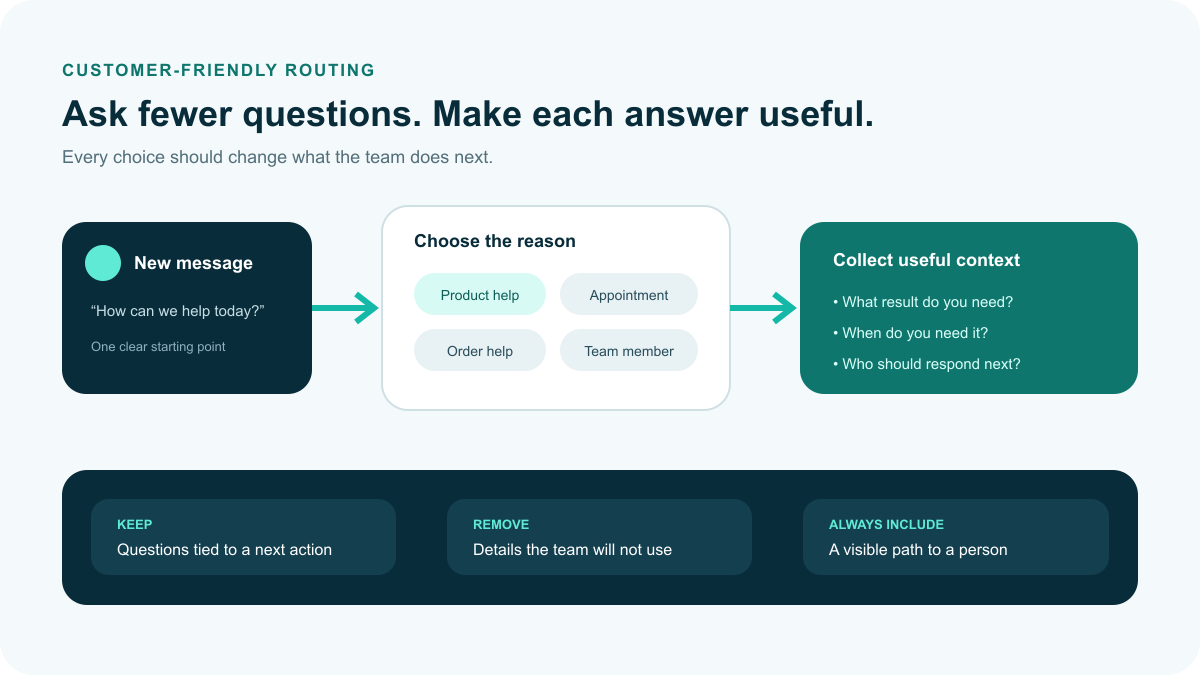
Illustrative business-message routing: ask only useful questions and keep a visible route to a person. This is not an Instagram interface screenshot or proof that an account is authentic.
Paano malalaman kung ang isang tao ay bot sa Instagram?
The following patterns can prompt a closer look, but no single profile clue proves that an account is automated, fake or dangerous. Evaluate the message and verify its source before acting:
- Hindi Kumpleto o Kahina-hinalang Mga Profile: A sparse profile gives you less context. Do not treat a missing photo or stock image as proof of automation; verify who is contacting you.
- Pangkalahatang o Nawawalang Mga Bio: A vague or missing bio is a reason to seek more context, especially if the account is asking for money or account access.
- Hindi Karaniwang Mga Username: An unfamiliar username is not proof of a bot. Compare it carefully with the account published by the business or person you intended to contact.
- Mababang Rate ng Pakikipag-ugnayan: Low engagement can have many explanations. Do not use an engagement-rate threshold to declare that an account is a bot.
- Hindi Balanseng Ratio ng Sinusundan sa Tagasunod: An unusual follower ratio is not an authenticity verdict. Use it only as context alongside the account’s identity and behavior.
- Spammy na DMs o Komento: Treat repeated or irrelevant pitches cautiously, whether they were sent manually or automatically.
- Kakulangan ng Personal na Mga Post: Reposted content alone does not establish who operates an account. Ask whether you can independently verify the sender and the purpose of the request.
- Mga Erratic na Imbitasyon: Repeated follow/unfollow activity can be unwanted, but it does not prove the method used or the account’s identity.
- Dramatikong Pagtaas ng Audience: A follower spike alone does not prove purchased followers. Avoid accusing an account based on a single visible pattern.
These checks help you decide when to pause, verify or report a request. They do not establish whether an account is a bot. This guide does not cite a specific study that validates profile clues as an Instagram detection test.
Mga Tool at Teknik na Upang Tukuyin ang mga Bot sa Instagram
- Mga Tool sa Pagtukoy ng Bot: Treat third-party authenticity scores as estimates, not proof. Review a tool’s permissions and privacy terms, and do not give an unfamiliar service your password or login code.
- Manwal na Pagsusuri ng Profile: Review the account’s identity and the actual request. An independent business contact route is more useful than guessing from a profile photo.
- Mga Calculator ng Rate ng Pakikipag-ugnayan: A calculator can describe visible engagement, but that number does not establish whether a person or a bot operates the account.
- Feedback ng Komunidad: Reports from people you know can provide context, but verify an unexpected request independently rather than treating a forwarded allegation as proof.
- Mga Tool sa Pag-uulat: Use Instagram’s current reporting options for suspicious or unwanted behavior. You do not need to prove that the sender is a bot before deciding not to engage.
Use the checks to make a safer next-step decision, not to label people automatically. If a request seems suspicious, stop interacting and use the current report or block controls instead of trying to investigate by sharing more private information.
Paano alisin ang AI sa Instagram?
Decide what you want to change: notifications from one chat, information already shared with AI, suggested content, or contact from an unwanted account. These are different controls. This guide does not promise a single switch that removes all AI from Instagram.
- Check the conversation controls: Open the chat’s information or settings and use the notification options actually offered. Muting a chat is not the same as deleting the conversation or information held by a service.
- Review information shared with AI: Meta’s privacy guidance describes commands for deleting information shared in AI chats, including
/reset-ai. Check the current instructions and confirmation shown for your account before relying on a command. - Manage content preferences separately: Use the feedback and preference controls available for posts you do not want to see. Hiding a recommendation is not evidence that AI processing or training has been disabled.
- Review message and account privacy: Check who can contact you and where message requests are delivered. Account privacy, notification settings and message requests are separate decisions; use current Help Center instructions for your account type.
- Keep AI disclosures accurate: Meta uses AI information labels to provide context about generated or edited content. Do not follow a blanket instruction to remove a label. Check the disclosure rules and any review or correction options available for the actual post.
Do not assume that an old search-bar icon, an Imagine yourself toggle or a menu called Privacy and Security is available in every account. Use Instagram’s official Help Center and the privacy information linked above for current controls. Avoid tools promising to remove AI if they ask for your credentials or unnecessary access.
Pamamahala ng Iyong Instagram Settings upang Limitahan ang Interactions ng Bot
Upang limitahan ang mga interaksyon sa mga bot sa Instagram, mahalagang ayusin ang iyong mga setting at maging proaktibo sa pamamahala ng iyong account. Narito ang ilang epektibong estratehiya:
- Suriin ang Iyong Mga Tagasunod: Review who follows you and use the current controls to remove a follower you do not want. That is your account-management choice, not proof that the account is automated or fraudulent.
- I-adjust ang Privacy Settings: Review your account’s privacy options and message-request settings separately. If a setting is not available for your account type, check official guidance rather than changing account type solely to follow an old menu path.
- Gumamit ng Filters para sa Mga Komento: Review the Hidden Words options available for comments and message requests. Choose the content you want to filter; do not treat a keyword match as a bot-detection test.
- I-report ang Mga Kahina-hinalang Account: Kung makakita ka ng mga account na sa tingin mo ay mga bot, i-report ang mga ito sa Instagram. Nakakatulong ito upang mapabuti ang pangkalahatang seguridad at karanasan ng gumagamit sa platform.
- Makipag-ugnayan sa Mga Tunay na Account: Verify a business through a contact route you already trust. A badge alone does not make an unexpected request safe, and following an account is not a guarantee about future recommendations.
These controls help manage what you receive; no setting guarantees that all unwanted contact stops. For more tips on managing your Instagram account, explore our Tingnan ang Aming Mga Tutorial.
Pag-explore sa Kinabukasan ng Instagram Bots
Plans for bot chat Instagram features can change. Evaluate what is available now, which account types can use it and how the business will handle exceptions. An announced experiment or a prediction is not a feature you can safely promise to customers.
Ang Papel ng AI Instagram Characters sa Pakikipag-ugnayan ng Gumagamit
Check the dated AI Studio notice above before planning a new character-based workflow. General AI writing and chat tools are a different category; their availability does not prove an Instagram character or messaging connection. Confirm the current product scope before making a customer-facing promise.
Paano Nagbabago ang mga Bot para sa Instagram: Mga Uso at Prediksyon
Use the following as evaluation questions for mga bot para sa Instagram, not as a forecast or a list of features guaranteed to exist:
- Personalization: What information is needed for the task, and can you avoid collecting unnecessary personal details?
- Suporta sa Wika: Which languages are documented and tested for your intended customers, including the route to a person when an answer fails?
- E-Commerce: Does the current product actually support the checkout or order task you need, and what approval or customer action is required?
- Insights: Can the available reports show useful outcomes, such as completed inquiries or unresolved questions, without treating every reply as revenue?
Choose the smallest workflow that helps a customer complete a useful task. Review the available conversation features, confirm the channels and permissions you need, and test the handoff before expanding it. For current plan details, Check Current Pricing.
Frequently Asked Questions About Instagram AI Chats
Are Instagram DMs automatically end-to-end encrypted?
Do not assume that they are. Meta’s March 9, 2026 update said it would remove Instagram’s optional encrypted-messaging option in the following months. This guide does not establish a completion date or transfer Messenger’s encryption status to Instagram.
Why can’t I find the AI chats or character-creation menu?
Check the current features shown in your account and official Help Center guidance. Meta’s August 10, 2026 AI Studio update says people can no longer create new AI characters or edit existing ones, although existing characters and chats remain active.
Does a low follower count prove an Instagram account is a bot?
No. A profile clue or engagement ratio is not proof of automation or fraud. Assess the actual request, verify the account through a trusted contact route and avoid sharing credentials or payment details with an unexpected sender.
Can I remove all AI from Instagram by muting a chat?
Muting, deleting information shared with AI, managing content preferences and controlling message requests are different actions. Use the current controls and their confirmations. Muting notifications alone does not establish that information has been deleted or that all AI use has stopped.
Is a business chatbot the same as Meta AI or an AI character?
No. Treat a business workflow, Meta AI and an existing AI character as separate conversation types. Before connecting a business tool, verify its supported account, permissions, privacy terms and human handoff. A general chat tool does not prove an Instagram integration.
 Tagalog
 English
 简体中文
 العربية
 हिन्दी
 Português do Brasil
 Español de México
 Français
 বাংলা
 香港中文
 繁體中文
 Nederlands
 Deutsch
 Bahasa Indonesia
 日本語
 한국어
 Polski
 Русский
 Español
 Tiếng Việt