
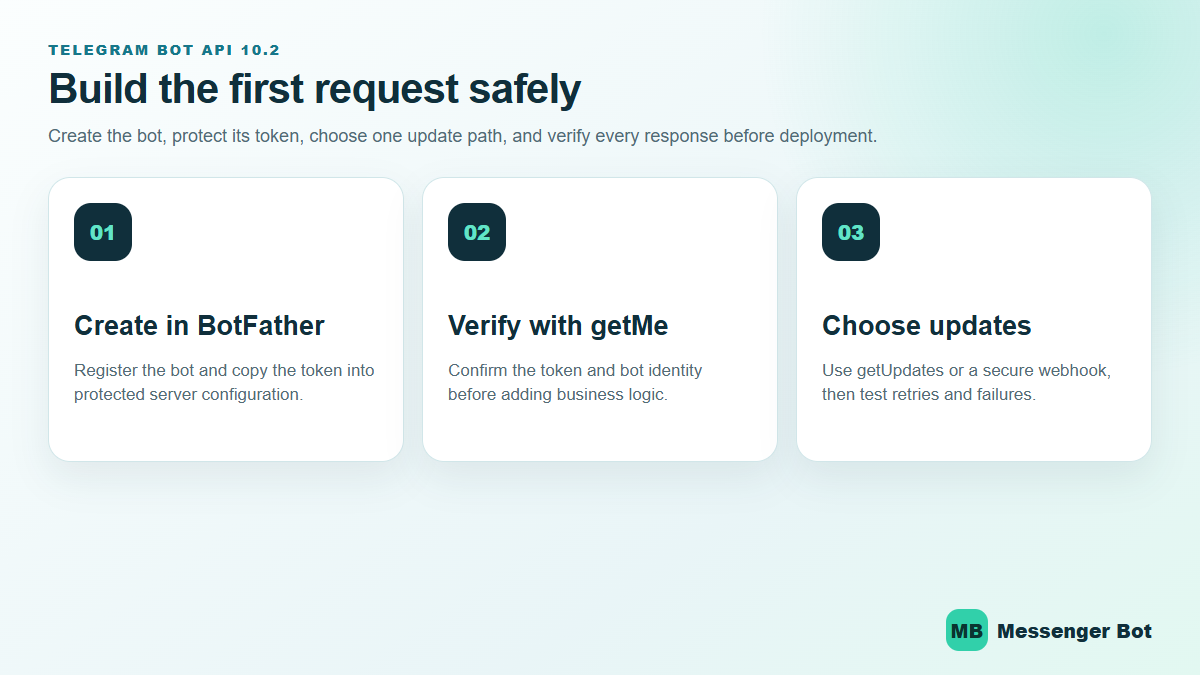
Telegram Bot API 10.2 gives developers a clearer path from a BotFather token to production-ready conversations—but a working request is not the same as a reliable bot. The safest build order is to verify the bot identity, select exactly one update method, make processing idempotent, and test token rotation before a customer depends on the workflow. This July 2026 update uses Telegram’s current official API reference, tutorial, bot introduction, and FAQ.
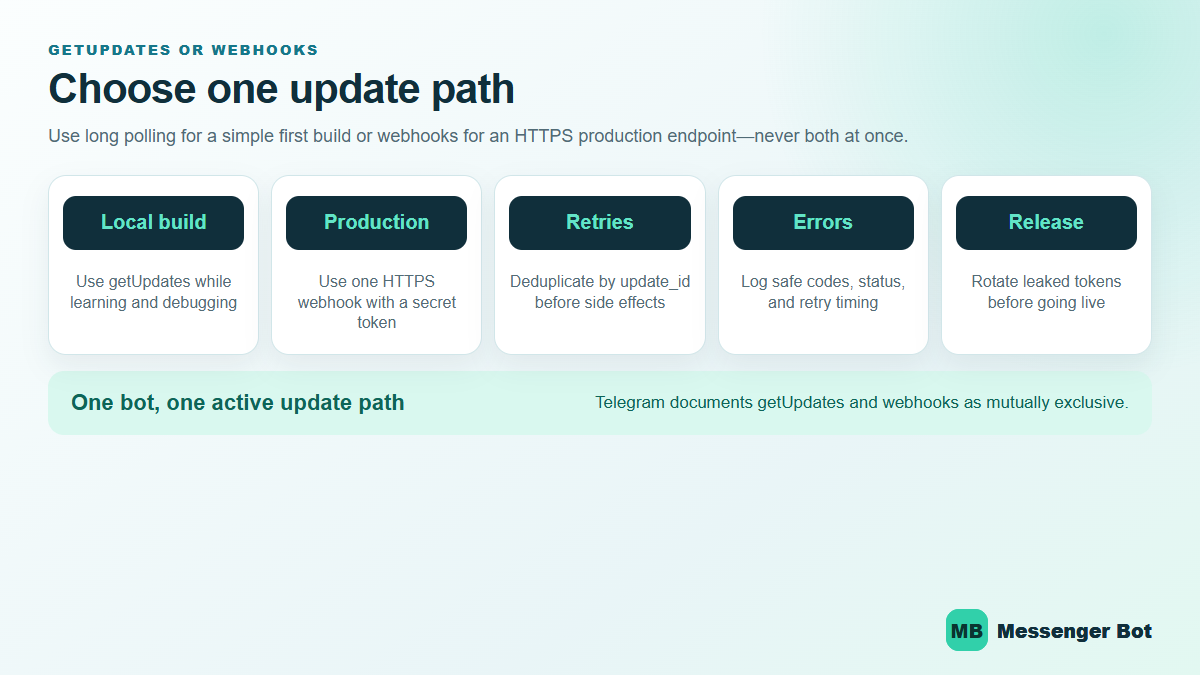
Telegram Bot API 10.2 Changes the Surface, Not the Release Discipline
Telegram’s official API reference lists Bot API 10.2 on July 14, 2026. The release adds rich-message media and blocks, voice-note media, ephemeral-message support, and additional Mini App security controls. Those features can improve the customer experience, but they do not replace the fundamentals: keep the bot token private, verify the bot with getMe, validate every update shape, and make every state-changing handler safe to retry.
Start with the official official API reference, then use the BotFather-to-Hello-World tutorial for the first request. Never paste a real token into a public code sample, screenshot, browser address bar, issue, or support thread. If a token is exposed, revoke and replace it in BotFather before continuing.
Use This Build Order to Reach a Reliable First Reply
- Create the bot in BotFather. Record the username and keep the issued token in protected server configuration.
- Call
getMe. Confirm that the response identifies the bot you intended to configure before adding commands or message logic. - Chọn
getUpdatesor a webhook. Telegram documents these as mutually exclusive update paths. Long polling is easier to inspect during a local build; webhooks fit a stable HTTPS production endpoint. - Deduplicate by
update_id. A retry must not create a second order, support case, or customer action. - Exercise blocked and error paths. Test an invalid token, an expired request, a duplicate update, a malformed payload, a downstream timeout, and a 429 response.
- Release with monitoring. Capture customer-safe error codes and timing while excluding tokens, private messages, and raw customer identifiers.
Long Polling and Webhooks Solve Different Delivery Problems
| Decision | getUpdates |
Webhook |
|---|---|---|
| Best first use | Local learning, debugging, and a simple worker | Stable HTTPS production service |
| Inbound delivery | Your process asks Telegram for updates | Telegram posts updates to your endpoint |
| Primary risk | Overlapping pollers or lost offset handling | Unverified requests, slow handlers, or endpoint downtime |
| Required safeguard | One active poller and a durable offset | Secret-token validation, fast acknowledgement, and retry-safe processing |
Telegram’s giới thiệu bot chính thức explains that bots cannot initiate a conversation before a user starts or adds them. Telegram also says incoming updates are stored for no longer than 24 hours. That makes recovery design part of the product, not an optional infrastructure detail. A bot that stays offline beyond the retention window may not be able to reconstruct missed conversations from Telegram alone.
Rate Limits Need Backoff, Not Faster Loops
Telegram’s current bot FAQ advises avoiding more than one message per second in a single chat, more than 20 messages per minute in a group, and roughly 30 messages per second for free bulk notifications. Treat those figures as operating guidance rather than a promise that every burst will pass. When the API returns 429, read the retry guidance, pause the affected work, and resume without duplicating messages.
Your retry plan should preserve the intended recipient, approved content, operation identifier, and next attempt time—without placing the bot token or private conversation text into broad application logs. For customer conversations on Facebook Messenger, use Xem Các Hướng Dẫn Của Chúng Tôi to plan channel-specific setup instead of assuming Telegram delivery rules apply to every platform.
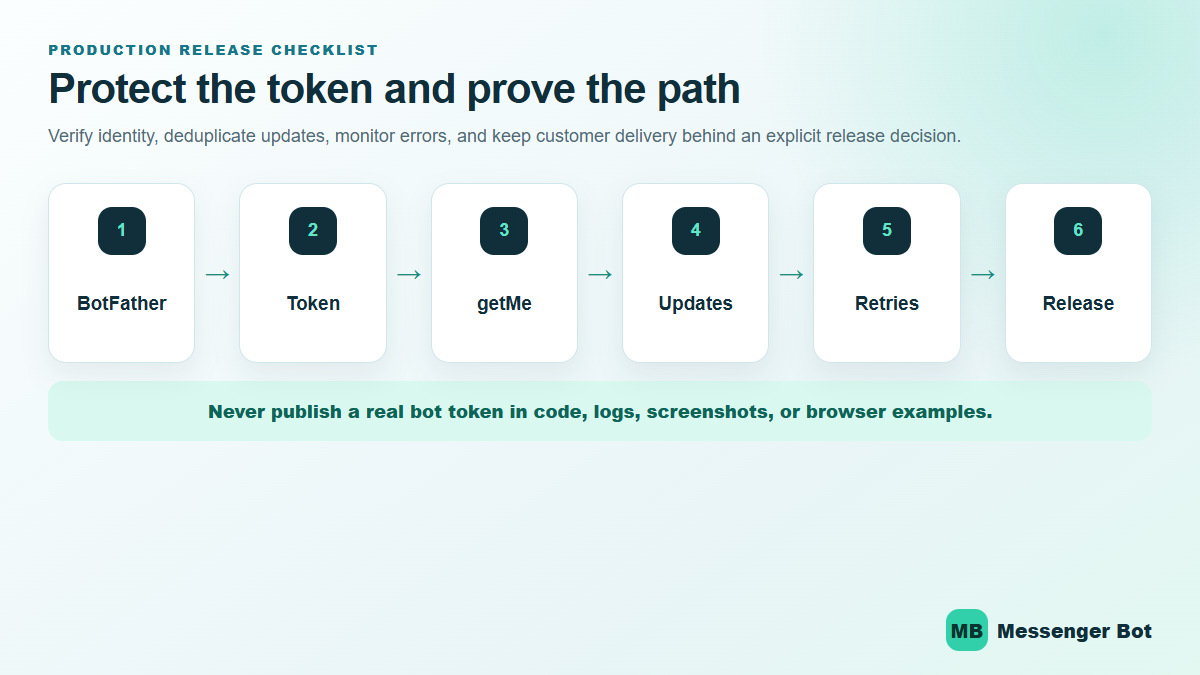
Telegram Bot API 10.2 Release Checklist
- The bot identity returned by
getMematches the intended BotFather bot. - No real token appears in source control, screenshots, browser history, logs, or support notes.
- Only one update path is active.
- Nhân bản
update_idvalues produce zero repeated side effects. - Webhook requests are validated before business logic runs.
- Long-running work leaves the inbound handler quickly and runs behind a retry-safe boundary.
- 429 responses follow the returned retry timing.
- Token rotation is rehearsed and does not require publishing a new customer link.
- Customer delivery remains disabled until the exact workflow, audience, and rollback path are approved.
Nếu bạn đã đọc một hướng dẫn chung về bot Telegram, đây là lớp tiếp theo. Chúng tôi không dừng lại ở /newbot và một ảnh đại diện. Chúng tôi sẽ đi từ BotFather đến các cuộc gọi API thực, các liên kết bot Telegram có thể chia sẻ, một điểm cuối webhook, và một triển khai vẫn hoạt động sau khi laptop của bạn tắt.
Điều đó quan trọng hơn vào năm 2026 vì Telegram không còn là một kênh bot bên lề nữa. FAQ chính thức của Telegram nói rằng ứng dụng hiện có hơn 1 tỷ người dùng hoạt động , hỗ trợ các nhóm lên đến, 200,000 người , và cho phép các kênh phát sóng đến, đối tượng không giới hạn khán giả không giới hạn. Telegram’s official bot introduction also says the Bot Platform hosts more than 10 triệu bot và miễn phí cho các nhà phát triển. Lợi ích thì rõ ràng: nền tảng này có thể hỗ trợ các sản phẩm nghiêm túc. Nhược điểm cũng rõ ràng: một bot chưa hoàn thiện sẽ nhanh chóng bị bỏ qua.
Sai lầm tốn thời gian nhất là coi BotFather như toàn bộ sản phẩm. Nó không phải vậy. BotFather đăng ký bot, phát hành mã thông báo và cho phép bạn quản lý các cài đặt cốt lõi. Logic thực sự của bạn nằm trong mã của bạn hoặc nền tảng tự động hóa của bạn. Nếu bạn muốn con đường không kỹ thuật rộng hơn sau khi đi qua API này, hãy bắt đầu với hướng dẫn bot Telegram tổng quát và Xem Các Hướng Dẫn Của Chúng Tôi cho phần không mã.
Những gì đã thay đổi trong API Bot Telegram vào năm 2026 trước khi bạn xây dựng bất cứ điều gì
Có bốn sự thật năm 2026 thực sự thay đổi quyết định triển khai.
Đầu tiên, Telegram lớn hơn những gì các hướng dẫn bot cũ gợi ý. Số liệu của chính nền tảng hiện nay cho thấy nó có hơn 1 tỷ người dùng hoạt động, điều này khiến Telegram trở thành một kênh sản phẩm thực sự cho các bot hỗ trợ, bot cảnh báo, bot giáo dục, bot cộng đồng và trợ lý AI. Điều đó không có nghĩa là mọi doanh nghiệp đều nên mặc định sử dụng Telegram. Nó có nghĩa là quy mô khán giả không còn là yếu tố hạn chế.
Thứ hai, nền tảng bot của Telegram vẫn mở một cách bất thường. Trang giới thiệu chính thức nói rằng nền tảng này miễn phí cho người dùng và nhà phát triển, và nó vẫn cung cấp cho bạn một API Bot HTTPS thẳng thay vì buộc bạn phải sử dụng một trình tạo độc quyền duy nhất. Đó là một lý do lớn khiến các đội kỹ thuật vẫn thích Telegram: bạn có thể bắt đầu đơn giản, phát hành một bot hữu ích trong một ngày, và sau đó thêm vào logic kinh doanh sau.
Third, the API kept moving in 2026. Telegram’s Bot API changelog shows API Bot 9.6 được phát hành vào ngày 3 tháng 4 năm 2026. Giới thiệu bot của Telegram cũng hiện nay nhấn mạnh Chế độ luồng cho chatbot AI, phản hồi được phát trực tiếp, và Chế độ Doanh Nghiệp để người dùng doanh nghiệp có thể kết nối bot để giúp quản lý các cuộc trò chuyện. Đó không phải là những cập nhật chỉ mang tính thẩm mỹ. Chúng làm cho Telegram dễ sử dụng hơn nhiều cho các quy trình dịch vụ so với những gì các hướng dẫn về echo-bot cũ gợi ý.
Thứ tư, hạn chế lâu đời nhất vẫn còn quan trọng: bot vẫn không thể bắt đầu cuộc trò chuyện với người dùng trước. Telegram cho biết rằng một người dùng phải nhắn tin cho bot trước hoặc thêm nó vào một nhóm. Quy tắc đơn lẻ đó định hình kế hoạch thu hút của bạn, liên kết bot Telegram của bạn và quy trình onboarding của bạn. Telegram rất xuất sắc trong việc phục vụ ý định. Nó không phải là một lối tắt DM lạnh hướng ra ngoài.
Đây là quy tắc quyết định thực tế mà tôi sử dụng. Nếu sản phẩm của bạn hưởng lợi từ các lệnh, nhóm, kênh, liên kết sâu, hoặc một bot cảm giác như một ứng dụng tiện ích nhỏ, Telegram là một lựa chọn mạnh mẽ. Nếu khách hàng tiềm năng của bạn chủ yếu đến từ tin nhắn Trang Facebook và DM Instagram, hãy so sánh quy trình đó với See Our Plans trước khi bạn dành một sprint để xây dựng trên kênh sai chỉ vì Telegram cảm thấy thân thiện hơn với nhà phát triển.
Những gì bạn cần trước khi tạo một bot Telegram
Bạn có thể tạo một bot Telegram trong vài phút. Bạn không thể tạo một bot Telegram tốt trong vài phút trừ khi bạn chuẩn bị năm điều trước.
- Một công việc rõ ràng cho bot: hỗ trợ phân loại, đặt chỗ, thông báo, hướng dẫn, giúp đỡ cộng đồng, hoặc Hỏi & Đáp AI.
- Một tài khoản Telegram: bạn cần một tài khoản Telegram bình thường để sử dụng BotFather.
- Một tên người dùng bạn có thể giữ lại: điều này trở thành tên công khai của bạn và liên kết bot telegram cơ bản của bạn.
- Một kế hoạch lưu trữ: kiểm tra cục bộ là ổn, nhưng sản xuất có nghĩa là một điểm cuối công khai hoặc một công nhân polling đáng tin cậy.
- Một thói quen quản lý bí mật: mã thông báo bot không phải là một chuỗi demo. Hãy coi nó như một mật khẩu từ phút đầu tiên.
Nếu bạn bỏ qua bước một, phần còn lại sẽ trở thành thiết lập ngẫu nhiên. Một bot hỗ trợ, một bot yêu cầu báo giá, và một bot nghiên cứu AI cần các lệnh khác nhau, quyền khác nhau, liên kết khác nhau, và các lựa chọn triển khai khác nhau. Hãy chọn công việc trước.
If you skip step four, you end up with the classic beginner problem: the bot exists, BotFather says it is live, your friends can open the chat, and nothing actually replies because the backend is still on your machine. That is why this guide spends real time on webhooks and deployment instead of stopping at account creation.
If you skip step five, you create work for future you. Telegram’s own documentation is blunt here: everyone who has your bot token has full control of the bot. Store it in environment variables, a secrets manager, or at minimum a private .env file that never gets committed.
The quick preflight checklist
- Pick a display name that says what the bot does.
- Reserve a username that is short enough to share in a link and usually ends with
bot. - Write one sentence that explains the first action users should take.
- Decide whether the bot will live in private chats, groups, channels, or all three.
- Choose your first runtime: local long polling for testing, then webhooks for production.
- Choose your first host: Railway, Render, or your own infrastructure.
How to Create a Telegram Bot in BotFather and Protect the Token
BotFather is Telegram’s official bot registry and settings control point. It is where you create the bot identity, get the token, set commands, and control a handful of key behaviors. It is not the part that runs your logic.
Create the bot with /newbot
- Open Telegram and search for @BotFather.
- Chạm vào Bắt đầu.
- Gửi
/newbot. - Enter the display name users will see.
- Enter the username you want Telegram to reserve.
- Copy the token BotFather returns and store it immediately.
Telegram’s official introduction confirms that BotFather is the starting point for registering the bot and receiving the authentication token. That token is the credential your code will use for every Bot API call. Lose control of it and you lose control of the bot.
Screenshot cue: Capture the BotFather success screen that shows the bot name, username, and share link. Blur the token completely if this image will ever leave your internal notes.
Set the profile before you share the bot
Once the bot exists, go straight to /mybots. From there, tighten the public-facing setup before anyone sees it:
/setdescriptionfor the visible what-this-bot-does summary./setabouttextfor the short one-line profile text./setuserpicfor the avatar./setjoingroupsif you want to allow or block group installs./setprivacyif the bot needs full group-message access.
Keep the description plain. “Get delivery updates, ask support questions, or book a call” is useful. “Your intelligent assistant for digital success” is not. Telegram bot users decide very quickly whether the bot is worth keeping in their chat list.
Store the token like production infrastructure, not sample data
This is the part beginners keep underestimating. A Telegram bot token is not just a setup artifact. It is the credential that authorizes every call to https://api.telegram.org/bot<token>/METHOD_NAME. If you leak it in a repo, screenshot, client handoff, or front-end bundle, the fix is not be-more-careful-next-time. The fix is rotating the token and updating every deployment.
Use one of these patterns from day one:
- Environment variables on Railway or Render.
- A local
.envfile ignored by Git. - A secrets manager if you already have one.
Do not hardcode the token in JavaScript shipped to the browser, in a public GitHub repo, or inside a static HTML file. Telegram’s docs are explicit that anyone with the token has full control of the bot.
Set commands now so the first-run experience is not empty
You can set commands in BotFather with /setcommands, and later you can also manage them through the Bot API. Telegram’s Bot Features guide recommends supporting basic commands like /start và /help, and Telegram apps surface those commands in the UI. That is free usability you should take.
A practical starter set for most bots looks like this:
/start - open the main menu
/help - explain what the bot can do
/status - confirm the bot is live
/pricing - show plans or packages
/support - route to a human or form
Keep the first version short. Three to five commands is enough. The menu is not your roadmap. It is the shortest path to the job the bot was built to do.
How to Create a Telegram Bot Link, Deep Link, and Group Install Link
This is where a lot of tutorials stay too vague. A telegram bot link is not just a vanity URL. It is part of your acquisition flow. It determines how users start the bot, whether context gets passed in, and whether the bot is entering a private chat, a group, or a channel setup flow.
Telegram’s documentation gives every bot a base link in the form https://t.me/<bot_username>. After that, you can add parameters to shape what happens next.
| Link type | Ví dụ | Nó làm gì |
|---|---|---|
| Basic bot link | https://t.me/your_bot |
Opens the bot chat so the user can tap Start. |
| Private deep link | https://t.me/your_bot?start=pricing |
Passes a parameter to the bot as /start pricing. |
| Group install link | https://t.me/your_bot?startgroup=welcome |
Starts the add-to-group flow and can pass setup context. |
| Channel admin link | https://t.me/your_bot?startchannel |
Starts the add-to-channel flow. |
Telegram’s deep linking documentation says start parameters can use A-Z, a-z, 0-9, _, và -, and the parameter can be up to 64 characters. The lower-level links documentation also documents startgroup và startchannel luồng.
Use different telegram bot links for different entry points
This is one of the cleanest low-effort upgrades you can make. Do not send every user to the same blank bot link if you already know where they came from. Use different deep links for different campaigns, menu entries, or channel intents.
- Pricing CTA:
?start=pricing - Support article CTA:
?start=refund_help - Community invite:
?startgroup=community - Newsletter onboarding:
?start=welcome_email
That lets your bot route immediately instead of wasting the first reply on a generic “How can I help?” message. It also makes attribution cleaner when you start measuring which telegram bot links actually drive useful sessions.
The two link mistakes that break onboarding
First mistake: changing the username after links are already published. Your base bot link depends on the username. If you rename the bot later, old QR codes, bios, docs, and blog posts can break or point to the wrong place.
Second mistake: assuming a deep link means the bot can message users first. It cannot. The user still has to tap the link and interact. The deep link passes context. It does not override Telegram’s opt-in rule.
Screenshot cue: Show one plain bot link and one deep link side by side in a browser or notes app, then show the resulting /start pricing message landing in Telegram. Readers understand deep links faster when they can see the input and output together.
Your First Telegram Bot API Requests with curl or Postman
The Bot API is just HTTPS. That is one reason Telegram is still easy to work with. Once you have the token, you can test core behavior before writing the full bot.
Bắt đầu với getMe
This is the fastest sanity check. If getMe fails, do not touch your webhook or deployment yet. Fix the token first.
curl "https://api.telegram.org/bot$TOKEN/getMe"A healthy response returns JSON with "ok": true and the bot’s metadata. Telegram’s Bot API manual documents this request format directly on the main API page.
Set commands through the API
BotFather is fine for one-off command setup. The API is better when you want repeatable environments or client handoff scripts.
curl -X POST "https://api.telegram.org/bot$TOKEN/setMyCommands" ^
  -H "Content-Type: application/json" ^
  -d "{\"commands\":[
    {\"command\":\"start\",\"description\":\"Open the main menu\"},
    {\"command\":\"help\",\"description\":\"See what this bot can do\"},
    {\"command\":\"status\",\"description\":\"Check webhook status\"}
  ]}"
If you manage multiple staging or client bots, this is much safer than manually clicking through settings and hoping every environment matches.
Send a test message after you know the chat ID
Telegram will not let you randomly push a message to a user who never started the bot. You need a valid chat_id from an incoming interaction first. The simplest test flow is:
- Open the bot in Telegram.
- Chạm vào Bắt đầu.
- Collect the resulting update via
getUpdatesor your webhook log. - Use the returned
chat.idin asendMessagecall.
curl -X POST "https://api.telegram.org/bot$TOKEN/sendMessage" ^
  -H "Content-Type: application/json" ^
  -d "{\"chat_id\":123456789,\"text\":\"Your Telegram Bot API test is working.\"}"
If this request succeeds, your token works, the chat exists, and your bot can reply. That is the minimum viable proof before you wire in longer code paths.
Use these three endpoints constantly during setup
getMeto confirm token and metadata.setWebhookvàgetWebhookInfoto manage delivery.deleteWebhookwhen you need to switch back to polling.
There are many more methods, but those three plus sendMessage handle a surprising amount of early-stage debugging.
Long Polling vs Webhooks in the Telegram Bot API
Telegram documents two mutually exclusive ways to receive updates: getUpdates và setWebhook. Their own API manual says incoming updates are stored on Telegram’s server until your bot receives them one way or the other, but not longer than 24 hours. That matters because it tells you exactly how much failure cushion you have if your bot is briefly offline.
| Phương pháp | Tốt nhất cho | Why people choose it | Main drawback |
|---|---|---|---|
Long polling with getUpdates |
Local development and quick tests | No public URL required, easy to inspect updates, simple to start | Your bot has to keep asking for updates and is weaker for production |
Webhooks with setWebhook |
Production deployments | Telegram pushes updates to you immediately, lower overhead, cleaner runtime model | You need public HTTPS, valid certificates, and a real deploy target |
Telegram’s docs are also explicit that getUpdates will not work while a webhook is set. That one sentence explains a lot of why-is-polling-empty confusion. If you move to webhooks, delete or ignore your polling code. If you switch back to local testing, call deleteWebhook first.
When long polling is the right choice
Use long polling when you are still shaping the update schema, reading raw payloads, or testing on your machine. It is easier to debug because you can inspect the exact JSON that came in without worrying about public HTTPS or a hosted endpoint. It is also the cleanest route when you are not ready to deploy yet.
When webhooks are the right choice
Use webhooks when the bot needs to stay on, reply fast, and stop depending on your local shell session. Telegram’s webhook guide explains the basic advantage well: Telegram pushes the update to you as soon as it arrives instead of making your bot ask repeatedly. In practice that means less polling code, cleaner production architecture, and better latency.
The production rule
Develop with long polling if it makes you faster. Launch with webhooks unless you have a very specific reason not to. That split keeps setup simple without pretending a laptop process is a deployment plan.
Build a Working Telegram Bot API Webhook in Python with FastAPI
You can use any stack that can receive HTTPS POST requests and make HTTPS requests back to Telegram. Python with FastAPI is a clean choice because it stays small, reads well, and deploys easily on common hobby hosts.
Install the minimum packages
pip install fastapi uvicorn httpxThat is enough for a minimal webhook bot. No Telegram SDK is required for the first version because we can talk to the Bot API directly.
Create a minimal app.py
import os
import httpx
from fastapi import FastAPI, Header, HTTPException, Request

TOKEN = os.environ["TELEGRAM_BOT_TOKEN"]
WEBHOOK_SECRET = os.environ["TELEGRAM_WEBHOOK_SECRET"]
BASE_URL = f"https://api.telegram.org/bot{TOKEN}"

app = FastAPI()


async def telegram_api(method: str, payload: dict) -> dict:
    async with httpx.AsyncClient(timeout=15.0) as client:
        response = await client.post(f"{BASE_URL}/{method}", json=payload)
        response.raise_for_status()
        data = response.json()
        if not data.get("ok"):
            raise RuntimeError(data)
        return data["result"]


@app.get("/")
async def healthcheck():
    return {"ok": True}


@app.post("/telegram/webhook")
async def telegram_webhook(
    request: Request,
    x_telegram_bot_api_secret_token: str | None = Header(default=None),
):
    if x_telegram_bot_api_secret_token != WEBHOOK_SECRET:
        raise HTTPException(status_code=403, detail="Invalid webhook secret")

    update = await request.json()
    message = update.get("message") or {}
    chat = message.get("chat") or {}
    text = (message.get("text") or "").strip()
    chat_id = chat.get("id")

    if not chat_id:
        return {"ok": True}

    if text.startswith("/start"):
        reply = (
            "Telegram Bot API is live.\\n\\n"
            "Try /help for commands or /status to confirm the webhook."
        )
    elif text == "/help":
        reply = "Commands: /start, /help, /status"
    elif text == "/status":
        reply = "Webhook is receiving updates correctly."
    else:
        reply = f"I received: {text[:300]}" if text else "Send a text command to test."

    await telegram_api(
        "sendMessage",
        {
            "chat_id": chat_id,
            "text": reply,
        },
    )

    return {"ok": True}
This bot is intentionally small. It does four useful things and nothing fancy:
- Verifies the webhook secret header.
- Reads the incoming update JSON.
- Handles a few starter commands.
- Sends a reply with
sendMessage.
That is enough to prove your entire path: BotFather token, public webhook, deployment, incoming update handling, and outgoing API call.
Run it locally
set TELEGRAM_BOT_TOKEN=your_token_here
set TELEGRAM_WEBHOOK_SECRET=your_secret_here
uvicorn app:app --host 0.0.0.0 --port 8000
For local testing, you have two sane options. Use long polling until the logic works, or expose the local server through a tunnel and set a temporary webhook. For most first builds, I would test the conversation logic locally with polling, then move to a real hosted URL before I spend time debugging certificates and tunnels.
What to add next after the first reply works
- Structured routing: handle
callback_queryand custom reply paths instead of plain text only. - Ghi log: store raw updates and error responses so you can debug real failures.
- Tính idempotent: track
update_idso retries do not duplicate downstream actions. - Timeout handling: do not let one slow dependency block the whole webhook.
- Queues: offload expensive jobs if you later add AI, file processing, or CRM sync.
The winning pattern is to keep the webhook handler short. Parse the update, acknowledge it fast, and hand heavier work to a background task or worker if needed.
How to Set the Webhook, Verify It, and Reset It Without Guessing
Telegram’s Bot API manual and webhook guide are very specific about the pieces that matter: the webhook URL must be HTTPS, supported public ports are 443, 80, 88, và 8443, and Telegram can include the header X-Telegram-Bot-Api-Secret-Token when you set a secret token. Those are the parts that break production most often.
Set the webhook
curl -X POST "https://api.telegram.org/bot$TOKEN/setWebhook" ^
  -H "Content-Type: application/json" ^
  -d "{\"url\":\"https://your-domain.com/telegram/webhook\",\"secret_token\":\"$WEBHOOK_SECRET\"}"
If Telegram returns "ok": true, the webhook is registered. That does not automatically mean your app logic is correct. It only means Telegram accepted the delivery target.
Check status with getWebhookInfo
curl "https://api.telegram.org/bot$TOKEN/getWebhookInfo"This endpoint is the first thing to check when the bot exists but nobody gets replies. If pending_update_count keeps climbing, Telegram is trying to deliver updates and your server is not handling them cleanly. If last_error_message is populated, read it before you change anything else.
Reset the webhook cleanly when switching environments
curl -X POST "https://api.telegram.org/bot$TOKEN/deleteWebhook" ^
  -H "Content-Type: application/json" ^
  -d "{\"drop_pending_updates\":true}"
Sử dụng drop_pending_updates with intent. It is helpful when you changed environments or interrupted background processing and do not want stale traffic replaying into the new runtime. It is not something to click blindly in the middle of a live incident.
The three webhook checks that save the most time
- Make sure your app returns a real
2xxresponse quickly. - Make sure the
secret_tokenyou set matches the header your code expects. - Make sure your host is actually exposing a supported public HTTPS endpoint.
Telegram’s Bots FAQ also notes that redirects are not supported, wildcard certificates may not work, and the certificate common name must exactly match your domain. That is why a domain opening in your browser is not enough proof that Telegram will accept it.
Deploy a Telegram Bot API Project on Railway or Render Without Babysitting It
There are plenty of places to host a Telegram bot. For most small teams and solo builders in 2026, Railway and Render are still the two easiest ways to get a webhook bot online without spending a day on infrastructure.
| Nền tảng | Official 2026 entry price | Best use | Tradeoff |
|---|---|---|---|
| Railway | $5/month Hobby plan with $5 included usage | Fast deploys for hobby and small production bots | Usage-based billing can rise if the bot grows or idles badly |
| Render | $0 account plan plus Starter web service from $7/month | Simple web-service deployments with predictable instance sizing | Production-like service usually starts at the paid Starter tier |
| Self-hosted local Bot API server | Depends on your own infrastructure | High-control workloads, bigger file limits, custom networking needs | More ops responsibility than most first projects need |
Deployment pricing sources: Railway pricing plans, Render pricing, and Telegram’s local Bot API server documentation, checked April 12, 2026.
Railway deployment steps
- Push your bot code to GitHub.
- Create a new Railway project from the repo.
- Thêm
TELEGRAM_BOT_TOKENvàTELEGRAM_WEBHOOK_SECRETas environment variables. - Set the start command to
uvicorn app:app --host 0.0.0.0 --port $PORT. - Deploy and copy the generated HTTPS URL.
- Call
setWebhookwith that URL. - Gửi
/startto the bot and watch the logs.
Railway’s official docs say the Hobby plan is $5/month and includes $5 of usage. That pricing model is good for small bots because the floor is low. It also means you should shut down wasteful workers and oversized services early instead of pretending usage-based billing will stay tiny forever.
Render deployment steps
- Push the same repo to GitHub.
- Create a new web service in Render.
- Use your Python build command and start command.
- Add the same environment variables.
- Deploy and copy the public service URL.
- Set the Telegram webhook to
https://your-render-domain/telegram/webhook.
Render’s pricing page currently shows a free web service tier and a paid Starter instance at $7/month. For experiments, free can be fine. For a client bot or a real customer-facing workflow, I would budget around the paid tier instead of building your launch around sleep behavior and cold-start anxiety.
When a local Bot API server is actually worth it
Telegram’s official Bot API documentation says a local Bot API server lets you download files without a size limit, upload files up to 2000 MB, use HTTP URLs or local IP addresses for webhooks, and raise webhook connection limits far beyond the default service. That is useful for high-volume media bots, heavy internal systems, or infrastructure teams that need full control.
For most bots, it is unnecessary complexity. Use Telegram’s hosted Bot API until you have a real reason to own that layer.
Telegram Bot Pricing in 2026: What Is Actually Free and What Starts Costing Money
Free Telegram bot is only true if you mean bot creation through BotFather and the base Bot API itself. Telegram’s platform is free to start. Real projects still pick up costs from hosting, automation tools, AI APIs, storage, monitoring, or human support time.
| Cost bucket | Official 2026 price point | Những gì bạn nhận được |
|---|---|---|
| Telegram Bot Platform | $0 platform fee | Create the bot, use the Bot API, manage links, commands, and settings |
| ManyChat Essential | $17/month monthly or $14/month annual | No-code multichannel automation, up to 250 active contacts, up to 2 channels including Telegram |
| SendPulse Pro | $12/month monthly or $9.60/month annual at 500 subscribers | Unlimited flows and messages, Telegram support, API and webhook access |
| Railway Hobby | $5/month with $5 included usage | Low-cost deploy target for a custom webhook bot |
| Render Starter web service | $7/month | Simple always-on host for a custom webhook bot |
Pricing citations: Telegram’s bot platform introduction, ManyChat’s Essential plan and active contacts documentation, SendPulse messenger pricing, Railway pricing plans, and Render pricing, checked April 12, 2026.
Two practical caveats matter here.
First, ManyChat changed its pricing model on ngày 2 tháng 3 năm 2026. ManyChat’s own help docs say the new plans are currently tied to region availability and to accounts created on or after that date. So if your account is older, you may see legacy plan behavior instead of the numbers above.
Second, builder pricing is not the same as Bot API pricing. If your bot is mostly rules, simple buttons, and a few lead forms, a builder may save time. If your bot needs custom webhooks, internal tooling, AI routing, or fine control over links and infrastructure, custom code plus cheap hosting often wins.
The part most guides leave out is the operational cost. Someone still has to read failed updates, fix broken commands, rotate tokens, review logs, and adjust onboarding flows. That labor is small on a clean bot and expensive on a sloppy one.
Telegram vs Messenger vs Website Bots: Where This API Wins and Where It Does Not
Telegram is not the universal answer. It is the right answer for specific shapes of work.
| Channel | Phù hợp nhất | Why it wins | Why it loses |
|---|---|---|---|
| bot Telegram | Communities, alerts, AI assistants, utility bots, niche global audiences | Commands, groups, channels, deep links, flexible Bot API | Users must start the chat first and Telegram habit still depends on audience fit |
| Messenger or Instagram bot | Meta-first lead funnels, Page support, DM automation | Works where a lot of social traffic already lands | Less open than Telegram for raw bot infrastructure |
| Website chatbot | On-site support, lead capture, ecommerce conversion | No app switch required, strongest for people already on your site | Weaker return habit than a messaging thread people keep |
Choose Telegram when the conversation is part of the product. Alerts, community management, AI help, onboarding utilities, and operator tools all map well to commands, deep links, and group installs. Choose Messenger or Instagram when the lead already started life inside Meta. Choose website chat when the job is to convert or support people without forcing an app switch.
If your real audience lives in Facebook and Instagram rather than Telegram, the faster move is often to Upgrade to Pro instead of rebuilding the same logic in a channel your users do not naturally open for business conversations.
Agencies run into this constantly. The technical team falls in love with the Telegram Bot API because it is clean. The client actually needs Meta lead capture, follow-up, and site chat. If you sell automation services and keep seeing that pattern, Tham gia Chương Trình Liên Kết Của Chúng Tôi for the Messenger side instead of forcing every client into a Telegram-shaped solution.
Security Rules That Keep Your Telegram Bot from Turning into a Headache
Telegram makes bot creation easy. That does not reduce your security obligations.
Validate the webhook source
Telegram’s Bot API supports the secret_token parameter on setWebhook. Use it. Then verify the X-Telegram-Bot-Api-Secret-Token header in your handler before you process the update. This is the easiest high-value security step in the whole stack.
Telegram’s webhook guide also publishes IP ranges you can allowlist if you want stricter network control. As of the current guide, Telegram says you can limit access to 149.154.160.0/20 và 91.108.4.0/22, while also noting those ranges may change. That means header verification is the baseline; IP filtering is optional extra hardening.
Never trust one successful 200 OK
A webhook returning 200 only proves that your server replied. It does not prove the update was handled correctly, the database write succeeded, or the downstream message was sent. Log the update, log the outgoing Telegram response, and log exceptions with enough detail to diagnose failures later.
Sử dụng update_id to avoid duplicate side effects
Telegram’s API manual explains that update_id lets you restore correct update order or ignore repeats. Use that. If your bot creates tickets, orders, payouts, bookings, or CRM records, do not assume each webhook hits you exactly once and only once. Store processed update IDs or build idempotency into downstream actions.
Keep your webhook handler short
Webhook handlers should parse, validate, enqueue, and acknowledge. They should not wait on five external APIs, a slow AI completion, and a fragile CRM before returning. If the job is heavy, hand it to a background task or worker and acknowledge the webhook quickly.
Be careful with group permissions and privacy mode
Telegram’s docs note that privacy-enabled bots in groups only see messages relevant to them. That is a safety feature as much as a configuration detail. If the bot does not need full-message access, leave privacy mode on. If you disable it, be able to explain why and re-test the bot in the target group.
Common Telegram Bot API Errors and the Fixes That Save Hours
The failures below cause most first-launch pain. None of them are exotic.
401 Unauthorized or ok: false on every request
This usually means the token is wrong, truncated, rotated, or loaded from the wrong environment. Fix the token path first. Confirm with getMe. If getMe fails, everything else is noise.
The webhook is set, but the bot does not reply
Check getWebhookInfo. If pending_update_count grows, Telegram is trying to deliver updates and your server is not handling them cleanly. If the webhook URL looks correct but responses still fail, check certificate validity, route path, secret-token verification, and whether your app returns a real 2xx một cách nhanh chóng.
getUpdates suddenly returns nothing
You probably forgot that webhooks and polling are mutually exclusive. Telegram documents that clearly. Delete the webhook if you want to switch back to polling.
The bot works in private chat but not in groups
This is usually privacy mode or permissions. Telegram’s FAQ spells out what privacy-enabled bots can and cannot see. If you expect full-message visibility in a group, check /setprivacy and re-add the bot after changes if needed.
The telegram bot link opens, but nothing useful happens
That is normally not an API failure. It is an onboarding failure. The user reached the bot, but your first reply is weak, your commands are missing, or the deep-link parameter is not handled. Fix the first-run path instead of blaming the URL.
You start hitting 429 errors
Telegram’s FAQ says to avoid sending more than one message per second in a single chat, more than 20 messages per minute in a group, and more than about 30 messages per second for bulk broadcasts unless you enable paid broadcasts. If you are broadcasting, pace messages through a controlled background task. If you are responding in a loop, stop sending multiple fragments when one message would do.
The bot can reply to people, but cannot initiate new chats
That is platform behavior, not a bug. Telegram bots still cannot start the conversation first. Build better entry points instead: landing page CTAs, QR codes, channel posts, email buttons, or deep links with context.
Your deploy works, then fails after a token rotation
This usually means you rotated the token in BotFather but did not update the host environment variables or reset the webhook. Any time the token changes, update secrets in your deploy platform and re-run webhook setup.
The Production Launch Checklist Before You Share Your Telegram Bot Links
Before you hand the bot to users, run through this list once without skipping steps:
- Token: stored in environment variables, not code.
- Profile: name, avatar, description, and About text are finished.
- Commands:
/start,/help, and any core flows are set. - Webhook:
getWebhookInfoshows a healthy URL and no repeating errors. - Secret validation: the header check is active.
- Ghi log: you can inspect incoming updates and failed outbound API calls.
- Deep links: every public telegram bot link you plan to share has been tested.
- Group behavior: privacy mode and permissions match the real use case.
- Rate limits: broadcast jobs are queued, not dumped all at once.
- Fallback: unknown inputs return a useful next step instead of a dead end.
- Sự phù hợp của kênh: you are sure Telegram is where users actually want this bot to live.
If that last line is still not clear, decide it now, not after launch. The Bot API is flexible enough to make the wrong channel feel technically possible. That does not make it strategically correct.
If you are still deciding between Telegram, Meta DMs, and website chat, Xem Các Hướng Dẫn Của Chúng Tôi before you lock yourself into a deployment path that does not match your audience.
If your buyers mostly live inside Facebook and Instagram instead of Telegram, check See Our Plans and the option to Upgrade to Pro rather than rebuilding the same bot logic on the wrong messaging stack.
Sources and Pricing Checked April 12, 2026
- Câu hỏi thường gặp về Telegram
- Telegram Press Info
- Telegram bot platform introduction
- Telegram Bot Features guide
- Telegram deep links documentation
- Telegram Bot API manual
- Telegram Bot API changelog
- Telegram Bots FAQ
- Telegram webhook guide
- ManyChat Essential plan
- ManyChat active contacts documentation
- SendPulse messenger pricing
- Railway pricing plans
- Render pricing
Câu hỏi Thường gặp
API Bot Telegram có miễn phí vào năm 2026 không?
Yes, the platform layer is still free to start. Telegram’s official bot introduction says the Bot Platform is free for users and developers. What starts costing money is everything around it: hosting, no-code builders, AI APIs, databases, monitoring, and the labor needed to maintain a real bot.
Làm thế nào để tôi tạo một liên kết bot telegram mở đúng luồng?
Start with the base bot URL in the form https://t.me/your_bot. Then use deep-link parameters like ?start=pricing for private chat context or ?startgroup=welcome when the bot should be added to a group. Telegram’s docs say the start parameter can be up to 64 characters and should use URL-safe characters.
Should I use getUpdates or webhooks for a new bot?
Sử dụng getUpdates when you are developing locally and want quick visibility into raw payloads. Use webhooks in production. Telegram documents them as mutually exclusive, so do not try to run both at the same time.
Tại sao bot của tôi hoạt động trong các cuộc trò chuyện riêng tư nhưng không hoạt động trong một nhóm Telegram?
Nguyên nhân thường gặp là chế độ riêng tư hoặc thiếu quyền truy cập. Các bot trên Telegram được bật chế độ riêng tư chỉ thấy những tin nhắn liên quan đến chúng trong các nhóm. Nếu bot của bạn cần quyền truy cập đầy đủ, hãy thay đổi cài đặt trong BotFather và sau đó kiểm tra lại bot trong nhóm mà bạn thực sự quan tâm.
Tôi có thể tạo một bot Telegram mà không cần viết mã không?
Có, cho các luồng cơ bản. BotFather xử lý việc tạo ra, và các công cụ như ManyChat hoặc SendPulse có thể thêm logic không cần mã lên trên. Nhưng nếu bạn cần webhook chi tiết, tích hợp nội bộ, định tuyến AI tùy chỉnh, hoặc kiểm soát hạ tầng, thì API Bot Telegram thô và một ứng dụng nhỏ thường là con đường tốt hơn trong dài hạn.



 Tiếng Việt
  English
  Tagalog
  简体中文
简体中文  العربية
  हिन्दी
  Português do Brasil
  Español de México
  Français
  বাংলা
বাংলা  香港中文
香港中文  繁體中文
繁體中文  Nederlands
  Deutsch
  Bahasa Indonesia
  日本語
日本語  한국어
한국어  Polski
  Русский
  Español