
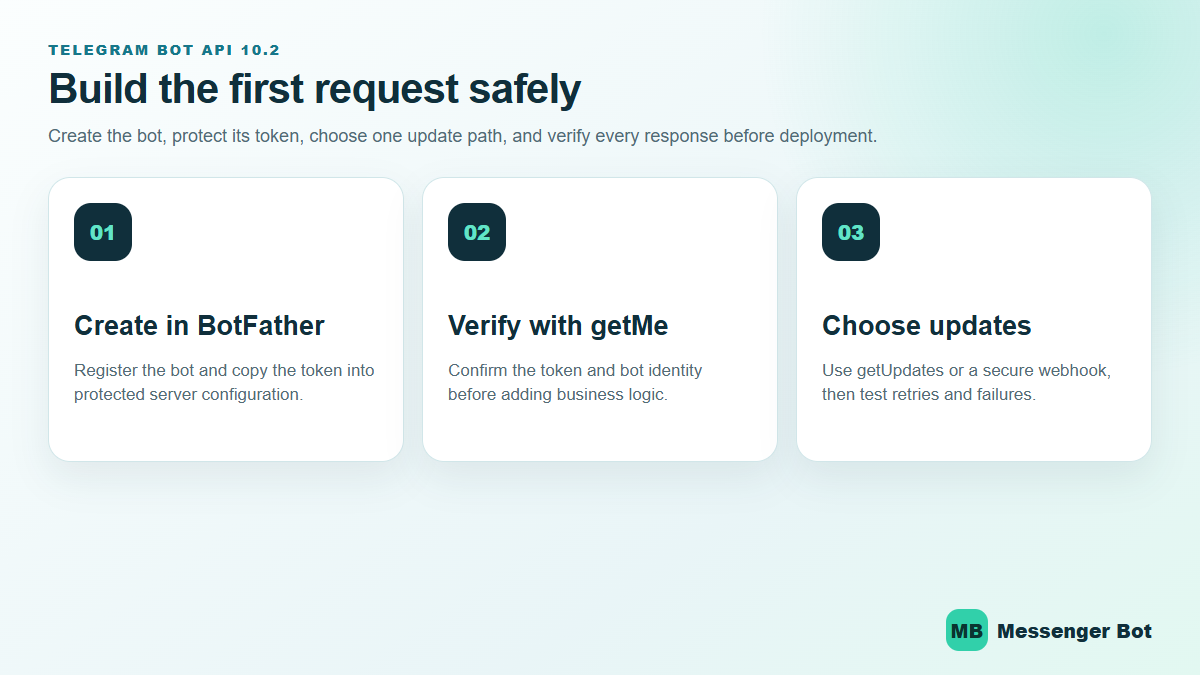
Telegram Bot API 10.2 gives developers a clearer path from a BotFather token to production-ready conversations—but a working request is not the same as a reliable bot. The safest build order is to verify the bot identity, select exactly one update method, make processing idempotent, and test token rotation before a customer depends on the workflow. The July 2026 setup baseline remains the starting point; the source review below was updated on October 16, 2026.
Telegram Bot API 10.2 Changes the Surface, Not the Release Discipline
Version context, October 16, 2026: This tutorial and its diagrams use the Bot API 10.2 setup baseline released on July 14, 2026. Telegram subsequently released Bot API 10.3 on August 24. Check the current API reference when selecting methods and optional features for your implementation.
Telegram’s official API reference lists Bot API 10.2 on July 14, 2026. That July release added rich-message media and blocks, voice-note media, ephemeral-message support and Mini App origin hardening. Those features can improve the customer experience, but they do not replace the fundamentals: keep the bot token private, verify the bot with getMe, validate every update shape, and make every state-changing handler safe to retry.
Start with the official API reference, then use the bot setup guide for the first request. Never paste a real token into a public code sample, screenshot, browser address bar, issue, or support thread. If a token is exposed, revoke and replace it in BotFather before continuing.
Use This Build Order to Reach a Reliable First Reply
- Create the bot in BotFather. Record the username and keep the issued token in protected server configuration.
- Call
getMe. Confirm that the response identifies the bot you intended to configure before adding commands or message logic. - Choose
getUpdatesor a webhook. Telegram documents these as mutually exclusive update paths. Long polling is easier to inspect during a local build; webhooks fit a stable HTTPS production endpoint. - Deduplicate by
update_id. A retry must not create a second order, support case, or customer action. - Exercise blocked and error paths. Test an invalid token, an expired request, a duplicate update, a malformed payload, a downstream timeout, and a 429 response.
- Release with monitoring. Capture customer-safe error codes and timing while excluding tokens, private messages, and raw customer identifiers.
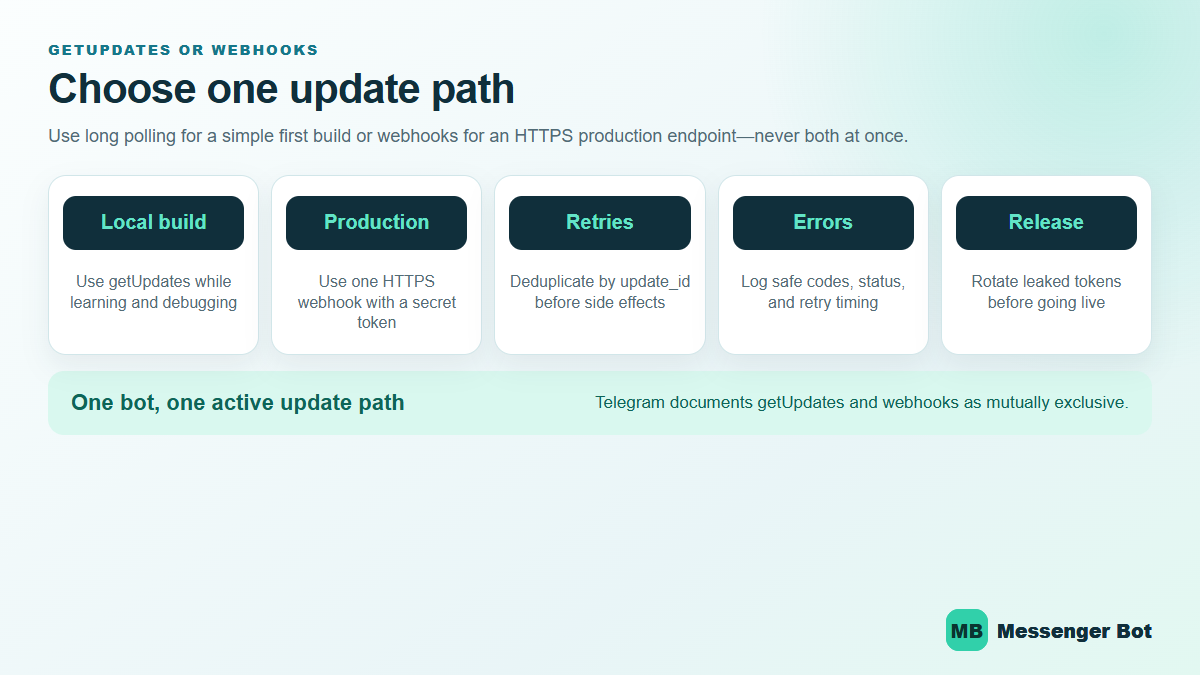
Long Polling and Webhooks Solve Different Delivery Problems
| Decision | getUpdates |
Webhook |
|---|---|---|
| Best first use | Local learning, debugging, and a simple worker | Stable HTTPS production service |
| Inbound delivery | Your process asks Telegram for updates | Telegram posts updates to your endpoint |
| Primary risk | Overlapping pollers or lost offset handling | Unverified requests, slow handlers, or endpoint downtime |
| Required safeguard | One active poller and a durable offset | Secret-token validation, fast acknowledgement, and retry-safe processing |
Telegram’s delivery and privacy FAQ describes ordinary bot messaging and group-access rules. For the private-chat example below, the test user must first open the bot and interact; adding a bot to a group is not permission to privately contact every member. Telegram also says incoming updates are stored for no longer than 24 hours. That makes recovery design part of the product, not an optional infrastructure detail. A bot that stays offline beyond the retention window may not be able to reconstruct missed conversations from Telegram alone.
Rate Limits Need Backoff, Not Faster Loops
Telegram’s current bot FAQ advises avoiding more than one message per second in a single chat, more than 20 messages per minute in a group, and roughly 30 messages per second for free bulk notifications. Treat those figures as operating guidance rather than a promise that every burst will pass. When the API returns 429, read the retry guidance, pause the affected work, and resume without duplicating messages.
Your retry plan should preserve the intended recipient, approved content, operation identifier, and next attempt time—without placing the bot token or private conversation text into broad application logs. For customer conversations on Facebook Messenger, use Browse Our Tutorials to plan channel-specific setup instead of assuming Telegram delivery rules apply to every platform.
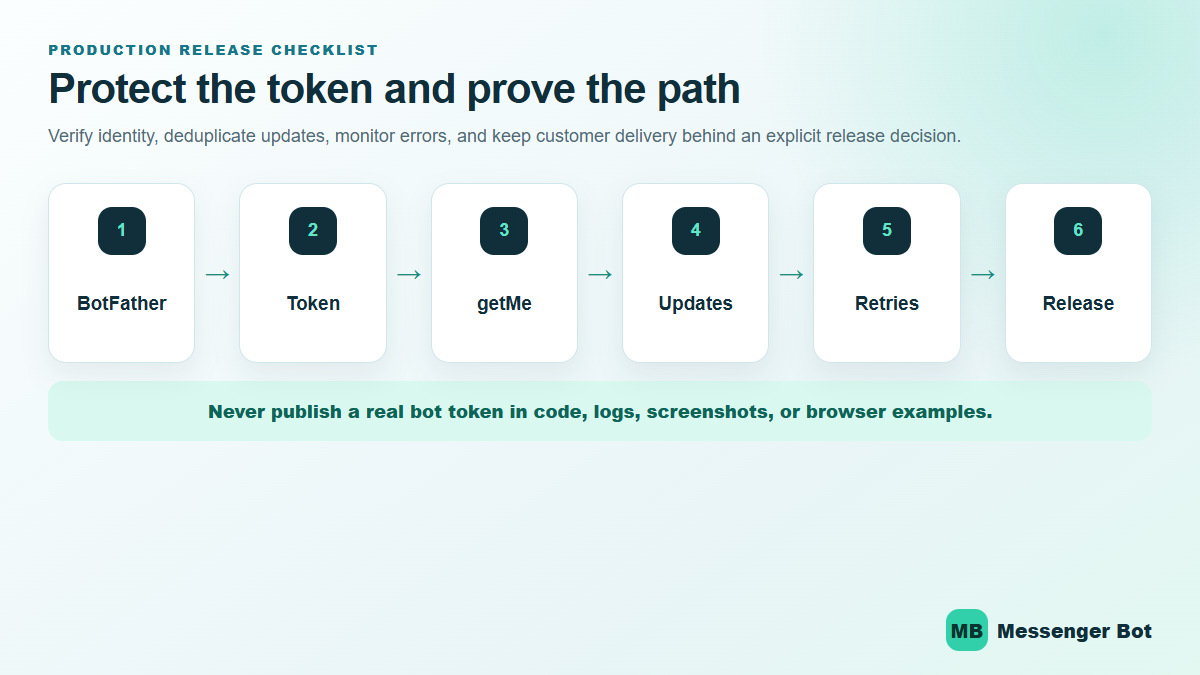
Telegram Bot API 10.2 Release Checklist
- The bot identity returned by
getMematches the intended BotFather bot. - No real token appears in source control, screenshots, browser history, logs, or support notes.
- Only one update path is active.
- Duplicate
update_idvalues produce zero repeated side effects. - Webhook requests are validated before business logic runs.
- Long-running work leaves the inbound handler quickly and runs behind a retry-safe boundary.
- 429 responses follow the returned retry timing.
- Token rotation is rehearsed and does not require publishing a new customer link.
- Customer delivery remains disabled until the exact workflow, audience, and rollback path are approved.
If you already read a general Telegram bot guide, this is the next layer down. We are not stopping at /newbot and a profile photo. We are going from BotFather to real API calls, shareable telegram bot links, a webhook endpoint, and a deploy that stays alive after your laptop closes.
For audience context, Telegram’s official FAQ, reviewed October 16, 2026, states over 1 billion active users, groups of up to 200,000 people, and channels for unlimited audiences. Those are Telegram’s platform-wide figures, not evidence that a particular business’s customers use the app. Confirm the audience and the task before choosing the channel.
The mistake that burns the most time is treating BotFather like the whole product. It is not. BotFather registers the bot, issues the token, and lets you manage core settings. Your actual logic lives in your code or your automation platform. If you want the broader non-technical path after this API walkthrough, start with our general Telegram bot tutorial and Browse Our Tutorials for the no-code side.
What Changed in the Telegram Bot API in 2026 Before You Build Anything
Before implementation, distinguish audience fit, the integration approach, feature versions and how users start a conversation.
First, match the interaction to the audience. A support bot needs a maintained answer source and a human handoff; an alert bot needs a user-requested subscription and a stop path; a community bot needs defined group permissions. Decide which of those jobs you are implementing before selecting commands or a hosting arrangement.
Second, choose who will implement and maintain the workflow. Telegram provides an HTTPS Bot API for custom code; a compatible builder is another option. The base platform is free to start, while hosting, optional paid features and the tools you choose can add costs. Start with a small command handler and expand only when its behavior and operating requirements are clear.
Third, separate release history from the feature you intend to use. Telegram’s earlier changelog lists Bot API 9.6 on April 3, 2026, including managed-bot and poll changes. The current bot-platform overview separately describes threaded, streamed and business features. That does not make those features part of the 9.6 release, or enable them automatically in the private command example below; check the relevant method and access requirements before adding one.
Fourth, design the entry point explicitly. In the ordinary private-chat flow used here, a user opens the bot and starts interacting before the bot replies. A group installation does not authorize unsolicited private messages to members. Telegram’s guest, business and other bot modes have separate access rules; do not apply this private-test example to those modes without reviewing their documentation.
Choose the channel from the interaction you need. If your product benefits from commands, groups, channels, deep links, or a bot that feels like a small utility app, Telegram is a strong fit. If your leads mostly come from Facebook Page messages and Instagram DMs, compare that workflow with See Our Plans before you spend a sprint building on the wrong channel just because Telegram feels more developer-friendly.
What You Need Before You Create a Telegram Bot
BotFather registration is only the account-creation step. Before implementing a working bot, prepare the five decisions below so that the token, runtime and first user action belong to the same defined workflow.
- A clear job for the bot: support triage, booking, alerts, onboarding, community help, or AI Q&A.
- A Telegram account: you need a normal Telegram account to use BotFather.
- A username you can keep: this becomes your public handle and your base telegram bot link.
- A hosting plan: local testing is fine, but production means a public endpoint or a reliable polling worker.
- A secret-management habit: the bot token is not a demo string. Treat it like a password from the first minute.
If you skip step one, the rest turns into random setup. A support bot, a quote-request bot, and an AI research bot need different commands, different permissions, different links, and different deployment choices. Pick the job first.
If you skip step four, you end up with the classic beginner problem: the bot exists, BotFather says it is live, your friends can open the chat, and nothing actually replies because the backend is still on your machine. That is why this guide spends real time on webhooks and deployment instead of stopping at account creation.
If you skip step five, you create work for future you. Telegram’s own documentation is blunt here: everyone who has your bot token has full control of the bot. Store it in environment variables, a secrets manager, or at minimum a private .env file that never gets committed.
The quick preflight checklist
- Pick a display name that says what the bot does.
- Choose an available username of 5–32 Latin letters, digits or underscores ending in
bot. Telegram documents bot usernames as not renameable later; the display name is separate. - Write one sentence that explains the first action users should take.
- Decide whether the bot will live in private chats, groups, channels, or all three.
- Choose one update method: a supervised polling worker or an HTTPS webhook receiver, with hosting and recovery suited to the workflow.
- Choose your first host: Railway, Render, or your own infrastructure.
How to Create a Telegram Bot in BotFather and Protect the Token
BotFather is Telegram’s official bot registry and settings control point. It is where you create the bot identity, get the token, set commands, and control a handful of key behaviors. It is not the part that runs your logic.
Create the bot with /newbot
- Open Telegram and search for @BotFather.
- Tap Start.
- Send
/newbot. - Enter the display name users will see.
- Enter the username you want Telegram to reserve.
- Copy the token BotFather returns and store it immediately.
Telegram’s official introduction confirms that BotFather is the starting point for registering the bot and receiving the authentication token. That token is the credential your code will use for every Bot API call. Lose control of it and you lose control of the bot.
Before sharing setup details, confirm the bot name, username, and share link. Keep the token out of screenshots and shared notes; share only the non-secret details needed to identify the bot.
Set the profile before you share the bot
Once the bot exists, go straight to /mybots. From there, tighten the public-facing setup before anyone sees it:
/setdescriptionfor the visible what-this-bot-does summary./setabouttextfor the short one-line profile text./setuserpicfor the avatar./setjoingroupsif you want to allow or block group installs./setprivacyto review which group messages the task needs; retain limited access unless additional visibility is necessary.
Keep the description plain. “Get delivery updates, ask support questions, or book a call” is useful. “Your intelligent assistant for digital success” is not. Give the reader one recognizable action to try when they open the bot.
Store the token like production infrastructure, not sample data
This is the part beginners keep underestimating. A Telegram bot token is not just a setup artifact. It is the credential that authorizes every call to https://api.telegram.org/bot<token>/METHOD_NAME. If you leak it in a repo, screenshot, client handoff, or front-end bundle, the fix is not be-more-careful-next-time. The fix is rotating the token and updating every deployment.
Use one of these patterns from day one:
- Environment variables on Railway or Render.
- A local
.envfile ignored by Git. - A secrets manager if you already have one.
Do not hardcode the token in JavaScript shipped to the browser, in a public GitHub repo, or inside a static HTML file. Telegram’s docs are explicit that anyone with the token has full control of the bot.
Set commands now so the first-run experience is not empty
You can set commands in BotFather with /setcommands, and later you can also manage them through the Bot API. Telegram’s Bot Features guide recommends supporting basic commands like /start and /help, and Telegram apps surface those commands in the UI. That is free usability you should take.
The list below illustrates commands users can send. Advertise only commands you implement: the Python learning example supports /start, /help and /status, not the optional pricing or support flows. Follow BotFather’s current prompt when entering its menu list; the later API example uses bare command names in JSON.
/start - open the main menu
/help - explain what the bot can do
/status - confirm the bot is live
/pricing - show plans or packages
/support - route to a human or form
Keep the first version short. Three to five commands is enough. The menu is not your roadmap. It is the shortest path to the job the bot was built to do.
How to Create a Telegram Bot Link, Deep Link, and Group Install Link
This is where a lot of tutorials stay too vague. A telegram bot link is not just a vanity URL. It is part of your acquisition flow. It determines how users start the bot, whether context gets passed in, and whether the bot is entering a private chat, a group, or a channel setup flow.
Telegram’s documentation gives every bot a base link in the form https://t.me/<bot_username>. After that, you can add parameters to shape what happens next.
| Link type | Example | What it does |
|---|---|---|
| Basic bot link | https://t.me/your_bot |
Opens the bot chat so the user can tap Start. |
| Private deep link | https://t.me/your_bot?start=pricing |
Passes a parameter to the bot as /start pricing. |
| Group install link | https://t.me/your_bot?startgroup=welcome |
Starts the add-to-group flow and can pass setup context. |
| Channel admin link | https://t.me/your_bot?startchannel&admin=post_messages |
Requests the channel-install flow with posting permission, subject to the user’s authority and explicit confirmation. The start payload in the group-install example is not a channel-start payload. |
Telegram’s deep linking documentation says start parameters can use A-Z, a-z, 0-9, _, and -, and the parameter can be up to 64 characters. The lower-level links documentation also documents startgroup and startchannel flows.
Use different telegram bot links for different entry points
This is one of the cleanest low-effort upgrades you can make. Do not send every user to the same blank bot link if you already know where they came from. Use different deep links for different campaigns, menu entries, or channel intents.
- Pricing CTA:
?start=pricing - Support article CTA:
?start=refund_help - Community invite:
?startgroup=community - Newsletter onboarding:
?start=welcome_email
Your handler must read the start payload and map known values to the intended action. The link alone does not build a pricing or support flow. Keep payloads to short, non-sensitive identifiers, and test a known value, an unknown value and an ordinary start without a parameter before publishing campaign links.
The two link mistakes that break onboarding
First mistake: choosing a bot username as if it were a temporary display name. Telegram documents that a bot’s username cannot be changed later. Choose it before publishing QR codes, bios or documentation; changing the display name is a separate action and does not create a new username.
Second mistake: assuming a deep link means the bot can message users first. It cannot. The user still has to tap the link and interact. The deep link passes context. It does not override Telegram’s opt-in rule.
Compare your plain bot link with the version containing ?start=pricing. In a designated test chat, check whether the bot receives the intended /start pricing context before you share that link with other people.
Your First Telegram Bot API Requests with curl or Postman
The command examples below use Bash, not Windows Command Prompt or PowerShell. Enter the token privately for your local learning session, keep shell tracing and HTTP request logging off, and do not save terminal output containing credentials. The token is configuration, not part of the code you publish.
read -r -s -p 'Bot token: ' TELEGRAM_BOT_TOKEN
printf '\n'
export TELEGRAM_BOT_TOKEN
Start with getMe
Use getMe to check which bot the token identifies before investigating delivery. If the request fails, inspect its safe error code and request configuration; an authentication failure and a transport failure require different checks.
curl --fail --silent --show-error \
  "https://api.telegram.org/bot${TELEGRAM_BOT_TOKEN}/getMe"
A healthy response returns JSON with "ok": true and the bot’s metadata. Telegram’s Bot API manual documents this request format directly on the main API page.
Set commands through the API
BotFather is fine for one-off command setup. The API is better when you want repeatable environments or client handoff scripts.
curl --fail --silent --show-error -X POST \
  "https://api.telegram.org/bot${TELEGRAM_BOT_TOKEN}/setMyCommands" \
  -H 'Content-Type: application/json' \
  -d '{"commands":[
    {"command":"start","description":"Open the main menu"},
    {"command":"help","description":"See what this bot can do"},
    {"command":"status","description":"Check the private test reply"}
  ]}'
A saved command definition can be reviewed and applied consistently to separate test or client bots. Check the intended bot identity before applying it; registering a command menu does not implement the handler for that command.
Send a test message after you know the chat ID
Telegram will not let you randomly push a message to a user who never started the bot. You need a valid chat_id from an incoming interaction first. The simplest test flow is:
- Open the bot in Telegram.
- Tap Start.
- Inspect the resulting update only in the designated private test session, through
getUpdatesor the test handler. Keep the test chat ID out of shared output and routine logs. - Replace the illustrative
123456789below with that private test chat’s returnedchat.id; use only a chat you control for this exercise.
curl --fail --silent --show-error -X POST \
  "https://api.telegram.org/bot${TELEGRAM_BOT_TOKEN}/sendMessage" \
  -H 'Content-Type: application/json' \
  -d '{"chat_id":123456789,"text":"Your Telegram Bot API test is working."}'
If this request succeeds, your token works, the chat exists, and your bot can reply. That is the minimum viable proof before you wire in longer code paths.
Use these identity and delivery methods during setup
getMeto confirm token and metadata.setWebhookandgetWebhookInfoto manage delivery.deleteWebhookwhen you need to switch back to polling.
These checks cover bot identity and delivery configuration; sendMessage separately tests an authorized reply. Keep the result of each check distinct rather than treating one successful response as complete deployment proof.
Long Polling vs Webhooks in the Telegram Bot API
Telegram documents two mutually exclusive ways to receive updates: getUpdates and setWebhook. Their own API manual says incoming updates are stored on Telegram’s server until your bot receives them one way or the other, but not longer than 24 hours. That matters because it tells you exactly how much failure cushion you have if your bot is briefly offline.
| Method | Best for | Why people choose it | Main drawback |
|---|---|---|---|
Long polling with getUpdates |
Local development and quick tests | No public URL required, easy to inspect updates, simple to start | Needs an available worker, durable offset handling and restart procedures |
Webhooks with setWebhook |
Deployments with an available HTTPS receiver | Telegram sends updates to the configured endpoint; that receiver must validate and handle them reliably | You need public HTTPS, valid certificates, and a real deploy target |
Telegram’s docs are also explicit that getUpdates will not work while a webhook is set. That one sentence explains a lot of why-is-polling-empty confusion. If you move to webhooks, delete or ignore your polling code. If you switch back to local testing, call deleteWebhook first.
When long polling is the right choice
Long polling lets a worker request updates without exposing an inbound HTTPS endpoint. It can be used for local learning or for a deployed worker. Keep one active poller for the bot, retain the confirmed offset durably and plan how the process restarts; leaving a terminal open is not a hosting strategy. Inspect only safe, minimal test data while developing.
When webhooks are the right choice
Webhooks are an option when an HTTPS receiver can remain available and validate incoming requests. Telegram delivers updates to that endpoint instead of an application requesting them through polling. Account for certificate configuration, response timing, retries and downstream failures. This is an operating choice, not a documented guarantee of lower latency or a requirement that every production bot use webhooks.
The production rule
Choose either a supervised polling worker or an HTTPS webhook receiver according to the application’s operating requirements. Telegram supports both approaches, but they cannot receive updates simultaneously for the same bot. Whichever you choose needs reliable hosting, duplicate handling, monitored failures and a recovery procedure.
Build a Working Telegram Bot API Webhook in Python with FastAPI
This basic learning example uses Python 3.10 or newer with FastAPI and httpx. Use a bot and private test chat that are not connected to customer workflows. It demonstrates a small request-and-reply path, not a production delivery service.
Install the minimum packages
pip install fastapi uvicorn httpxThat is enough for a minimal webhook bot. No Telegram SDK is required for the first version because we can talk to the Bot API directly.
Create a minimal app.py
"""Basic private-chat learning example; not a production delivery worker."""

import hmac
import json
import os
import re

import httpx
from fastapi import FastAPI, Header, Request
from fastapi.responses import JSONResponse

MAX_UPDATE_BYTES = 16_384
MAX_REPLY_RESPONSE_BYTES = 65_536


def create_app(*, bot_token: str, webhook_secret: str,
               api_transport: httpx.AsyncBaseTransport | None = None) -> FastAPI:
    if not isinstance(bot_token, str) or not bot_token:
        raise ValueError("A bot token is required")
    if not isinstance(webhook_secret, str) or re.fullmatch(
        r"[A-Za-z0-9_-]{1,256}", webhook_secret
    ) is None:
        raise ValueError("Webhook secret requires 1-256 ASCII letters, digits, _ or -")

    app = FastAPI()

    async def send_reply(chat_id: int, text: str) -> bool:
        try:
            async with httpx.AsyncClient(
                transport=api_transport, timeout=10.0,
                follow_redirects=False, trust_env=False,
            ) as client:
                response = await client.post(
                    f"https://api.telegram.org/bot{bot_token}/sendMessage",
                    json={"chat_id": chat_id, "text": text},
                )
            if response.status_code != 200:
                return False
            if len(response.content) > MAX_REPLY_RESPONSE_BYTES:
                return False
            data = response.json()
            return (
                type(data) is dict and data.get("ok") is True
                and type(data.get("result")) is dict
                and type(data["result"].get("message_id")) is int
            )
        except (httpx.HTTPError, ValueError):
            # Never log a token-bearing URL, exception, update or provider body.
            return False

    @app.get("/")
    async def healthcheck():
        return {"ok": True, "code": "app_running_not_delivery_proof"}

    @app.post("/telegram/webhook")
    async def webhook(
        request: Request,
        x_telegram_bot_api_secret_token: str | None = Header(default=None),
    ):
        supplied = x_telegram_bot_api_secret_token
        if supplied is None or not hmac.compare_digest(
            supplied.encode("utf-8"), webhook_secret.encode("utf-8")
        ):
            return JSONResponse(
                status_code=403, content={"ok": False, "code": "secret_mismatch"}
            )

        length = request.headers.get("content-length")
        if length is not None and (
            len(length) > 8 or not length.isascii() or not length.isdecimal()
            or int(length) > MAX_UPDATE_BYTES
        ):
            return JSONResponse(
                status_code=413, content={"ok": False, "code": "update_rejected"}
            )
        chunks = []
        size = 0
        async for chunk in request.stream():
            size += len(chunk)
            if size > MAX_UPDATE_BYTES:
                return JSONResponse(
                    status_code=413, content={"ok": False, "code": "update_rejected"}
                )
            chunks.append(chunk)
        try:
            update = json.loads(b"".join(chunks))
        except (ValueError, UnicodeDecodeError):
            return JSONResponse(
                status_code=400, content={"ok": False, "code": "invalid_update"}
            )
        if type(update) is not dict or type(update.get("update_id")) is not int:
            return JSONResponse(
                status_code=400, content={"ok": False, "code": "invalid_update"}
            )
        if update["update_id"] < 0:
            return JSONResponse(
                status_code=400, content={"ok": False, "code": "invalid_update"}
            )

        message = update.get("message")
        if type(message) is not dict:
            return {"ok": True, "code": "ignored_update"}
        chat = message.get("chat")
        if type(chat) is not dict or chat.get("type") != "private":
            return {"ok": True, "code": "ignored_update"}
        chat_id, text = chat.get("id"), message.get("text")
        if type(chat_id) is not int or chat_id <= 0 or not isinstance(text, str):
            return {"ok": True, "code": "ignored_update"}

        command = text.strip().split(maxsplit=1)
        command = command[0] if command else ""
        replies = {
            "/start": "Telegram Bot API is live.\n\nTry /help or /status.",
            "/help": "Learning commands: /start, /help, /status.",
            "/status": "This private-chat test reached the application.",
        }
        reply = replies.get(command, "Use /start, /help or /status for this test.")
        if not await send_reply(chat_id, reply):
            return JSONResponse(
                status_code=502, content={"ok": False, "code": "reply_unavailable"}
            )
        return {"ok": True, "code": "reply_request_accepted"}

    return app


def application() -> FastAPI:
    # Read configuration only when the operator explicitly starts this factory.
    return create_app(
        bot_token=os.environ["TELEGRAM_BOT_TOKEN"],
        webhook_secret=os.environ["TELEGRAM_WEBHOOK_SECRET"],
    )
This bot is intentionally small. It does four useful things and nothing fancy:
- Verifies the webhook secret header.
- Reads the incoming update JSON.
- Handles a few starter commands.
- Sends a reply with
sendMessage.
A successful private-chat test checks only the path you exercised. The health route does not prove delivery, and an accepted reply request does not prove that a person received or read it.
This example has no durable idempotency store, transaction boundary, background worker, or delivery reconciliation. It sends before acknowledging the update; a timeout or retry can repeat a reply. Do not connect it to customer messaging, bookings, orders, or payments. Before production, design and separately test durable update handling, duplicate protection, safe retry behavior, monitoring, and recovery.
Run it locally
Choose a webhook secret containing 1–256 ASCII letters, digits, underscores (_), or hyphens (-). Keep it separate from the bot token and enter the same value when registering the webhook and starting this application.
read -r -s -p 'Webhook secret: ' TELEGRAM_WEBHOOK_SECRET
printf '\n'
export TELEGRAM_WEBHOOK_SECRET
uvicorn app:application --factory --host 127.0.0.1 --port 8000
This Python example implements a webhook receiver, not a polling worker. Its local health check is http://127.0.0.1:8000/. For a Telegram private-chat test, the exact /telegram/webhook handler must be reachable through an appropriately secured HTTPS test endpoint; a local health response alone does not make it reachable by Telegram. If you choose long polling instead, implement a separate getUpdates worker and its offset handling.
What to add next after the first reply works
- Structured routing: handle
callback_queryand custom reply paths instead of plain text only. - Diagnostics: retain only safe error codes, status counts, and timing needed to diagnose failures. Do not record raw updates, private message text, raw identifiers, credentials, token-bearing URLs, or provider response bodies.
- Idempotency: track
update_idso retries do not duplicate downstream actions. - Timeout handling: do not let one slow dependency block the whole webhook.
- Queues: offload expensive jobs if you later add AI, file processing, or CRM sync.
For a production receiver, validate the request and durably record accepted work before acknowledging it. Process heavier jobs through a retry-safe worker. A response sent before the work is safely recorded can lose the task, and an in-memory background task alone is not durable recovery.
How to Set the Webhook, Verify It, and Reset It Without Guessing
Telegram’s Bot API manual and webhook guide are very specific about the pieces that matter: the webhook URL must be HTTPS, supported public ports are 443, 80, 88, and 8443, and Telegram can include the header X-Telegram-Bot-Api-Secret-Token when you set a secret token. Check each requirement against the exact public handler, rather than assuming that a working local route is sufficient.
Set the webhook
python -c 'import json, os; print(json.dumps({"url":"https://your-domain.com/telegram/webhook","secret_token":os.environ["TELEGRAM_WEBHOOK_SECRET"]}))' \
  | curl --fail --silent --show-error -X POST \
      "https://api.telegram.org/bot${TELEGRAM_BOT_TOKEN}/setWebhook" \
      -H 'Content-Type: application/json' --data-binary @-
If Telegram returns "ok": true, the webhook is registered. That does not automatically mean your app logic is correct. It only means Telegram accepted the delivery target.
Check status with getWebhookInfo
curl --fail --silent --show-error \
  "https://api.telegram.org/bot${TELEGRAM_BOT_TOKEN}/getWebhookInfo"
Use this endpoint to inspect the registered URL, pending update count and most recent delivery error. A growing pending_update_count means updates are awaiting delivery; inspect last_error_message, endpoint availability and handler behavior before choosing a correction. Do not copy token-bearing URLs or private error details into shared logs.
Reset the webhook cleanly when switching environments
curl --fail --silent --show-error -X POST \
  "https://api.telegram.org/bot${TELEGRAM_BOT_TOKEN}/deleteWebhook" \
  -H 'Content-Type: application/json' \
  -d '{"drop_pending_updates":false}'
Keep drop_pending_updates set to false when resetting the webhook unless you have explicitly decided to discard that exact backlog. Setting it to true irreversibly discards pending updates; use that option only for the backlog you intend to remove. It is not a recovery step to run automatically during an incident.
The three webhook checks that save the most time
- Make sure your app returns a real
2xxresponse quickly. - Make sure the
secret_tokenyou set matches the header your code expects. - Make sure your host is actually exposing a supported public HTTPS endpoint.
Check the certificate and redirect constraints in Telegram’s Bots FAQ. The certificate’s common name or Subject Alternative Name must match the webhook domain; do not assume that a wildcard or redirected URL is accepted merely because it opens in a browser. Validate the exact endpoint reported by getWebhookInfo.
Deploy a Telegram Bot API Project on Railway or Render Without Babysitting It
Railway and Render are two hosted options to compare for the Python example. Check the service’s runtime, billing, availability and storage model before choosing one. Use the launch checklist to confirm your own running service and reply handling before sharing the bot.
| Platform | Official 2026 entry price | Best use | Tradeoff |
|---|---|---|---|
| Railway | $5/month Hobby plan with $5 included usage | Personal or hobby projects within the plan’s published scope | Usage-based billing can rise if the bot grows or idles badly |
| Render | Free test service; Starter 0.5 vCPU/512 MB instance listed at $7/month | Simple web-service deployments with predictable instance sizing | Production-like service usually starts at the paid Starter tier |
| Self-hosted local Bot API server | Depends on your own infrastructure | High-control workloads, bigger file limits, custom networking needs | More ops responsibility than most first projects need |
Deployment pricing reviewed October 16, 2026: Railway plan reference and Render’s own instance-price reference. Check the selected instance size, billing terms and storage requirements before deployment. Telegram’s local-server limits are described in the API reference.
Railway deployment steps
- Push your bot code to GitHub.
- Create a new Railway project from the repo.
- Add
TELEGRAM_BOT_TOKENandTELEGRAM_WEBHOOK_SECRETas environment variables. - Set the start command to
uvicorn app:application --factory --host 0.0.0.0 --port "$PORT". - Deploy and copy the generated HTTPS URL.
- Append
/telegram/webhookto that HTTPS base URL and register the complete handler URL withsetWebhook. The root path is a separate health check. - Send
/startto the bot and watch the logs.
Railway lists Hobby at $5/month with $5 of included usage; usage above that amount is charged as the difference. It positions Hobby for personal projects and a separate plan for professional teams. The included amount is not a fixed total-bill ceiling. Estimate the worker or service’s resource use and check the appropriate plan before using it for a business workflow.
Render deployment steps
- Push the same repo to GitHub.
- Create a new web service in Render.
- Use your Python build command and start command.
- Add the same environment variables.
- Deploy and copy the public service URL.
- Set the Telegram webhook to
https://your-render-domain/telegram/webhook.
Render’s cited instance reference lists Starter at $7/month. Its free-service limits say that a free web service spins down after 15 minutes without inbound HTTP or WebSocket traffic, can take about one minute to restart, and has ephemeral local file changes. A free instance is therefore not an always-on receiver or durable store for processed update IDs. Select hosting and persistence that meet the workflow’s actual recovery requirements.
When a local Bot API server is actually worth it
Telegram’s official Bot API documentation says a local Bot API server lets you download files without a size limit, upload files up to 2000 MB, use HTTP URLs or local IP addresses for webhooks, and raise webhook connection limits far beyond the default service. That is useful for high-volume media bots, heavy internal systems, or infrastructure teams that need full control.
For most bots, it is unnecessary complexity. Use Telegram’s hosted Bot API until you have a real reason to own that layer.
Telegram Bot Pricing in 2026: What Is Actually Free and What Starts Costing Money
Free Telegram bot is only true if you mean bot creation through BotFather and the base Bot API itself. Telegram’s platform is free to start. Real projects still pick up costs from hosting, automation tools, AI APIs, storage, monitoring, or human support time.
| Cost bucket | Official 2026 price point | What you get |
|---|---|---|
| Telegram Bot Platform | $0 platform fee | Create the bot, use the Bot API, manage links, commands, and settings |
| ManyChat Essential | $17 per month on monthly billing, or $14/month equivalent billed yearly | No-code multichannel automation, up to 250 active contacts, up to 2 channels including Telegram |
| SendPulse Pro | At 500 subscribers: $12 monthly, or $9.60/month equivalent with $115.20 billed yearly | Telegram, flows, API and webhooks are listed; message and advanced-feature conditions apply |
| Railway Hobby | $5/month with $5 included usage | Low-cost deploy target for a custom webhook bot |
| Render Starter web service | $7/month | Paid instance option to evaluate separately from free-service sleep and storage limits |
Builder prices reviewed October 16, 2026: ManyChat plan reference and SendPulse plan reference. Compare subscriber or Active Contact definitions, billing period, included features and additional charges rather than treating the two starting prices as equivalent bundles.
Two practical caveats matter here.
First, ManyChat’s Essential reference includes 250 Active Contacts and two channels, including Telegram. It lists additional Active Contacts at $0.10 each on monthly billing or $0.08 with yearly billing. Regional and account rollout conditions matter: confirm which plan is available to the intended account before budgeting from these figures.
Second, builder pricing is not the same as Bot API pricing. Compare the actual workflow: supported triggers and buttons, required integrations, who maintains the logic, where data is stored and how failures are handled. Custom code gives the developer implementation responsibility as well as control; a builder’s value depends on its verified features and plan, not a universal lower-cost or faster-build claim.
Include maintenance in the budget: someone must review safe failure records, repair commands, rotate credentials and keep onboarding accurate. Assign an owner for those tasks and decide when a failed operation needs manual review. Hosting charges alone do not describe the cost of maintaining the workflow.
Telegram vs Messenger vs Website Bots: Where This API Wins and Where It Does Not
Telegram is not the universal answer. It is the right answer for specific shapes of work.
| Channel | Best fit | Operational fit | Boundary to check |
|---|---|---|---|
| Telegram bot | Communities, alerts, AI assistants, utility bots, niche global audiences | Commands, groups, channels, deep links, flexible Bot API | Users must start the chat first and Telegram habit still depends on audience fit |
| Messenger or Instagram bot | Meta-first lead funnels, Page support, DM automation | Works where a lot of social traffic already lands | Check the selected channel’s access rules, permissions and supported workflow |
| Website chatbot | On-site support, lead capture, ecommerce conversion | A conversation can start on the site where the visitor is already reading | Decide how a visitor can return to the conversation or reach a person later |
Choose Telegram when the conversation is part of the product. Alerts, community management, AI help, onboarding utilities, and operator tools all map well to commands, deep links, and group installs. Choose Messenger or Instagram when the lead already started life inside Meta. Choose website chat when the job is to convert or support people without forcing an app switch.
If your audience uses Facebook or Instagram for the intended conversation, review the published channel and plan details before choosing a Telegram implementation. Compare the offer on Upgrade to Pro with the channel, features and staff handoff your workflow needs.
For a client project, agree on the actual channel, user action and support responsibilities before choosing software. If an affiliate arrangement fits the services you provide, Join Our Affiliate Program to review the program details. Check the terms and your responsibilities before recommending an offer to a client.
Security Rules That Keep Your Telegram Bot from Turning into a Headache
Telegram makes bot creation easy. That does not reduce your security obligations.
Validate the webhook source
Telegram’s Bot API supports the secret_token parameter on setWebhook. Use it. Then verify the X-Telegram-Bot-Api-Secret-Token header in your handler before you process the update. That check establishes the configured shared-secret boundary; it does not validate the update body or guarantee downstream delivery.
Where the host supports network restrictions, current documented Telegram sources can be an additional layer of control. Check Telegram’s current webhook guidance rather than copying IP ranges from an older article. Network filtering does not replace validating the configured secret header before processing a request.
Never trust one successful 200 OK
A webhook returning 200 only proves that your server replied. It does not prove the update was handled correctly, the database write succeeded, or the downstream message was sent. Diagnose failures with safe error codes, status counts, and timing. Keep raw updates, private message text, identifiers, token-bearing URLs, provider responses, and exception details out of routine logs.
Use update_id to avoid duplicate side effects
Telegram’s API manual explains that update_id lets you restore correct update order or ignore repeats. Use that. If your bot creates tickets, orders, payouts, bookings, or CRM records, do not assume each webhook hits you exactly once and only once. Store processed update IDs or build idempotency into downstream actions.
Keep your webhook handler short
Keep the production receiver short: validate the request, durably record accepted work and its duplicate-handling key, then acknowledge it. Let a retry-safe worker process slower integrations after that durable acceptance. A task held only in process memory can disappear on restart, so it is not a substitute for a durable record.
Be careful with group permissions and privacy mode
For ordinary group use, review the messages available under the bot’s privacy setting and administrator permissions. Leave access limited to what the task requires. Do not describe disabling privacy as universal access to every message or every bot mode; document the permission decision and test the specific behavior in the intended group.
Common Telegram Bot API Errors and Delivery Checks
Use the checks below to identify which layer needs attention: authentication, update delivery, request validation, reply handling or the user entry point. Keep safe error codes separate from private message content.
401 Unauthorized or ok: false on every request
For an authentication error, check whether the intended token was loaded completely and whether it was replaced in BotFather. Use getMe to verify the identified bot. Inspect safe transport and API error codes separately rather than assuming that every unsuccessful request has the same cause.
The webhook is set, but the bot does not reply
Check the exact URL and recent delivery error in getWebhookInfo. Pending updates indicate a backlog, not its cause. Inspect certificate validity, the /telegram/webhook path, secret-header validation and handler failures. For a production receiver, confirm accepted work is durably recorded before its successful acknowledgement.
getUpdates suddenly returns nothing
Check getWebhookInfo before changing delivery modes: polling cannot receive updates while a webhook is configured. An empty poll can also mean that no updates are pending. If intentionally switching to polling, delete the webhook without discarding pending updates by default, then inspect the worker’s offset handling.
The bot works in private chat but not in groups
Check whether the handler supports the received update and command form, then review group permissions and the documented privacy rules. A private-chat test does not prove group behavior. Change /setprivacy only for a defined need, follow any documented re-add requirement and test the intended group; do not promise universal message visibility.
The telegram bot link opens, but nothing useful happens
A launch page alone does not confirm that the bot’s receiver or worker is running. Check the ordinary start action, the handler’s reply and any start parameter separately. This distinguishes an unavailable backend from an unhandled parameter or an unclear next action without guessing from the link opening successfully.
You start hitting 429 errors
Telegram’s FAQ says to avoid sending more than one message per second in a single chat, more than 20 messages per minute in a group, and more than about 30 messages per second for bulk broadcasts unless you enable paid broadcasts. If you are broadcasting, pace messages through a controlled background task. If you are responding in a loop, stop sending multiple fragments when one message would do.
The bot can reply to people, but cannot initiate new chats
For the ordinary private-chat flow shown here, provide an entry point that lets the user open the bot and start interacting: a landing-page button, QR code or contextual deep link. Group, guest and connected-business modes have their own access rules; they are not permission to send unsolicited private messages to group members.
Your deploy works, then fails after a token rotation
After replacing a token in BotFather, update the application configuration and restart the affected process so it uses the intended credential. Check bot identity with getMe and delivery configuration with getWebhookInfo. Re-register the webhook only when its actual URL or secret needs correction; do not discard pending updates as a routine rotation step.
The Production Launch Checklist Before You Share Your Telegram Bot Links
Before you hand the bot to users, run through this list once without skipping steps:
- Token: stored in environment variables, not code.
- Profile: name, avatar, description, and About text are finished.
- Commands:
/start,/help, and any core flows are set. - Update path: for webhooks, inspect the exact URL and recent errors with
getWebhookInfo; for polling, verify the supervised worker and durable offset handling. - Webhook requests: if using webhooks, validate the configured secret header before handling an update.
- Diagnostics: safe error codes, status counts, and timing help you inspect failures without retaining raw updates, private message text, identifiers, credentials, or provider response bodies.
- Deep links: every public telegram bot link you plan to share has been tested.
- Group behavior: privacy mode and permissions match the real use case.
- Rate limits: broadcast jobs are queued, not dumped all at once.
- Fallback: unknown inputs return a useful next step instead of a dead end.
- Channel fit: you are sure Telegram is where users actually want this bot to live.
If that last line is still not clear, decide it now, not after launch. The Bot API is flexible enough to make the wrong channel feel technically possible. That does not make it strategically correct.
If you are still deciding between Telegram, Meta DMs, and website chat, Browse Our Tutorials before you lock yourself into a deployment path that does not match your audience.
For a Facebook- or Instagram-centered workflow, use See Our Plans and Upgrade to Pro to compare the published offer with the channel and capabilities you need. Confirm the required handoff and plan limits before starting a paid workflow.
Sources and Pricing Reviewed October 16, 2026
- Telegram FAQ
- Telegram Press Info
- Telegram bot platform introduction
- Telegram Bot Features guide
- Telegram deep links documentation
- Telegram Bot API manual
- Telegram Bot API changelog
- Telegram Bots FAQ
- Telegram webhook guide
- ManyChat Essential plan
- ManyChat Active Contact definitions and bot connection instructions.
- SendPulse messenger pricing
- Railway pricing plans
- Render instance pricing, free-service limits and FastAPI deployment guide.
Frequently Asked Questions
Is the Telegram Bot API free in 2026?
Yes, the platform layer is still free to start. Telegram’s official bot introduction says the Bot Platform is free for users and developers. What starts costing money is everything around it: hosting, no-code builders, AI APIs, databases, monitoring, and the labor needed to maintain a real bot.
How do I create a telegram bot link that opens the right flow?
Start with the base bot URL in the form https://t.me/your_bot. Then use deep-link parameters like ?start=pricing for private chat context or ?startgroup=welcome when the bot should be added to a group. Telegram’s docs say the start parameter can be up to 64 characters and should use URL-safe characters.
Should I use getUpdates or webhooks for a new bot?
Either method can be used for a deployed bot. Use getUpdates with a supervised worker and durable offset handling, or configure an available HTTPS webhook receiver with request validation and retry handling. Telegram documents the methods as mutually exclusive for receiving updates.
Why does my bot work in private chats but not in a Telegram group?
With privacy mode enabled, an ordinary group bot receives relevant commands and replies rather than every group message. Administrator status or disabling privacy changes the available messages; other bot modes have separate access rules. Check the update handler and group permissions, then re-add the bot after changing its privacy setting as Telegram documents.
Can I create a Telegram bot without writing code?
BotFather creates the bot identity. A supported no-code builder can add flow logic; for example, ManyChat documents connecting a BotFather bot and token, and SendPulse lists Telegram support. Compare the required workflow, plan and integration limits. Custom code is another option when the developer needs to implement and maintain behavior beyond the selected builder’s capabilities.



 English
  Tagalog
  简体中文
简体中文  العربية
  हिन्दी
  Português do Brasil
  Español de México
  Français
  বাংলা
বাংলা  香港中文
香港中文  繁體中文
繁體中文  Nederlands
  Deutsch
  Bahasa Indonesia
  日本語
日本語  한국어
한국어  Polski
  Русский
  Español
  Tiếng Việt