
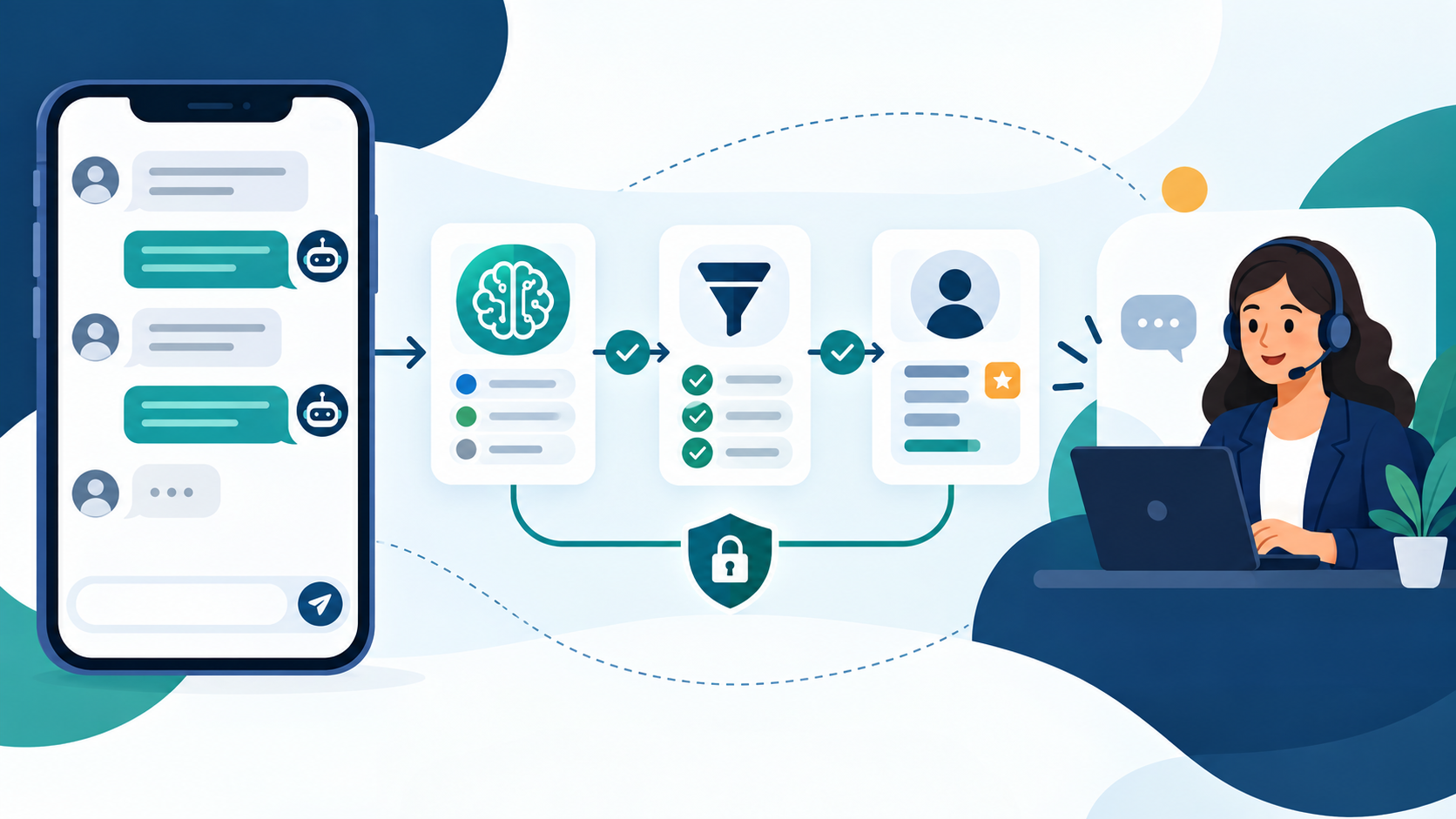
Evaluating a conversational WhatsApp AI chatbot helps growing businesses qualify prospective customer inquiries, organize routine support answers, and reduce front-desk bottlenecks while preserving reliable human oversight.
Conversational AI Meets WhatsApp Messaging
Direct messaging channels have changed how prospective buyers and returning clients interact with local service providers, professional consultancies, and commercial firms. Rather than waiting on telephone hold or checking an email inbox hours later, customers expect direct exchanges on messaging apps. For a business whose customers already use WhatsApp, it can be a useful touchpoint. However, managing high-volume inbound chats manually can quickly strain support staff, resulting in delayed replies, lost inquiries, and inconsistent answers during peak hours.
This operational challenge is where a WhatsApp AI 聊天機器人 is worth evaluating. A supported conversational workflow can interpret questions and suggest approved answers. Rules and menus remain useful when customers need a predictable choice. When a prospective client asks about service availability, standard pricing guidelines, or project timelines, the test should check whether the workflow finds the right approved answer, admits uncertainty and offers staff help when needed.
Basic messaging rules have supported customer communications for years. Teams that previously relied on simple auto-replies or no-code WhatsApp message automation often consider conversational intelligence when they need greater flexibility with natural phrasing. Test varied phrasing before relying on conversational answers, and keep structured choices for important next steps.
Adopting an automated conversational workflow requires a realistic understanding of platform boundaries, official messaging rules, operational expenses, and team oversight. Selecting the right approach for your organization is not about chasing speculative software trends; it is about building a dependable communication pipeline that delivers practical customer support while preserving dependable escalation paths to human staff.
Core Business Use Cases for WhatsApp Automation
Small businesses and regional service providers typically evaluate conversational assistants on WhatsApp across three core operational workflows: lead intake, routine customer support, and appointment coordination. Understanding how these workflows function in practice helps business owners assess real team requirements before deploying new software.
Structured Lead Qualification and Intake
Inbound customer inquiries often arrive with incomplete context. A prospective client might send a short text asking about general availability without specifying the type of work needed or their location. Responding manually to every vague message consumes valuable administrative hours just to establish basic project parameters before determining whether the lead fits your business.
An automated conversational intake flow gathers essential project details systematically for team review, when the chosen workflow supports that intake:
- Identifying the specific service category requested.
- Confirming general geographic service areas or service eligibility.
- Clarifying expected project timeframes or urgency levels.
- Noting customer communication preferences for human follow-up.
Consider a hypothetical U.S. home-service business, such as a residential heating and cooling repair firm. When a homeowner initiates a WhatsApp inquiry, the conversational assistant can ask whether the request involves seasonal maintenance, system replacement estimates, or urgent diagnostic repair. It can then request the homeowner’s general service area—such as a specific municipality or county zone—to verify that the property falls within the company’s operational coverage. In this illustrative scenario, the assistant collects solely the service category and general service territory. It does not solicit or store personal names, phone numbers, street addresses, or payment card details. Crucially, this intake request represents an initial inquiry record for staff evaluation, not a binding contract, guaranteed quote, or confirmed dispatch commitment.
Once preliminary intake details are collected, the conversation can be flagged for staff review in a shared team inbox. For broader insights on designing conversational intake flows across multiple touchpoints, explore our small business AI chatbot services guide.
Frontline Customer Support and Routine Inquiries
Repetitive informational inquiries take up significant staff time each week. Routine questions regarding standard operating hours, office locations, general service policies, and standard turnaround ranges do not require human creativity, yet leaving them unanswered frustrates prospective customers. Establishing an approved informational knowledge base allows an automated assistant to address these frequent questions consistently.
By referencing verified company documentation—such as service catalogs, standard terms, and published operational guidelines—the team can test whether the assistant returns the correct approved information during busy hours and off-hours alike. However, business owners must recognize that a verified knowledge base is an informational reference, not an absolute accuracy guarantee. Language models require clear boundaries, and unsupported questions or unusual inquiries must route to a tested staff fallback rather than allowing the system to guess.
Automated assistants can answer verified policy questions, but they do not eliminate the need for human customer service professionals. Unsupported inquiries, edge cases, and unexpected phrasing must always have a direct path to human staff.
Appointment Coordination and Consultation Intake
For service firms, business consultancies, and home contractors, coordinating initial appointments via manual chat can lead to prolonged delays. A customer suggests a time, an office coordinator checks a calendar hours later, finds a scheduling conflict, and suggests an alternative, by which time the customer may have reached out to another provider.
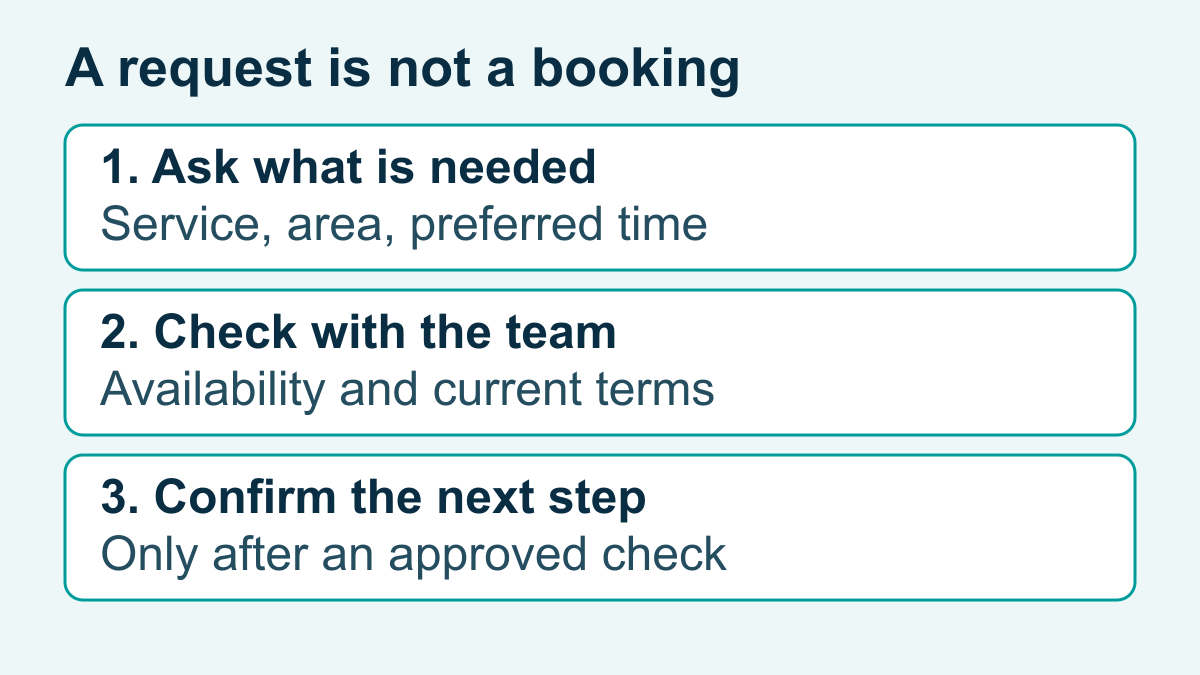
A conversational assistant simplifies this intake process by asking prospective clients for their preferred days of the week, morning or afternoon preferences, and the specific reason for the consultation. However, teams must distinguish between initial appointment intake and confirmed calendar execution. An intake conversation collects customer preferences; it does not constitute a guaranteed reservation or live calendar lock unless an integrated, tested booking system is configured with real-time conflict checking. For teams planning their scheduling architecture, evaluating an appointment booking chatbot provides a practical framework for testing booking handoffs and calendar validation rules.
Rule-Based Automation vs. Conversational AI
When assessing messaging tools, business leaders often ask whether they should implement a structured rule-based system or deploy conversational artificial intelligence. Rather than viewing this as an all-or-nothing choice, organizations benefit from understanding the concrete operational tradeoffs of each architecture. Rule-based systems do not automatically fail; they provide predictable, deterministic routing that works reliably for defined menus and compliance choices. Conversely, conversational AI does not flawlessly interpret every complex sentence; it requires tested boundaries, reference materials, and human monitoring.
| Operational Dimension | 基於規則的聊天機器人 | 對話式 AI 聊天機器人 |
|---|---|---|
| Input Handling | Restricted to button selections, numeric prompts, and exact keyword matches. | Evaluates unstructured natural language, typos, and conversational context within prompt boundaries. |
| Setup Requirements | Requires manual design of every dialogue path, branching condition, and error response. | Requires curated reference documentation, system instructions, and scenario testing. |
| Flexibility & Adaptation | Stops or returns fallback messages when phrasing deviates from predefined triggers. | Extracts intent from varied phrasing but requires guardrails against unverified claims. |
| Maintenance Demands | Decision trees require manual editing whenever services, terms, or policies change. | Refresh approved documents and retest answers; automatic sync depends on the supported setup. |
| Supervision & Risk | Fixed wording is easier to inspect; routing and fallback still need testing. | Moderate output risk; requires continuous review to prevent off-topic or hallucinated statements. |
| Best Operational Fit | Defined service categories, clear routing choices, and checked informational menus. | Open-ended customer inquiries, preliminary FAQ resolution, and broad exploratory questions. |
In practice, many growing businesses find that a hybrid model offers the best balance of speed and control. Customers can type natural inquiries such as asking about standard consultation procedures, receive an approved answer derived from verified documentation, and then click structured buttons to select an intake category or request a team callback.
Technical Prerequisites for WhatsApp Chatbot Integration
Deploying automated conversational software on WhatsApp requires navigating Meta’s messaging platform structure. Business operators must understand the technical distinctions between available business environments before committing resources.
WhatsApp Business App vs. WhatsApp Business Platform
Meta maintains two distinct business messaging environments with different capabilities and operational boundaries:
- WhatsApp 商業應用程式: A free mobile application created for sole proprietors and micro-businesses. It provides basic built-in tools such as greeting messages, away notices, quick replies, and contact labels. The app operates on individual mobile devices (with limited linked web sessions) and is built for manual staff messaging rather than third-party programmatic AI routing.
- WhatsApp Business Platform (Cloud API): Meta’s enterprise messaging infrastructure designed for scalable business communications. It supports multi-agent team inboxes, CRM integrations, and programmatic connections to conversational software platforms. The platform has no standalone consumer phone interface; interactions are managed through connected business software dashboards.
Phone Number Setup and Onboarding Realities
Setting up a business number on the WhatsApp Business Platform requires careful planning. A common misconception is that business owners must immediately delete their existing WhatsApp accounts to transition to automation. In reality, number setup paths depend on the specific onboarding process, account eligibility, and the chosen business solution provider.
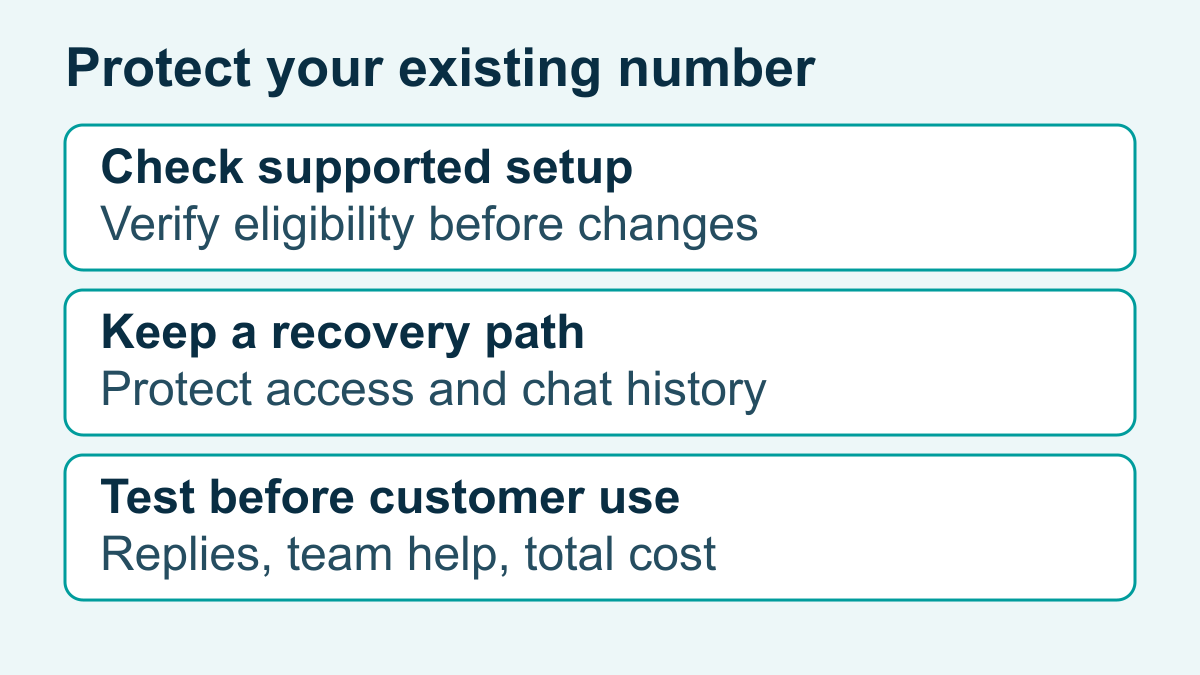
Some supported arrangements can keep an eligible Business App number in use alongside the Platform; others need a separate number or a carefully planned change. Verify the arrangement for your number and chosen service before changing an account. Unconditional account deletion instructions are unsound and can lead to unexpected loss of chat histories or communication downtime. Before altering an active phone number, consult your chosen software provider to verify the exact supported onboarding requirements, number eligibility criteria, and operational prerequisites for your specific account.
Messaging Window Boundaries and Official Rules
Operating on the WhatsApp Business Platform requires adhering to Meta’s communication session model:
- The 24-Hour Customer Service Window: When a user sends a message to your business, Meta initiates a 24-hour customer service window. During this window, replies can use free-form messages, subject to the messaging policy; timing does not remove other restrictions. Each new message received from the customer resets this 24-hour window.
- Template Messages Outside the Service Window: Once 24 hours have passed since the customer’s last message, businesses cannot send open-ended free-form messages. Outside it, only approved templates may be used, with the applicable permissions and policy requirements. For comprehensive guidance on template requirements, review our WhatsApp Business template messages guide.
- Business Profile Verification: Check the current account and number requirements in the supported setup. Confirm who controls the business profile and can recover access.
Consult official developer documentation and platform guidelines to ensure your system architecture aligns with Meta’s messaging specifications.
Designing Your Knowledge Base and Guardrails
A conversational assistant is only as reliable as the reference materials that guide its output. Feeding unverified notes or broad internal documents into an AI assistant creates risk, potentially leading to inaccurate answers, customer confusion, or inappropriate commitments. Building an effective deployment requires organized knowledge bases and firm behavioral guardrails.
Begin by compiling clear, approved documentation that addresses your most frequent customer inquiries:
- Service Descriptions and Scopes: Plain explanations of standard service offerings, package deliverables, and common project boundaries.
- Pricing Policies and Estimate Guidelines: Documented starting rates, evaluation criteria for custom quotes, and clear statements that final pricing requires staff confirmation.
- Operational Procedures: Standard business hours, turnaround ranges, service territories, and cancellation or rescheduling terms.
- Contact and Escalation Protocols: Departmental contact routing, emergency procedures, and office location details.
Equally important is establishing strict negative constraints. System instructions must define what the assistant is prohibited from doing. The assistant should never provide diagnostic medical advice, make legally binding promises, fabricate custom discounts, or speculate on questions outside its documented sources. When confronted with unfamiliar inquiries, the assistant should transparently state its limitations and offer a staff escalation path.
If evaluating Bring Your Own Key (BYOK), verify the supported model connection, access controls and data handling terms. Customer-owned access does not guarantee privacy, answer quality or every workflow feature. If your team also engages prospects across Meta’s broader ecosystem, review our WhatsApp Business vs Facebook Messenger channel comparison to align communication standards across platforms.
Human Handoff Protocols and Staff Escalation Paths
Automated assistants should support your customer service team, not replace human judgment. Regardless of improvements in natural language processing, nuanced customer negotiations, complex technical questions, and sensitive concerns will always require human empathy and experienced decision-making. A well-designed escalation protocol ensures smooth transitions between automated intake and human support.
Reliable handoff workflows typically incorporate three essential triggers:
- Direct Customer Request: When a user types phrases such as “speak to an agent,” “human support,” or “talk to a person,” the system should acknowledge the request promptly and halt automated replies.
- Repeated Misunderstandings: If the assistant fails to match user queries to verified knowledge after consecutive attempts, it should stop guessing and offer to route the chat to team members.
- High-Value or Sensitive Topics: Inquiries involving formal complaints, billing disputes, or complex project requirements need a tested route to staff review; do not assume notifications arrive.
When an escalation occurs, the platform should present the conversation history and collected intake notes in a unified team inbox. This context allows team members to step in smoothly without asking the customer to repeat their initial inquiry. If an escalation occurs outside normal business hours, the assistant should communicate standard operating hours clearly, record customer preferences for follow-up, and avoid making unrealistic promises such as guaranteed next-morning response times. Real response timing must reflect actual team staffing schedules and tested internal processes.
Understanding WhatsApp AI Chatbot Costs in 2026
Planning a budget for WhatsApp messaging automation involves evaluating two separate cost elements: Meta’s message delivery fees and third-party software platform subscriptions. Understanding how both components interact protects small businesses from unexpected operating costs.
Meta Message-Based Pricing Categories
該 official WhatsApp Business Platform pricing guide describes delivered-message charges by recipient market and category: marketing, utility, authentication and service. It lists uncharged service replies in the open 24-hour window, qualifying utility replies, volume tiers and eligible 72-hour ad or Page entry points. Check current terms and rates before budgeting; these rules do not make every workflow free.
Keep message charges separate from software and staff costs. Record expected recipient markets, message purposes and paid allowances alongside supported features. For a campaign example, see qualifying leads after a WhatsApp ad click.
Software Platform Subscriptions and Evaluation Checks
Beyond Meta’s message delivery fees, operating an automated assistant requires an automation platform to manage conversation workflows, host knowledge bases, coordinate language model interactions, and provide team inbox collaboration. Software subscription costs typically reflect several key factors:
- Monthly active contact volume or conversation processing limits.
- Knowledge base storage capacity, document reference processing, and model connectivity.
- The number of human staff seats, department routing rules, and supported messaging channels.
When researching potential software solutions, verify exact channel availability, feature access, and workflow compatibility with your chosen provider before subscribing. Software features and channel connections can vary based on plan tiers, regional availability, and platform updates. Rather than assuming automatic compatibility, treat platform documentation as an evaluation resource to determine whether specific automation features match your operational requirements. To examine workflow tiers, team features, and scalable plans, Check Current Pricing for Messenger Bot to evaluate how available options align with your business goals.
Privacy, Consent, and Compliance Safeguards
該 WhatsApp Business messaging policy requires appropriate permission, respect for opt-outs, accurate business information and clear escalation. Avoid sensitive financial identifiers in chat. Permission and timing do not make prohibited content permissible.
Write down what intake information is genuinely needed, who can access it and how staff handle unwanted sensitive submissions. Do not assume automatic redaction or that a software subscription establishes legal compliance. Review applicable obligations with qualified advice when needed.
Implementation Checklist for Small Businesses
Transitioning from manual chat management to an automated conversational assistant is most effective when executed in structured phases. Use this practical implementation checklist to evaluate your readiness and guide deployment:
- Channel and Number Readiness: Assess phone number requirements, confirm supported onboarding paths with your software provider, and establish a dedicated business line if required.
- Meta Business Setup: Prepare verified Meta Business Manager credentials, establish official company profile details, and configure payment methods for messaging usage.
- Channel Access Verification: Confirm exact channel availability, message routing capabilities, and team inbox features with your chosen automation platform before subscribing.
- Knowledge Base Curation: Assemble approved documentation covering standard services, estimate guidelines, operational hours, and service territories. Set clear boundaries to prevent speculation.
- Staff Escalation Configuration: Configure handoff triggers, assign shared inbox responsibilities, and set clear customer expectations for off-hours inquiries without unrealistic response promises.
- Intake Workflow Testing: Test hypothetical triage scenarios—such as service category and broad service territory—verifying that customer preferences are logged without requesting unnecessary personal data.
- Controlled Pilot and Review: Launch the assistant to a limited customer segment, reviewing chat transcripts regularly to identify knowledge gaps, refine response boundaries, and verify handoff reliability.
To examine detailed walkthroughs covering workflow builders, lead triage structures, and multi-channel configurations, 瀏覽我們的教程. For broader industry context on how conversational tools fit into modern business operations, review our guide to modern AI chatbot applications.
常見問題
What is the primary difference between the WhatsApp Business App and the WhatsApp Business Platform?
The Business App provides built-in tools for managing customer chats. The Platform supports connections to business software for separately configured workflows. Check current features, number eligibility and the chosen service’s actual access; neither label proves a particular AI or team workflow is available.
Can a WhatsApp AI chatbot guarantee accurate answers for all customer inquiries?
No conversational assistant can guarantee absolute accuracy across every customer interaction. Even with an approved reference set, unexpected phrasing, novel questions, and ambiguous requests require strict guardrails and tested escalation paths to human team members.
How are WhatsApp messaging fees calculated for business chatbots?
Check Meta’s current rate card and the chosen software’s terms separately, then add setup and staff costs. Use the recipient markets, message purposes and expected usage rather than assuming every reply has the same charge.
What happens when an inquiry falls outside the chatbot’s knowledge base?
When a user query exceeds documented reference materials or confidence boundaries, the assistant should acknowledge the limitation transparently and route the conversation to human staff. Test whether the chosen workflow reaches the responsible staff member and preserves the needed context. If no supported handoff is available, offer a clear alternative and realistic business hours; do not promise automatic assignment.
Do businesses need customer consent before sending messages through a WhatsApp chatbot?
Follow the current policy for recipient permission and opt-outs. An inbound inquiry is not blanket permission for future promotions. Approved templates outside the service window do not replace required permissions or other policy checks.



 繁體中文
繁體中文  English
  Tagalog
  简体中文
简体中文  العربية
  हिन्दी
  Português do Brasil
  Español de México
  Français
  বাংলা
বাংলা  香港中文
香港中文  Nederlands
  Deutsch
  Bahasa Indonesia
  日本語
日本語  한국어
한국어  Polski
  Русский
  Español
  Tiếng Việt