
A Facebook Page auto reply should give the customer more than a courtesy note. A weak instant reply says, “Thanks for messaging us.” A useful one answers the first question, sets response expectations, and gives the customer a next step before they drift away.
A clear first response helps customers understand when they can expect help. If your Page gets messages from ads, local search, marketplace traffic, organic posts, or referrals, your first auto reply does three jobs at once. It reassures the customer that the message went through, filters intent, and protects leads that arrive outside business hours.
Start by checking the reply controls available in your Meta Business Suite inbox. Look for instant-reply, away-message and keyword options, then review the requirements shown for your Page. The catch is that native tools are still limited. They are fine for simple first-touch workflows, but they get cramped fast once you want branching replies, lead capture, CRM sync, multichannel routing, or better reporting.
Review the options available in your connected Page before changing settings; menu labels and account eligibility can differ. If you are mapping a larger support or lead-generation system beyond the first reply, start with this guía de Messenger para negocios después de que termines aquí. Este artículo se centra en la capa de respuesta automática: lo que Facebook nativo puede hacer, dónde se detiene y cómo actualizar sin escribir código.
Por qué las Respuestas Automáticas Importan para las Páginas de Facebook en 2026
La primera respuesta automática no se trata de sonar amigable. Se trata de controlar los primeros 15 segundos de la conversación. Si un prospecto envía un mensaje a tu Página preguntando sobre el precio, la entrega, el horario de apertura, la reserva o la disponibilidad del producto, la peor experiencia posible es el silencio. Incluso una respuesta automática básica supera el silencio, pero la respuesta automática correcta puede hacer mucho más que confirmar la recepción.
Una respuesta automática sólida en Messenger ayuda de cinco maneras de inmediato:
- Reduce el pánico. Las personas saben que su mensaje llegó a un negocio real y no desapareció en una bandeja de entrada muerta.
- Establece expectativas. Si tu equipo responde en dos horas, di dos horas. Si estás cerrado hasta mañana, dilo.
- Responde instantáneamente una cosa útil. Las horas de atención, el enlace de reserva, el rango de envío o el rango de precios son todos buenos candidatos.
- Mueve al cliente hacia adelante. Las mejores respuestas ofrecen un botón, una palabra clave o una acción clara a seguir en lugar de terminar con un amable punto muerto.
- Protege los leads fuera del horario. Un buen mensaje de ausencia capta la intención mientras el comprador todavía está lo suficientemente motivado para preguntar.
Piensa en los tipos de mensajes de Facebook que la mayoría de las empresas reciben. Rara vez son ensayos largos y complejos. Suelen ser preguntas cortas y de alta intención: “¿Cuánto cuesta?” “¿Estás abierto?” “¿Puedo reservar hoy?” “¿Haces envíos a Dubái?” “¿Tienes esto en stock?” “¿Puede alguien llamarme?” Estas son exactamente las preguntas que las respuestas automáticas deberían absorber primero.
Keep the first Messenger reply short enough to read comfortably on a phone. On Messenger, your first reply should feel like a front-desk assistant who already knows the common questions and is ready to route the person fast.
Esa es también la razón por la que las respuestas automáticas nativas de Facebook siguen importando incluso si planeas usar un chatbot más completo más tarde. Son la red de seguridad mínima viable para cualquier Página activa. Si tu Página recibe tráfico constante y aún no tiene respuesta instantánea, efectivamente estás pagando por clics y atención solo para hacer que la gente espere.
Respuesta Automática Nativa de Facebook vs Chatbots de Terceros
Antes de comprar cualquier cosa, ayuda separar las cinco herramientas diferentes que la gente mezcla bajo la frase “respuesta automática de Messenger.”
- Saludo: el mensaje de vista previa que alguien ve antes de enviar el primer mensaje.
- Respuesta instantánea: la primera respuesta automatizada después de que llega un nuevo mensaje entrante.
- Mensaje de ausencia: la respuesta automática enviada cuando tu Página está configurada como Ausente o programada fuera del horario laboral.
- Respuestas guardadas: respuestas manuales predefinidas, útiles para el personal, pero no totalmente automáticas.
- Automatización por palabras clave: una regla que envía una respuesta específica cuando un mensaje contiene ciertas palabras o frases.
Review the automated-response templates available in your Page inbox. Begin with the simplest option that acknowledges the customer and sets an honest response expectation; add keyword routing only after testing the matching and timing rules shown in your account.
| Need | First check | When to evaluate another tool |
|---|---|---|
| Acknowledgement | Available instant-reply controls | The tested response does not meet your requirements |
| Closed-hours response | Available away-message settings and timezone | Your schedule cannot be represented accurately |
| Keyword routing | Matching rules, timing and available keyword options | You need logic the current controls do not support |
| Lead handling | How your team captures the minimum necessary detail | You have a documented routing or integration requirement |
The native route is best when you want three things only: a clean first reply, a real after-hours message, and a few keyword shortcuts for common questions. It is especially good if you are running one Page, one time zone, and a short list of FAQs.
The third-party route starts making sense when your first reply needs to branch. For example, if someone types “price,” you want one flow. If they type “book,” you want another. If they come from a specific ad, you want a campaign-specific opener. If they need a human, you want to capture their details and push them into a team inbox or CRM. Native tools can hint at that. Dedicated chatbot platforms are built for it.
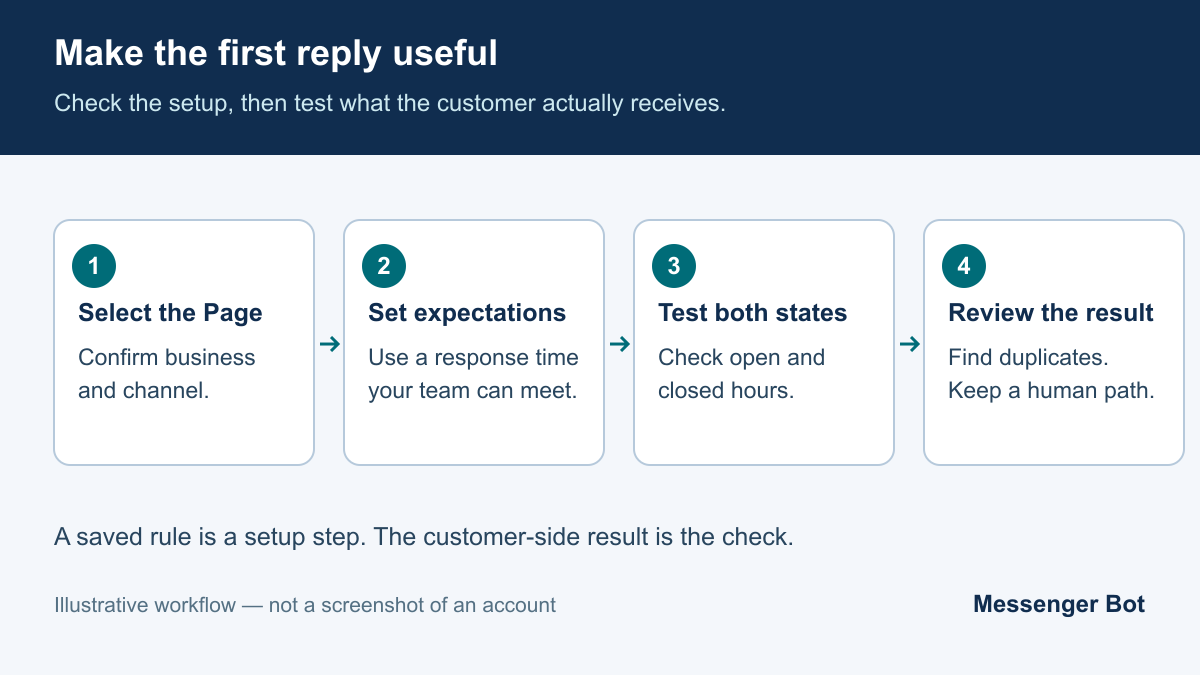
Test instant replies and away messages separately, then together, using the options shown in your Page. Confirm which response a customer receives during open and closed hours rather than assuming both messages will be sent.
Setting Up Native Auto Replies on Facebook Page Without Guesswork
If your goal is to get a usable Messenger auto reply live today, stay disciplined. Do not try to build a mini call center in the first session. Set up the greeting, instant reply, away message, and one or two keyword-based replies first. Then test from a second account.
Before you touch the settings, have these ready:
- Your Facebook Page with messaging turned on
- Facebook or task access to that Page
- Your business hours
- Three common questions customers ask
- One booking link, website link, or support email if you want a next step
Open Meta Business Suite Inbox and go straight to Automations
Select the intended Facebook Page in Meta Business Suite and open Inbox. Look for Automations or the equivalent automated-response controls available to that Page. Labels and available templates can vary; use the current on-screen instructions rather than assuming every account has the same menu.
If you manage more than one Page, confirm that you have selected the business Page you intend to update. If replies still do not work, use our Facebook Messenger auto-reply setup and troubleshooting guide to review the setup before changing more settings.
Turn on Instant Reply and write a message that does one real job
Choose the instant-reply option if it is available, review its trigger and channel, enter your message and save. Reopen the saved rule and check the wording before testing it from a consenting teammate’s account.
Do not waste this message on a generic thank-you. Your instant reply should do one of these well:
- Answer a common question immediately
- Tell the user the exact reply window
- Offer a booking or quote link
- Tell them which keywords to send next
A weak example: “Hi! Thanks for messaging us. We will get back to you soon.”
A better example: “Thanks for messaging Brightlane Travel. We usually reply within 30 minutes during business hours. If you need pricing now, reply PRICE. For booking help, reply BOOK.”
Add an Away Message that matches your real operating hours
Meta lets you create an away message and schedule your Page status around business hours. That is the right place to handle evenings, weekends, holidays, and time-zone gaps. You can also manually set a Page to Away for a limited period, but a schedule is better if your hours are predictable. For timing beyond a basic away message, learn how to schedule messages in Messenger safely while preserving consent and review controls.
Your away message should do three things:
- Say when your team is back
- Offer one self-service option now
- Invite the customer to leave the one detail you need next
Example: “We are offline right now and will reply after 9:00 a.m. GMT+1. If this is about an order, send your order number now. If you need a quote, leave your service type and country and we will pick it up first thing.”
If a reply does not appear, check the selected Page, channel, saved automation and away schedule. Change one setting at a time and record the result so a second automation does not hide the cause.
Use Greeting and Keyword Automations to cut repetitive questions
The greeting is the message people see before they send the first message. It is not the same as the instant reply. Use it to frame the conversation, not to dump details. Something as simple as “Message us for pricing, booking, or order help” is enough.
If your Page offers a keyword-response option, review its matching rules and timing before configuring it. Test each spelling and phrase you intend to support; do not assume synonyms or upper- and lowercase versions match automatically. Useful examples to test include:
price,precios,costbook,booking,appointmenthours,open,closingdelivery,shipping,track order
Keep the replies short. Messenger is not the place for a seven-sentence FAQ wall. A good keyword reply gives one answer, one option, and one route to a human if needed.
Test from a second account before you assume it works
Do not test only from the admin account. Use a second personal Facebook account or ask a teammate to message the Page from their own device. Run four tests:
- Send a first-time message and confirm the greeting and instant reply behavior.
- Test the configured closed-hours state and record which response appears, including any duplicate reply.
- Send each keyword variant and make sure the right response triggers.
- Try a vague message like “I need help” and confirm the fallback still points to a human path.
If the reply feels stiff, rewrite it immediately. Messenger copy should sound useful, not ceremonial.
When You Need More Than Native Auto Replies
Native auto replies are solid up to a point. After that, they start to create hidden manual work. The question is not whether Meta’s built-in tools work. They do. The question is whether they still work once your inbox becomes an actual operating channel.
You probably need more than native if any of these are true:
- You want different replies based on ad source, campaign, or product line.
- You need branching flows instead of one-off canned answers.
- You want to collect lead data inside Messenger and send it to Sheets, email, or a CRM.
- You need a persistent menu, human handoff rules, tags, or follow-up sequences.
- Your team handles both Facebook Messenger and Instagram DMs and wants one cleaner system.
- You want reporting beyond “messages came in.”
This is where a no-code chatbot starts paying for itself. Not because “AI” sounds impressive, but because the conversation becomes manageable. Instead of one generic first response, you can build an actual intake flow: ask what the customer needs, route them correctly, collect the minimum useful detail, and push that data to the right place.
If you want the broader builder walkthrough after the native setup, the guía de chatbot sin código is the next logical read. It covers the wider workflow decisions that sit beyond simple instant replies.
How to Compare Auto-Reply Tools for Your Page
Choose the smallest setup that handles your actual customer questions. Start with the controls available in your Page inbox. If a requirement cannot be met there, write it down before comparing a paid tool. A longer feature list is not useful if the selected plan does not support your channel or your team cannot maintain the workflow.
| Requirement | What to check | Evidence to keep |
|---|---|---|
| Connected Page and channel | Does the selected plan support the exact account you manage? | The connected account and channel shown in settings |
| Reply trigger | What starts the response, and can another rule overlap? | A test conversation showing the intended reply once |
| Human handoff | Who receives a question the automation cannot answer? | A tested handoff and an honest response-time message |
| Usage and cost | What is included, what is metered, and when is the plan billed? | The current quote and selected billing period |
| Customer details | What information is necessary, and who can access it? | A minimal intake form and the team’s access settings |
| Stopping a rule | Can the team pause the exact automation without disrupting other work? | The pause control and a follow-up test |
Evaluating Messenger Bot for a business Page
For a business managing Facebook conversations, begin with a practical result: acknowledge the question, collect only the detail needed to help, and give the customer a clear next step. Compare that workflow with the selected Messenger Bot plan and confirm the required channel and features in your account before purchase.
The public pricing page lists Starter at $29 per month, Pro at $99 per month and Agency at $299 per month, checked September 12, 2026. Verificar precios actuales for the selected plan and confirm the terms at checkout. Advertised features are not proof that every workflow or integration is available for your particular account.
Compare total cost rather than a headline price
When comparing any tool, include account allowances, contact limits, team seats, usage charges and the billing commitment. Ask which limit will apply to your expected workload and what happens when it is exceeded. Do not compare an annual-billing monthly equivalent with a month-to-month price without noting the difference.
Test the simplest useful workflow before adding complexity. A short acknowledgement, an accurate closed-hours message and a reliable human path are easier to maintain than a large branching flow built around assumptions. Keep a record of the trigger, expected result and observed result so the team can diagnose a problem later.
Auto Reply Templates With a Clear Next Step
The best auto reply templates share one trait: they reduce uncertainty. They do not try to be clever. They tell the user what happens next, and they make the next action obvious.
| Escenario | Weak version | Stronger version |
|---|---|---|
| General first reply | Thanks for messaging us. | Thanks for messaging North River Studio. We reply within 1 hour. Reply PRICE, BOOK, or HUMAN so we can route you faster. |
| After-hours | We are away right now. | We are offline and reopen at 8:30 a.m. EST. Leave your question now, or reply BOOK for our booking link. |
| Pricing inquiry | Please wait for an agent. | Our starter packages begin at $49. If you want an exact quote, reply QUOTE and send your country plus service type. |
| Order support | We will check. | For order help, send your order number now and we will pull the right update faster. |
| Human handoff | Someone will contact you. | A team member will reply within business hours. Leave your name, email, and the issue in one message so you do not have to repeat it later. |
Use these five examples as starting points. Replace all sample names, prices and response times with details your team can support.
Template for a first-time Page message
“Thanks for messaging [Business Name]. We usually reply within [time]. If you need help faster, reply with one word: PRICE, BOOK, HOURS, or HUMAN.”
This works because it shortens the customer’s decision. They do not have to guess what your inbox can handle.
Template for after-hours lead capture
“We are currently offline and will reply after [time and time zone]. If you want a quote, send your product or service plus your country now and we will pick it up first when we return.”
This gives the customer a concrete next step instead of an unexplained wait.
Template for booking-based businesses
“Thanks for reaching out. If you want to book today, reply BOOK and we will send the fastest appointment option. If you need pricing first, reply PRICE.”
That split works well for clinics, salons, trainers, consultants, and service businesses because it separates intent cleanly.
Template for ecommerce support
“Need order help? Send your order number in this chat and we will check the status. For delivery timelines, reply SHIPPING.”
The main win here is context capture. Your human team gets the order identifier before they ever join the thread.
Template for a human handoff without sounding evasive
“A team member can help with that. Please send your name, best contact method, and the issue in one message so we can reply without extra back-and-forth.”
The strongest human-handoff template does not apologize too much. It just reduces friction.
Check the Messaging Window Before Automating Follow-Up
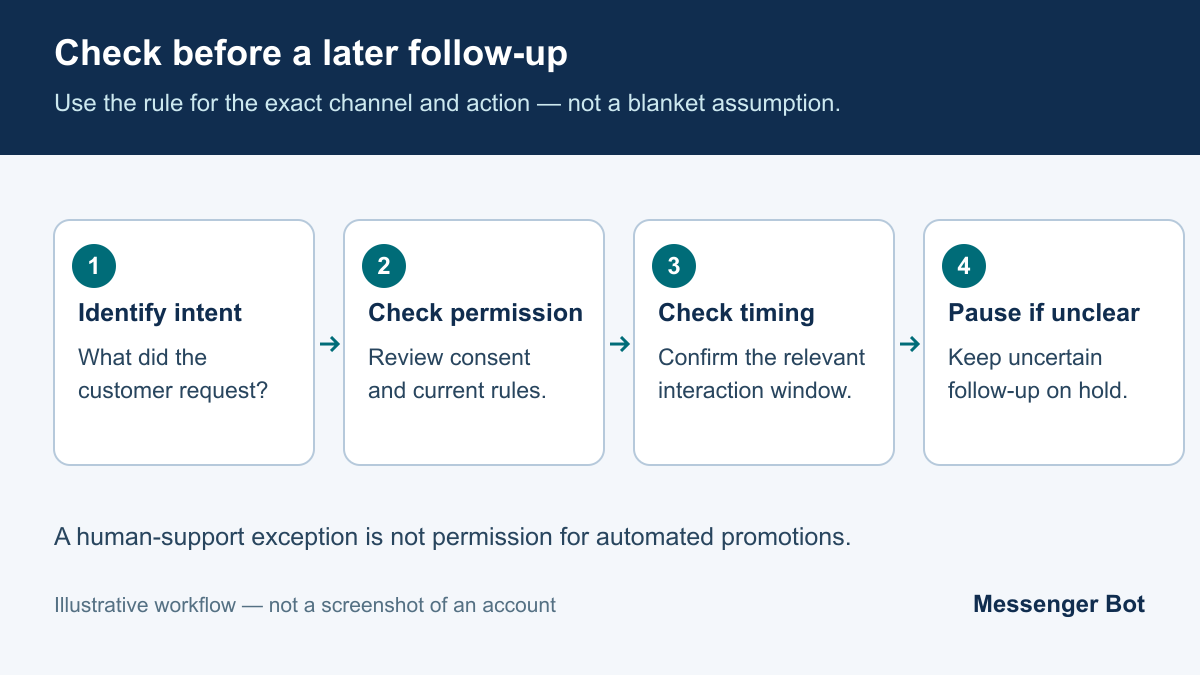
A reply to a new inquiry and a later promotional follow-up are different actions. Before automating either, verify the current Meta rule for the exact channel, message type and conversation. Do not assume that a previous message creates ongoing permission to contact someone.
You may encounter references to a 24-hour window or a human-agent extension. Neither label is a blanket authorization. Check the applicable rule, eligibility and permitted use in your connected tool; do not use a human-support exception to run automated promotions.
- Identify what triggered the reply and confirm the recipient expects it.
- Check the last relevant interaction and the current rule for the intended action.
- Keep a human handoff distinct from automatic follow-up.
- Pause the proposed follow-up when permission or timing is unclear.
- Confirm the result in the conversation rather than treating a saved rule as delivery proof.
Order updates, reminders and marketing can have different requirements. A useful business purpose does not itself establish permission. Review the current platform terms and the customer’s preferences before enabling an outbound workflow.
Common Auto Reply Mistakes to Avoid
Messenger auto replies are easy to launch and surprisingly easy to ruin. These are the mistakes that hurt results the fastest.
- Writing a polite message with no action: “Thanks for messaging us” is not a workflow.
- Using one generic reply for every intent: pricing, support, booking, and complaints should not all hit the same dead-end line.
- Skipping open- and closed-hours tests: check the interaction between saved rules before relying on them.
- Pretending a human is live when nobody is there: customers forgive slow support more easily than fake availability.
- Asking for too much too soon: if the first reply asks for full contact details before helping, people leave.
- Ignoring keyword variants: customers type “cost,” “price,” “rates,” and “how much” interchangeably.
- Testing only inside admin view: the customer-side mobile experience is what matters.
- Skipping the applicable messaging rule: verify permission and timing before enabling follow-up.
- Never reviewing real inbox data: the best auto reply copy usually comes from the last 50 messages you already received.
The simplest monthly maintenance habit is this: open your inbox, find the top five repeated questions from the last month, then tighten your instant reply, away message, and keyword triggers around those. Review one change at a time against actual customer questions.
What to Launch After Your First Auto Reply Works
If native Messenger auto replies already cover your volume, keep them lean and updated. If your inbox is starting to act like a sales or support channel, move up to a real no-code flow before manual work piles up. Compare the live plan limits, builder features, and channel options on Verificar precios actuales, then choose the smallest setup that gives you instant replies, after-hours handling, and one clean human handoff path.
Preguntas Frecuentes
¿Cómo configuro la respuesta automática en Facebook Messenger?
Select your business Page in Meta Business Suite, open Inbox and find the available automated-response controls. Review the instant-reply trigger and channel, save your message and test it from a consenting teammate’s account. Menu labels and availability can vary.
¿Puedo establecer respuestas automáticas diferentes para diferentes palabras clave?
Check whether your Page or selected tool offers keyword responses. Review the matching rules and timing shown there, then test each intended phrase and spelling before relying on the rule.
¿Cuál es la regla de 24 horas para las respuestas automáticas de Messenger?
Messaging eligibility depends on the exact channel, action, conversation and current Meta policy. Verify the applicable window before automating follow-up; do not treat a human-agent exception as permission for automated promotions.
¿Las respuestas automáticas también funcionan para los DMs de Instagram?
Check the connected Instagram account and the channel options in the selected tool. Test that specific account separately instead of assuming a Facebook Page rule also applies to Instagram.
What should an auto reply template include?
Acknowledge the question, state a response time your team can meet and give one useful next step. Treat sample prices, business names and response times as examples to replace, not promises to copy unchanged.
 Español
  English
  Tagalog
  简体中文
简体中文  العربية
  हिन्दी
  Português do Brasil
  Español de México
  Français
  বাংলা
বাংলা  香港中文
香港中文  繁體中文
繁體中文  Nederlands
  Deutsch
  Bahasa Indonesia
  日本語
日本語  한국어
한국어  Polski
  Русский
  Tiếng Việt