
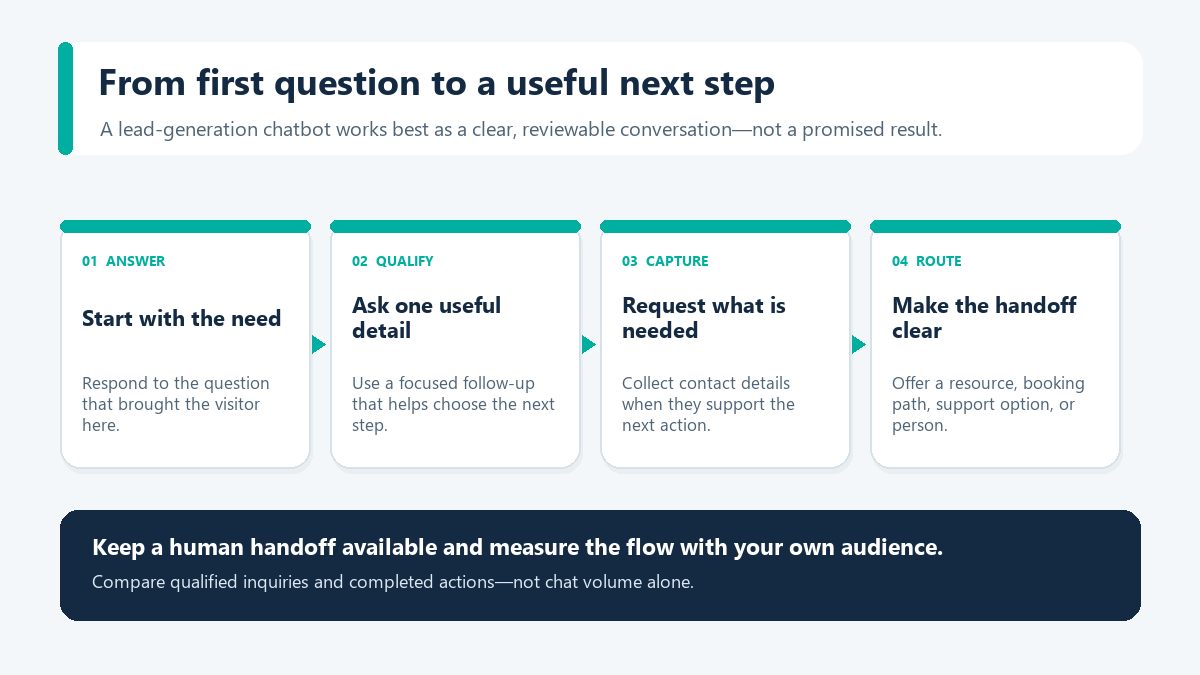
A lead generation chatbot can answer a visitor’s first question, ask a relevant follow-up, and point them toward a useful next step. It gives businesses another way to organize lead capture; it does not guarantee more leads than a form.
This approach is worth testing when prospects need context before sharing contact details. Define what counts as an eligible visit, a captured inquiry, and a qualified lead, then compare the flow with the existing form under similar conditions.
The guide below maps the conversation, explains which information to request, and shows how to judge whether it helps your team. If your first interaction happens in Facebook or Instagram comments or direct messages, read Messenger Bot’s Facebook and Instagram workflow overview; this article focuses on general lead-capture design and vendor-neutral evaluation.
Why Lead Generation Chatbots Complement Static Forms on High-Intent Traffic
Static forms remain a familiar option on many landing pages and can work well for basic, uniform data collection. Some visitors, however, may prefer an answer before sharing contact details.
A conversational chatbot can offer an interactive preliminary step: answer a question, collect a relevant detail, and present an appropriate next action. The effect on completion or abandonment depends on page intent, audience, and the flow itself, so compare results against a suitable baseline before drawing conclusions.
| 리드 캡처 방법 | Interaction structure | Information gathered | Primary friction point |
|---|---|---|---|
| Static web form | Simultaneous fixed-field presentation | Standard contact fields, often without immediate context | May request several details before answering a visitor’s question |
| Conversational flow | Progressive, interactive exchange | Contact details paired with declared intent, requirements, and urgency | Requires deliberate conversation mapping, prompt routing, and ongoing flow review |
A potential benefit of conversational capture is that it can answer an initial question before requesting more information. Visitors on pricing or demo pages may want details about compatibility, service tiers, or rollout requirements. Test whether the sequence helps your audience, and request contact information only when it is needed for the next step.
What a Lead Generation Chatbot Does Between First Click and Follow-Up
A lead generation chatbot is not merely an alternative visual container for form fields. When implemented effectively, it manages a structured five-part sequence: greeting visitors according to context, qualifying requirements with targeted questions, collecting essential contact data progressively, routing the inquiry appropriately, and preserving conversation context for team follow-up.
Qualification Starts Before the Bot Ever Asks for an Email Address
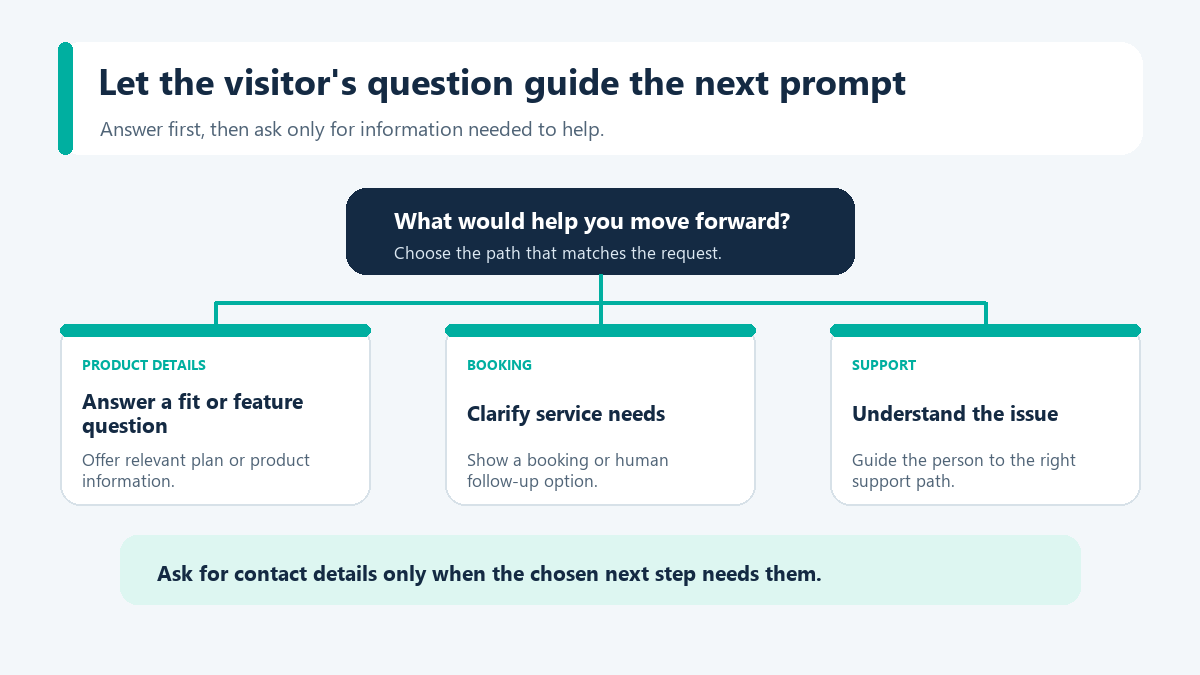
Effective qualification begins with contextual relevance. A visitor on a pricing page has different priorities than a reader browsing a high-level educational post. High-intent prospects typically seek answers to practical questions: compatibility, suitability for their team size, implementation requirements, or speaking with a specialist. A well-designed bot addresses those baseline questions before introducing qualifying prompts.
Relevant qualifying criteria often include:
- Use case: demo scheduling, pricing assessment, integration requirements, or feature migration.
- Organization size: solo/small business, mid-market, or enterprise.
- 타임라인: immediate implementation, current quarter planning, or preliminary research.
- 역할: business owner, marketing director, operations manager, or agency consultant.
Collecting this contextual data enables teams to distinguish high-priority commercial inquiries from early-stage exploratory research before sales follow-up begins.
진보적 프로파일링은 대화를 짧게 유지하여 마무리할 수 있도록 합니다.
Conversational capture falters when structured like an exhaustive survey. Prospects expect prompt guidance rather than lengthy questionnaires. Progressive profiling addresses this by requesting only the single most relevant data point needed for the immediate next step. If a visitor arrives via an identified marketing campaign, basic identification fields can be bypassed. Similarly, if a prospect indicates basic exploratory interest, the flow can direct them to self-serve documentation rather than presenting complex enterprise questions.
A progressive conversation can collect context over several turns. Test whether your visitors prefer that sequence, and gather only the details needed for a useful next step.
Evaluating CRM Handoff and Downstream Workflows
When evaluating conversational tools, buyers often consider how captured inquiries transition into back-end operational workflows. In automated lead generation setups, consistent execution typically involves associating inquiries with campaign sources, mapping responses to appropriate contact fields, and triggering subsequent operational tasks.
Depending on organizational workflows, downstream steps may include calendar scheduling for qualified inquiries, notifications to account managers, or routing support questions to dedicated help desks. For teams managing both support and sales inquiries, review Messenger Bot support use cases for routing principles that serve both operational functions.
Because data handling and integration capabilities vary widely across software providers, buyers should review the specific product’s current documentation to confirm supported connectors, available integrations, and data export formats before deployment.
Key Platform Evaluation Criteria for Lead Generation Chatbots in 2026
Selecting conversational software depends on an organization’s primary traffic channels, technical infrastructure, and operational handoff requirements. When evaluating conversational tools in the market, buyers typically encounter three broad architectural categories:
- Social & Multichannel Messaging Platforms: Ideal for organizations whose inbound demand originates across social channels, paid message ads, and website chat widgets. These tools focus on visual flow building, direct integration with messaging ecosystems like Facebook Messenger and Instagram, and automated comment-to-chat responses.
- CRM-Native Chatbot Builders: May suit businesses already using a specific CRM platform. Depending on the selected product and plan, they may offer field mapping or lifecycle updates within that ecosystem; verify included features and terms before committing.
- Conversational Landing Page & Standalone Web Bots: Focused on paid traffic funnels, full-page conversational experiences, and dedicated lead capture testing.
Buyers should verify each vendor’s supported integrations, data retention policies, and API access levels directly against their current technical requirements.
First-Party Messaging Solutions With Messenger Bot
For teams organizing Facebook and Instagram comment and direct-message follow-up, Messenger Bot provides visual workflows for lead capture, support questions, and guided next steps. Check the current feature details before relying on any channel or integration for a specific campaign.
As of September 2026, Messenger Bot offers published subscription tiers including Starter at $29/month, Pro at $99/month, Agency at $299/month, and a 7-day trial. Teams can Check Current Pricing for verified plan details. Review current plan details before choosing a tier.
Structuring a Practical Lead Qualification Flow
Dependable qualification sequences prioritize clarity and steady forward momentum. A structured conversational sequence typically follows a five-step progression: greet, qualify, capture, route, and follow up.
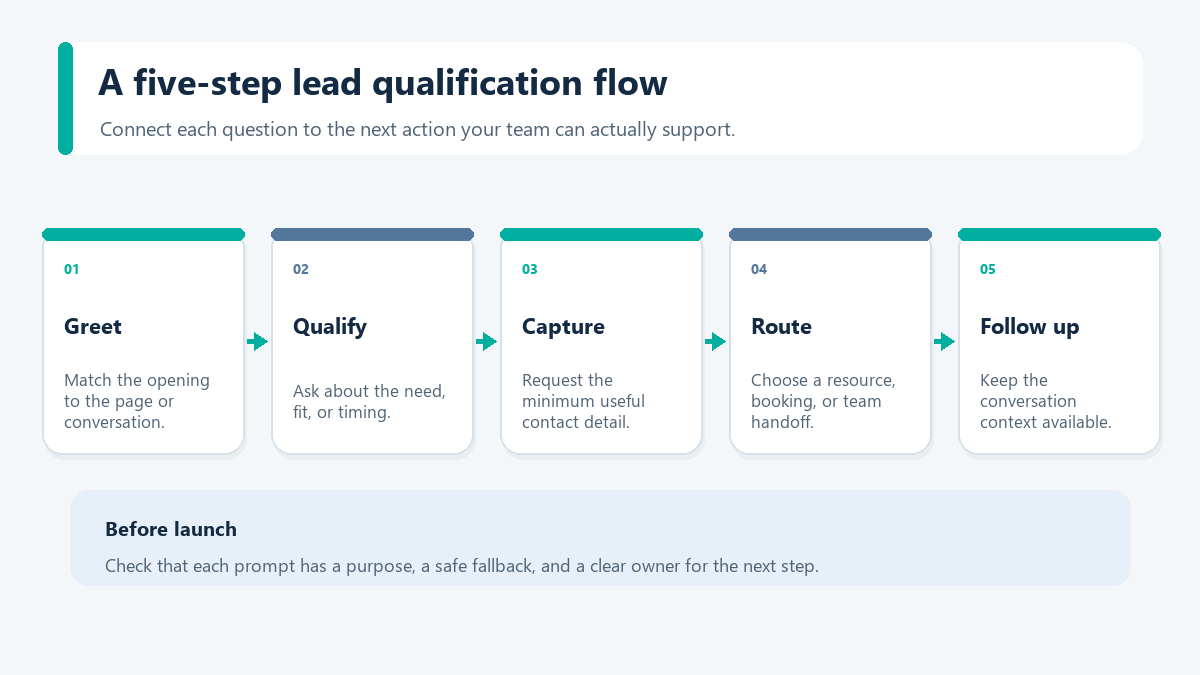
- Open with page-relevant intent, not a generic greeting. Address the visitor’s specific context directly. For example, on a pricing page: “Looking for team plan details or need help selecting the right setup? I can guide you to plan specifications or schedule a discussion.”
- Keep preliminary qualification focused. Ask for the information needed to choose the next step, such as role, team context, core requirement, or implementation timing. For a direct customer inquiry, product category or urgency may be enough.
- Request only the minimum contact information required for the next milestone. A business email address is typically adequate for digital follow-up. Request telephone details only if your team maintains dedicated outbound calling workflows.
- Route inquiries immediately based on verified fit. High-fit inquiries should be directed to calendar scheduling or live team handoff, whereas early-stage researchers can receive educational documentation or follow-up resources.
- Execute follow-up promptly. Ensure the chatbot delivers immediate confirmation, logs the interaction into operational records, and assigns appropriate tasks while the interaction remains fresh.
Collect only details that support the next step
Before adding a field, write down what decision it informs and what next action it unlocks. If it is not needed to answer the visitor or route a useful follow-up, leave it out of the first exchange. A shorter path is a design choice to test, not a proven conversion lift.
Explain why each requested detail is useful. Keep sensitive information such as passwords, full payment credentials, or private account data out of a general lead-capture conversation. Use an established account or payment path for those tasks. If a question falls outside the flow’s purpose, say so plainly and offer an appropriate person or self-service route instead.
- Name the next action before asking for contact details.
- Make optional fields clearly optional.
- Provide a useful route for an unclear or out-of-scope answer.
- Tell visitors how the requested information will be used.
- Review storage, access, retention, and update/removal options in the chosen product’s current documentation.
These are design checks, not a claim that any specific vendor meets a privacy standard. Confirm the applicable requirements for your business and the tools you select.
Plan a fallback for answers the flow did not expect
Not every visitor fits a prewritten branch. Include a not-sure or other choice, let people correct an answer, and decide where the conversation should go when a response does not match. For pricing or feature questions, point to a maintained source. For billing, account access, or other sensitive requests, route to the appropriate support path instead of collecting private details in a lead form.
Before a flow handles real inquiries, walk through complete paths and edge cases: a missing contact detail, an ambiguous answer, repeated selections, an after-hours request, and a narrow mobile viewport. Check that a handoff includes only context the next person needs and that a clear follow-up owner is assigned. Record who reviews the flow and when it should be checked again if the offer, plans, or supported features change.
For a heating or cooling business, adapt these checks using our HVAC inquiry and booking-handoff plan. It separates service-area qualification, human review and confirmed appointments; a captured request is not a technician booking.
A standard B2B qualification sequence might structure questions as follows:
- Objective: What are you looking to do today: schedule a consultation, review pricing, check a technical requirement, or explore capabilities?
- Team context: Are you working solo, with a growing team, or across a larger organization?
- Current setup: What process or tool are you using now?
- 타이밍: Are you ready to make a change, planning for a later date, or still researching?
- 캡처: Preferred business email to transmit relevant information.
The conversational flow should branch systematically based on these responses. Teams requiring more capacity should compare current page, contact, and campaign limits with their planned workflow before selecting a tier.
B2B and B2C Considerations in Conversational Lead Capture
Lead capture requirements differ fundamentally between business-to-business and direct-to-consumer environments. B2B qualification emphasizes evaluation depth, account fit, and sales efficiency, whereas B2C lead capture prioritizes responsiveness, simplicity, and rapid resolution before visitors navigate away.
| Design consideration | B2B conversational capture | B2C conversational capture |
|---|---|---|
| Primary objective | Schedule consultation, verify technical fit, request custom pricing | Provide product recommendations, deliver offers, resolve pre-purchase inquiries |
| Qualification scope | Targeted prompts about role, team context, technical environment, and timing | A brief preference path focused on the immediate decision |
| High-value data points | Organizational role, team size, technical environment, implementation timeline | Product preference, price range, immediacy, contact method |
| Handoff logic | Account-based routing, calendar integration, sales qualification alerts | Direct link to product checkout, store locator, customer support team |
| Follow-up timeline | Prompt follow-up for high-priority inquiries | Immediate in-session response or automated notification |
Organizations operating across both sectors should avoid imposing a single generic flow across all pages. Separate opening greetings, qualifying criteria, and success metrics should be maintained for distinct audience segments.
CRM Integration Approaches: An Evaluation Framework for Buyers
Data synchronization between front-end messaging tools and back-end databases requires careful planning. If duplicate records accumulate or field mappings are omitted, sales and marketing teams face data reconciliation issues. When evaluating how conversational tools integrate with broader operational databases, buyers typically assess three primary architectural approaches:
| Integration approach | Best suited for | Primary benefit | Key consideration |
|---|---|---|---|
| Native integration | Direct platform-to-platform connectors | Straightforward setup and low maintenance requirements | Governed by vendor-defined field mappings and supported endpoints |
| Middleware connectors | Automated multi-app workflows without custom engineering | High flexibility across standard productivity tools | Can require ongoing monitoring as workflow volume grows |
| Direct API integration | Custom scoring models, dedicated enrichment, or bidirectional syncing | Maximum architectural control and data customization | Requires dedicated technical oversight and development resources |
These integration approaches represent general market patterns. Because software capabilities, supported integrations, and direct connectors vary by vendor, organizations should verify the chosen platform’s documentation and technical specifications before committing to an architecture.
A disciplined implementation checklist should be verified prior to campaign launch:
- Map every conversational prompt to an active field. Avoid collecting data points that have no designated destination or operational purpose.
- Establish deduplication rules. Verify matching criteria for email addresses, phone records, and account domains before routing live traffic.
- Record source attribution data. Capture campaign identifier, landing page URL, flow identifier, and timestamp alongside contact records.
- Preserve conversation context. Ensure team members can review prior questions, answers, and routing rationale prior to outreach.
- Conduct edge-case testing. Test responses for unassisted queries, duplicate submissions, and non-business hour routing prior to scale.
Evaluating Chatbot Lead Generation ROI With Internal Data
Evaluating conversational capture requires looking beyond raw conversation volume. Meaningful evaluation examines contact capture rates, qualified lead proportions, response velocity, consultation attendance, and pipeline generated. Generating additional conversations provides little value if operational teams must spend time manually filtering low-quality submissions.
A Structured Lead Generation Measurement Worksheet
To evaluate performance rigorously without relying on unverified claims or hypothetical multipliers, organizations should implement a structured measurement worksheet:
- 1. Eligible Inbound Sessions: Total unique visits to high-intent pages (such as pricing, product demonstration, or campaign pages) where the conversational flow is active during the measurement window.
- 2. Inquiries Captured: Total visitors who initiate interaction and submit verified contact information.
- 3. Qualified Inquiries: Inquiries meeting documented qualification standards (such as role, budget threshold, use case fit, and implementation readiness).
- 4. Completed Milestones: Contacts who complete substantive subsequent actions, such as attending a scheduled consultation or completing a trial setup.
- 5. Matched Control Comparison: Evaluating metrics against historical baselines or split tests holding traffic sources, ad spend, and seasonality consistent.
The Federal Trade Commission’s small-business advertising guide says advertising claims should be truthful and supported by a reasonable basis. Rather than assume conversion gains or headcount reductions, evaluate your own results against documented baselines.
When assessing software costs against potential efficiency gains, Check Current Pricing for current subscription details. Whether a tool is worthwhile depends on measured business value, total costs, and the quality of the inquiries it helps your team handle.
A Controlled Approach to Testing Chatbot Lead Generation
Rather than overhauling all website forms simultaneously, consider starting with a single high-intent destination—such as a pricing page, product comparison, or dedicated campaign page. Implement a targeted conversational flow designed to answer common questions, qualify inquiries, and route contacts cleanly. Evaluate performance over a disciplined testing period against historical baseline data, retaining workflows that demonstrate verified utility. To review available subscription options, See Our Plans and select an appropriate tier for your testing requirements.
자주 묻는 질문
How do chatbots compare to static forms for lead generation?
Chatbots and static forms offer different interaction models. A traditional form may show its fields together, which some visitors may find like a large first step when they need a quick answer. A conversational exchange can present information and collect relevant details progressively. Actual conversion rates vary by page intent, traffic quality, and design, so compare against your own baseline.
What should businesses consider when choosing a B2B lead generation chatbot?
Key considerations include CRM integration capabilities, progressive qualification flexibility, routing reliability, and ease of flow design. Businesses should determine whether they require multichannel messaging support, such as Facebook Messenger and Instagram automation alongside website chat, and verify that pricing aligns transparently with their team size and operational needs.
챗봇을 내 CRM에 어떻게 연결하나요?
Chatbot tools in the broader market generally connect to CRM systems via direct native integrations, automated middleware services, or custom API endpoints. Native integrations typically provide the simplest configuration, middleware services offer flexibility across multiple applications, and direct API connections support custom data architectures. Organizations should verify their selected tool’s documentation to confirm which connection methods are supported.
챗봇이 자동으로 리드를 자격을 부여할 수 있나요?
Some chatbot tools can automate parts of lead qualification by asking about role, organization, use case, budget, or timing, then presenting a next step based on the visitor’s answers. Available routing and record-keeping depend on the selected product and setup, so verify those capabilities before relying on them.
리드 생성 챗봇의 비용은 얼마인가요?
Software costs vary depending on features, contact volume, and integration complexity. As of September 2026, Messenger Bot offers transparent pricing starting at $29/month for Starter, $99/month for Pro, and $299/month for Agency, alongside a 7-day trial. Current plan details and feature capabilities are available on the official pricing page.



 한국어
한국어  English
  Tagalog
  简体中文
简体中文  العربية
  हिन्दी
  Português do Brasil
  Español de México
  Français
  বাংলা
বাংলা  香港中文
香港中文  繁體中文
繁體中文  Nederlands
  Deutsch
  Bahasa Indonesia
  日本語
日本語  Polski
  Русский
  Español
  Tiếng Việt