
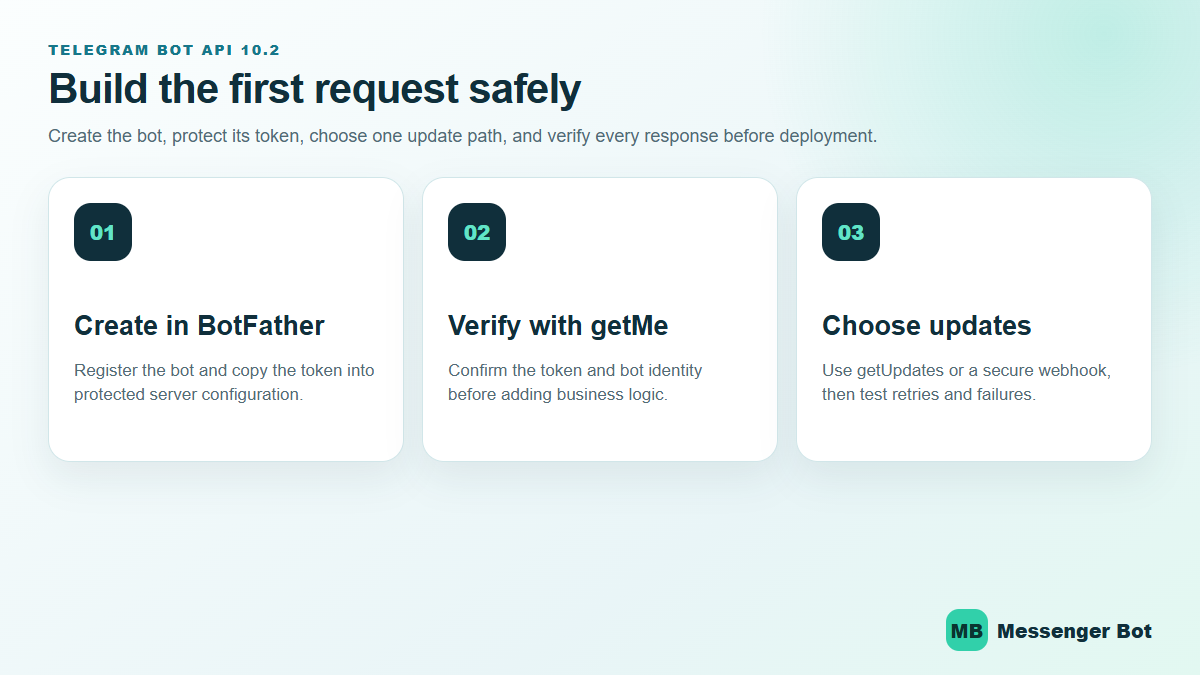
Telegram Bot API 10.2 gives developers a clearer path from a BotFather token to production-ready conversations—but a working request is not the same as a reliable bot. The safest build order is to verify the bot identity, select exactly one update method, make processing idempotent, and test token rotation before a customer depends on the workflow. This July 2026 update uses Telegram’s current official API reference, tutorial, bot introduction, and FAQ.
Telegram Bot API 10.2 Changes the Surface, Not the Release Discipline
Telegram’s official API reference lists Bot API 10.2 on July 14, 2026. The release adds rich-message media and blocks, voice-note media, ephemeral-message support, and additional Mini App security controls. Those features can improve the customer experience, but they do not replace the fundamentals: keep the bot token private, verify the bot with getMe, validate every update shape, and make every state-changing handler safe to retry.
Start with the official official API reference, then use the BotFather-to-Hello-World tutorial for the first request. Never paste a real token into a public code sample, screenshot, browser address bar, issue, or support thread. If a token is exposed, revoke and replace it in BotFather before continuing.
Use This Build Order to Reach a Reliable First Reply
- Create the bot in BotFather. Record the username and keep the issued token in protected server configuration.
- Call
getMe. Confirm that the response identifies the bot you intended to configure before adding commands or message logic. - 選擇
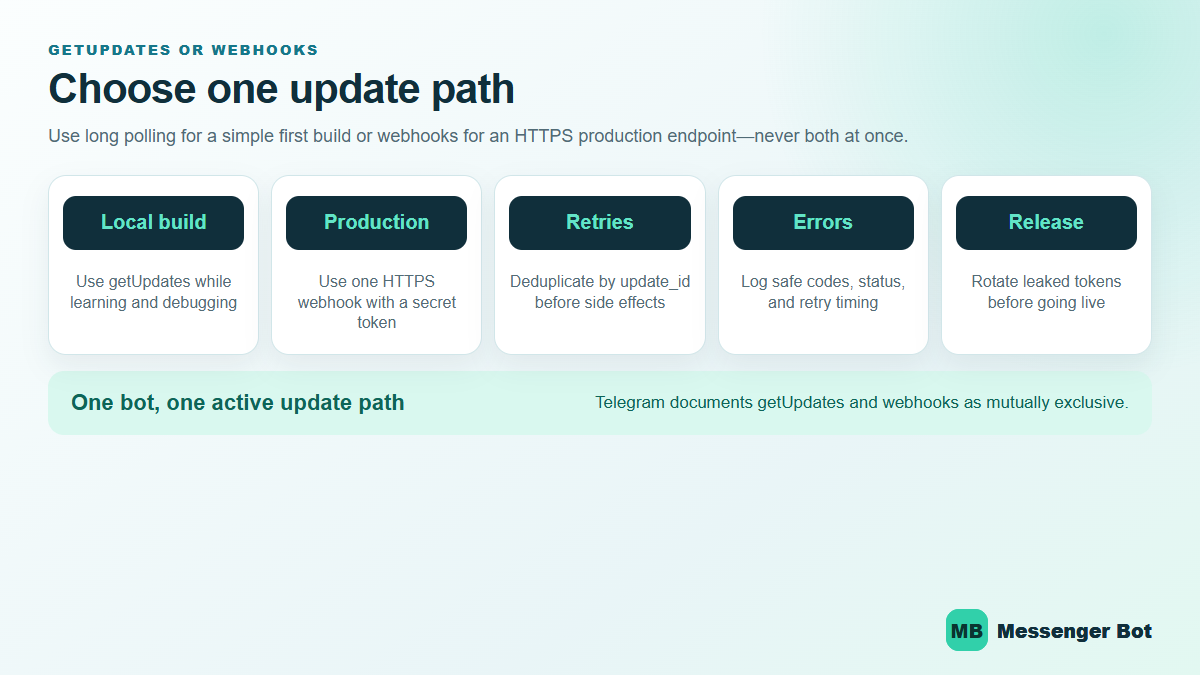
getUpdatesor a webhook. Telegram documents these as mutually exclusive update paths. Long polling is easier to inspect during a local build; webhooks fit a stable HTTPS production endpoint. - Deduplicate by
update_id. A retry must not create a second order, support case, or customer action. - Exercise blocked and error paths. Test an invalid token, an expired request, a duplicate update, a malformed payload, a downstream timeout, and a 429 response.
- Release with monitoring. Capture customer-safe error codes and timing while excluding tokens, private messages, and raw customer identifiers.
Long Polling and Webhooks Solve Different Delivery Problems
| Decision | getUpdates |
Webhook |
|---|---|---|
| Best first use | Local learning, debugging, and a simple worker | Stable HTTPS production service |
| Inbound delivery | Your process asks Telegram for updates | Telegram posts updates to your endpoint |
| Primary risk | Overlapping pollers or lost offset handling | Unverified requests, slow handlers, or endpoint downtime |
| Required safeguard | One active poller and a durable offset | Secret-token validation, fast acknowledgement, and retry-safe processing |
Telegram’s 官方機器人介紹 explains that bots cannot initiate a conversation before a user starts or adds them. Telegram also says incoming updates are stored for no longer than 24 hours. That makes recovery design part of the product, not an optional infrastructure detail. A bot that stays offline beyond the retention window may not be able to reconstruct missed conversations from Telegram alone.
Rate Limits Need Backoff, Not Faster Loops
Telegram’s current bot FAQ advises avoiding more than one message per second in a single chat, more than 20 messages per minute in a group, and roughly 30 messages per second for free bulk notifications. Treat those figures as operating guidance rather than a promise that every burst will pass. When the API returns 429, read the retry guidance, pause the affected work, and resume without duplicating messages.
Your retry plan should preserve the intended recipient, approved content, operation identifier, and next attempt time—without placing the bot token or private conversation text into broad application logs. For customer conversations on Facebook Messenger, use 瀏覽我們的教程 to plan channel-specific setup instead of assuming Telegram delivery rules apply to every platform.
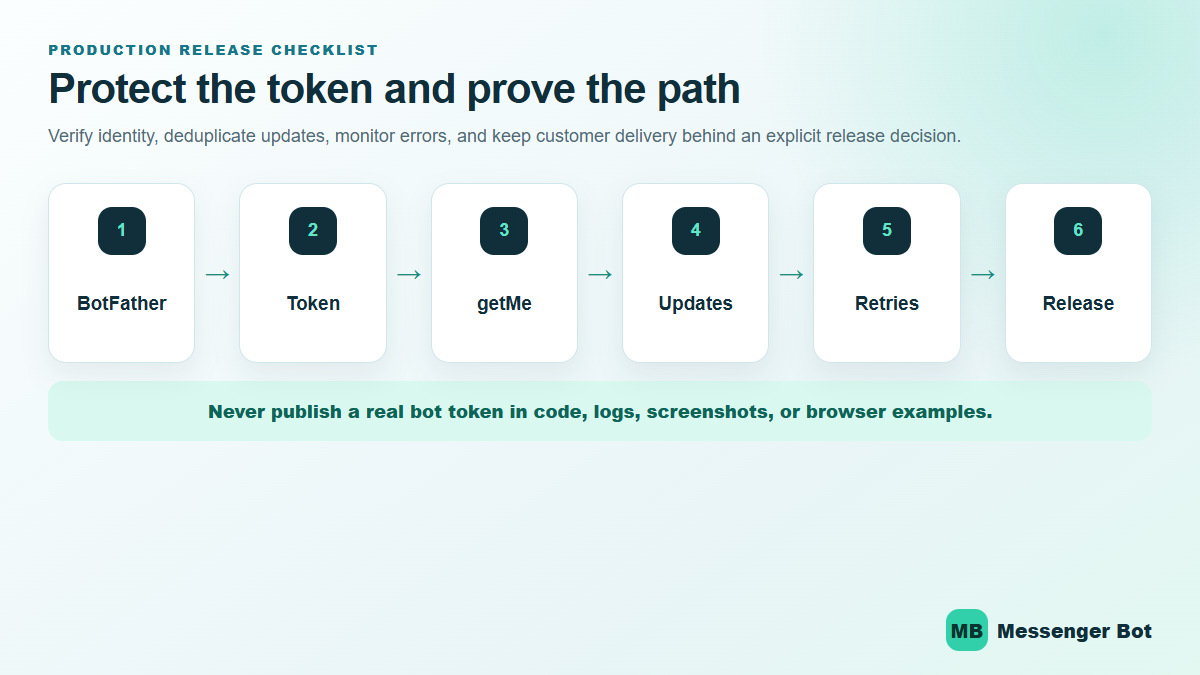
Telegram Bot API 10.2 Release Checklist
- The bot identity returned by
getMematches the intended BotFather bot. - No real token appears in source control, screenshots, browser history, logs, or support notes.
- Only one update path is active.
- 複製
update_idvalues produce zero repeated side effects. - Webhook requests are validated before business logic runs.
- Long-running work leaves the inbound handler quickly and runs behind a retry-safe boundary.
- 429 responses follow the returned retry timing.
- Token rotation is rehearsed and does not require publishing a new customer link.
- Customer delivery remains disabled until the exact workflow, audience, and rollback path are approved.
如果你已經閱讀了一般的 Telegram 機器人指南,這是下一層的內容。我們不會停留在 /newbot 和個人資料照片。我們將從 BotFather 進入真正的 API 調用、可分享的 Telegram 機器人鏈接、一個 webhook 端點,以及一個在你的筆記本電腦關閉後仍然保持運行的部署。.
這在 2026 年變得更加重要,因為 Telegram 不再是邊緣的機器人渠道。Telegram 的 官方常見問題解答 表示該應用程序現在擁有超過 10 億活躍用戶, ,支持最多 200,000 人, 的群組,並允許頻道廣播給 無限的受眾. Telegram’s official bot introduction also says the Bot Platform hosts more than 1000 萬個機器人 並且對開發者免費。好處顯而易見:該平台可以支持嚴肅的產品。壞處同樣明顯:一個未完成的機器人會很快被忽視。.
最浪費時間的錯誤是把 BotFather 當作整個產品。它不是。BotFather 註冊機器人,發出令牌,並讓你管理核心設置。你的實際邏輯存在於你的代碼或自動化平台中。如果你希望在這次 API 瀏覽後採取更廣泛的非技術路徑,請從我們的 一般 Telegram 機器人教程 和 瀏覽我們的教程 開始,針對無代碼方面。.
在你構建任何東西之前,2026 年 Telegram 機器人 API 有哪些變化
有四個 2026 年的事實實際上改變了實施決策。.
首先,Telegram 比舊的機器人教程所暗示的要大得多。該平台目前的數據顯示其活躍用戶已超過 10 億,這使得 Telegram 成為支持機器人、警報機器人、教育機器人、社區機器人和 AI 助手的真正產品渠道。這並不意味著每個企業都應該默認使用 Telegram。這意味著受眾規模不再是限制因素。.
其次,Telegram 的機器人平台仍然異常開放。官方介紹頁面表示該平台對用戶和開發者免費,並且仍然提供直接的 HTTPS Bot API,而不是強迫你使用單一的專有構建器。這是技術團隊仍然喜歡 Telegram 的一個重要原因:你可以從簡單的開始,在一天內發佈一個有用的機器人,然後再逐步添加商業邏輯。.
Third, the API kept moving in 2026. Telegram’s Bot API changelog shows Bot API 9.6 於 2026 年 4 月 3 日. Telegram 的機器人介紹現在也強調了 線程模式 用於 AI 聊天機器人,, 實時回應, 以及 商業模式 讓商業用戶可以連接機器人以幫助管理聊天。這些不是外觀上的更新。它們使 Telegram 在服務工作流程中比舊的回音機器人教程更具可用性。.
第四,最古老的限制仍然很重要:機器人仍然不能先與用戶開始對話。Telegram 表示,用戶必須先發送消息給機器人或將其添加到群組中。這一條規則塑造了你的獲客計劃、你的 Telegram 機器人鏈接和你的入門流程。Telegram 在滿足意圖方面表現出色。它不是一個外發冷 DM 的捷徑。.
這是我使用的實用決策規則。如果你的產品受益於命令、群組、頻道、深層鏈接,或一個感覺像小型實用應用的機器人,那麼 Telegram 是一個強有力的選擇。如果你的潛在客戶主要來自 Facebook 頁面消息和 Instagram DM,請將該工作流程與 See Our Plans 進行比較,然後再花一個衝刺在錯誤的渠道上構建,只因為 Telegram 感覺更適合開發者。.
在創建 Telegram 機器人之前你需要的東西
你可以在幾分鐘內創建一個 Telegram 機器人。除非你先準備好五樣東西,否則你無法在幾分鐘內創建一個好的 Telegram 機器人。.
- 機器人的明確任務: 支援分流、預訂、警報、入門、社區幫助或 AI 問答。.
- 一個 Telegram 帳戶: 您需要一個正常的 Telegram 帳戶來使用 BotFather。.
- 一個您可以保留的用戶名: 這將成為您的公共標籤和您的基本 Telegram 機器人鏈接。.
- 一個託管計劃: 本地測試可以,但生產環境意味著需要一個公共端點或可靠的輪詢工作者。.
- 一個秘密管理的習慣: 機器人令牌不是演示字符串。從第一分鐘起就要像對待密碼一樣對待它。.
如果您跳過第一步,其餘的將變成隨機設置。一個支援機器人、一個報價請求機器人和一個 AI 研究機器人需要不同的命令、不同的權限、不同的鏈接和不同的部署選擇。首先選擇工作。.
If you skip step four, you end up with the classic beginner problem: the bot exists, BotFather says it is live, your friends can open the chat, and nothing actually replies because the backend is still on your machine. That is why this guide spends real time on webhooks and deployment instead of stopping at account creation.
If you skip step five, you create work for future you. Telegram’s own documentation is blunt here: everyone who has your bot token has full control of the bot. Store it in environment variables, a secrets manager, or at minimum a private .env file that never gets committed.
The quick preflight checklist
- Pick a display name that says what the bot does.
- Reserve a username that is short enough to share in a link and usually ends with
機器人. - Write one sentence that explains the first action users should take.
- Decide whether the bot will live in private chats, groups, channels, or all three.
- Choose your first runtime: local long polling for testing, then webhooks for production.
- 選擇您的第一個主機:Railway、Render 或您自己的基礎設施。.
如何在 BotFather 中創建 Telegram 機器人並保護令牌
BotFather 是 Telegram 的官方機器人註冊和設置控制點。在這裡,您可以創建機器人身份、獲取令牌、設置命令並控制一些關鍵行為。它不是運行您邏輯的部分。.
使用以下方式創建機器人 /newbot
- 打開 Telegram 並搜索 @BotFather.
- 點擊 開始.
- 發送
/newbot. - 輸入用戶將看到的顯示名稱。.
- 輸入您希望 Telegram 保留的用戶名。.
- 複製 BotFather 返回的令牌並立即保存。.
Telegram’s official introduction confirms that BotFather is the starting point for registering the bot and receiving the authentication token. That token is the credential your code will use for every Bot API call. Lose control of it and you lose control of the bot.
截圖提示: 捕捉 BotFather 成功畫面,顯示機器人名稱、用戶名和分享鏈接。如果這張圖片將離開您的內部筆記,請完全模糊令牌。.
在分享機器人之前設置個人資料
一旦機器人存在,直接前往 /mybots. 從那裡,在任何人看到之前,緊縮對外的設置:
/setdescription以顯示這個機器人做什麼的摘要。./setabouttextfor the short one-line profile text./setuserpicfor the avatar./setjoingroupsif you want to allow or block group installs./setprivacyif the bot needs full group-message access.
Keep the description plain. “Get delivery updates, ask support questions, or book a call” is useful. “Your intelligent assistant for digital success” is not. Telegram bot users decide very quickly whether the bot is worth keeping in their chat list.
Store the token like production infrastructure, not sample data
This is the part beginners keep underestimating. A Telegram bot token is not just a setup artifact. It is the credential that authorizes every call to https://api.telegram.org/bot<token>/METHOD_NAME. If you leak it in a repo, screenshot, client handoff, or front-end bundle, the fix is not be-more-careful-next-time. The fix is rotating the token and updating every deployment.
Use one of these patterns from day one:
- Environment variables on Railway or Render.
- A local
.envfile ignored by Git. - A secrets manager if you already have one.
Do not hardcode the token in JavaScript shipped to the browser, in a public GitHub repo, or inside a static HTML file. Telegram’s docs are explicit that anyone with the token has full control of the bot.
Set commands now so the first-run experience is not empty
You can set commands in BotFather with /setcommands, and later you can also manage them through the Bot API. Telegram’s Bot Features guide recommends supporting basic commands like /start 和 /help, and Telegram apps surface those commands in the UI. That is free usability you should take.
A practical starter set for most bots looks like this:
/start - open the main menu
/help - explain what the bot can do
/status - confirm the bot is live
/pricing - show plans or packages
/support - route to a human or form
Keep the first version short. Three to five commands is enough. The menu is not your roadmap. It is the shortest path to the job the bot was built to do.
How to Create a Telegram Bot Link, Deep Link, and Group Install Link
This is where a lot of tutorials stay too vague. A telegram bot link is not just a vanity URL. It is part of your acquisition flow. It determines how users start the bot, whether context gets passed in, and whether the bot is entering a private chat, a group, or a channel setup flow.
Telegram’s documentation gives every bot a base link in the form https://t.me/<bot_username>. After that, you can add parameters to shape what happens next.
| Link type | 範例 | What it does |
|---|---|---|
| Basic bot link | https://t.me/your_bot |
Opens the bot chat so the user can tap Start. |
| Private deep link | https://t.me/your_bot?start=pricing |
Passes a parameter to the bot as /start pricing. |
| Group install link | https://t.me/your_bot?startgroup=welcome |
Starts the add-to-group flow and can pass setup context. |
| Channel admin link | https://t.me/your_bot?startchannel |
Starts the add-to-channel flow. |
Telegram’s deep linking documentation says start parameters can use A-Z, a-z, 0-9, _, 以及 -, and the parameter can be up to 64 characters. The lower-level links documentation also documents startgroup 和 startchannel 流程中。.
Use different telegram bot links for different entry points
This is one of the cleanest low-effort upgrades you can make. Do not send every user to the same blank bot link if you already know where they came from. Use different deep links for different campaigns, menu entries, or channel intents.
- Pricing CTA:
?start=pricing - Support article CTA:
?start=refund_help - Community invite:
?startgroup=community - Newsletter onboarding:
?start=welcome_email
That lets your bot route immediately instead of wasting the first reply on a generic “How can I help?” message. It also makes attribution cleaner when you start measuring which telegram bot links actually drive useful sessions.
The two link mistakes that break onboarding
First mistake: changing the username after links are already published. Your base bot link depends on the username. If you rename the bot later, old QR codes, bios, docs, and blog posts can break or point to the wrong place.
Second mistake: assuming a deep link means the bot can message users first. It cannot. The user still has to tap the link and interact. The deep link passes context. It does not override Telegram’s opt-in rule.
截圖提示: Show one plain bot link and one deep link side by side in a browser or notes app, then show the resulting /start pricing message landing in Telegram. Readers understand deep links faster when they can see the input and output together.
Your First Telegram Bot API Requests with curl or Postman
The Bot API is just HTTPS. That is one reason Telegram is still easy to work with. Once you have the token, you can test core behavior before writing the full bot.
開始使用 getMe
This is the fastest sanity check. If getMe fails, do not touch your webhook or deployment yet. Fix the token first.
curl "https://api.telegram.org/bot$TOKEN/getMe"A healthy response returns JSON with "ok": true and the bot’s metadata. Telegram’s Bot API manual documents this request format directly on the main API page.
Set commands through the API
BotFather is fine for one-off command setup. The API is better when you want repeatable environments or client handoff scripts.
curl -X POST "https://api.telegram.org/bot$TOKEN/setMyCommands" ^
  -H "Content-Type: application/json" ^
  -d "{\"commands\":[
    {\"command\":\"start\",\"description\":\"Open the main menu\"},
    {\"command\":\"help\",\"description\":\"See what this bot can do\"},
    {\"command\":\"status\",\"description\":\"Check webhook status\"}
  ]}"
If you manage multiple staging or client bots, this is much safer than manually clicking through settings and hoping every environment matches.
Send a test message after you know the chat ID
Telegram will not let you randomly push a message to a user who never started the bot. You need a valid chat_id from an incoming interaction first. The simplest test flow is:
- Open the bot in Telegram.
- 點擊 開始.
- Collect the resulting update via
getUpdatesor your webhook log. - Use the returned
chat.idin asendMessagecall.
curl -X POST "https://api.telegram.org/bot$TOKEN/sendMessage" ^
  -H "Content-Type: application/json" ^
  -d "{\"chat_id\":123456789,\"text\":\"Your Telegram Bot API test is working.\"}"
If this request succeeds, your token works, the chat exists, and your bot can reply. That is the minimum viable proof before you wire in longer code paths.
Use these three endpoints constantly during setup
getMeto confirm token and metadata.setWebhook和getWebhookInfoto manage delivery.deleteWebhookwhen you need to switch back to polling.
There are many more methods, but those three plus sendMessage handle a surprising amount of early-stage debugging.
Long Polling vs Webhooks in the Telegram Bot API
Telegram documents two mutually exclusive ways to receive updates: getUpdates 和 setWebhook. Their own API manual says incoming updates are stored on Telegram’s server until your bot receives them one way or the other, but not longer than 24 hours. That matters because it tells you exactly how much failure cushion you have if your bot is briefly offline.
| Method | 最佳適用於 | Why people choose it | Main drawback |
|---|---|---|---|
Long polling with getUpdates |
Local development and quick tests | No public URL required, easy to inspect updates, simple to start | Your bot has to keep asking for updates and is weaker for production |
Webhooks with setWebhook |
Production deployments | Telegram pushes updates to you immediately, lower overhead, cleaner runtime model | You need public HTTPS, valid certificates, and a real deploy target |
Telegram’s docs are also explicit that getUpdates will not work while a webhook is set. That one sentence explains a lot of why-is-polling-empty confusion. If you move to webhooks, delete or ignore your polling code. If you switch back to local testing, call deleteWebhook 首先。.
When long polling is the right choice
Use long polling when you are still shaping the update schema, reading raw payloads, or testing on your machine. It is easier to debug because you can inspect the exact JSON that came in without worrying about public HTTPS or a hosted endpoint. It is also the cleanest route when you are not ready to deploy yet.
When webhooks are the right choice
Use webhooks when the bot needs to stay on, reply fast, and stop depending on your local shell session. Telegram’s webhook guide explains the basic advantage well: Telegram pushes the update to you as soon as it arrives instead of making your bot ask repeatedly. In practice that means less polling code, cleaner production architecture, and better latency.
The production rule
Develop with long polling if it makes you faster. Launch with webhooks unless you have a very specific reason not to. That split keeps setup simple without pretending a laptop process is a deployment plan.
Build a Working Telegram Bot API Webhook in Python with FastAPI
You can use any stack that can receive HTTPS POST requests and make HTTPS requests back to Telegram. Python with FastAPI is a clean choice because it stays small, reads well, and deploys easily on common hobby hosts.
Install the minimum packages
pip install fastapi uvicorn httpxThat is enough for a minimal webhook bot. No Telegram SDK is required for the first version because we can talk to the Bot API directly.
Create a minimal app.py
import os
import httpx
from fastapi import FastAPI, Header, HTTPException, Request

TOKEN = os.environ["TELEGRAM_BOT_TOKEN"]
WEBHOOK_SECRET = os.environ["TELEGRAM_WEBHOOK_SECRET"]
BASE_URL = f"https://api.telegram.org/bot{TOKEN}"

app = FastAPI()


async def telegram_api(method: str, payload: dict) -> dict:
    async with httpx.AsyncClient(timeout=15.0) as client:
        response = await client.post(f"{BASE_URL}/{method}", json=payload)
        response.raise_for_status()
        data = response.json()
        if not data.get("ok"):
            raise RuntimeError(data)
        return data["result"]


@app.get("/")
async def healthcheck():
    return {"ok": True}


@app.post("/telegram/webhook")
async def telegram_webhook(
    request: Request,
    x_telegram_bot_api_secret_token: str | None = Header(default=None),
):
    if x_telegram_bot_api_secret_token != WEBHOOK_SECRET:
        raise HTTPException(status_code=403, detail="Invalid webhook secret")

    update = await request.json()
    message = update.get("message") or {}
    chat = message.get("chat") or {}
    text = (message.get("text") or "").strip()
    chat_id = chat.get("id")

    if not chat_id:
        return {"ok": True}

    if text.startswith("/start"):
        reply = (
            "Telegram Bot API is live.\\n\\n"
            "Try /help for commands or /status to confirm the webhook."
        )
    elif text == "/help":
        reply = "Commands: /start, /help, /status"
    elif text == "/status":
        reply = "Webhook is receiving updates correctly."
    else:
        reply = f"I received: {text[:300]}" if text else "Send a text command to test."

    await telegram_api(
        "sendMessage",
        {
            "chat_id": chat_id,
            "text": reply,
        },
    )

    return {"ok": True}
This bot is intentionally small. It does four useful things and nothing fancy:
- Verifies the webhook secret header.
- Reads the incoming update JSON.
- Handles a few starter commands.
- Sends a reply with
sendMessage.
That is enough to prove your entire path: BotFather token, public webhook, deployment, incoming update handling, and outgoing API call.
Run it locally
set TELEGRAM_BOT_TOKEN=your_token_here
set TELEGRAM_WEBHOOK_SECRET=your_secret_here
uvicorn app:app --host 0.0.0.0 --port 8000
For local testing, you have two sane options. Use long polling until the logic works, or expose the local server through a tunnel and set a temporary webhook. For most first builds, I would test the conversation logic locally with polling, then move to a real hosted URL before I spend time debugging certificates and tunnels.
What to add next after the first reply works
- Structured routing: handle
callback_queryand custom reply paths instead of plain text only. - 日誌記錄: store raw updates and error responses so you can debug real failures.
- 冪等性: track
update_idso retries do not duplicate downstream actions. - Timeout handling: do not let one slow dependency block the whole webhook.
- Queues: offload expensive jobs if you later add AI, file processing, or CRM sync.
The winning pattern is to keep the webhook handler short. Parse the update, acknowledge it fast, and hand heavier work to a background task or worker if needed.
How to Set the Webhook, Verify It, and Reset It Without Guessing
Telegram’s Bot API manual and webhook guide are very specific about the pieces that matter: the webhook URL must be HTTPS, supported public ports are 443, 80, 88, 以及 8443, and Telegram can include the header X-Telegram-Bot-Api-Secret-Token when you set a secret token. Those are the parts that break production most often.
Set the webhook
curl -X POST "https://api.telegram.org/bot$TOKEN/setWebhook" ^
  -H "Content-Type: application/json" ^
  -d "{\"url\":\"https://your-domain.com/telegram/webhook\",\"secret_token\":\"$WEBHOOK_SECRET\"}"
If Telegram returns "ok": true, the webhook is registered. That does not automatically mean your app logic is correct. It only means Telegram accepted the delivery target.
Check status with getWebhookInfo
curl "https://api.telegram.org/bot$TOKEN/getWebhookInfo"This endpoint is the first thing to check when the bot exists but nobody gets replies. If pending_update_count keeps climbing, Telegram is trying to deliver updates and your server is not handling them cleanly. If last_error_message is populated, read it before you change anything else.
Reset the webhook cleanly when switching environments
curl -X POST "https://api.telegram.org/bot$TOKEN/deleteWebhook" ^
  -H "Content-Type: application/json" ^
  -d "{\"drop_pending_updates\":true}"
使用 drop_pending_updates with intent. It is helpful when you changed environments or interrupted background processing and do not want stale traffic replaying into the new runtime. It is not something to click blindly in the middle of a live incident.
The three webhook checks that save the most time
- Make sure your app returns a real
2xxresponse quickly. - Make sure the
secret_tokenyou set matches the header your code expects. - Make sure your host is actually exposing a supported public HTTPS endpoint.
Telegram’s Bots FAQ also notes that redirects are not supported, wildcard certificates may not work, and the certificate common name must exactly match your domain. That is why a domain opening in your browser is not enough proof that Telegram will accept it.
Deploy a Telegram Bot API Project on Railway or Render Without Babysitting It
There are plenty of places to host a Telegram bot. For most small teams and solo builders in 2026, Railway and Render are still the two easiest ways to get a webhook bot online without spending a day on infrastructure.
| 平台 | Official 2026 entry price | Best use | Tradeoff |
|---|---|---|---|
| Railway | $5/month Hobby plan with $5 included usage | Fast deploys for hobby and small production bots | Usage-based billing can rise if the bot grows or idles badly |
| Render | $0 account plan plus Starter web service from $7/month | Simple web-service deployments with predictable instance sizing | Production-like service usually starts at the paid Starter tier |
| Self-hosted local Bot API server | Depends on your own infrastructure | High-control workloads, bigger file limits, custom networking needs | More ops responsibility than most first projects need |
Deployment pricing sources: Railway pricing plans, Render pricing, and Telegram’s local Bot API server documentation, checked April 12, 2026.
Railway deployment steps
- Push your bot code to GitHub.
- Create a new Railway project from the repo.
- 新增
TELEGRAM_BOT_TOKEN和TELEGRAM_WEBHOOK_SECRETas environment variables. - Set the start command to
uvicorn app:app --host 0.0.0.0 --port $PORT. - Deploy and copy the generated HTTPS URL.
- Call
setWebhookwith that URL. - 發送
/startto the bot and watch the logs.
Railway’s official docs say the Hobby plan is $5/month and includes $5 of usage. That pricing model is good for small bots because the floor is low. It also means you should shut down wasteful workers and oversized services early instead of pretending usage-based billing will stay tiny forever.
Render deployment steps
- Push the same repo to GitHub.
- Create a new web service in Render.
- Use your Python build command and start command.
- Add the same environment variables.
- Deploy and copy the public service URL.
- Set the Telegram webhook to
https://your-render-domain/telegram/webhook.
Render’s pricing page currently shows a free web service tier and a paid Starter instance at $7/month. For experiments, free can be fine. For a client bot or a real customer-facing workflow, I would budget around the paid tier instead of building your launch around sleep behavior and cold-start anxiety.
When a local Bot API server is actually worth it
Telegram’s official Bot API documentation says a local Bot API server lets you download files without a size limit, upload files up to 2000 MB, use HTTP URLs or local IP addresses for webhooks, and raise webhook connection limits far beyond the default service. That is useful for high-volume media bots, heavy internal systems, or infrastructure teams that need full control.
For most bots, it is unnecessary complexity. Use Telegram’s hosted Bot API until you have a real reason to own that layer.
Telegram Bot Pricing in 2026: What Is Actually Free and What Starts Costing Money
Free Telegram bot is only true if you mean bot creation through BotFather and the base Bot API itself. Telegram’s platform is free to start. Real projects still pick up costs from hosting, automation tools, AI APIs, storage, monitoring, or human support time.
| Cost bucket | Official 2026 price point | What you get |
|---|---|---|
| Telegram Bot Platform | $0 platform fee | Create the bot, use the Bot API, manage links, commands, and settings |
| ManyChat Essential | $17/month monthly or $14/month annual | No-code multichannel automation, up to 250 active contacts, up to 2 channels including Telegram |
| SendPulse Pro | $12/month monthly or $9.60/month annual at 500 subscribers | Unlimited flows and messages, Telegram support, API and webhook access |
| Railway Hobby | $5/month with $5 included usage | Low-cost deploy target for a custom webhook bot |
| Render Starter web service | $7/month | Simple always-on host for a custom webhook bot |
Pricing citations: Telegram’s bot platform introduction, ManyChat’s Essential plan and active contacts documentation, SendPulse messenger pricing, Railway pricing plans, and Render pricing, checked April 12, 2026.
Two practical caveats matter here.
First, ManyChat changed its pricing model on 2026 年 3 月 2 日. ManyChat’s own help docs say the new plans are currently tied to region availability and to accounts created on or after that date. So if your account is older, you may see legacy plan behavior instead of the numbers above.
Second, builder pricing is not the same as Bot API pricing. If your bot is mostly rules, simple buttons, and a few lead forms, a builder may save time. If your bot needs custom webhooks, internal tooling, AI routing, or fine control over links and infrastructure, custom code plus cheap hosting often wins.
The part most guides leave out is the operational cost. Someone still has to read failed updates, fix broken commands, rotate tokens, review logs, and adjust onboarding flows. That labor is small on a clean bot and expensive on a sloppy one.
Telegram vs Messenger vs Website Bots: Where This API Wins and Where It Does Not
Telegram is not the universal answer. It is the right answer for specific shapes of work.
| Channel | 最佳適合 | 為什麼它獲勝 | Why it loses |
|---|---|---|---|
| Telegram 機器人 | Communities, alerts, AI assistants, utility bots, niche global audiences | Commands, groups, channels, deep links, flexible Bot API | Users must start the chat first and Telegram habit still depends on audience fit |
| Messenger or Instagram bot | Meta-first lead funnels, Page support, DM automation | Works where a lot of social traffic already lands | Less open than Telegram for raw bot infrastructure |
| Website chatbot | On-site support, lead capture, ecommerce conversion | No app switch required, strongest for people already on your site | Weaker return habit than a messaging thread people keep |
Choose Telegram when the conversation is part of the product. Alerts, community management, AI help, onboarding utilities, and operator tools all map well to commands, deep links, and group installs. Choose Messenger or Instagram when the lead already started life inside Meta. Choose website chat when the job is to convert or support people without forcing an app switch.
If your real audience lives in Facebook and Instagram rather than Telegram, the faster move is often to Upgrade to Pro instead of rebuilding the same logic in a channel your users do not naturally open for business conversations.
Agencies run into this constantly. The technical team falls in love with the Telegram Bot API because it is clean. The client actually needs Meta lead capture, follow-up, and site chat. If you sell automation services and keep seeing that pattern, 加入我們的聯盟計劃 for the Messenger side instead of forcing every client into a Telegram-shaped solution.
Security Rules That Keep Your Telegram Bot from Turning into a Headache
Telegram makes bot creation easy. That does not reduce your security obligations.
Validate the webhook source
Telegram’s Bot API supports the secret_token parameter on setWebhook. Use it. Then verify the X-Telegram-Bot-Api-Secret-Token header in your handler before you process the update. This is the easiest high-value security step in the whole stack.
Telegram’s webhook guide also publishes IP ranges you can allowlist if you want stricter network control. As of the current guide, Telegram says you can limit access to 149.154.160.0/20 和 91.108.4.0/22, while also noting those ranges may change. That means header verification is the baseline; IP filtering is optional extra hardening.
Never trust one successful 200 OK
A webhook returning 200 only proves that your server replied. It does not prove the update was handled correctly, the database write succeeded, or the downstream message was sent. Log the update, log the outgoing Telegram response, and log exceptions with enough detail to diagnose failures later.
使用 update_id to avoid duplicate side effects
Telegram’s API manual explains that update_id lets you restore correct update order or ignore repeats. Use that. If your bot creates tickets, orders, payouts, bookings, or CRM records, do not assume each webhook hits you exactly once and only once. Store processed update IDs or build idempotency into downstream actions.
Keep your webhook handler short
Webhook handlers should parse, validate, enqueue, and acknowledge. They should not wait on five external APIs, a slow AI completion, and a fragile CRM before returning. If the job is heavy, hand it to a background task or worker and acknowledge the webhook quickly.
Be careful with group permissions and privacy mode
Telegram’s docs note that privacy-enabled bots in groups only see messages relevant to them. That is a safety feature as much as a configuration detail. If the bot does not need full-message access, leave privacy mode on. If you disable it, be able to explain why and re-test the bot in the target group.
Common Telegram Bot API Errors and the Fixes That Save Hours
The failures below cause most first-launch pain. None of them are exotic.
401 Unauthorized or ok: false on every request
This usually means the token is wrong, truncated, rotated, or loaded from the wrong environment. Fix the token path first. Confirm with getMe. If getMe fails, everything else is noise.
The webhook is set, but the bot does not reply
Check getWebhookInfo. If pending_update_count grows, Telegram is trying to deliver updates and your server is not handling them cleanly. If the webhook URL looks correct but responses still fail, check certificate validity, route path, secret-token verification, and whether your app returns a real 2xx 快速完成的人。
getUpdates suddenly returns nothing
You probably forgot that webhooks and polling are mutually exclusive. Telegram documents that clearly. Delete the webhook if you want to switch back to polling.
The bot works in private chat but not in groups
This is usually privacy mode or permissions. Telegram’s FAQ spells out what privacy-enabled bots can and cannot see. If you expect full-message visibility in a group, check /setprivacy and re-add the bot after changes if needed.
The telegram bot link opens, but nothing useful happens
That is normally not an API failure. It is an onboarding failure. The user reached the bot, but your first reply is weak, your commands are missing, or the deep-link parameter is not handled. Fix the first-run path instead of blaming the URL.
You start hitting 429 errors
Telegram’s FAQ says to avoid sending more than one message per second in a single chat, more than 20 messages per minute in a group, and more than about 30 messages per second for bulk broadcasts unless you enable paid broadcasts. If you are broadcasting, pace messages through a controlled background task. If you are responding in a loop, stop sending multiple fragments when one message would do.
The bot can reply to people, but cannot initiate new chats
That is platform behavior, not a bug. Telegram bots still cannot start the conversation first. Build better entry points instead: landing page CTAs, QR codes, channel posts, email buttons, or deep links with context.
Your deploy works, then fails after a token rotation
This usually means you rotated the token in BotFather but did not update the host environment variables or reset the webhook. Any time the token changes, update secrets in your deploy platform and re-run webhook setup.
The Production Launch Checklist Before You Share Your Telegram Bot Links
Before you hand the bot to users, run through this list once without skipping steps:
- Token: stored in environment variables, not code.
- Profile: name, avatar, description, and About text are finished.
- Commands:
/start,/help, and any core flows are set. - Webhook:
getWebhookInfoshows a healthy URL and no repeating errors. - Secret validation: the header check is active.
- 日誌記錄: you can inspect incoming updates and failed outbound API calls.
- Deep links: every public telegram bot link you plan to share has been tested.
- Group behavior: privacy mode and permissions match the real use case.
- Rate limits: broadcast jobs are queued, not dumped all at once.
- Fallback: unknown inputs return a useful next step instead of a dead end.
- 渠道適配: you are sure Telegram is where users actually want this bot to live.
If that last line is still not clear, decide it now, not after launch. The Bot API is flexible enough to make the wrong channel feel technically possible. That does not make it strategically correct.
If you are still deciding between Telegram, Meta DMs, and website chat, 瀏覽我們的教程 before you lock yourself into a deployment path that does not match your audience.
If your buyers mostly live inside Facebook and Instagram instead of Telegram, check See Our Plans and the option to Upgrade to Pro rather than rebuilding the same bot logic on the wrong messaging stack.
Sources and Pricing Checked April 12, 2026
- Telegram常見問題解答
- Telegram Press Info
- Telegram bot platform introduction
- Telegram Bot Features guide
- Telegram deep links documentation
- Telegram Bot API manual
- Telegram Bot API changelog
- Telegram Bots FAQ
- Telegram webhook guide
- ManyChat Essential plan
- ManyChat active contacts documentation
- SendPulse messenger pricing
- Railway pricing plans
- Render pricing
常見問題
2026年Telegram Bot API是免費的嗎?
Yes, the platform layer is still free to start. Telegram’s official bot introduction says the Bot Platform is free for users and developers. What starts costing money is everything around it: hosting, no-code builders, AI APIs, databases, monitoring, and the labor needed to maintain a real bot.
我該如何創建一個可以打開正確流程的 Telegram 機器人連結?
Start with the base bot URL in the form https://t.me/your_bot. Then use deep-link parameters like ?start=pricing for private chat context or ?startgroup=welcome when the bot should be added to a group. Telegram’s docs say the start parameter can be up to 64 characters and should use URL-safe characters.
Should I use getUpdates or webhooks for a new bot?
使用 getUpdates when you are developing locally and want quick visibility into raw payloads. Use webhooks in production. Telegram documents them as mutually exclusive, so do not try to run both at the same time.
為什麼我的機器人在私人聊天中可以工作,但在 Telegram 群組中卻無法工作?
通常的原因是隱私模式或缺少權限。啟用隱私的 Telegram 機器人僅能看到與它們相關的群組消息。如果您的機器人需要完全可見性,請在 BotFather 中更改設置,然後在您真正關心的群組中重新測試機器人。.
我可以不寫程式碼就創建一個 Telegram 機器人嗎?
是的,對於基本流程來說。BotFather 負責創建,而像 ManyChat 或 SendPulse 這樣的工具可以在此基礎上添加無代碼邏輯。但如果您需要細粒度的 webhook、內部集成、自定義 AI 路由或基礎設施控制,原始的 Telegram Bot API 和一個小應用程序通常是更好的長期選擇。.



 繁體中文
繁體中文  English
  Tagalog
  简体中文
简体中文  العربية
  हिन्दी
  Português do Brasil
  Español de México
  Français
  বাংলা
বাংলা  香港中文
香港中文  Nederlands
  Deutsch
  Bahasa Indonesia
  日本語
日本語  한국어
한국어  Polski
  Русский
  Español
  Tiếng Việt