

Key Takeaways
- Know which assistant you are using: Meta AI is different from a business chatbot replying on behalf of a Facebook Page.
- Check current options: Menus and feature availability can differ; an older tutorial is not a guarantee that a control exists on your account.
- Protect your information: Treat an AI conversation differently from a private conversation with a friend. Avoid sharing passwords, payment details or confidential customer information.
- Keep people involved: Use automation for a clear, limited task and provide a way to ask a team member for help.
- Check the full cost: A free personal assistant, a trial and a business automation plan are different offers. Check current limits before connecting a business Page.
A Facebook Messenger AI chatbot can mean two different things: Meta’s own assistant inside Messenger, or a chatbot that a business connects to its Facebook Page. Knowing the difference helps you choose the right settings, understand who handles your messages and avoid paying for a service that does not fit your task.
This guide separates those uses, explains practical privacy precautions and shows what to check before trying a business integration. It does not promise that every account has the same AI menu, that a chat can be permanently removed from every interface, or that any service is free without limits. Start with the task you want to complete, then check the controls actually available in your app.
What is the AI in Facebook Messenger?
Meta AI is Meta’s general-purpose assistant. It can help with tasks such as brainstorming, explaining a topic or drafting a message where the feature is available. A business chatbot, by contrast, should answer within the business’s approved information and clearly explain how to reach a person.
Understanding the Role of AI in Messaging
Meta’s assistant announcement describes questions, search and creative tasks across its apps. Those examples explain the type of assistance, not a promise that every current account has identical features. Check the account’s visible controls and help information before following an older command or menu path.
Personalization also needs context. A useful prompt can describe the tone or format you want without including private details. For example, ask for a short, friendly appointment reminder using placeholder names. Review the wording yourself before sending it to anyone. A fluent answer is not proof that facts, prices or availability are correct.
Do not follow older AI Studio creation instructions as though they are current. Meta’s August 10, 2026 AI Studio update says people can no longer create new AI characters or edit existing ones; existing characters and chats remain active. That update does not say that every existing character is a business-approved representative.
Benefits of AI Integration in Facebook Messenger
- Drafting help: Ask for alternative wording, then check the result for accuracy and tone.
- Ideas to compare: Use suggestions as a starting point rather than a final decision.
- Clearer questions: Break a complicated request into one task and specify the answer format.
- More deliberate sharing: Use fictional examples or placeholders instead of sensitive information.
- A human next step: For an important issue, check the original source or speak to the responsible person.
For more context on the distinction between an assistant and a business workflow, see Understanding AI in Messenger Chatbots.

What is Facebook Messenger Chatbot?
A Facebook Messenger chatbot is software that responds within a messaging experience. For a business, it should have a defined purpose: answering an opening-hours question, helping someone choose the right contact, or gathering a few details before a team member replies. Not every chatbot uses generative AI, and an automated response is not necessarily an answer from Meta AI.
Exploring the Functionality of Facebook Messenger Chatbots
Use this checklist when evaluating a business chatbot. These are requirements to verify in the service you choose, not features promised for every product:
- Approved answers: Can you limit replies to reviewed business information and identify who maintains it?
- Clear boundaries: What happens when a question falls outside the available information?
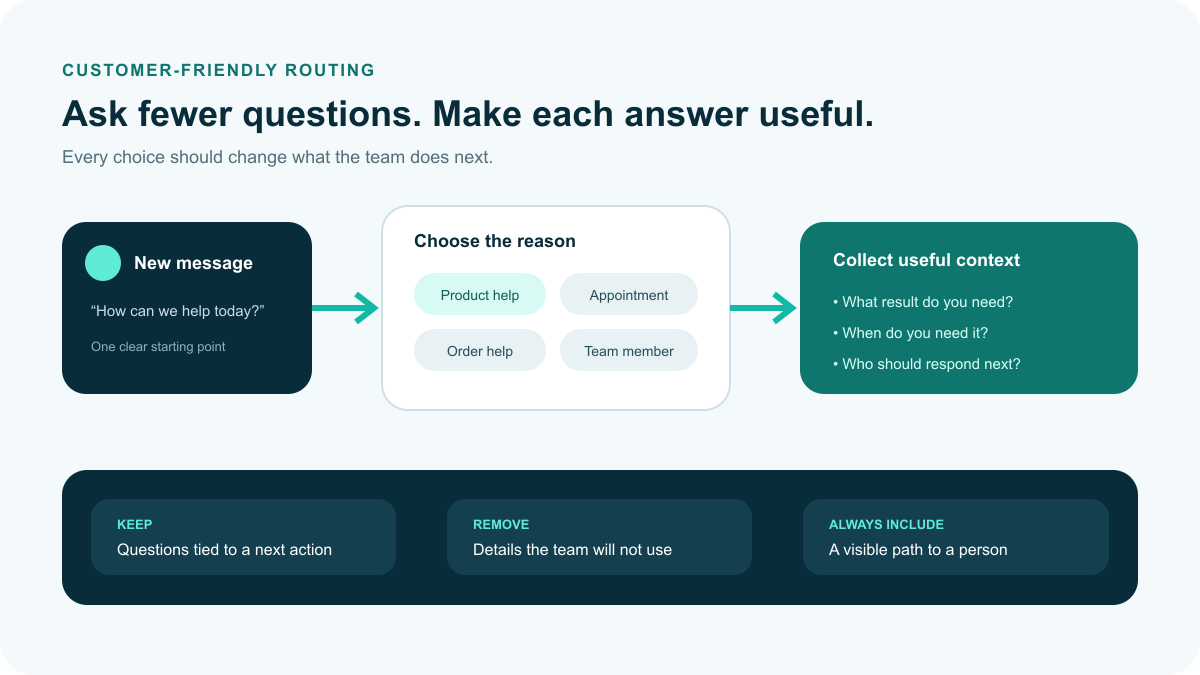
- Team handoff: Can the customer request a person, and does the message reach someone who is responsible for following up?
- Connection permissions: Which Page access does the service require, and can you remove that access if you stop using it?
- Useful testing: Can you try ordinary questions, unexpected wording and missing information before inviting customers to use the flow?
Write down the answer to each question before choosing a tool. A short, reliable flow can be more useful than a long conversation that makes unsupported promises. For a practical starting point, read Setting Up Facebook Messenger Bots.
How Facebook Messenger Chatbots Enhance User Experience
A helpful experience starts with a task the business can actually complete. For an opening-hours question, provide the reviewed hours and any holiday exception. For an appointment request, explain whether the response is only a request or a confirmed booking. If a person must finish the task, say what happens next instead of implying that the bot has completed it.
Measure your own results rather than treating old industry forecasts as current evidence. Record the questions answered correctly, the requests passed to a person, and the cases that needed correction. Review a sample of real outcomes with appropriate privacy safeguards. An answer delivered quickly is not useful if it gives the wrong expectation.
For examples to evaluate against your own needs, see Real-Life Applications of AI Chatbots. Treat each example as a possible workflow to investigate, not proof that a specific product supports it.
Can I use ChatGPT on Messenger?
Meta AI and ChatGPT are different services. Seeing an AI feature in Messenger does not mean that your ChatGPT account is connected. If a third-party business service advertises a connection, verify its current documentation, the supported Facebook Page workflow and the data it will receive before authorizing anything.
Integrating ChatGPT with Facebook Messenger
Do not start by entering a personal password into an unfamiliar chatbot page. Use this decision sequence before considering an integration:
- Define the result: Choose one business task and describe a correct answer, an incorrect answer and when a person must take over.
- Verify the current connection: Read the service’s own documentation for the exact Facebook Page connection. An old tutorial or a logo on a marketing page is not enough.
- Review access: Confirm which account and Page you are authorizing. Check the permissions shown during the actual connection process and keep control of the account.
- Check information handling: Read the privacy terms, retention controls and deletion process before sharing customer messages.
- Test without private details: Use fictional questions first, including an unsupported request, an unclear question and a request for a team member.
- Review cost and exit: Confirm plan limits, recurring charges and how to disconnect the service. Do not assume a personal AI subscription covers a separate business tool.
Advantages of Using ChatGPT in Messenger Conversations
Evaluate the proposed benefit before connecting a tool. A drafting assistant might help a team member prepare a reply, while a customer-facing automation needs stronger limits and a clear handoff. These are different decisions; a successful writing demonstration does not establish that an unattended conversation is ready.
- Answer quality: Compare suggested replies with approved information, not just how natural they sound.
- Coverage: List the questions the workflow should not answer, including account-specific or sensitive requests.
- Availability: Check actual support arrangements and what customers see when a reply cannot be completed.
- Cost: Estimate charges at your expected message volume, including any separate plan requirements.
- Oversight: Decide who reviews errors, updates information and follows up on unresolved conversations.
How to get rid of Meta AI on Facebook Messenger?
Reducing interruptions, clearing a visible conversation and managing information shared with AI are separate tasks. Do not assume that muting or deleting a chat disables Meta AI everywhere, or that an ordinary profile-blocking tutorial applies to an AI assistant.
- Choose the task: Decide whether you want fewer notifications, a tidier conversation list or to review information shared with AI.
- Check the actual chat controls: Open the conversation’s available options. If a mute or delete option is present, read its confirmation before using it; menu labels can differ.
- Do not infer permanent removal: A local chat-list change is not evidence that AI search or other entry points are turned off.
- Review AI-specific information controls: Meta’s generative AI privacy explanation describes a reset command and explains that AI interactions are handled differently from private messages with friends. Follow the current in-app explanation and confirm its scope before relying on a reset.
- Avoid unverified workarounds: Do not change your account’s country, install an unofficial app or give another site your login details to make a menu disappear.
Use the official Messenger Help Center for controls available to your account. This guide does not promise a universal off switch, a permanent block or a specific mute duration.
Common Issues with Meta AI and How to Resolve Them
Separate a connection problem from a missing feature or an inaccurate answer. These checks help you describe the issue without assuming a cause:
- Loading or delay: Check whether ordinary messages and other internet services work. Note any error before restarting the app.
- Incorrect answer: Stop relying on that answer. Check the original source, particularly for prices, dates, health, legal or financial questions.
- Unwanted interruptions: Review the options actually offered for the conversation. Do not assume every app version has the same settings.
- Missing entry point: Check the installed app version and official help. An update may fix a software problem, but it does not guarantee eligibility for a feature.
For a business workflow, also check whether the issue affects your own Page automation rather than Meta AI. Our Mastering Facebook Messenger Chatbots guide provides additional context for that distinction.
Is chatting with AI safe?
No AI conversation should be treated as a guarantee of accuracy or confidentiality. Choose what to share, check important answers and use a qualified person for decisions that need professional judgment. A friendly tone or familiar app does not remove those responsibilities.
Evaluating the Safety of AI Conversations
Use these questions before sharing information or acting on an answer:
- Could the answer be wrong? Check the original document or responsible organization before using an answer about a deadline, payment or important requirement.
- Does the request contain private details? Remove passwords, verification codes, payment information and confidential records. A placeholder is usually enough to explain a drafting task.
- Is this a sensitive decision? Do not use a chatbot as a substitute for qualified medical, legal or financial advice.
- Who is speaking? Distinguish an AI assistant, a business automation and a person. Ask for a human contact if the identity or next step is unclear.
- What does the service retain? Read the current privacy explanation and available controls instead of assuming that deleting a visible chat removes every copy of information.
Set sensible boundaries and seek trusted human help when a conversation concerns something important. If an answer cites a study, check that the actual study exists and supports the conclusion before repeating the claim. A research-sounding reference is not a substitute for a source you can inspect.
Best Practices for Safe Interactions with AI on Messenger
Make safety decisions before a conversation becomes sensitive:
- Use a small example: Describe the task with fictional names or a short, nonconfidential sample.
- Check before sharing: Remove identifiers from screenshots and copied messages.
- Review the answer: Confirm factual details and remove suggestions that do not fit the situation.
- Keep a human route: Ask a trusted person or the responsible organization when an answer affects access, money, health or safety.
- Use age-appropriate guidance: For a young person’s account, follow current eligibility and supervision guidance. Do not assume an ordinary Messenger account grants access to every AI feature.
For a business team, agree on information that must never enter a draft and who can approve a reply. See the distinction between personal AI and Page workflows in our Messenger Bot guide.
How do I turn on AI on Facebook?
Look for the AI entry point that your current app actually offers. Do not pay someone to unlock a menu or assume that a tutorial from another account establishes your eligibility. Personal AI access and connecting a business chatbot to a Page are separate processes.
Activating AI Features in Facebook Messenger
- Open the official Messenger app and check that you are using the intended account.
- Look for a clearly labeled Meta AI entry point in the interface available to you. Do not type a command solely because an old guide says it must work.
- Read the introductory information and privacy notices before sending a prompt.
- Begin with a nonsensitive request, such as asking for alternative wording for a fictional event invitation.
If no entry point is available, document what you see and consult current official help. Repeatedly reinstalling the app or changing account details is not proof of a solution. Avoid sharing a screenshot publicly if it includes private conversations or account information.
Troubleshooting AI Activation Issues on Messenger
- Check the official app store for an available update, without assuming an update adds a particular feature.
- Confirm whether the issue is a failed connection, a missing menu or an answer-quality problem.
- Record the app version and the exact message shown. Keep private account details out of any public support question.
- Use the app’s current help and reporting options for an account-specific answer. Avoid unofficial activation downloads.
When asking for help, explain the task you expected to complete and what happened instead. That is more useful than assuming an account restriction or a regional rollout caused the problem.
Facebook Messenger AI Chatbot Free: Exploring Cost-Free Options
Separate a personal assistant from a business automation plan before comparing cost. A free entry point may help you try a limited task, but it does not establish what a connected business Page can do, how many conversations are included or which charges apply later. Confirm the current offer rather than relying on an old free-plan list.
Benefits of Using Free Facebook Messenger AI Chatbots
- A limited trial task: Choose one question or routing step to evaluate before committing to a wider workflow.
- A written checklist: Record included conversations, connections, team access and the point where charges begin.
- A fair comparison: Compare the same task and expected message volume across services.
- A safe exit: Find the disconnection, cancellation and information-deletion instructions before connecting a Page.
- A reviewed next step: Only expand the flow after checking answer quality and human follow-up.
How to Check Current Free Messenger Chatbot Offers
Older comparisons name ManyChat, Chatfuel, MobileMonkey and Flow XO. Their appearance in an archive does not confirm a current free plan, supported Messenger connection or included AI feature. Check the service’s current product and pricing information before relying on any of those claims.
| What you are comparing | What to verify | What not to assume |
|---|---|---|
| Personal Meta AI use | The features offered in your account and current privacy notices | That it controls your business Page |
| A free business tier | Included connections, usage limits and upgrade conditions | That every AI or team feature is included |
| A time-limited trial | End date, billing terms and cancellation steps | That it stays free after the trial |
| A paid business workflow | Total cost, approved answers and a reliable human handoff | That paying guarantees correct replies |
For Messenger Bot, Check Current Pricing and confirm that the planned workflow fits your business before starting. For setup context, see Mastering Facebook Messenger Chatbots.
Frequently Asked Questions
Is Meta AI the same as a Facebook Page chatbot?
No. Meta AI is Meta’s assistant; a business Page chatbot is a separate workflow chosen by a business. Check who operates a conversation before sharing information.
Can I still create a new AI Studio character?
Meta’s August 10, 2026 update says new AI characters cannot be created and existing ones cannot be edited. Existing characters and chats remain active.
Does deleting a Meta AI chat turn it off everywhere?
Do not assume that deleting a visible conversation disables every AI entry point or removes all retained information. Check the current in-app explanation for each control.
Should I share customer information with an AI chatbot?
Avoid sharing confidential customer information, passwords, payment details or verification codes. Use fictional examples and review the service’s privacy terms before connecting a business workflow.
Are Facebook Messenger business chatbots always free?
No. A free tier, a trial and a paid plan have different conditions. Check the current connection, usage limits, recurring charges and cancellation terms before starting.


 English
  Tagalog
  简体中文
简体中文  العربية
  हिन्दी
  Português do Brasil
  Español de México
  Français
  বাংলা
বাংলা  香港中文
香港中文  繁體中文
繁體中文  Nederlands
  Deutsch
  Bahasa Indonesia
  日本語
日本語  한국어
한국어  Polski
  Русский
  Español
  Tiếng Việt