
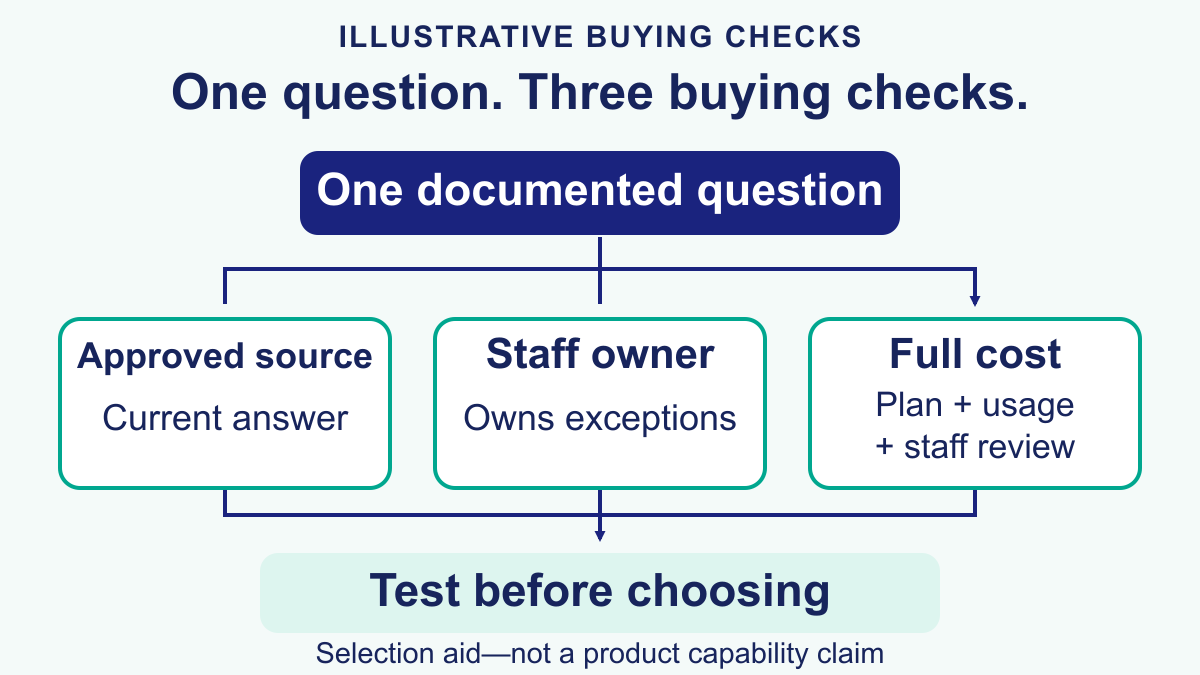
Choose a conversational AI chatbot around one customer question your team can answer from an approved source. Compare how each tool handles ordinary wording, asks for missing details and reaches a named staff member when it cannot finish. Before buying, test that question, an unclear follow-up and a request for a person in the exact account and channel you plan to use. Keep refunds, account changes and other sensitive decisions with staff unless a separate reviewed workflow authorizes them.
A conversational AI chatbot is useful when a customer can ask in ordinary language and reach an approved answer or a clear next step. It is not a reason to remove staff oversight. Before comparing software, separate three jobs: answering a documented question, collecting enough context for a person, and changing something in a customer account. Each job needs different permissions and checks. A fluent answer is not proof that the system can safely complete a booking, issue a refund or confirm an order.
There is no universal resolution rate that your business should expect from a conversation chatbot. Results depend on the questions, approved sources, connected systems and what counts as resolved. The NIST AI Risk Management Framework provides voluntary guidance for considering trustworthiness throughout the design, use and evaluation of AI systems. For a small business, the practical starting point is narrower: choose one documented question, name the person responsible for its answer, and define when the conversation must go to staff.
This guide covers the broader conversational-AI buying and operating decision, not a promise to replace a particular percentage of staff work. For the detailed source-review and escalation process, use our AI customer service chatbot handoff guide. That implementation guide is a separate resource: use it to decide which questions can receive approved answers and which should stay with your team. Pricing references below describe the public Messenger Bot page checked on October 12, 2026; confirm your selected plan and account before purchase.
How a Conversation Chatbot Adds a Natural-Language Path
Rules and menus suit requests with a small set of exact choices, such as opening hours or a service selection. Natural-language handling lets customers phrase a question in their own words, but it still needs approved sources and a reliable staff-help path. Compare both approaches with the same reviewed examples rather than assuming that one replaces the other.
A conversation chatbot adds a natural-language path alongside menus and forms. A useful design checks whether the request matches an approved source, identifies any missing detail and makes a staff-help option visible. It should not treat a plausible sentence as permission to take action. Buttons still help when a choice must be exact, such as selecting a service or confirming that the person wants to contact your team.
Find repetitive questions in your own records rather than assuming a few intents make up most of your workload. With appropriate access, review a representative set of recent conversations, remove private details, and group them by purpose. Count questions that have a current approved answer separately from exceptions and requests for account changes. That distinction gives you a defensible first workflow and prevents a large conversation count from hiding a small amount of genuinely answerable work.
| Evaluation check | Evidence to request | What it does not prove |
|---|---|---|
| Approved answers | The exact reviewed source used for a test reply | That every future question can be answered |
| Staff handoff | A completed test reaching the named responder with appropriate context | That every channel shares the same conversation history |
| Action permissions | A separately approved test of the exact connected action | That fluent text can authorize an account change |
| Measured usefulness | Your own resolved, escalated and unresolved counts under a stated definition | A universal automation rate or guaranteed savings |
Read these checks as a practical evaluation framework, not a published performance benchmark. A candidate tool should pass them with your own approved examples before it is used for customer conversations.
Separate the first-response task from the relationship with the customer. An approved factual answer may help with a routine question, while a complaint or exception needs a person who can review the circumstances. Keep that distinction visible in your test cases and measurements rather than treating every staff response as work the bot should have eliminated.
How to Review Context and Customer Effort
Continuity matters when a customer returns with a follow-up or moves between channels. For example, a person who already described an appointment question should not have to repeat it simply because another staff member responds. That is a design goal, not evidence that every conversational AI chatbot maintains one identity or history across platforms. Test the exact handoff in your connected account and avoid joining conversations through a guessed customer identity.
Different channels may have different permissions, histories and staff ownership. Start by deciding which context a responder actually needs and which details should remain restricted. A short reviewed summary can be more useful than copying a full private conversation. If your selected tool cannot carry the required context safely, tell the customer how staff will follow up rather than presenting a seamless cross-channel experience that does not exist.
Fluency is not the acceptance test. Ask whether a reply answers the question, points to the right source and explains the next step without collecting unnecessary information. Test follow-ups such as a changed service request or a request to speak to a person. If the answer is uncertain, a clear handoff is better than inventing an order status, availability or account detail.
- Continuity: the bot should carry context across the same conversation, not ask the same setup questions again.
- Accuracy: the answer has to come from approved policy, pricing, inventory, or help content, not model confidence.
- Availability: state when the workflow is available and what happens outside staff hours.
- Clean escalation: when the bot cannot solve it, the handoff has to be fast and informed.
Evaluate customer effort alongside correctness. Count the steps needed to reach a useful answer and check whether a person can request staff help at any point. A longer conversation is not automatically a better one. A short response that states the limit of the answer and offers a useful next step may serve the customer better than several fluent but unsupported replies.

Where Traditional Customer Service Still Beats a Conversational AI Chatbot
Keep judgment-heavy work with accountable people. A chatbot can help organize a question, but that does not qualify it to decide a refund, negotiate an exception or make a sensitive recommendation. Define which requests receive a documented answer and which go directly to staff before choosing an automation target.
| Support situation | Possible chatbot role | Staff responsibility | Acceptance check |
|---|---|---|---|
| Hours and general published policies | Offer the current approved information | Own source changes and exceptions | The answer matches the reviewed source |
| Order or appointment status | Only use a specifically authorized current connection | Confirm when the connection or permission is missing | No inferred status or fabricated booking |
| Refund disputes and account access | Explain the staff-help path without deciding the request | Review the account and make the decision | No sensitive details collected in ordinary chat |
| Legal, medical or other sensitive advice | Route to appropriate qualified help | Own the review and response | No automated advice or eligibility decision |
| Service inquiries and lead routing | Explain an approved next step | Confirm availability, fit and any quote | No unverified promise or unrelated promotion |
The honest reason traditional customer service still wins in those cases is accountability. When a customer is furious, when the company is exposed legally, or when the conversation can save or lose a large account, the human is not there just to answer. The human is there to judge tone, make exceptions, negotiate, and own the outcome.
Build the first workflow around documented answers and accountable people. Keep exceptions visible rather than counting every handoff as a failure. For sensitive requests, successful routing to an appropriate staff member may be the intended outcome. Decide that before reporting the results so a resolution target does not encourage the bot to continue when it should stop.
How a Conversational AI Chatbot Actually Works Behind the Scenes
Evaluate understanding, source quality, permitted actions and staff handoff separately. A conversational AI chatbot may need all four, but each must be tested in the intended workflow. A successful language demo does not prove that a connection is authorized, a source is current or a staff member will receive the unresolved question.
| Layer | What it does | What breaks if it is weak |
|---|---|---|
| Intent layer | Understands the customer’s actual request in natural language | The bot loops, misroutes, or answers the wrong question |
| Knowledge layer | Pulls responses from approved content, pricing, product data, or policies | The bot hallucinates, goes vague, or gives outdated information |
| Action layer | Only completes an action through its separately tested connection and approval | The bot can talk but cannot move the conversation forward |
| Handoff layer | Transfers to a person with context, reason, and transcript attached | The customer has to start over and support cost stays high |
Ask for evidence beyond a fluent demonstration. Use an approved question, an outdated-source example and a request the bot should not finish. Check the proposed answer and the path to staff. The source and handoff deserve as much attention as how naturally the response is written.
A practical build rule: do not let the bot answer from anything your team would not currently trust in front of a customer. If your help center is outdated, fix that first. If your delivery policy lives in three different docs, consolidate it first. If your pricing page changes every month, sync the source before you let the AI speak for the business. If you want the implementation walkthroughs after this section, Browse Our Tutorials and map the source content before you add more conversational polish.

Which Customer Questions to Evaluate First
Choose a first use case with a current answer, a clear staff owner and a limited downside if the request is misunderstood. Opening hours, service areas and how to ask for an appointment are easier to review than refund decisions or account access. Whether the work saves time must be measured in your business; it is not guaranteed by choosing a common use case.
FAQ coverage for recurring questions
Hours, service areas, plan definitions and how to contact staff can be suitable candidates when the published information is current. Distinguish a general policy from a decision about a specific customer. A bot may explain how a return request is reviewed, but that does not authorize it to approve the return. Test unclear wording and make the source owner responsible for changes.
Order status, booking status, and appointment reminders
Status information needs an authorized, current source. Do not let a natural-language reply infer a reservation, delivery date or appointment from an old conversation. If the connection and permissions are not available in the selected account, explain how the customer can reach staff for confirmation. A helpful next step is preferable to a fabricated status.
Pre-purchase Questions With a Clear Next Step
Some questions concern fit before a purchase: service area, plan requirements or the next step for an inquiry. Answer only what the approved source establishes. If the person asks to continue, explain what information staff need and who will review it. Do not treat a question as permission for unrelated promotions or assume a booking has been confirmed.
Pre-handoff context gathering
Even when staff must finish the conversation, a short summary of the question can reduce repetition. Collect only information needed for the next step, and explain why it is requested. Avoid asking for account credentials, payment details or private documents in an ordinary chat. Give sensitive requests a separately reviewed path with appropriate access controls.
Multi-channel triage
Write down the same staff responsibilities and answer rules for each channel you use. Then test each connected channel separately: permissions and available context may differ. A common checklist can make review easier without implying that every conversation is automatically joined or that one tool can perform the same actions everywhere.
The easiest way to choose the first flow is to score candidate workflows against five filters:
- High volume: the issue appears every week, not once a quarter.
- Low ambiguity: there is a correct answer or a controlled next step.
- Source grounded: the answer already exists in policy, docs, or system data.
- Low liability: getting it wrong will not create a legal or trust disaster.
- Easy to measure: you can track whether the bot actually reduced staff workload.
Use those filters to shortlist the workflow you will test first. If a question lacks an approved answer or a staff owner, resolve that gap before buying software for it. Start with one repeatable question and a clear handoff path; expand only after reviewing the results.
A 2026 Comparison Framework for Social DMs, Website Chat and Support Tools
A conversation chatbot can sit in a social-message workflow, a website support tool or a larger service system. Compare those categories by the work you need to complete, not by treating every fluent demo as the same product. Start with the channel where customers actually ask questions, the approved answer source and the staff member who handles exceptions. Then test that path in the selected account.
| Workflow category | First question to ask | Useful test | Staff responsibility | Budget check | Limit to verify |
|---|---|---|---|---|---|
| Social-message follow-up | Can the exact connected Page or account support the intended reply? | One reviewed comment or DM moving to an appropriate next step | Approve follow-up eligibility and own exceptions | Connected assets, contacts and campaigns | Current channel rules and account restrictions |
| Website question handling | Where does the approved answer come from? | A common question, a changed question and a staff-help request | Maintain the source and receive unresolved requests | Website tools and review time | Actual availability of the selected connection |
| Service-system assistance | Which records may the responder access? | A read-only request under the correct account permissions | Own customer records and access decisions | Seats, connected services and usage | Exact record access and private-data boundaries |
| AI-assisted draft review | Can staff check the source before using the draft? | A grounded draft, a missing-source case and an escalation | Review the answer and decide the response | Software plus separate AI usage where applicable | Draft assistance is not autonomous delivery |
| Account-changing actions | What explicit approval is required? | A separately authorized test with recovery instructions | Approve the action and own the outcome | Action service, supervision and error handling | An ordinary chatbot reply is not authorization |
Ask for the full price of the selected configuration, its usage definition and its available integrations. Some subscriptions charge by seats, some by usage and others by a combination. Those labels do not tell you whether an unresolved conversation still needs staff time. Compare a realistic low, normal and busy month using the terms of the exact plan instead of importing rates from an old comparison table.
For a practical budgeting checklist, see our chatbot pricing guide. Keep your cost estimate separate from a savings claim until you have measured the workflow. A hypothetical time calculation helps planning; it is not evidence that a particular product will deliver that result.
How to Evaluate Messenger Bot for Your Customer Conversations
For a business handling Facebook or Instagram inquiries, begin with the customer outcome: a clearer first response, a useful next step and a staff-help path. Review whether the selected Messenger Bot plan and connected account support that workflow before promising it to customers. Do not infer availability of website, booking, ecommerce or cross-channel actions from a general chatbot article.
The public Check Current Pricing page, checked on October 12, 2026, lists Starter at $29 per month, Pro at $99 per month and Agency at $299 per month. It describes a seven-day trial. These are public advertised prices, not a verification of a customer’s checkout, tax, renewal or account entitlement. Review the terms shown for your selected subscription before purchasing.
The same page describes BYOK (Bring Your Own Key) and AI-assisted drafts on supported plans. Treat draft assistance as a human-review workflow, not a promise of autonomous customer answers. The page states that AI usage from your BYOK account is separate from the software subscription. Verify the setup, available sources, usage terms and review responsibilities in your own account before relying on them.
A useful evaluation starts with one connected asset and one documented question. Test the answer, a follow-up outside the source and a request for staff. Check who receives the unresolved case and how the person knows what happens next. If a required action is unavailable, keep it with staff rather than improvising an answer.
For the current public plan information, See Our Plans. Choose on verified channel fit and usable limits, not an untested claim that a cheaper subscription replaces a whole support operation.
How to Launch a Messenger Bot Conversation Chatbot Without Overengineering It
Keep the first Messenger Bot workflow narrow enough to review. A useful start has an approved answer, a tested staff handoff and a named owner for changes. Do not promise a fixed launch time, savings target or independent action before the selected workflow has been verified.
- Review a representative set of recent questions. Use only conversations your team is authorized to access, remove private details from test examples, and group them by purpose. Do not bulk-export private conversations to create a demo.
- Choose one reviewed first workflow. Start with a documented question, such as opening hours, and specify the approved answer and staff handoff. Treat booking, order status and account changes as separate evaluations requiring their own sources and permissions.
- Write source-approved answers. Keep them short, current, and owned by someone on the team. If you would not paste the answer into a customer email, do not give it to the bot.
- Build one welcome flow and one free-text fallback. Menus still help with orientation, but natural language should not dead-end if the customer skips the buttons.
- Add one form for support or lead capture. Ask only for the fields the human actually needs next, such as order number, phone, preferred appointment date, or email.
- Define explicit handoff triggers. Identify complaints, repeated failures, sensitive questions and other cases your team assigns to staff. Test the destination and name the person responsible for responding.
- Test with ugly real messages. Try typos, slang, short messages, screenshots referenced in text, and impatient follow-ups. Demo-perfect prompts are not the job.
- Review conversations on a regular schedule. Record unanswered questions, incorrect replies and missed staff-help requests. Check the approved source, wording and handoff path, then test each change with the same reviewed examples.
Use exact choices where certainty matters, such as a service selection, staff-help request or separately reviewed preference. Use natural language when it helps people describe the question. Test how the two paths meet so a free-form request cannot bypass an approval step. Neither design removes the need for current sources and staff ownership.
A simple launch checklist looks like this:
- The bot has a visible human handoff option.
- Every answer comes from a source you reviewed this month.
- There is one owner for transcript review and one owner for source updates.
- The team knows which intents the bot is allowed to finish and which ones it must escalate.
- There is a recorded way to count resolved, escalated and unresolved conversations under your team’s definitions.
If a test fails, identify whether the issue is an outdated answer, unclear wording, missing permission or a failed handoff. Repair that specific cause and rerun the same reviewed example. Changing the welcome message alone will not establish that the underlying workflow now works.
How to Measure Whether Your Conversation Chatbot Is Actually Replacing Support Work
The wrong success metric is total chat volume. A bot can generate a lot of interaction and still fail the business. The useful metrics are the ones that tell you whether the repetitive layer of service is actually leaving the human support workload.
| Metric | Healthy signal | Warning sign |
|---|---|---|
| Resolution rate | Bot finishes a meaningful share of repetitive conversations without human help | Volume is high but almost everything still ends in a handoff |
| Handoff rate | Escalations happen mostly on complex or sensitive cases | Customers ask for a human after one or two bot replies |
| Fallback rate | Unknown questions shrink over time as sources improve | The same unanswered intents keep showing up every week |
| Average handle time after handoff | Humans solve escalated cases faster because context is already collected | The team still has to ask customers to repeat everything |
| Customer effort | Fewer steps to answer, route, or book | Customers bounce between menu, free text, and email follow-up |
For a hypothetical planning example, separate gross time avoided from the time still needed for review and exceptions. If your team handles 3,000 repetitive conversations a month and the conversation chatbot resolves 55% of them, that removes 1,650 contacts from the human support workload. If those contacts used to take four minutes each, that is about 110 hours recovered in a month. Those numbers are hypothetical, not a measured Messenger Bot result or a savings promise. Subtract staff review, follow-up and correction time before estimating net time recovered.
Budget the full workflow rather than comparing unrelated headline prices. List the software subscription, any separate AI usage, connected services, staff review time and the cost of handling mistakes. Check what the supplier counts as a conversation or outcome and whether staff still need to finish the case. Do not use an old per-seat price or a vendor-reported resolution percentage as a substitute for the terms and results of your own plan.
The Failure Patterns That Make Natural-Language Bots Feel Worse Than Humans
Review failures by what happened: an unsupported answer, an unavailable action, a repeated question or a missed request for staff. Those categories give your team a concrete repair to test. Do not assume the cause from the writing style of the reply.
Weak source content
An outdated source can produce an outdated answer. Check the exact material used by the workflow and who owns its updates. Test a recently changed policy and a question the source does not answer. The correct response to missing evidence is a clear next step, not a confident guess.
Hidden or delayed escalation
Test what happens when a customer asks for a person. The request should reach the named responder without another loop of automated replies. Check the destination, the context staff receive and what the customer is told to expect.
Buying based on fluency instead of task completion
An interactive AI chat experience can feel impressive in a demo even when it cannot check an order, capture a lead, or trigger the right next step. In production, task completion matters more than conversational charm.
Automating too many edge cases too early
Keep the first test focused on one documented question. List exceptions separately, decide which belong with staff and review any additional permissions before testing an automated action. Expand only when your team can explain and check the resulting workflow.
No transcript review rhythm
Give review work a named owner and a regular schedule. Record unanswered questions, incorrect answers and requests for staff help separately. Check whether the approved source changed before changing the reply. Keep a small set of reviewed test questions so the next adjustment can be compared with the previous version.
Keep improvement tied to reviewed evidence. A simpler flow with a current answer and a visible staff-help option may be the right starting point for your team. Compare it with your own test cases and measured outcomes before adding complexity.
When to Review a Higher Messenger Bot Plan
Review an upgrade when a verified limit prevents a workflow that is already useful. More conversations alone do not establish that the next tier is the answer. Check whether the restriction comes from your subscription, the connected channel, the approved source or the way staff handle the request.
The public pricing page lists one Facebook Page and one Instagram account for Starter, five of each for Pro and thirty of each for Agency. It also lists different contact and campaign allowances. Those published limits are a comparison starting point; the selected account and subscription terms still need checking before you plan additional assets or higher usage.
- Count the connected business assets that the team actually needs to manage.
- Estimate usage under the supplier’s stated definition, including a busy month.
- Check who can review drafts and handle unanswered or sensitive requests.
- Confirm any required connection and permission before relying on an action.
- Review separate AI usage and the subscription terms before approving a budget.
A higher plan will not repair an outdated source, an unclear staff handoff or an unsupported promise. Resolve those first. If a genuine plan limit remains, compare the current options on Check Current Pricing and choose the smallest plan that supports the verified workflow.
Build One Useful, Reviewable Customer Conversation
Start with a question your team can answer confidently, a current source and a visible staff-help option. Test ordinary wording, missing details and an exception before expanding. Measure whether the person reached a useful next step, not simply how many messages the bot produced.
Use Browse Our Tutorials for setup guidance, then verify the exact workflow in your selected account. Keep account changes, billing decisions and sensitive requests with the appropriate staff member. A clear boundary is part of helpful service, not a failure of conversational AI.
Frequently Asked Questions
What is the difference between a conversation chatbot and a traditional chatbot?
A traditional chatbot commonly uses fixed menus or rules. A conversation chatbot adds a natural-language path so a person can ask in ordinary wording. Neither approach guarantees a correct answer; approved sources, tested permissions and a clear staff-help option still matter.
Can a conversational AI chatbot replace all customer service agents?
No. Keep exceptions, sensitive questions and account-changing decisions with appropriate staff. Measure the share of documented questions the workflow actually answers rather than assuming a universal resolution rate or promising a particular staffing reduction.
Which channels should a business evaluate first in 2026?
Start where customers already ask recurring questions and where the exact connected account supports the intended workflow. Test an approved answer, an unclear follow-up and a staff-help request. Do not assume permission or shared history across channels.
How much does a conversation chatbot cost in 2026?
The full cost depends on the selected subscription, usage terms, connections and staff review. The public Messenger Bot pricing page checked on October 12, 2026 lists Starter at $29 per month, Pro at $99 per month and Agency at $299 per month. Confirm the selected subscription terms before purchasing; separate AI usage may also apply.
How should I decide whether Messenger Bot fits my workflow?
Define the customer question, connected channel, approved source and staff handoff first. Check current plans and verify the workflow in your selected account. Do not infer autonomous answers, account-changing permissions or unavailable connections from a public feature description.



 English
  Tagalog
  简体中文
简体中文  العربية
  हिन्दी
  Português do Brasil
  Español de México
  Français
  বাংলা
বাংলা  香港中文
香港中文  繁體中文
繁體中文  Nederlands
  Deutsch
  Bahasa Indonesia
  日本語
日本語  한국어
한국어  Polski
  Русский
  Español
  Tiếng Việt