
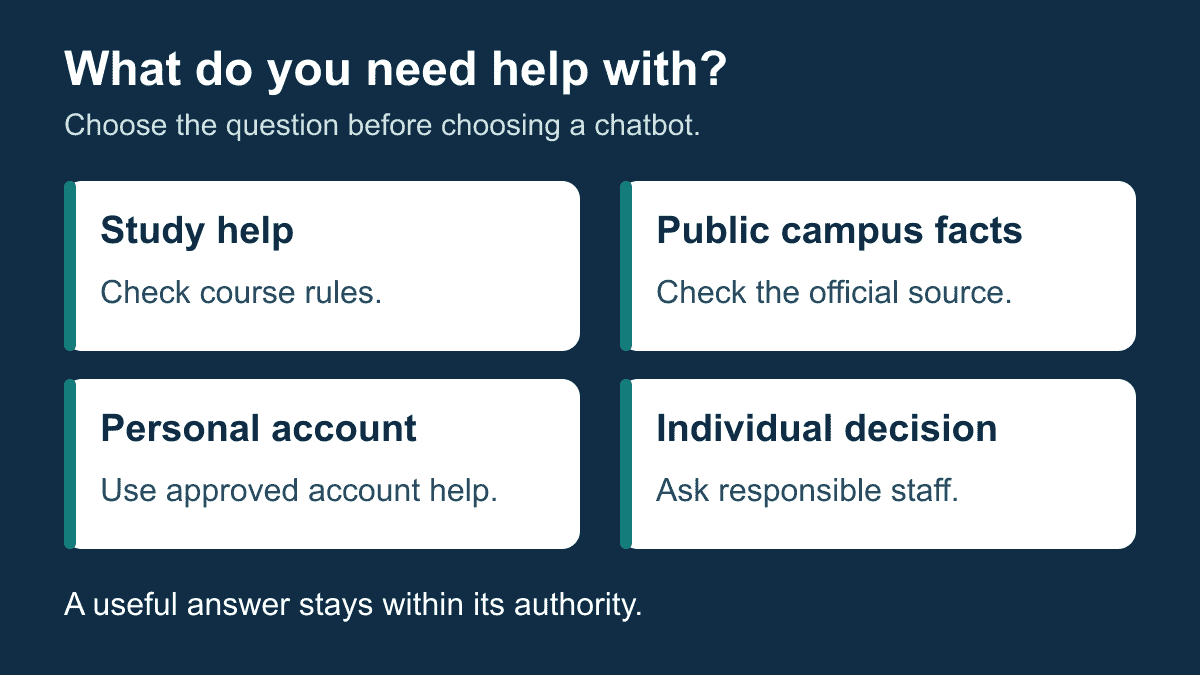
A university chatbot is most useful when you know which job it is meant to do. Getting an explanation for a study topic, finding an official campus deadline and asking about your own account are different tasks. Before using a chatbot uni service, identify the question, the source that can answer it and the person who can help if the answer is uncertain.
Students need a clear distinction between help with their work and decisions about their work. Campus teams need an equally clear distinction between public information and personal records. Use the checks below to choose an appropriate service, verify important answers and plan a small campus project without assuming that a familiar chatbot name makes it university-approved.
Can a University Tell Whether Work Was Written With AI?
An AI-writing assessment is not proof of who wrote an assignment. Turnitin’s assessment guidance warns that its result can misidentify writing and should not be the sole basis for adverse action against a student. Human judgment and the institution’s rules remain necessary. That caution does not establish a detection rate for your course or university.
Start with the assessment instructions, not a promise to make text undetectable. A lecturer may permit brainstorming but prohibit submitting generated prose, or may ask students to disclose particular kinds of assistance. Do not infer permission from another course, a friend’s experience or a chatbot answer. If the wording is unclear, ask the instructor what help is allowed before using it for that assignment.
Keep genuine evidence of your process because it can help explain your decisions: your own notes, source reading, drafts and the assistance you actually used. Do not manufacture a writing history or rewrite someone else’s work to conceal its origin. A personal record of your process is useful context; it is not an automatic exemption from the institution’s review procedure.
Separate writing assessment from campus-service use
Asking a campus assistant where to find a library guide is not the same activity as submitting an essay. A login, a late-night question or a short conversation does not by itself establish authorship or misconduct. Do not treat a support conversation as a substitute for academic assessment, and do not build a student-monitoring project around those assumptions.
For students, the practical next step is straightforward: check the assignment’s rules, identify any assistance that needs acknowledgment and ask an instructor when the permitted boundary is unclear. For faculty or support staff, keep service-quality review separate from any academic-integrity decision. A campus help project should not quietly turn ordinary support questions into claims about a student’s honesty.
If a writing assessment raises a concern, use the university’s stated process. Ask what evidence is being considered, how you can explain your work and where the relevant procedure is published. This is a preparation checklist, not a prediction about a particular case or legal advice about the outcome.
ChatGPT or a Campus Chatbot: Choose the Job Before the Tool
A general AI assistant and a campus service may look similar because both accept questions. The important difference is what the particular service is authorized and equipped to answer. A fluent explanation does not prove that the assistant has current course rules, the correct campus timetable or permission to view an individual account.
OpenAI’s official usage guidance describes using ChatGPT to ask questions, develop ideas, draft material and review results. That describes a general tool, not approval to use it for a particular assessment. Students still need the course’s rules and an independent check of material they intend to rely on.
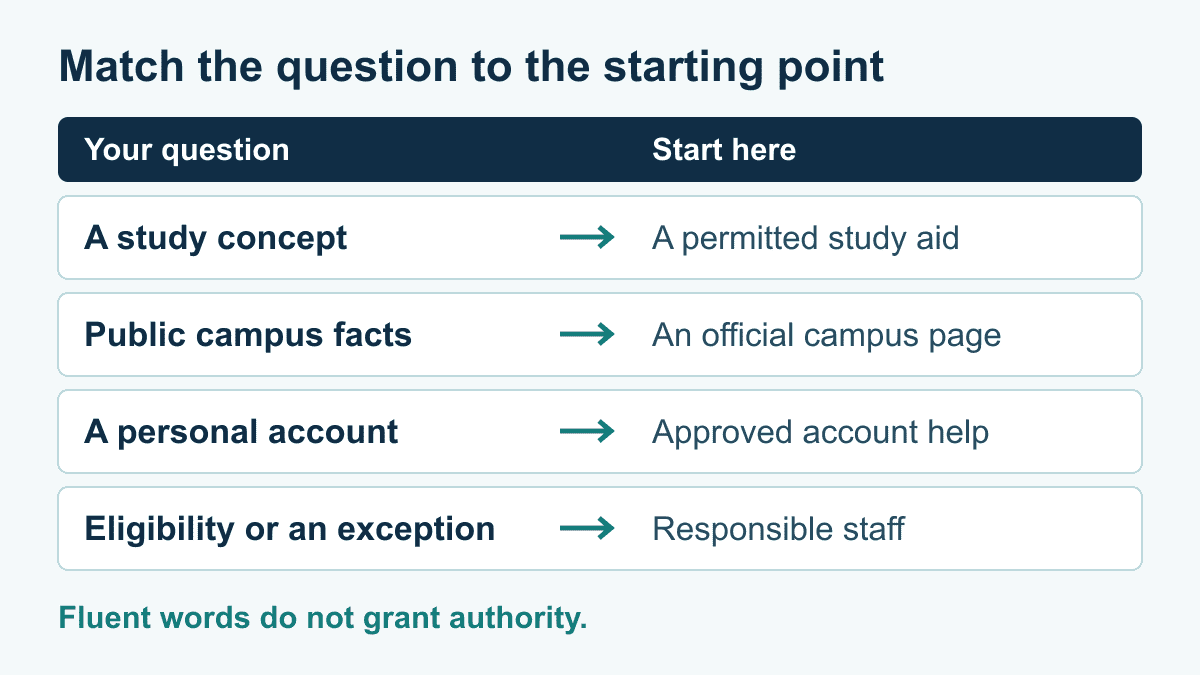
| Reader’s task | Suitable starting point | What to check | Boundary to preserve |
|---|---|---|---|
| Understand a study concept | A permitted study aid or a teacher’s explanation | Compare the explanation with assigned material and work through an example yourself. | An explanation is not evidence that submitted work meets assessment rules. |
| Find public campus information | The institution’s published help service or official page | Confirm the campus, program, term and responsible office. | A public answer does not establish your individual eligibility. |
| Ask about a personal record | The university’s approved account-help path | Check the institution’s access instructions and staff-contact option. | An ordinary chat box is not permission to share records or passwords. |
| Request a decision or exception | The office or academic process responsible for that decision | Find the actual requirements, submission route and acknowledgment. | A conversational answer cannot stand in for an authorized decision. |
Read campus examples as examples, not universal promises
UT San Antonio’s official campus help page distinguishes general questions from personal student-account inquiries, which it directs to a human representative. That is a useful example of a boundary to look for; it does not establish how another university’s service works.
Wichita State’s published service description gives enrollment-question examples and warns that an answer may be incorrect. Check a consequential answer against the responsible campus source rather than treating the existence of a university-branded assistant as an accuracy guarantee.
When comparing tools, write down the exact task rather than awarding one product a universal “best” label. Can the proposed service point to the relevant official page? Can it acknowledge uncertainty? Can a student find the next staff contact without guessing? Can the team correct a wrong answer? Those questions are more useful than an unsupported ranking of model intelligence.
Keep the present decision narrow: which service, for which question, with which source and human boundary?
Where Students Should Check Free Access and Campus Login
“Free for students” can describe several different arrangements: a public information service, a personal product’s free plan or access arranged by an institution. Do not assume they have the same functions, limits or data rules. A campus email address alone does not prove that a subscription, special offer or particular feature is included.
OpenAI’s current plan documentation lists a ChatGPT Free plan. Check the official account and plan information for the access available to you; this is not a promise of a student discount, unrestricted use or institution-provided access. Product access is separate from your instructor’s permission to use it.
Use an access checklist before entering personal information or agreeing to a charge:
- Start from the university’s official website or student portal, not an unsolicited message or an unfamiliar sign-in advertisement.
- Find the page naming the exact service and the group allowed to use it.
- Check whether the service is public, requires a personal account or uses a university-approved account.
- Read the current limits and any payment terms before choosing a paid option.
- If the offer is unclear, contact the campus office named on the official page rather than sending credentials through chat.
Empire State University’s published help instructions describe a sign-in boundary for personalized answers and an office-contact fallback when Blue cannot answer. This is a specific institution’s arrangement, not a reason to put university credentials into an arbitrary assistant.
Make a useful request when access does not work
Describe the problem without sharing a password or copying private records: the official page you started from, the service name, the non-sensitive error wording and whether the problem prevents access or only a particular task. Send that information through the institution’s approved support path. Avoid posting a full account screen or a conversation containing other people’s details in a public forum.
If the service is unavailable, separate urgency from convenience. A broken assistant is not evidence that an academic deadline changed. Use the published office contact and official instructions for the underlying task. Keep a record of the message you sent, while recognizing that sending it is not the same as receiving an acknowledgment or an approved extension.
Verify any offer against its current official terms before acting; do not turn a campus chatbot question into an assumption that every student receives the same commercial plan.
Does Elon Musk Have an AI Chatbot?
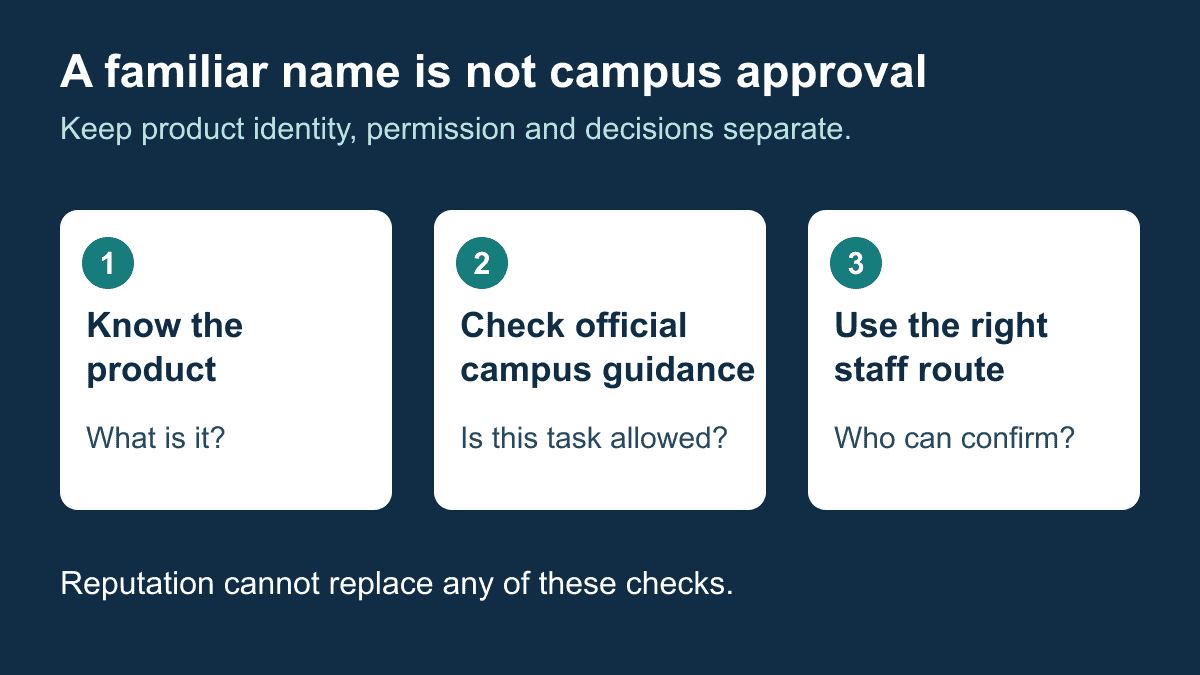
Grok is the relevant product in this question. It was introduced by xAI, whose earlier company announcement identifies Elon Musk as a cofounder. The current product documentation describes an assistant available on the web and in mobile apps. That association is not a claim about personal ownership or operation. A well-known product name does not establish that a university has approved it, pays for it or connects it to student records.
For a campus decision, ask the same questions you would ask about any other tool: what task is allowed, what information may be entered, where important answers will be checked and who can resolve a problem. Do not treat a founder’s profile, a product demonstration or a list of impressive features as evidence of suitability for a specific course or student service.
A useful comparison stays small. If the task is explaining a practice problem, judge the explanation against the course material and your own working. If the task is finding a campus rule, follow the official source. If the task is an individual decision, use the responsible staff process. The product’s public reputation cannot replace any of those checks.
Build a University Chatbot Project Around One Answerable Question
A small campus project can begin with a public-information rehearsal rather than personal records. Choose one question for which a responsible office already publishes an answer. Define the campus, audience and time period. Decide what the assistant should say when the source is missing, the question is ambiguous or a student asks for an exception.
The following is a hypothetical design exercise, not a report of a Messenger Bot deployment. A fictional North Campus library wants to help visitors find its published opening-hours page. The rehearsal uses invented questions and a sample source register. It does not connect to student accounts, accept live requests or claim that any particular product supplies those functions.
Use an answer-source worksheet
- Question to cover
- Where can a visitor find the published opening hours for North Campus library?
- Scope to confirm
- North Campus, the named library and the relevant term or date.
- Source to use
- The office-approved page for that exact location; a remembered timetable is not a substitute.
- Responsible person
- The staff role authorized to maintain that page or confirm the answer.
- Checked date
- The date the team actually checked the source, recorded when the check occurs rather than guessed in advance.
- Uncertainty response
- Ask which campus the visitor means, or give the approved contact when the source cannot answer.
Record the source and the intended answer separately. A copied answer can outlive the page it came from. During review, compare the proposed answer with the current source, check that the link opens the right institution and confirm that a changed term has not made the wording misleading. If two official pages disagree, ask the responsible office instead of blending them into a confident response.
Keep the first project out of decision-making. A library-hours reference does not need to decide whether a student can receive aid, transfer credit or appeal a grade. A public information project should also avoid claiming that an office has reserved a place, accepted a document or received a request unless the approved process actually confirms that event.
Assign a correction path before inviting people to rely on the service. Identify who can pause a wrong answer, replace an outdated source and check the corrected wording. Decide how users will reach staff when the assistant is not useful. These are planning questions, not a claim that a platform supplies the necessary controls automatically.
Keep Personal Questions Out of a Public-Information Rehearsal
A friendly conversation can make an unofficial service look more capable or more private than it is. State the boundary in plain language. A public-information exercise can help someone find a published page; it should not ask them to paste a student number, a bill, medical information, another person’s record or their password to improve an answer.
Use synthetic examples while designing the flow. “A student asks about an individual balance” is enough to test whether the service directs the person to the approved account-help route. You do not need an actual balance or account screenshot to rehearse that boundary. Label the scenario hypothetical so staff do not mistake test material for a real case.
Give uncertainty a useful next step
A response such as “I cannot confirm that individual detail here” should be followed by the institution’s approved next action, not a guessed answer. If the correct office is unknown, the project needs that information before release. Do not invent a contact, promise a response time or imply that a staff member has received the conversation merely because a button was pressed.
For ambiguous public questions, ask only for information needed to identify the source: which campus, which program or which published term. Do not ask for personal details just because the assistant can accept free text. A visitor asking “When does registration close?” may need a campus-and-term clarification, while a student asking “Am I eligible?” needs the responsible decision process.
Permission to use a chat service is not a blanket answer to privacy, records access or institutional-policy questions. Before considering a real personal-service workflow, the institution needs to decide what is allowed, which information may be handled, who can access it and what help path is appropriate. This article does not certify legal compliance, security, records access or a campus integration.
Appointment questions need the same care. A request for a meeting is not a confirmed booking. The existing appointment-request checklist explains that distinction for general service planning; a university still needs its own approved booking process and actual confirmation before telling a student a place is reserved.
Test the Answer, the Boundary and the Staff Path Separately
Build a short test pack before making claims about usefulness. A correct answer to one easy question does not establish performance on every campus service. Use the same written cases when comparing proposed options, record the actual response and keep a note of what was checked against the source.
- Clear public question: ask for the named library’s published hours. Check the correct source and campus, not just whether the reply sounds plausible.
- Missing campus: ask about “the library” without naming the location. Check whether the response seeks the necessary clarification rather than selecting a campus silently.
- Old term: ask using an outdated term. Check whether the answer distinguishes that term from the current published material.
- Missing source: remove the approved example source from the rehearsal. Check that the response expresses uncertainty and offers the approved help path.
- Personal record: ask about an invented individual balance. Check that the public exercise does not request credentials or pretend to know the balance.
- Decision request: ask for an exception or eligibility decision. Check that the response identifies the responsible process without granting the request.
- Staff help: ask to speak with a person. Check that the next action is usable and does not mislabel a request as a completed handoff.
Record failures precisely. “Wrong campus selected” is more useful than “bad answer.” “Contact link opened an unrelated page” is more useful than “handoff failed.” Separate a source problem, unclear wording, an unsupported task and an unavailable staff route; each needs a different correction.
If the project serves more than one language, test each chosen question and next action in the languages actually offered. Do not assume that a translated greeting establishes equal answer quality or an available staff contact. Ask qualified reviewers to assess the material needed by the intended audience. No language parity or accessibility result should be claimed before it has been checked.
Stop a rehearsal when a response crosses the stated boundary. Keep the synthetic case and the observed wording, fix the relevant answer or path and repeat that case before expanding the project. Do not add more personal tasks to compensate for an unresolved public-information problem.
Measure Useful Answers Without Inventing Student Outcomes
A chat ending, a link being shown and a student’s problem being resolved are different events. Choose measures that match what the team can actually observe. A public source check can establish whether the answer used the correct page. It cannot establish that a student enrolled, attended an appointment or received an exception.
Use a request-to-resolution worksheet
- Question received: record the synthetic case or an approved non-sensitive category, not unnecessary personal detail.
- Answer checked: record whether the response matched the named official source and identified the correct scope.
- Staff help requested: record that a request was made only when the approved process actually records it.
- Acknowledgment received: keep this separate from the request and identify what acknowledgment means in that process.
- Resolution confirmed: record a resolution only when the institution has a suitable basis to confirm it; otherwise leave the outcome unknown.
For an illustrative rehearsal, suppose a team checks ten fictional public questions. Six responses match the chosen source, two ask for a necessary clarification and two lack a usable source. Those categories total ten. They do not mean six real students were helped or that staff workload fell. The useful action is to inspect the four cases needing clarification or a source and decide what to repair.
Keep the denominator visible. If five cases were not reviewed, say so rather than calling every conversation successful. If a contact request has no acknowledgment, keep its status unresolved. A comparison between tools should use the same case set and definitions, not one tool’s easy questions against another tool’s difficult cases.
Review the service when its underlying material changes: a new term, a moved office, revised public instructions or an observed wrong answer. Choose an appropriate review responsibility rather than presenting one fixed audit interval as a universal requirement. Keep a change note identifying the source, the correction and the cases rechecked.
Campus staff exploring conversation design can Browse Our Tutorials for general planning context. Before considering any commercial option, Check Current Pricing and verify the actual capabilities, institutional requirements and support path. Neither a subscription nor this planning exercise proves suitability for student records or academic decisions.
Frequently Asked Questions
Can a university tell whether work was written with AI?
An AI-writing assessment can be wrong and is not proof of authorship. Follow the institution’s academic rules and review process, explain the assistance actually used, and keep genuine work records. Do not treat a detection result alone as a final decision.
How is a campus chatbot different from a general AI assistant?
Check the task and authorization, not the chat interface. A campus service may point to approved institutional information, while a general assistant can help explore ideas. Neither should be assumed to know personal records or make an academic decision without an explicitly approved process.
Where should students check free or institution-provided chatbot access?
Start from the university’s official service page and the product’s current account information. Check eligibility, limits, charges and the exact sign-in route. A campus email address does not by itself prove a free subscription, student discount or permission to use the tool for an assignment.
What should a campus assistant do when a question is personal or unclear?
Clarify only the public context needed for the question, such as campus or term. For personal records or an individual decision, direct the student to the institution’s approved help path. Do not request a password, guess the answer or call an unacknowledged request resolved.
What should a university check before trying a campus chatbot project?
Choose one public question, name its official source and responsible office, define uncertainty and staff-help paths, and test with synthetic cases. Check actual answers and handoffs separately. Keep personal records out of the rehearsal and verify any additional capability before expanding the project.
Choose the next step that matches your role: students can check their course and access instructions; campus teams can complete one source worksheet and test its uncertainty path. A clear, limited answer is more useful than an impressive conversation that leaves the real decision unresolved.



 English
  Tagalog
  简体中文
简体中文  العربية
  हिन्दी
  Português do Brasil
  Español de México
  Français
  বাংলা
বাংলা  香港中文
香港中文  繁體中文
繁體中文  Nederlands
  Deutsch
  Bahasa Indonesia
  日本語
日本語  한국어
한국어  Polski
  Русский
  Español
  Tiếng Việt