
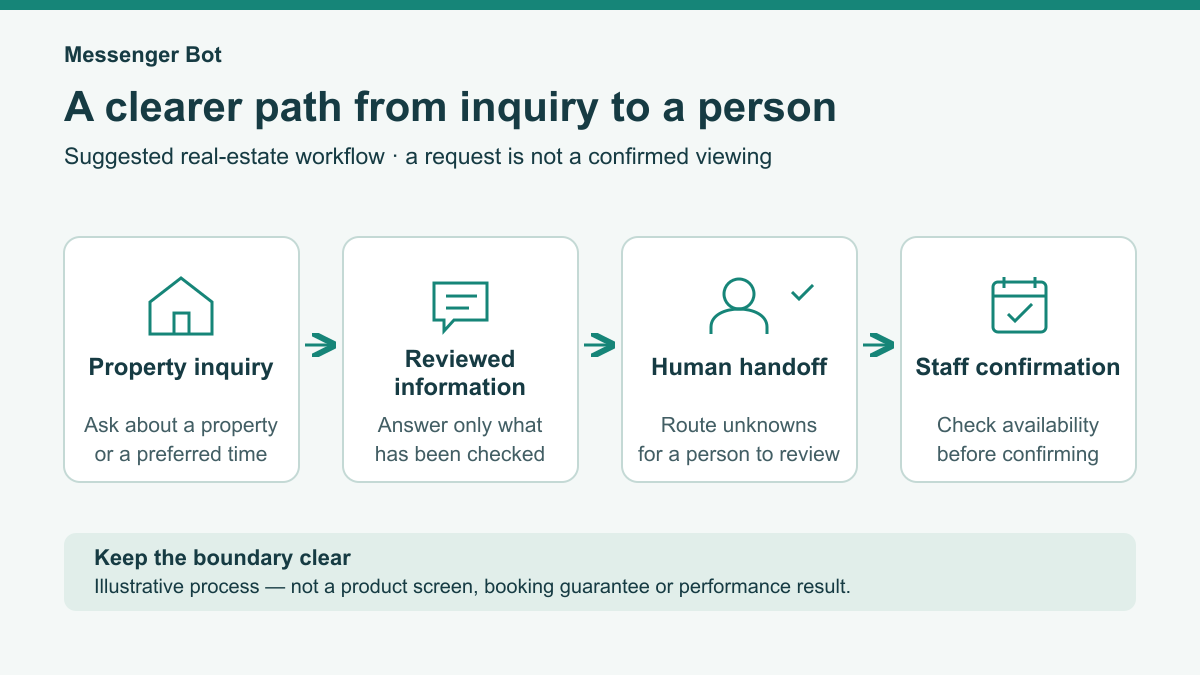
A real estate chatbot is worth evaluating when your team wants a clearer way to handle a property’s first question, a viewing request, or a request to speak with an agent. Start with the conversation you want a person to experience: a useful answer when approved information is available, an honest explanation when it is not, and a clear choice about the next step.
This guide recommends a modest first-contact workflow for real estate teams. It does not promise more showings, fewer staff, a particular response time, or a completed sale. Treat each proposed step as something to test with the software, channel, information and staff you actually have. A greeting is not proof that a request was saved, delivered to a colleague or turned into an appointment.
Keep the initial job small: understand the inquiry, avoid guessing about the property, ask only for useful contact context, and leave confirmation to a person. For the broader channel discussion, the business Messenger conversation guide is related reading. Here, the focus is choosing and testing a property-inquiry process, not building an entire marketing plan.
Choose a Real Estate Chatbot by the Conversation You Need to Handle
Before comparing software, write down one common question and the next action your team could honestly offer. An example might be a visitor asking to discuss a property with an agent. Identify the channel where that question arrives, the person responsible for responding, and the information that person needs. Use that example throughout your evaluation rather than comparing long feature lists without a practical task.
Consider the following checks as a purchasing worksheet, not a statement that any particular product has these capabilities. Ask for a demonstration of the exact workflow. If a capability cannot be shown or tested, record it as unverified and design the first workflow without depending on it. Website, Facebook and Instagram support should each be checked separately; success on one channel does not establish success on another.
| What your team needs | Suggested evaluation test | Evidence to keep |
|---|---|---|
| A usable conversation on the chosen channel | Complete the same inquiry on a phone and a desktop, including a return visit. | The tested channel, device and result; mark other channels unverified. |
| A clear way for a person to take over | Ask a question outside the approved answers and check how staff find it. | Who reviewed the request and how they reached it, without assuming an alert arrived. |
| Control over property answers | Change a test fact, withdraw it, then repeat the question. | Whether the old answer stopped appearing and the current answer was correct. |
| Appropriate staff access | Check what a reviewer and an unrelated test account can see. | The access checks completed and any unresolved restrictions. |
| Understandable costs and support | Review the current offer and ask how changes or faults are handled. | The checked terms and unanswered questions, not an assumed plan entitlement. |
A visual editor may be convenient, but the deciding question is whether your team can maintain accurate answers and a truthful next step. For related reading, see the visual chatbot builder guide. Test the actual editing and review process before relying on it for property information.
Build One Inquiry Path Before Adding More Choices
A useful first workflow can focus on a property question followed by a request for human help. For this first workflow, keep the opening short and explain that the visitor is speaking with an automated assistant. Offer understandable choices such as asking about a property, discussing a viewing request or speaking with the team. Include a way to continue without choosing a property and a way to stop.
- Ask what help the person wants. Use ordinary words, not an assessment of whether they are a serious lead. Let them correct an accidental choice.
- Identify the topic. A property reference or general inquiry type may be enough. Avoid asking for a home address when the conversation does not need one.
- Use an approved answer or a clear fallback. If the detail has not been checked, explain that a team member needs to verify it. Do not fill the gap with a plausible answer.
- Offer one next step. Ask whether the person wants to continue the conversation or request human follow-up. Do not treat a question as consent to ongoing marketing.
- Ask for one preferred contact route if needed. Request the detail for that chosen route only. A person choosing email should not also have to provide a phone number.
- Use a truthful ending. Describe the next step without claiming a save, delivery, staff notification or booking that has not been verified.
Keep the initial questions distinct from application or eligibility assessment. In this recommended workflow, leave financing, screening and representation decisions to the team’s separately reviewed human process. If a visitor does not want to share contact information, offer the available way to continue or leave; do not turn an optional request into a compulsory data collection step.

Keep Property Answers Tied to Information Your Team Has Checked
Prepare a small answer sheet for the test workflow. For each answer, record the property reference, the exact wording staff have approved, when it was checked and who is responsible for reviewing it again. Keep only details that the responsible person can verify. The sheet is a recommended working method, not a claim that a chatbot automatically obtains or updates listing information.
Separate a dated description from a current availability answer. A checked description does not prove that a viewing can be arranged now. If current availability is unknown, the proposed response should say it needs confirmation. Do not infer that a property is active from an old page, a photo or a visitor’s message. Avoid turning an ambiguous status into a confident statement about a sale or contract.
Test a change deliberately using fictional test information: replace an answer, remove it, and ask the same question again. Check every channel included in the proposed workflow. If the old answer remains, stop relying on that answer until the team has understood and corrected the problem. If there is no verified way to keep a fact current, use a human-check response instead.
Choose a fallback that helps without creating a new promise: “That detail needs checking by the team. Would you like to continue here or choose a contact route for follow-up?” Keep valuation, offer terms, ownership, access instructions and sensitive questions outside the prepared first-contact answers. This article does not establish a housing rule or a legal obligation; the responsible team should determine its own reviewed boundaries.
Treat a Viewing Request as a Request Until a Person Confirms It
For this proposed workflow, ask for a preferred viewing window rather than offering a held or booked appointment. The person reviewing the request should check the property information, team availability and the team’s applicable access process before confirming anything. This recommendation does not specify notice periods, representation requirements or universal eligibility rules. For a broader intake and confirmation checklist, use the appointment request and human-confirmation workflow while keeping the viewing time pending until the responsible person confirms it.
Keep the distinction visible throughout the conversation. A visitor selecting a day is expressing a preference. It is not proof of an available slot, permission to enter a property or an agreement by a colleague. Avoid buttons and closing messages that say “Booked” or “Confirmed” when the only established event is a request for review. Do not share private access information in the first-contact dialogue.
| Information offered by the visitor | What it means in this workflow | Suggested staff check |
|---|---|---|
| A property reference | The topic of the inquiry, not verified availability. | Confirm which property the person means and check current information. |
| A preferred day or time window | A request, not a reserved appointment. | Review the team’s availability and relevant access arrangements. |
| One chosen contact route | A preference for this follow-up, not ongoing marketing permission. | Use only the route and purpose the person chose. |
| A request to change or cancel | A new request requiring review. | Check its status and avoid implying a change has already taken effect. |
If your current setup cannot prove that a request reached the responsible person, its ending must not claim that it did. Test the handoff independently and use an approved fallback when it is unavailable. Staff should decide what follow-up wording they can support with their actual coverage; this guide recommends no universal deadline.

Use Illustrative Dialogues That Do Not Invent Property Facts
The following dialogues are illustrative templates, not real conversations, customer results or descriptions of current product behavior. Bracketed labels are placeholders rather than names, addresses, contact details or property facts. A team would need to review the wording and test its actual handling before using any version with customers.
Illustrative Property Question and Viewing Request
This example deliberately treats availability and scheduling as unknown until checked. It asks for one chosen contact route, not both a phone number and an email address.
- Assistant: “Hello. I am an automated assistant for [team]. Are you asking about [property reference], or would you like help with something else?”
- Visitor: “I would like to know whether I can view [property reference].”
- Assistant: “Availability and a viewing time need confirmation by the team. What viewing window would you prefer?”
- Visitor: “[Preferred viewing window].”
- Assistant: “Would you prefer to continue here or choose one contact route for a team member to follow up?”
- Visitor: “[One preferred contact route].”
- Assistant: “If that route needs a contact detail, please provide only [detail for the chosen route]. A team member needs to confirm the next step; this conversation does not reserve a viewing.”
Illustrative Seller Request for a Conversation
This template offers discussion with a person, not a valuation, market assessment or promise of an assigned specialist. The general area is optional context; it is not evidence about a market.
- Assistant: “What would you like to discuss with [team]?”
- Visitor: “I am considering selling and would like to speak with someone.”
- Assistant: “A team member should discuss that with you. If useful, you can share [optional general area]. You do not need to give a detailed home address for this initial question.”
- Visitor: “[Optional general area, or no area supplied].”
- Assistant: “Would you prefer to continue here or choose one contact route for follow-up?”
- Visitor: “[One preferred contact route].”
- Assistant: “Please give only [detail for the chosen route] if needed. The team needs to review your inquiry before agreeing any consultation or next step.”
Illustrative General Property Inquiry
This example does not identify suitable homes, promise a shortlist or infer personal circumstances. It clarifies the question so the person reviewing it has useful context.
- Assistant: “Are you asking about a particular property or would you like to speak with [team] more generally?”
- Visitor: “I would like help understanding what property information I should check.”
- Assistant: “What is the main question you would like the team to review? Please leave out financial documents, identity details and other sensitive information.”
- Visitor: “[General inquiry].”
- Assistant: “Would you prefer to continue here or choose one contact route for follow-up?”
- Visitor: “[One preferred contact route].”
- Assistant: “Provide only [detail for the chosen route] if needed. A person should review the question rather than this assistant guessing an answer.”
Give Human Follow-Up a Clear Owner and an Honest Fallback
Before testing the inquiry path, assign a responsible person and a backup. Decide how each person will find new requests, distinguish requests already reviewed and avoid duplicate contact. A manual check may be the first method. Do not assume that an email, phone alert or shared workspace exists or delivers correctly just because it appears in a product description.
Write down the coverage your team can actually provide and review it when staffing changes. If you choose to display response expectations, base them on tested handling and realistic coverage, not a standard borrowed from another business. After-hours wording should explain any limitation without promising a morning reply that nobody has agreed to provide.
Define the fallback for a request with no assigned reviewer, an absent colleague, missing context or a failed handoff. Test it by making the normal route unavailable in a controlled test. The fallback should offer the team’s reviewed contact option or explain that human help is unavailable at that moment. It should not silently label the inquiry complete or repeatedly ask for more personal data.
Before contacting the visitor, the reviewer should check the original question and chosen contact preference. Do not require a full transcript to be copied into an alert. Give staff access only to the context needed for the task, using the team’s reviewed method. Keep the distinction between “waiting for review,” “reviewed” and “person contacted” visible in your measurement notes.
Review Privacy and Accessibility Before Collecting More Detail
For a first-contact workflow, consider collecting the inquiry topic and at most one chosen contact detail when it is needed for follow-up. Names, exact addresses, document uploads and detailed circumstances should not become default questions merely because a form offers those fields. Let the responsible team justify each field and remove any field that does not change this narrow next step.
This is a process checklist, not privacy, housing or legal advice. Ask the people responsible for the team’s policies to review the purpose of collection, access, retention and deletion handling before use. Do not describe a tool as compliant or secure based solely on these recommendations. A sensitive question should reach the responsible human through the team’s reviewed process, not be answered by an improvised rule.
- Explain why the selected contact detail is requested and what follow-up it supports.
- Separate this inquiry from any optional permission for future updates; do not assume one authorizes the other.
- Leave identity documents, payment information, financial details and personal household information out of this general chat intake.
- Test whether staff see only the information appropriate to their task, and whether an unrelated test account is blocked.
- Review where information is kept, who can access it and how the team handles correction or removal requests. Record any unverified behavior.
- Provide a reviewed way to reach a person when the visitor cannot or does not want to use the conversation flow.
Accessibility also needs a practical check, not a general claim. Try the conversation using a keyboard, readable text enlargement and a narrow phone screen. Check that every choice has a clear label, focus remains visible, messages are understandable without color alone, and a person can correct a choice or leave. Where appropriate, include assistive-technology testing in the team’s review and record what was actually tested.
Measure Requests, Human Review and Unknown Results Separately
Choose one review period and channel before counting. Define a unique inquiry and a documented rule for repeat messages so the denominator does not change midway through the comparison. Keep controlled tests separate from customer inquiries. Record unavailable data as unknown; do not silently convert missing information into zero, success or abandonment.
| Measure | Exact proposed count or denominator | How to handle unknowns |
|---|---|---|
| Inquiry count | Unique inquiries within the chosen channel and period, using the same repeat-message rule. | Mark coverage unknown if the team cannot establish which inquiries were included. |
| Usable contact preference | Inquiries with a chosen follow-up route and its necessary detail, divided by inquiries where follow-up was requested and that route was offered. | Missing observation is unknown. A visitor declining contact is a separate state, not a verified detail. |
| Viewing requests | Count of observed requests identifying a property reference and a preferred window. | Do not label an unobserved handoff as a saved request or an appointment. |
| Human review coverage | Requests with verified human review, divided by all requests needing human review in the same period. | Report waiting and unknown review states alongside the rate. |
| Confirmed viewings | Requests with a separately verified human confirmation, divided by all observed viewing requests in the period. | Keep declined, waiting, cancelled and unknown states distinct. Do not infer confirmation from a button click. |
| Human response time | For matched inquiries with both timestamps, calculate elapsed time from the follow-up request to the first verified human response. | Report the matched count and excluded missing timestamps with any median. Do not treat an automated greeting as human response. |
For a rate, use the stated numerator divided by its stated denominator, multiplied by 100. Report both counts with the percentage. If the denominator is zero, the rate is not available, rather than zero performance. If observations are incomplete, explain the limitation; calculating a percentage from only known successes would hide the missing cases.
Keep each inquiry’s final state clear enough to avoid double counting. A viewing request could be waiting, human-confirmed, declined, cancelled or unknown at the review point. Document how later changes are handled. A confirmed request may subsequently be cancelled; that is not a reason to silently rewrite an earlier period’s counts without recording the change.
Use these observations to find unclear wording, missed reviews or stale answers. They do not establish that a chatbot caused more leads, higher revenue or less work. Channel mix, property availability and staff coverage may also differ between periods. For broader capture planning rather than this narrow evaluation, consult the lead generation chatbot guide.
Test Failure Cases as Carefully as the Normal Conversation
Use clearly fictional test records and do not enter real customer details. For each case, note the expected behavior, what actually happened and whether it needs repair. These are recommended acceptance checks for your own chosen workflow, not a claim that any software already passes them.
| Suggested test | What to try | What the team should verify |
|---|---|---|
| Known property question | Ask about a fictional property with a reviewed test answer. | The answer matches the approved wording without adding facts. |
| Changed or missing information | Replace or remove the test fact and ask again. | The old answer no longer appears; unknown information triggers a human-check response. |
| Viewing preference | Request a window that has not been checked. | No held slot, access permission or confirmed booking is implied. |
| Missing human coverage | Make the primary reviewer unavailable in the test. | The reviewed fallback appears without claiming that staff were notified. |
| Contact choice and refusal | Choose one route, decline contact, then correct a choice. | Only the selected detail is requested; refusal does not create an invented completion. |
| Sensitive or unfamiliar question | Ask about a matter outside the approved answers. | No eligibility decision, legal answer, valuation or speculative property detail is generated. |
| Access and readability | Use an unrelated test account, keyboard navigation and a narrow screen. | Private context is not exposed and the visible choices remain usable. |
Repeat the relevant tests after changing an answer, staff assignment or channel setting. A previously successful test does not prove the changed version works. Keep failures visible until repaired and retested, including the exact point where a visitor would otherwise receive a misleading message.
Expand Only After the Team Can Verify the First Workflow
Choose progress by completed checks rather than an arbitrary number of rollout days. Begin with staff-only examples, review every response, and remove claims the team cannot verify. Next, decide whether a limited use of the tested workflow is appropriate under the team’s reviewed policies and available coverage. There is no assumed launch date or automatic expansion in this recommendation.
- Agree the single inquiry type, approved answers, responsible reviewer and fallback.
- Complete the privacy, contact-preference and accessibility reviews relevant to the proposed use.
- Run the normal and failure cases, repair any mismatch and repeat the affected checks.
- Confirm how the team will observe requests and human review without relying on unverified alerts or saved records.
- If the team chooses limited use, review actual inquiries for missing context, stale information and misleading endings.
- Add another inquiry type or channel only after its own information, coverage and tests have been reviewed.
Keep a simple change record: what wording changed, which facts were reviewed, which tests passed and who will maintain the workflow. If a property answer or human handoff becomes uncertain, return to the reviewed fallback rather than continuing with an unsupported promise. The useful outcome is a conversation your team understands and can verify, not the largest possible collection of automated steps.
Decide Whether Messenger Bot Fits Your Customer Conversations
If your business handles customer questions through Facebook or Instagram, review the current Messenger Bot business conversation use cases and compare them with your team’s needs. For a clearer purchasing decision, Check Current Pricing and verify the scope you would need. Check any website, property-information or scheduling requirement with the product before relying on it, and choose only a workflow whose actual handling your team has checked.
Frequently Asked Questions
Do real estate chatbots actually work?
Judge a real estate chatbot by a tested task, not a promised result. Check whether it gives only approved answers, explains unknown information and offers a usable human-review path. Measure observed requests and verified human follow-up separately. This guide does not establish more showings, sales, faster responses or a particular result for any product.
What is the best chatbot for real estate agents?
Start with the channel and inquiry your team wants to handle. Evaluate the actual conversation, control of approved information, staff access, human handoff, accessibility and current costs. Keep capabilities unverified until demonstrated or tested. The best fit for your workflow is not established by a universal ranking or a long feature list.
How much does a real estate chatbot cost?
Use the current offer for the product and scope you are considering; this guide provides no verified price comparison. Check the subscription terms, any additional usage or setup charges and the work your team would need to maintain the workflow. Confirm the relevant capabilities before paying for a plan based on assumptions.
Can a chatbot replace a real estate assistant?
Do not plan staffing changes from an untested chatbot claim. This recommended workflow limits automation to reviewed first-contact handling and leaves confirmation, sensitive questions and individual decisions to the responsible human. Assess any change in work using observed tasks and staff review rather than assuming that a conversation tool replaces an assistant.
How do I set up a real estate chatbot for my website?
First verify that the product supports your actual website and the workflow you need. Define one inquiry path, approved answers, one optional contact route, a responsible reviewer and a truthful fallback. Test property-information changes, viewing requests, missing coverage, privacy and accessibility before deciding to use it. Require human confirmation rather than treating a request as a booked viewing.



 English
  Tagalog
  简体中文
简体中文  العربية
  हिन्दी
  Português do Brasil
  Español de México
  Français
  বাংলা
বাংলা  香港中文
香港中文  繁體中文
繁體中文  Nederlands
  Deutsch
  Bahasa Indonesia
  日本語
日本語  한국어
한국어  Polski
  Русский
  Español
  Tiếng Việt