
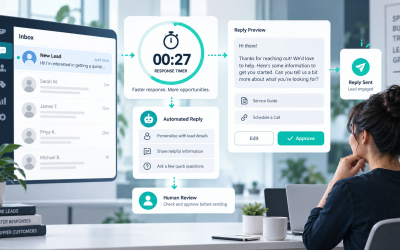
Instagram曾经是一个以评论为主的频道,私信则是附带的。在2026年,收件箱才是真正的购买意图所在。人们在私信中询问链接,回复故事,提及你的品牌在他们自己的故事中,询问运输情况,请求预约,并在你的团队睡觉时尝试购买。一旦这个数量开始增加,手动回复就不再是一个“客户服务任务”,而是变成了一个速度问题。.
这里是大多数指南跳过的部分:Instagram聊天机器人不仅仅是一个自动回复工具。它是一个意图的路由层。它捕捉简单的问题,开始正确的销售路径,将奇怪的事情交给人类处理,并保持你的响应时间不会在短视频、赠品或广告起飞的那一刻崩溃。.
我在2026年4月9日检查了定价和计划细节,参考了公共产品页面,因为这个类别不断变化。免费层会受到限制,AI附加功能会被重新包装,而上个季度看起来便宜的工具,一旦联系人或对话规模扩大,可能会迅速变得昂贵。如果你仍在Instagram工具和更广泛的商业聊天平台之间犹豫不决,请阅读 我们的完整聊天机器人比较 在此之后。本指南专注于一个任务:将Instagram私信转变为可重复的潜在客户和销售系统。.
为什么Instagram聊天机器人在2026年对商业来说比以往任何时候都重要
Instagram 消息量并不是因为品牌突然在社区管理方面变得更好而增长的。它的增长是因为客户现在期望最快的路径是私密的。他们不想在个人资料链接、菜单、联系页面之间寻找,然后等待明天早上的电子邮件回复。他们想要点击一个故事,输入一行,得到他们需要的东西。.
如果你的团队仍然像手工礼宾服务一样处理 Instagram,这将是一个问题。一个人每天可以应对 20 或 30 条简单的直接消息。超过这个数量,问题就会迅速显现。链接发送得很晚。重复的问题堆积起来。准备购买的潜在客户冷却下来。你开始用同样的疲惫复制粘贴回复来回答高意图的信息,而这正是自动化应该消除的工作类型。.
手动处理直接消息在活动真正有效时就会崩溃
很多品牌说他们想要“更多的互动”,但他们在运营上并没有准备好这意味着什么。如果一个故事投票、一个短视频 CTA、一个赠品或一个点击直接消息的广告效果很好,收件箱就会充满相同的三种模式:
- 产品意图: “多少钱?” “你能发链接吗?” “你们发货到英国吗?”
- 资格意图: “你们和沙龙合作吗?” “我可以预定星期五吗?” “这是给初学者的吗?”
- 支持意图: “我的订单在哪里?” “你们还有尺码吗?” “我可以更改我的预订吗?”
这些并不是困难的对话。它们是重复的对话。而重复的对话是聊天机器人发挥作用的地方。机器人不需要聪明。它需要立即回复,提出下一个有用的问题,并收集足够的上下文,以便人类在必要时介入。.
对一个小账户进行时间计算。如果你每月处理400条Instagram的入站消息,每条消息平均需要3分钟来阅读、回答、搜索正确的链接和标记潜在客户,那么这就是1200分钟的工作。在任何人进行真正的跟进、内容创作或客户成功之前,你已经花费了20个小时。这就是为什么Instagram自动化从“可有可无”变成“一目了然”,一旦私信成为真正的收入渠道。.
故事提及自动化是你可以使用的最高意图触发器之一
当有人在他们的故事中提到你的账户时,他们已经举起了手。他们不是从无处而来的冷门潜在客户。他们正在积极谈论你的产品、你的服务、你的活动、你的创作者品牌或你的报价。这就是为什么故事提及自动化在真实活动中通常优于普通的“私信我们”提示。对话是从自愿的关注开始的,而不是冷淡的请求。.
Meta自己的Instagram消息文档使这个触发器特别有用且特别紧迫。故事提及是短暂的,内容在24小时后消失,而私人账户的提及只有在对方关注你时才会流通。这意味着快速的自动确认很重要。如果你等到下一个工作日,势头就已经消失了。.
从实际角度来看,故事提及回复之所以有效,是因为它感觉很自然。“感谢你标记我们,要产品链接吗?”与品牌随机发送的促销DM体验截然不同。一种感觉像是跟进,另一种则像是垃圾邮件。.
在购买之前值得比较的6个Instagram聊天机器人平台
没有真正的“无需注册”的Instagram聊天机器人可供商业使用。如果一个工具声称不是,它只是在给你展示演示,而不是生产设置。真正的Instagram自动化需要一个Instagram专业账户、Meta权限、在许多设置中链接的Facebook页面,以及一个可以管理触发器、交接和报告的平台。.
在审查当前市场后,简短版本是:如果Instagram是你漏斗的中心,ManyChat仍然是市场领导者;如果Instagram与Facebook Messenger和网站聊天并存,MessengerBot.app是最具价值的选择;而其他平台在你有更窄的运营模型(如网站支持、全渠道销售操作或服务预订自动化)时才有意义。.
| 平台 | 公开起始价格 | 最佳Instagram功能 | 自动化深度 | 免费套餐 | 最佳契合 |
|---|---|---|---|---|---|
| 多聊天 | 免费计划;专业版每月$15 | Instagram私信、评论回复、故事回复触发器、故事提及回复触发器、AI步骤、实时聊天 | 深度 | 是 | 创作者、教练、电子商务品牌和社交优先团队 |
| MessengerBot.app | 免费试用;高级版每30天$19.99 | Instagram聊天机器人、自动评论回复、回复增强器、可视化流程构建器、网站聊天、Messenger优先自动化 | Meta渠道的深度 | 试用 | 希望在一个系统中使用Instagram和Facebook Messenger的小型企业 |
| 聊天燃料 | 7天免费试用;每月$69 | Instagram 自动回复消息和提及,故事回复,预订流程,AI 助手,CRM | 中等到深度 | 试用 | 希望简单设置和 AI 驱动回复的服务型企业 |
| MobileMonkey / Customers.ai InstaChamp | 免费礼品层;来自 $9.95/月的铂金促销 | DM 自动回复,故事提及回复,故事反应,关键词回复,受众增长自动化 | Medium的AI部分 | 有限的免费访问 | 以促销为驱动的创作者和品牌,愿意接受 Customers.ai 的过渡 |
| Respond.io | 7 天免费试用;入门版 $79/月 | Instagram inbox, workflows, broadcasts, AI agents, ads capture, team routing | Very deep | 试用 | Sales and support teams running multiple channels from one inbox |
| Tidio | Free plan; Starter $24.17/mo | Instagram integration, shared inbox, Flows, Lyro AI agent, website and email support | Medium的AI部分 | 是 | Website-first businesses that also need Instagram covered |
ManyChat Is Still the Safest First Recommendation for Instagram-First Brands
ManyChat stays on top because it understands how Instagram growth actually happens. You need comment-to-DM, story reply triggers, story mention automations, keyword triggers, lead capture, and a builder that non-technical marketers can ship quickly. The free plan is real, not fake, and the Pro tier starts low enough for creators and smaller businesses to test without a giant commitment. If Instagram is the primary sales surface, ManyChat is still the benchmark.
MessengerBot.app Is the Best Value If Instagram Is Part of a Bigger Meta Funnel
MessengerBot.app makes more sense than ManyChat when your funnel does not stop at Instagram. If you also care about Facebook Messenger, website chat, visual flows, form capture, sequences, Google Sheets, and SMB-friendly pricing, the platform becomes very attractive. Its public pricing is straightforward, the Instagram features are already listed on the pricing page, and the builder is easier to justify for businesses that want one operating layer across Meta channels instead of one tool for Instagram and another for everything else.
Chatfuel Feels Simpler Than It Used To, Which Is Mostly a Good Thing
Chatfuel has tightened its offer into a more direct AI assistant product. The current public plan is a single $69 per month package with a 7-day trial, and the product pitch is clear: automate replies across WhatsApp, Instagram, TikTok, and website chat with booking and CRM built in. That makes it cleaner than older Chatfuel pricing models, but it is no longer the cheap starter it once looked like.
MobileMonkey Still Exists in Practice, but the Brand Story Is Messy
This is where buyers get confused. The old MobileMonkey infrastructure and login path still show up inside Customers.ai, and the Instagram automation offer now lives under InstaChamp. If you are comparing tools in 2026, that means two things. First, the underlying social DM automation is still there. Second, the company has clearly pivoted harder toward ecommerce identity resolution. That does not make InstaChamp unusable. It just makes it a less clean buy than it used to be if you want a straightforward, long-term Instagram chatbot platform.
Respond.io Is Strong, but It Is Not Really a Creator Tool
Respond.io is excellent when you need an actual sales-and-support operation across Instagram, WhatsApp, email, and other channels. Workflows, AI agents, routing, inboxes, and broadcasts are all there. The tradeoff is obvious in the price. A $79 starting tier is reasonable for a real team, but it is overkill if all you want is a comment-triggered DM funnel for a small brand.
Tidio Works Best When Your Website Still Does Most of the Selling
Tidio is an inbox and support platform first, not an Instagram growth engine first. That matters. If your website, help desk, and AI support layer are central, Tidio is a strong option. If your main question is “How do I turn Instagram comments and story mentions into sales conversations?” it is usable, but it is not the sharpest specialist in the group.
How to Set Up an Instagram Chatbot Without Making the First Flow a Mess
The fastest way to waste a chatbot subscription is to build the automation before you define the path. A good first Instagram bot is narrow. It handles one sales path, one support path, and one human handoff path. That is enough to go live and start learning.
- Switch to a professional account and connect the right assets. Meta requires an Instagram professional account for messaging automation. In many setups you also need the account connected to a Facebook Page. If the account connection is broken, the rest of the setup does not matter.
- Pick one primary business goal. Do not start with ten automations. Choose one outcome such as sending product links, booking consultations, collecting leads, or answering pre-sale questions.
- Map the triggers before you write messages. Decide whether the conversation starts from a Story mention, Story reply, comment keyword, DM keyword, ad click, or private reply from a post comment.
- Design the opening flow in plain language. The first message should acknowledge intent, not dump a menu. For example: “Happy to help. Are you looking for pricing, the product link, or a quick question answered?”
- Add a human escape hatch immediately. Every serious bot needs a clean way to hand off. “Reply HUMAN” or “Talk to our team” is enough for version one.
- Test on your phone before going live. Desktop previews lie. Instagram automation has to feel good inside the actual app, with the actual message spacing, quick replies, and link behavior.
Connect Your Instagram Business Account the Right Way First
If your Instagram account is still personal, change that first. Meta’s help documentation is clear that professional Instagram accounts can be connected to a Facebook Page, and that connection unlocks cross-app tools, message management, and third-party app integrations. In plain English, your chatbot platform needs that plumbing to work.
At a minimum, confirm these five items before you touch the builder:
- Your Instagram account is set to Business or Creator, not Personal.
- The correct Facebook Page is connected to that Instagram account.
- You have admin or equivalent task access to the connected assets.
- Connected tools are enabled inside Instagram and Meta settings.
- The platform can see the account and pass the test connection.
If your business is also running Facebook Messenger automation, use the same planning pass to align both channels. That keeps your routing, tags, and human handoff logic consistent. For the Messenger side of that setup, read our Messenger automation guide once your Instagram flow is live.
Start With Three Triggers, Not Fifteen
Most first builds should start with just three triggers:
- Story mention reply: best for warm user-generated content and customer love.
- DM keyword trigger: best for promos, giveaways, lead magnets, and “send me the link” campaigns.
- Comment or private reply trigger: best for turning public interest into a private conversation.
That mix covers most real business cases without turning your automation map into spaghetti. Once those work, then add booking logic, product browsing, follow-up sequences, or multilingual branching.
Build the First Message Like a Concierge, Not a Sales Brochure
The first message is where weak flows give themselves away. If the bot opens with six buttons, a paragraph of brand voice, three emojis, and a sales pitch, users leave. If it opens with a tight acknowledgment and one useful next question, users continue.
Use this structure:
- Acknowledge the trigger: “Thanks for the mention” or “Got your message.”
- Offer one clear next step: “Want the link, pricing, or help choosing?”
- Reduce typing whenever possible: quick replies beat open text for common paths.
- Reserve open text for qualification: name, budget, date, location, or product question.
- Hand off when confidence drops: if the user asks something unexpected, route them.
That is also where many teams overestimate AI. AI can improve classification and answer quality, but the highest-converting Instagram flows are still usually built around strong trigger design, good copy, fast links, and clean escalation. You do not need a philosophical bot. You need a fast one.
Test the Full Loop Before You Publish the Trigger
Run your own dry tests from a second account and check all of this on mobile:
- Does the trigger fire every time it should?
- Does the first reply arrive fast enough to feel instant?
- Do links open correctly on iPhone and Android?
- Do quick replies still make sense after the user chooses one?
- Does the human handoff notify the team somewhere useful?
- Do tags, contact fields, or CRM updates actually save?
Most Instagram automation failures are boring failures. The wrong page is linked. The trigger only fires on public mentions. The keyword is too narrow. The handoff exists but nobody is notified. Fixing those details does more for revenue than adding more bot complexity.
Instagram Chatbot Use Cases That Consistently Drive Revenue
Not every chatbot use case deserves equal effort. The ones below show up again and again because they sit close to purchase intent, save real time, or both.
Story Mention Auto-Replies Turn User-Generated Content Into Warm Leads
This is one of the best low-friction plays in Instagram automation. A customer tags your brand in a Story, the bot replies with thanks, offers the product link, asks whether they want a discount code, or invites them into an affiliate or referral path. It feels timely because it is triggered by something the user already did.
This works especially well for beauty, fashion, food, travel, coaches, and local brands where customer Stories are normal. It also gives small teams a way to acknowledge every mention without someone manually checking the inbox all day.
DM Keyword Triggers Are Still the Cleanest Way to Capture Intent
If your content asks people to DM “PRICE,” “BOOK,” “CATALOG,” “GUIDE,” or “DEMO,” the bot should take over from there. The right automation sends the promised asset, asks one qualifying question, and records the result. That turns a fluffy engagement tactic into a measurable lead source.
Keyword flows are also the easiest place to A/B test. One version can offer a direct link first. Another can ask the qualifying question first. One can give the discount immediately. Another can trade the code for an email address. Instagram marketers love to talk about reach, but the real gains usually come from cleaning up this exact handoff.
Catalog Browsing Works When the Choice Set Is Small and Structured
Instagram DMs are great for lightweight commerce, not for dumping a giant store on someone. The winning pattern is a tight catalog path with category buttons, a short description, a hero image if the tool supports it well, and a clear route to checkout or human help. If you sell ten variants of the same product family, a bot can handle that well. If you sell 1,500 SKUs and expect the DM flow to replace search, it will feel clumsy.
The practical use case is not “browse everything.” It is “help me choose from a short shortlist.” That can still drive serious revenue when the product is visual and the buyer just needs a nudge.
Follower Growth Gets Easier When the Reward Lives Inside DM
Instagram bots do not magically create followers, but they do make follower growth campaigns easier to convert. A Reel can ask viewers to follow and DM a keyword for the checklist. A Story can invite people to mention your brand for the private link. A giveaway can use a comment trigger to move people from passive engagement into a real DM thread. The bot handles the delivery instantly, which is what keeps that spike in attention from turning into a pile of unread messages.
The important part is the exchange. Do not ask people to follow just because you want a vanity metric. Give them a reason to enter the DM: a guide, product list, sample menu, discount, booking link, early-access drop, or referral reward. That is how follower growth ties back to revenue instead of becoming empty reach.
Appointment Booking Is One of the Highest-ROI Instagram Automations
Service businesses get some of the cleanest wins from Instagram bots because the action is obvious. The customer wants availability, a price range, a service menu, or a consultation link. A bot can ask for the service type, preferred date, location, and contact details in under a minute, then hand the lead to a scheduler or a human.
Salons, clinics, trainers, agencies, home services, photographers, med spas, and consultants all fit this pattern. If your team is still manually answering “Do you have availability this week?” inside Instagram, you are spending human time on a machine-friendly task.
Meta’s Instagram Messaging Rules You Need to Respect Before You Scale
This is the section businesses ignore until a campaign stops delivering or an account gets restricted. Meta does allow meaningful Instagram automation, but it does not allow you to treat DMs like a free-for-all outbound spam channel.
You Are Usually Responding to User Intent, Not Starting Cold Conversations
The cleanest mental model is this: Instagram chatbot automation works best when the user started the interaction. They sent a DM, replied to a Story, mentioned you in a Story, commented on a post, reacted to an ad, or tapped into a thread. Meta’s messaging APIs and platform docs are built around that behavior. If your strategy depends on blasting cold promotional DMs to strangers, you are already on the wrong side of the product design.
That is why the best campaigns always begin with an explicit CTA such as:
- “DM us BOOK for today’s availability”
- “Mention us in your Story for the private link”
- “Comment GUIDE and we’ll send it”
- “Reply to this Story for the color chart”
The user initiates, the bot follows through. That is the safe and sustainable pattern.
The 24-Hour Window Still Shapes What You Can Do Next
Meta’s current Instagram Messaging docs still make the timing rules clear in the places that matter most. For private replies, you can send one message to a user who commented on a post, ad, reel, or live story, but only after the user replies can you continue inside the 24-hour messaging window. ManyChat’s current Instagram help docs reflect the same operational rule on story-based triggers: send within the allowed 24-hour period.
The practical takeaway is simple. Do not rely on slow follow-up. If someone triggers a Story mention flow, a Story reply, or a comment-to-DM entry point, your system should respond right away. Delay kills conversion and increases the chance you fall outside the safest messaging window.
Story Mentions Come With Special Privacy Rules
Meta’s Story Mention documentation includes a rule a lot of teams miss: you must not store or cache the story media on your own server. The content is ephemeral, the CDN URL can stop rendering once the Story expires or is deleted, and private-account mentions only flow through under specific visibility conditions.
If your team is building a custom inbox or using a platform with advanced rendering, treat Stories as temporary context, not permanent media assets. A good tool will reflect that reality and show a placeholder once the story is no longer available.
Comment-to-DM Is Powerful, but It Is Not Unlimited
Private Replies are one of the best bridges from public engagement to private conversation, but Meta does not give you unlimited follow-up freedom. The current docs say you can send only one private reply to the user who commented, and it has to be sent within 7 days for posts, ads posts, and reels. Instagram Live is stricter; the private reply has to happen while the live broadcast is still running.
That means comment automation works best as a hand-raiser, not as an excuse to stuff people into a long promotional sequence they never asked for. Use the first message to help, offer the asset, and invite the next step. If they respond, now you have a real conversation.
Legal Does Not Stop at Meta Policy
Platform rules are not the whole compliance picture. If you operate in the US or the UK, you still need to think about data collection, privacy notices, consent language, retention, and opt-out handling. If the bot collects names, emails, phone numbers, or purchase intent, your privacy policy should reflect that. If the bot delivers promotional offers, make the commercial nature clear. If someone wants out, give them a clean way out.
This is not legal advice, but it is practical advice: if your automation would feel sneaky, misleading, or overly aggressive to a reasonable customer, it is probably bad business even before a lawyer looks at it.
If Instagram is only one part of your Meta stack, keep the rules, tags, and handoff paths aligned with our Messenger automation guide so your team is not operating two different logic systems for customers who move between Instagram and Messenger.
How to Measure Instagram Chatbot ROI Without Lying to Yourself
A lot of businesses claim chatbot success because the bot sent a lot of messages. That is not ROI. Volume is only useful if it either saves labor, increases conversions, or both.
| Metric | What to measure | 为什么这很重要 |
|---|---|---|
| First response time | Seconds from trigger to first useful reply | Instagram buyers are impatient; speed is often the win |
| Qualified conversion rate | Percentage of bot conversations that reach booking, checkout, lead capture, or handoff | This shows whether the flow is producing business outcomes, not just clicks |
| DM volume handled | Total inbound conversations resolved or partially handled by the bot | Good for capacity planning and staffing math |
| Human takeover rate | Percentage of conversations escalated to a person | Too high means the bot is weak; too low can mean the bot is trapping people |
| Cost saved | Hours removed from manual DM handling multiplied by your actual labor cost | This is where automation usually justifies itself first |
Use a Simple Monthly ROI Formula First
You do not need a finance team to evaluate the first month. Start with this:
ROI estimate = (hours saved x hourly labor cost) + revenue influenced – platform cost
示例:
- 350 Instagram conversations handled or pre-qualified by the bot
- 2.5 minutes of manual work saved per conversation
- 14.6 hours saved in the month
- $25 per hour blended labor cost
- $365 labor value saved
- $600 in attributable bookings or sales from DM flows
- $19.99 to $49.99 platform cost on a small-business tier
That is why the economics often become obvious quickly. Even a modest Instagram chatbot can pay for itself if it catches after-hours leads and removes repetitive admin.
Do Not Ignore Assisted Revenue
Some of your best Instagram chatbot conversations will not close inside Instagram. The bot qualifies the lead, sends the catalog, collects the phone number, books the call, or routes someone to the site. If you only count in-thread purchases, you will undercount the tool’s value badly. Track assisted outcomes wherever possible.
The Mistakes That Make Instagram Chatbots Feel Annoying or Pointless
Instagram bots do not fail because customers hate automation. They fail because the setup is lazy.
- Starting with a giant menu: the more choices you show first, the lower the completion rate tends to be.
- Ignoring trigger context: a Story mention deserves a different first message than a booking keyword.
- No human handoff: if customers cannot reach a person when needed, the bot feels like a barrier.
- Using one flow for support and sales: those jobs need different logic and different tone.
- Sending the link too late: high-intent users should not be interrogated before they get the asset they asked for.
- Not testing private-account edge cases: not every mention or reply behaves the same way.
- Forgetting the 24-hour timing pressure: Instagram automation rewards fast follow-up, not lazy batching.
- Leaving the bot unchanged for months: your offers, FAQs, and objections change, so the flow has to change too.
The strongest habit is a monthly review. Pull the top entry points, top drop-off messages, top unresolved questions, and top human takeovers. Then tighten the opening copy, fix the broken branches, and remove anything that slows the buyer down.
Where MessengerBot.app Fits If You Want Instagram and Messenger Working Together
If your business lives inside Meta’s ecosystem, the smartest move is often not buying the most famous Instagram specialist. It is buying the tool that lets Instagram, Facebook Messenger, website chat, forms, sequences, and team handoff work as one system. That is where MessengerBot.app makes the most sense. You get Instagram automation features, Messenger-first depth, and pricing that stays approachable for small businesses. If that sounds closer to your operating model than a creator-only stack, 查看MessengerBot定价.
常见问题
我可以在Instagram上为我的业务使用聊天机器人吗?
是的。您需要一个 Instagram 专业账户和一个支持 Instagram 消息自动化的工具。最佳设置可以处理用户发起的 DM、故事回复、故事提及、评论触发的私人回复,以及在不让体验感觉机械的情况下进行人工交接。.
2026年最好的Instagram聊天机器人平台是什么?
对于大多数以Instagram为首的品牌来说,ManyChat仍然是市场领导者,因为它的故事、评论、私信和潜在客户捕获自动化功能成熟且易于启动。如果您想在一个平台上同时使用Instagram和Facebook Messenger、网站聊天以及更广泛的Meta渠道自动化,MessengerBot.app是性价比最高的选择之一。.
自动化Instagram私信是否合法?
是的,当您使用经过批准的工具并遵循平台和隐私规则时。安全模型是用户发起的消息、明确的披露、尊重的后续跟进、干净的选择退出处理,以及对机器人收集的任何个人数据的适当处理。冷消息行为和误导性促销是企业陷入麻烦的地方。.
一个Instagram聊天机器人多少钱?
小型企业的定价通常在免费和每月约$25之间起步,随后根据联系人、对话、席位或自动化深度而上升。ManyChat 免费开始,Pro 版每月 $15 开始。MessengerBot.app 以免费试用开始,Premium 版每 30 天 $19.99。高端团队和全渠道工具的费用可能每月达到 $79 及以上。.
Instagram聊天机器人能帮我增加更多粉丝吗?
是的,间接地,有时也直接地。机器人在将故事提及、评论提示、赠品和私信关键词转化为更快的互动时最为有效。这保持了对话的进行,提高了响应率,并使得奖励人们以链接、优惠、提醒或鼓励关注和分享的内容升级变得更加容易。.


 简体中文
简体中文  English
  Tagalog
  العربية
  हिन्दी
  Português do Brasil
  Español de México
  Français
  বাংলা
বাংলা  香港中文
香港中文  繁體中文
繁體中文  Nederlands
  Deutsch
  Bahasa Indonesia
  日本語
日本語  한국어
한국어  Polski
  Русский
  Español
  Tiếng Việt