
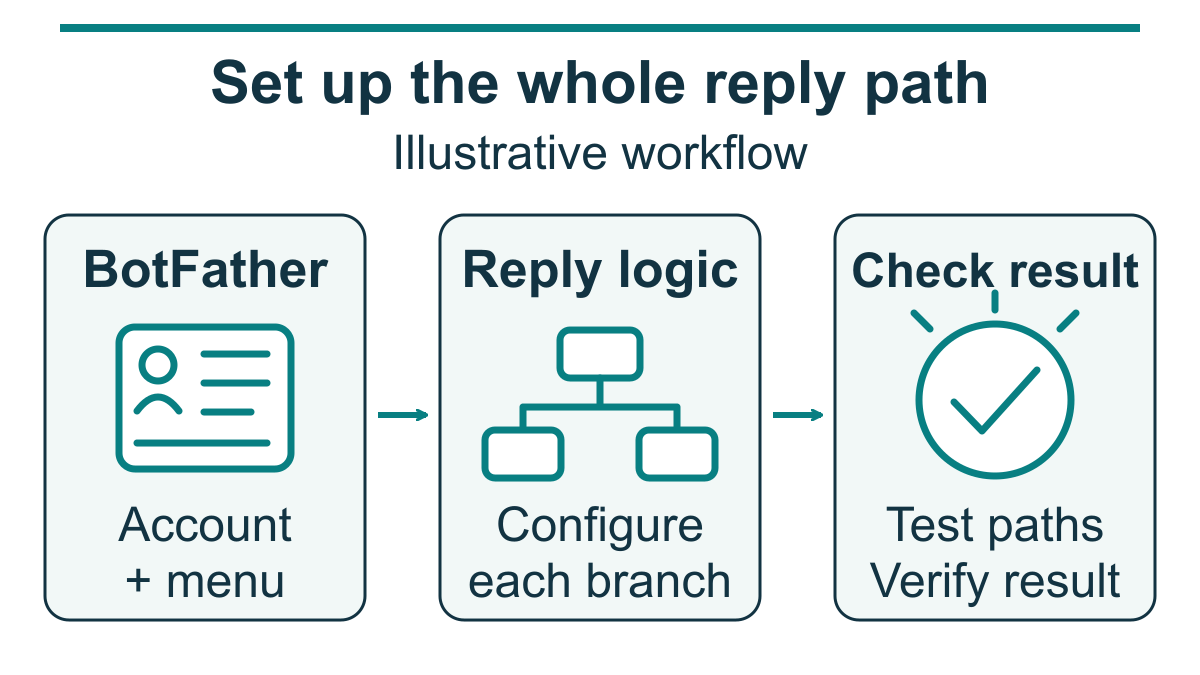
A useful Telegram bot needs more than a name and a link. Start by separating three jobs: create the bot account, give people a clear command menu, and connect the software that actually answers. BotFather handles the account and settings. Replies, bookings and AI assistance need their own configured logic. Work through each stage before inviting customers to use the bot; account creation alone is not a finished service.
Telegram describes its base bot platform as free in its official platform overview. That does not make every part of a project free. A builder, hosting service, connected business tool or AI service may have separate costs. Choose the task first, then check what the exact setup includes.
For an ordinary private conversation, the user needs to contact the bot first. Merely opening a link is not the same as sending a message, and adding the bot to a group does not give permission to contact each member privately. Start with people who want to use the channel. If your customers already ask questions through Facebook Page messages instead, compare the relevant workflow and Check Current Pricing before committing to a Telegram project.
What Your First Telegram Bot Should Do
Pick one job you can explain in a short sentence. For example: help visitors find service hours and request a callback. That gives you a clear starting point, an answer you can check, and a natural handoff when the request needs a person. It is a proposed design, not a claim that any existing bot or product already performs the task.
Write down who will maintain the answers and who will receive requests the bot cannot handle. A menu can look polished while still pointing to an unattended inbox or an out-of-date price list. Resolve that practical ownership before spending time on extra features. If nobody can follow up, offer a contact route the business actually monitors rather than promising an immediate response.
For a no-code starting point, read our guide to building a chatbot without coding. Check the selected tool’s current Telegram connection, supported triggers and costs. A visual builder is an implementation choice, not proof that every integration you need comes included.
Separate account setup from working replies
| Stage | What you prepare | What still needs checking |
|---|---|---|
| Bot account | Name, username, token and profile details through BotFather | This does not implement a conversation or process requests. |
| Command menu | Short labels that help people choose a task | Each command needs a handler in the chosen application or builder. |
| Reply workflow | Approved answers, routing and a fallback contact option | Test each branch and confirm that requests reach the right person. |
| Optional AI assistance | A limited task, reviewed source material and a refusal path | Check answers and failures; a prompt does not guarantee accuracy. |
These are responsibilities, not time estimates. A simple FAQ menu and a booking integration are different projects. Account access, tool selection, approved content and testing all affect the work. Stop at a useful first version rather than treating advanced features as a requirement for every business.
How to Create a Telegram Bot With BotFather
BotFather is Telegram’s official management tool. Use its current management reference when checking commands and settings. The following steps establish a bot account; they do not make it reply automatically.
Prepare the account details and a safe place for the token
- Use your Telegram account to contact the official BotFather account.
- Choose a clear display name and an available bot username.
- For ordinary BotFather creation, follow the documented username rules: 5–32 Latin letters, digits or underscores, ending in
bot. - Prepare a recognizable profile image and a brief description of the intended task.
- Choose secure storage for the token before creating the account.
The display name and username are different. Telegram documents the normal username as a choice that cannot be changed later through this creation process, so check its spelling before confirming it. Avoid using a customer’s name, confidential project information or a temporary offer in the public handle.
Create the account and protect its token
- Open the official @BotFather account in Telegram.
- Send
/newbotand follow the prompts for the name and username. - Save the token privately and check the bot link returned by BotFather.
- Do not publish the token in screenshots, support requests, shared documents or public code.
Possession of the token gives control over the bot. If it is exposed, use BotFather’s documented /token replacement procedure and update the application that uses it. Do not paste a real token into a tutorial example or ask someone to include it in an ordinary support message.
Check before continuing: confirm that the saved handle is the one you intended and that no token appears in the material you plan to share. A public bot link and its private access token are not interchangeable.
Give new visitors a clear profile
BotFather provides /setdescription, /setabouttext and /setuserpic for profile details. Use them to explain the job, not to claim that an unfinished workflow is already available. For example: “Find opening hours or leave a callback request.” Use that wording only if those paths have actually been configured.
Open the profile as a visitor and read it without relying on what you know as the owner. Does it explain what to do next? Does it tell people how to get help? If the bot cannot handle account-specific questions, say so clearly instead of inviting customers to submit private information.
Check before sharing: review the display name, profile image and description together. Remove claims such as round-the-clock support, instant booking or immediate human replies unless the complete service can meet them.
Set a small command menu and connect each command to an answer
Use /setcommands to declare the menu. This original example shows a possible service-business menu; the command names do not create the actions:
start - Open the main menu
help - See what this bot can do
pricing - View plans or request a quote
book - Request an appointment
support - Find a contact option
Configure the matching responses in the builder or application you choose. If /book only collects a preferred time, describe it as an appointment request—not a confirmed booking. If /support opens a form, tell the visitor what happens after submission rather than implying that a person is already waiting in the chat.
Check each command: open the bot, inspect the menu and try every listed option. A visible menu with no working replies is still account setup, not a completed bot. Keep a simple record of which branch failed and what needs correcting; do not include private customer conversations in that record.
Use only the group access your task needs
Ordinary group bots use Privacy Mode by default; bots added as administrators have different access. With privacy enabled, a bot receives relevant commands and replies rather than all ordinary group discussion. Telegram documents re-adding a bot after a privacy-mode change. Consult the current reference for the exact message classes and any special modes.
Keep the minimum access needed. Do not promote a bot to administrator or broaden message access merely because a command did not respond. First check the intended command, the configured handler and the application’s connection. If the bot does not need groups, review the documented /setjoingroups control.
Check the scope: test only the conversation type you intend to support and confirm what the bot receives. Do not use group membership as permission for private outreach or turn a support bot into a group-monitoring tool without a separate decision.

Adding Commands and Auto-Replies to Your Telegram Bot
BotFather creates the account, token, menu and settings. The response logic belongs in a configured builder or your own code. Keep those responsibilities separate when troubleshooting: a successful account-creation message does not prove that the reply application is running.
Choose where the reply logic will run
| Choice | What to verify before choosing it | Do not assume |
|---|---|---|
| A visual builder | Current Telegram support, exact triggers, fallback options and the plan’s limits | That every calendar, customer system or AI feature is included |
| A custom application | Who will implement, secure, test and maintain its reply handling | That having a token is enough to operate the service |
| An existing integration | Which messages it receives, which actions it performs and how it handles errors | That a successful connection proves the complete workflow works |
A documented connector can be a useful starting point, but test the exact flow you intend to offer. Send a sample request, inspect the resulting answer and check the destination of any follow-up. Use invented test details, not a real customer’s address, account number or other private information.
Design a first response that gives people a useful next step
Here is an original menu concept for a business answering common enquiries: opening hours, service information and a callback request. Each option should lead to a short approved answer or an explained next step.
- The visitor starts the bot and sees what it can help with.
- The visitor chooses a clear task from the configured menu.
- The flow returns an approved answer or asks only for information needed for that request.
- The flow explains whether the request is complete or still needs a person.
- An unrecognized message gets a useful fallback and a working contact option.
Do not label a branch “completed” merely because it displayed a confirmation. For a callback request, check that the responsible person can actually find it. For a booking link, check the destination and explain whether the visitor still needs to finish a separate form. This keeps the bot’s promises aligned with the service behind it.
If you want help shaping that flow, review the broader approach to building a chatbot without coding. Treat its examples as starting points and verify the current capabilities of your selected tools.
Keep a clear route to a person
Use approved answers for information such as opening hours or a public service description. Route billing disputes, security questions, sensitive account issues and requests outside the documented scope to a person. Do not ask a bot to guess a refund decision or invent an exception to company policy.
Check the fallback: enter a harmless question the flow does not cover. Confirm that it explains its limit and offers a contact route that works. Avoid a dead-end error message or a promise that the business has not agreed to fulfil.
Adding AI Assistance Without Promising Perfect Answers
AI is optional. Begin with the questions and approved answers you already need, then decide whether generated wording adds useful help. A proposed AI flow still needs the chosen service, a working connection, cost controls and review. Confirm bot-integration access separately from any consumer chat subscription.
One original design is to use fixed responses for business facts and let AI draft explanations from reviewed material. That is a design to test, not a guarantee against wrong answers. A correct source can be outdated, a rule can route to the wrong answer, and a model can still produce unsupported text.
Write down the boundaries before connecting a model
- Define the questions the proposed assistant may handle.
- Identify who approves and updates its reference material.
- Specify what it should do when the answer is missing or uncertain.
- Keep account access, payments and consequential decisions outside an unreviewed answer path.
- Check the selected service’s current pricing, data terms and available limits rather than assuming a universal free tier or spending cap.
This is an original prompt example, not a technical safeguard by itself: “Use only the approved service information provided here. If an answer is missing, say that you cannot confirm it and offer our contact option. Do not invent prices, availability or policy exceptions.” The application still needs its own checks; a sentence in a prompt does not authenticate a user or enforce an action limit.
Evaluate the answers your own business needs
Compare candidate setups using the same reviewed questions. Include an ordinary question, an ambiguous request, an outdated fact and something outside the permitted scope. Check the answer against its source, the refusal when evidence is absent and the route to human help. Do not select a model from an unsupported claim that one brand is always calmer, faster or more accurate.
Also check the costs and response times you actually observe under your chosen setup. A sample result is not a guarantee for every customer or future workload. Keep a record of the test conditions so a later change does not turn an old result into a new promise.
Check privacy and review: use synthetic questions during setup. For later improvement, prefer minimal issue categories and de-identified notes. Restrict access and set an appropriate retention period. Do not assume that customer messages may be exported to another service or used for model training merely because the bot received them.

7 Telegram Bot Use Cases to Validate Before Charging
The following are possible service designs, not proven profitable businesses or current market-price estimates. A bot can help deliver an offer, but demand, service quality, costs and follow-up still need evidence. Validate the need before adding paid access or promising a financial return.
Lead qualification for a service business
A proposed intake bot could ask what service a visitor wants and how they prefer to be contacted. Decide which details are genuinely necessary and explain how the business will follow up. Test that the request reaches the responsible person. Do not call it a qualified sale or assign it a revenue value merely because a form was completed.
Requested updates and useful alerts
A possible alert service might distribute information that subscribers have specifically asked to receive. Before offering it, check how people subscribe, stop updates and get help. Verify the underlying information and the delivery workflow.
Member onboarding and resource navigation
A community could use a bot to direct members to approved resources and explain where to ask for help. If access depends on membership, someone must implement and check that relationship. A menu item labelled “members only” is not access control, and a message saying that access was granted is not proof that the correct person received it.
Product information and digital delivery
A proposed shopping helper could point to product information or help a buyer find support. For digital goods or services sold inside Telegram apps, review the current digital-goods rules, including the Telegram Stars requirement. Physical goods and services have separate guidance. Do not add payment handling to a beginner flow until its fulfilment, support and applicable rules have been reviewed.
Support-question routing
Start with questions the business can answer from approved information. Record whether visitors found the answer or still needed a person. Any claim about staff time saved needs measured before-and-after evidence for that business; do not borrow a wage figure or assume every automated answer replaces a support hour.
Relevant resource recommendations
A publisher could design a flow that asks about a reader’s needs and points to relevant resources. Check the recommendations rather than presenting a commercial arrangement as independent evidence of quality. Make any commercial relationship clear. Do not describe a recommendation flow as producing commissions or customer results without evidence.
Appointment requests
A possible booking flow can start by explaining the service and directing a visitor to an appropriate request process. Distinguish a preferred time from a confirmed appointment. Check the full path, including what happens when the requested time is unavailable or the request needs a human decision.
Telegram, Messenger and WhatsApp: Choose From Your Actual Workflow
Do not assume that one channel is universally the easiest or most profitable. Use the conversations your business already receives and the task you can support. Facebook Messenger, Instagram direct messaging and WhatsApp are separate channels; verify the exact product and connection rather than treating them as interchangeable.
| Question | What to check |
|---|---|
| Where do customers already contact us? | Use actual enquiries and customer feedback, not a broad audience stereotype. |
| What does the selected channel allow? | Check its current access, permission and messaging requirements for the exact workflow. |
| What does our chosen tool implement? | Verify its connection, reply handling, handoff and limits; do not assume an advertised feature is configured. |
| Can the team maintain the service? | Assign answer updates, request follow-up and incident handling before public promotion. |
If Facebook Page conversations are the relevant starting point, review the current Messenger Bot offering and Upgrade to Pro only after checking that the available plan fits your needs. Check the plan’s named channels and connections before choosing it.
If your requirement concerns WhatsApp instead, use our WhatsApp chatbot guide as a separate starting point. Confirm the current product, pricing and permission rules before implementing it.
Common Telegram Bot Problems and Practical Checks
The account exists but nothing replies
Separate the public account from the application responsible for answers. Check whether the chosen tool is connected and whether it has a handler for the command you tested. Do not keep recreating accounts or replacing tokens merely because the menu appears but a branch does not work.
A menu option promises an action that never completes
Trace the intended path from the button or command to the actual result. For a callback, confirm receipt at the business. For an appointment, check whether the visitor has only made a request. Revise the confirmation copy if it claims more than the workflow proves.
Group behaviour differs from private-chat behaviour
Review the current documented access for that conversation type and the bot’s role. Test the relevant command without changing unrelated permissions. If broader access is genuinely necessary, explain why and review it separately rather than automatically disabling privacy or granting administrator rights.
An answer is missing or uncertain
Offer a clear fallback and a working contact route. Check whether approved information is missing or an existing branch needs repair. Do not hide the limit behind a confident AI-generated answer. Update the source and test the affected path before inviting more visitors to rely on it.
For businesses whose actual enquiries arrive through Facebook Page messages, Check Current Pricing and compare the available offering before choosing to Upgrade to Pro. Keep the channel decision tied to a supported customer task, not an assumed speed or revenue advantage.
What to Do Before You Promote Your Bot
- Confirm that the profile and menu describe what the working flow actually does.
- Check every intended command, missing-answer path and human contact option.
- Keep tokens and private information out of public examples and test notes.
- Make the difference between a submitted request and a completed action clear.
- Review permissions, costs, data handling and any commercial rules for the exact setup.
- Assign someone to maintain the answers and respond when the flow fails.
If Telegram is the right customer channel, improve the tested workflow before expanding it. If your audience contacts you through a Facebook Page instead, Check Current Pricing and review the actual plan before deciding to Upgrade to Pro. Neither choice removes the need to verify what your business will deliver.
Frequently Asked Questions
How do I create a Telegram bot for free?
Use the official BotFather account and its /newbot process to create the bot identity and obtain a token. Telegram describes its base bot platform as free. Account creation does not implement replies; check the separate costs and capabilities of any builder, hosting or connected service you choose.
Can I make money with a Telegram bot?
A bot can be part of a service or offer, but launching it does not establish demand or profit. Validate the offer, costs, fulfilment and support before charging. Digital goods and services sold inside Telegram apps have specific Telegram Stars rules; other commercial setups require their own review.
Do I need coding skills to build a Telegram bot?
BotFather account and menu setup are separate from implementing replies. A documented visual connector may offer a no-code path for a supported workflow, but check the exact triggers, integrations and limits. Custom behaviour may need development. Do not assume every automation or AI feature is available without technical setup.
What is BotFather and how does it work?
BotFather is Telegram’s official bot-management tool. It creates the account and token and provides profile, command-menu and permission settings. The application or builder connected to the bot supplies its response logic; declaring a command does not make that command perform an action.
Which is better for business: Telegram bot or Messenger bot?
Choose from your actual customer conversations and the task your team can support. Verify the chosen channel’s current rules and the tool’s implemented workflow, costs and handoff.



 English
  Tagalog
  简体中文
简体中文  العربية
  हिन्दी
  Português do Brasil
  Español de México
  Français
  বাংলা
বাংলা  香港中文
香港中文  繁體中文
繁體中文  Nederlands
  Deutsch
  Bahasa Indonesia
  日本語
日本語  한국어
한국어  Polski
  Русский
  Español
  Tiếng Việt